 CODEerts
Tools app for Odoo
Access Rights Security Audit
Audit Odoo access rights, record rules, groups and companies, see exactly why Odoo allows or denies access, and know what to review. Read-only, it never changes your security.
Overview
Access Rights Security Audit.
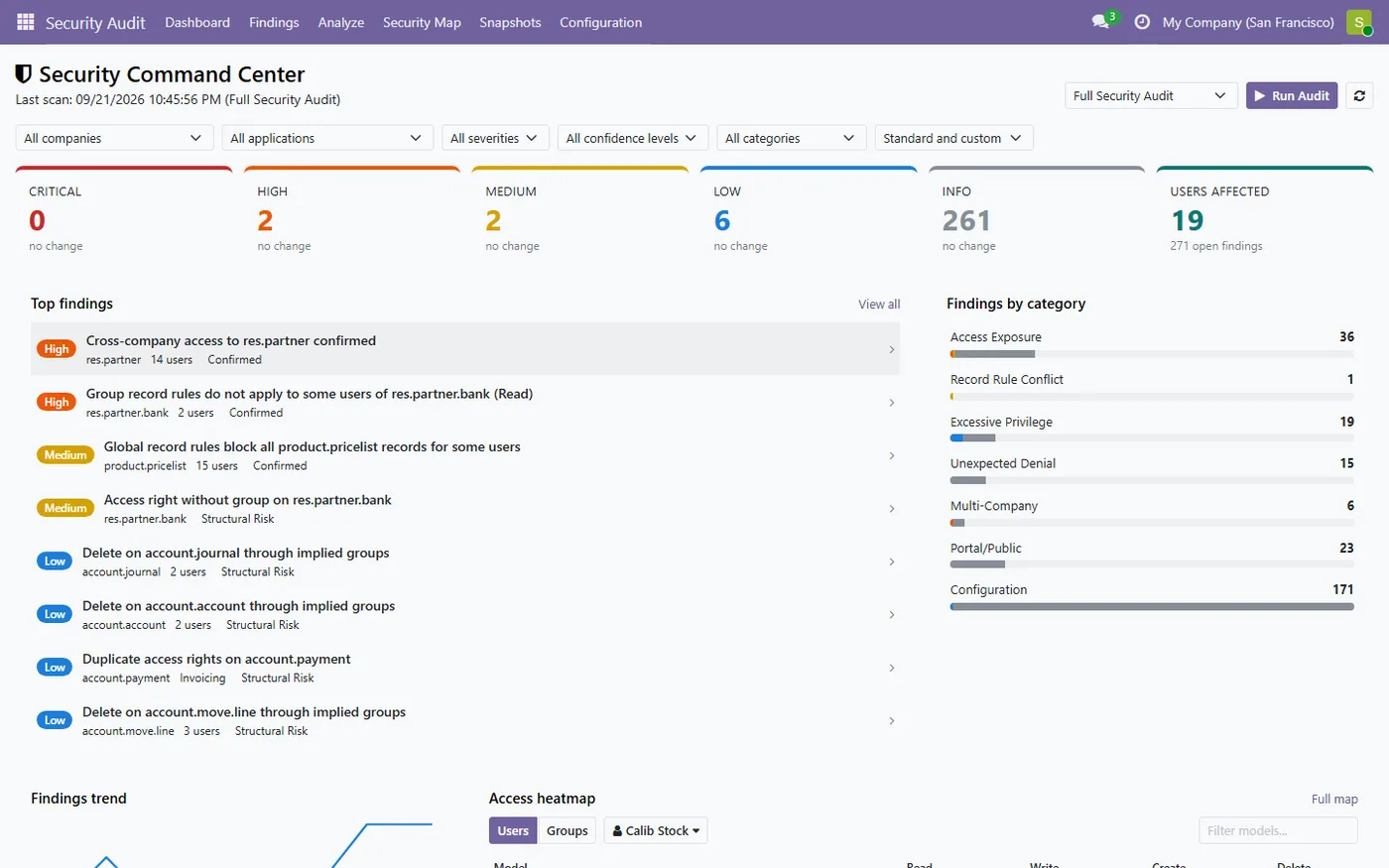
Access Rights Security Audit reads the security configuration already in your Odoo database and reports what looks wrong, with the evidence behind it. Five analyzers check access rights, record rules, company scoping, portal and public exposure, field groups and menus. Findings are ranked by severity and confidence, and standard Odoo behaviour is kept apart from your own customisations so a stock database is not flooded with warnings. For any user, model and operation the access tester shows the full path Odoo follows, the groups that grant access, the record rules that filter it and the verdict of Odoo's own access check run as that user. A Security Command Center dashboard, an access map, user and group comparison, snapshots with diff and a change log complete the picture. It audits, explains and recommends, and never edits an access right, a rule, a group or a menu.
How it works
Built around what you actually do.
Every screen below is the module running in Odoo, not a mockup.
01
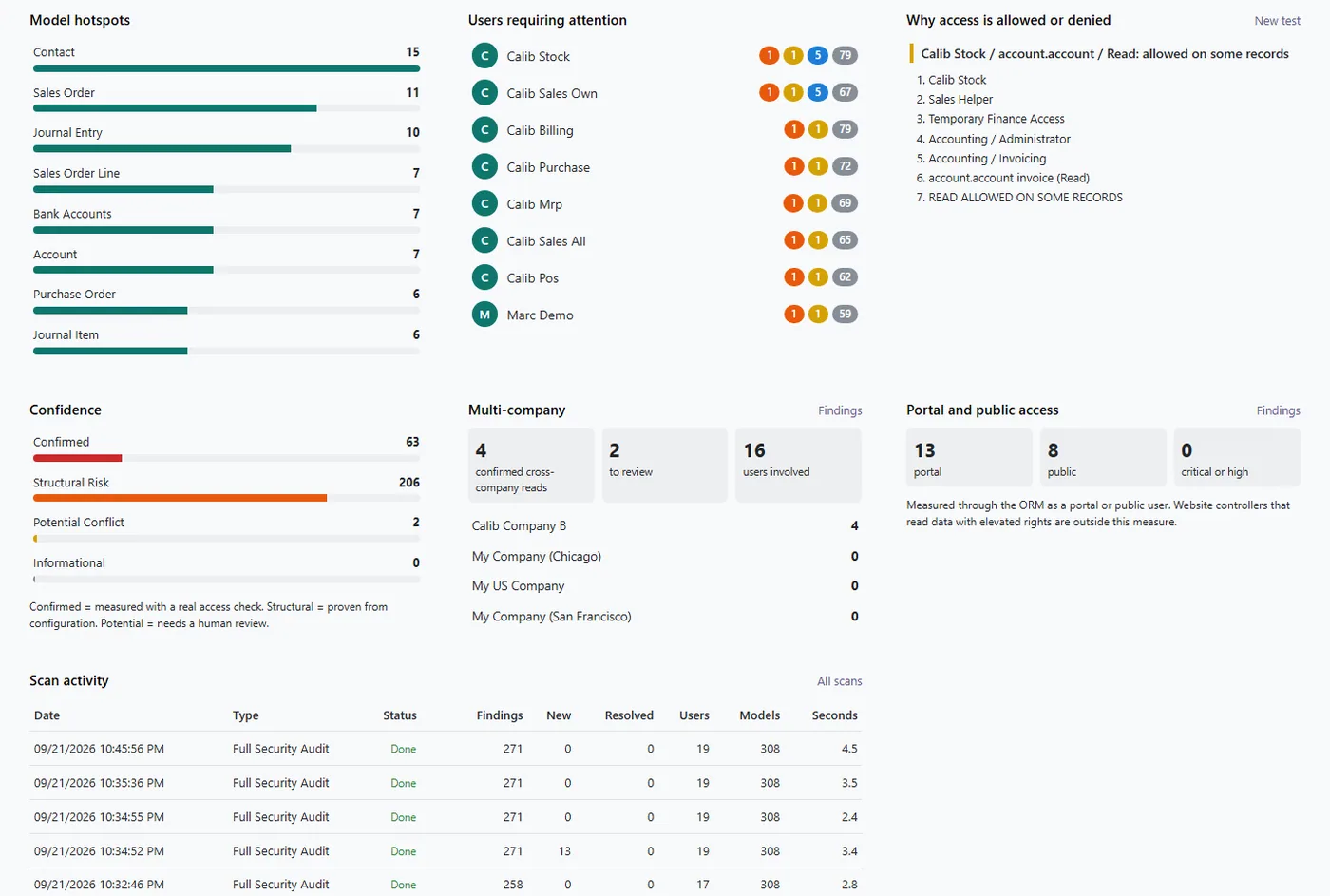
Security Command Center dashboard with severity cards, top findings, trend, hotspots and users requiring attention
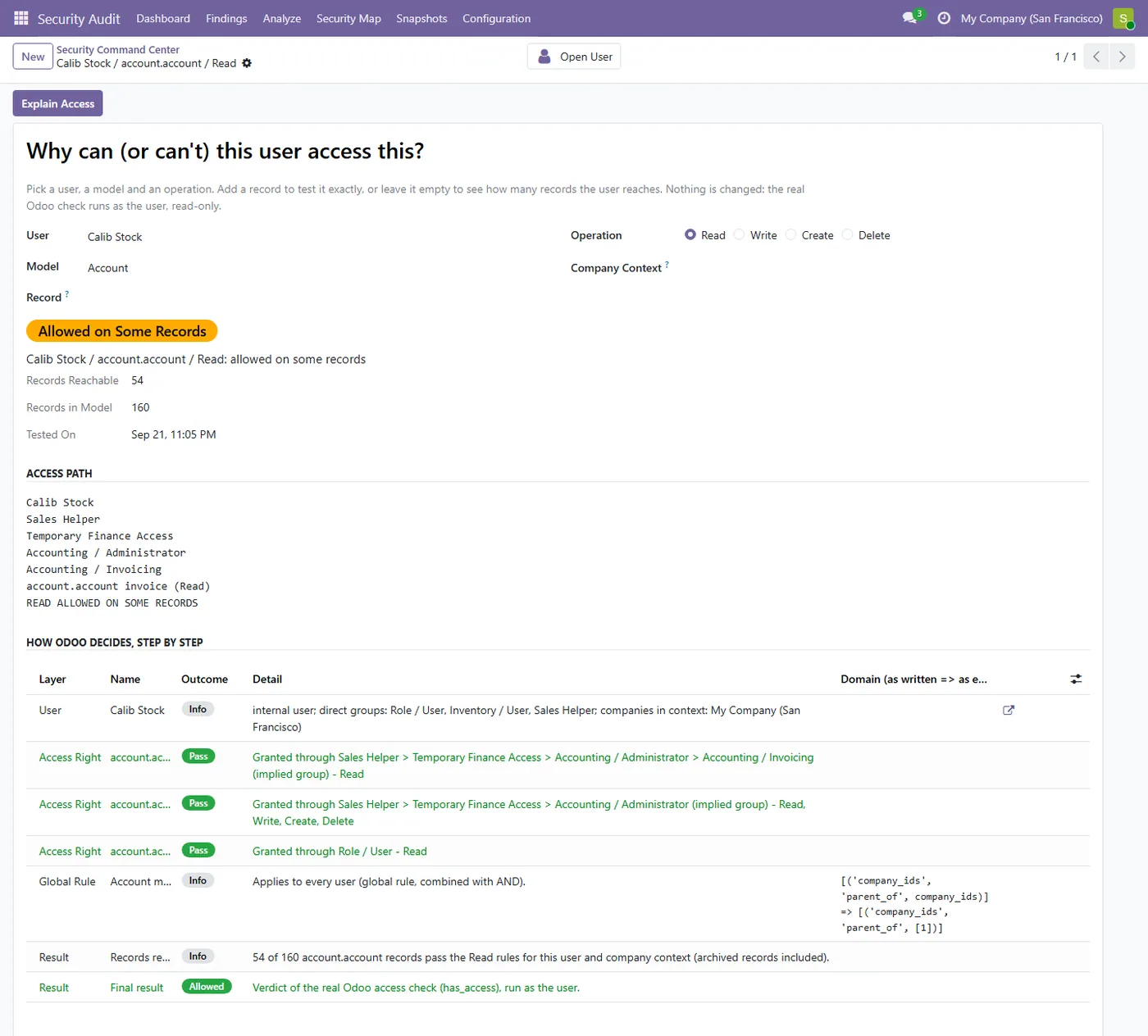
- Explains any access decision step by step, groups, access rights, record rules and Odoo's own verdict
02
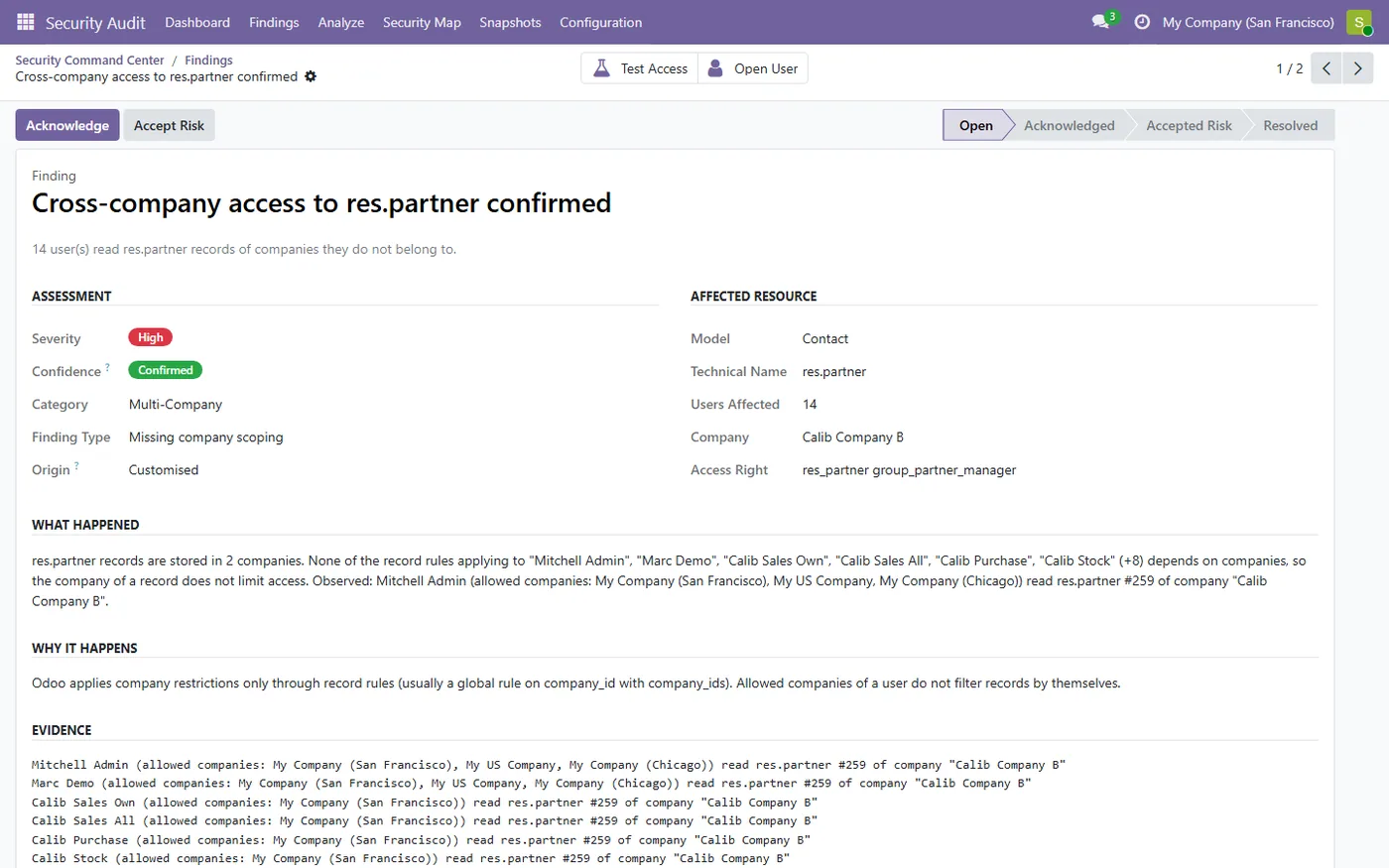
Finds rules bypassed by other groups, conflicting global rules, groupless and duplicate access rights
- Multi-company check confirmed by real cross-company reads, plus portal and public exposure checks
03
Access map, user and group comparison, snapshots with diff and a change log of security edits
- Read-only auditor with Auditor and Administrator roles, it never changes your security
Every screen
The whole module, screen by screen.
The captures the walkthrough above did not use, in the order you meet them in the product.
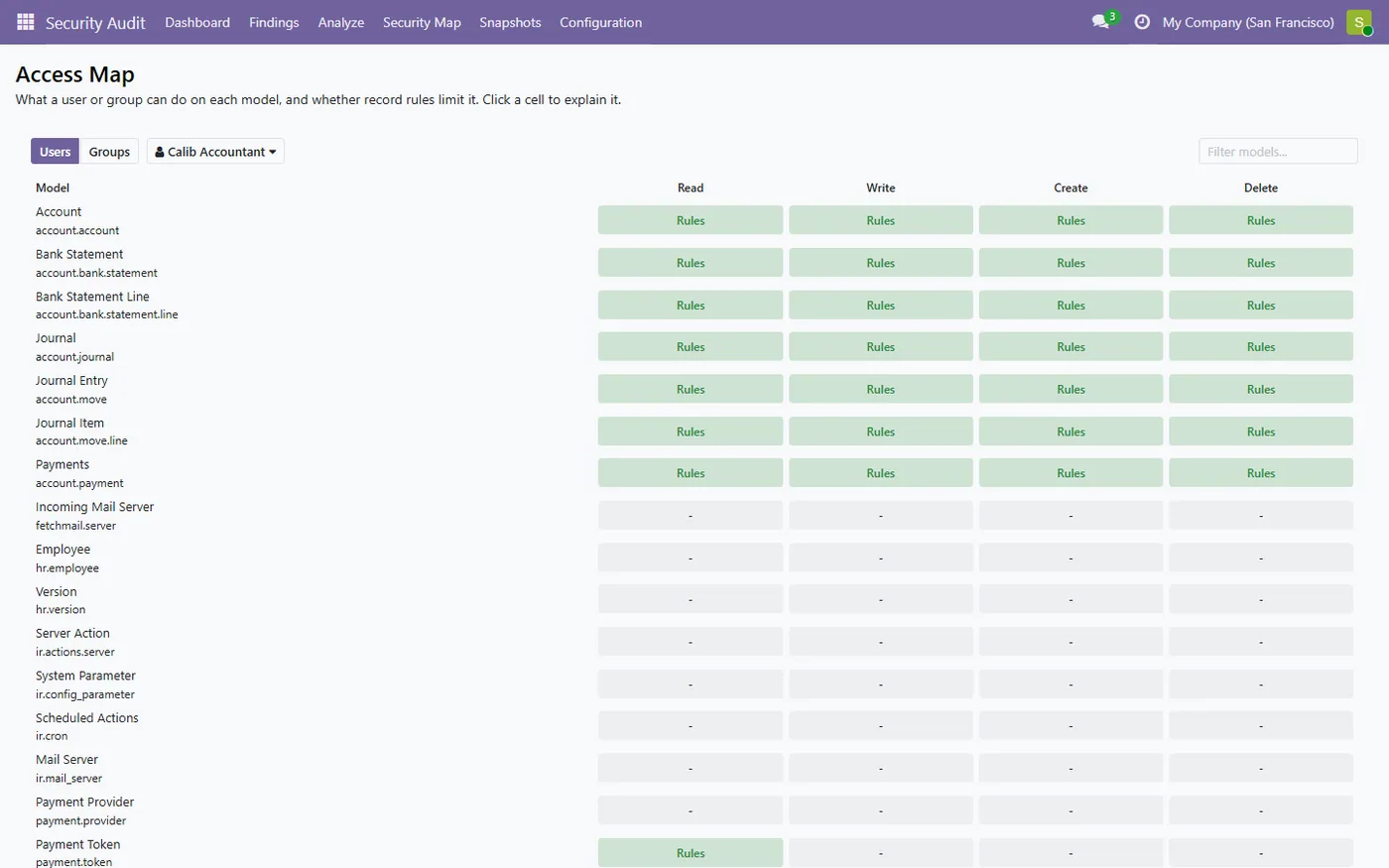
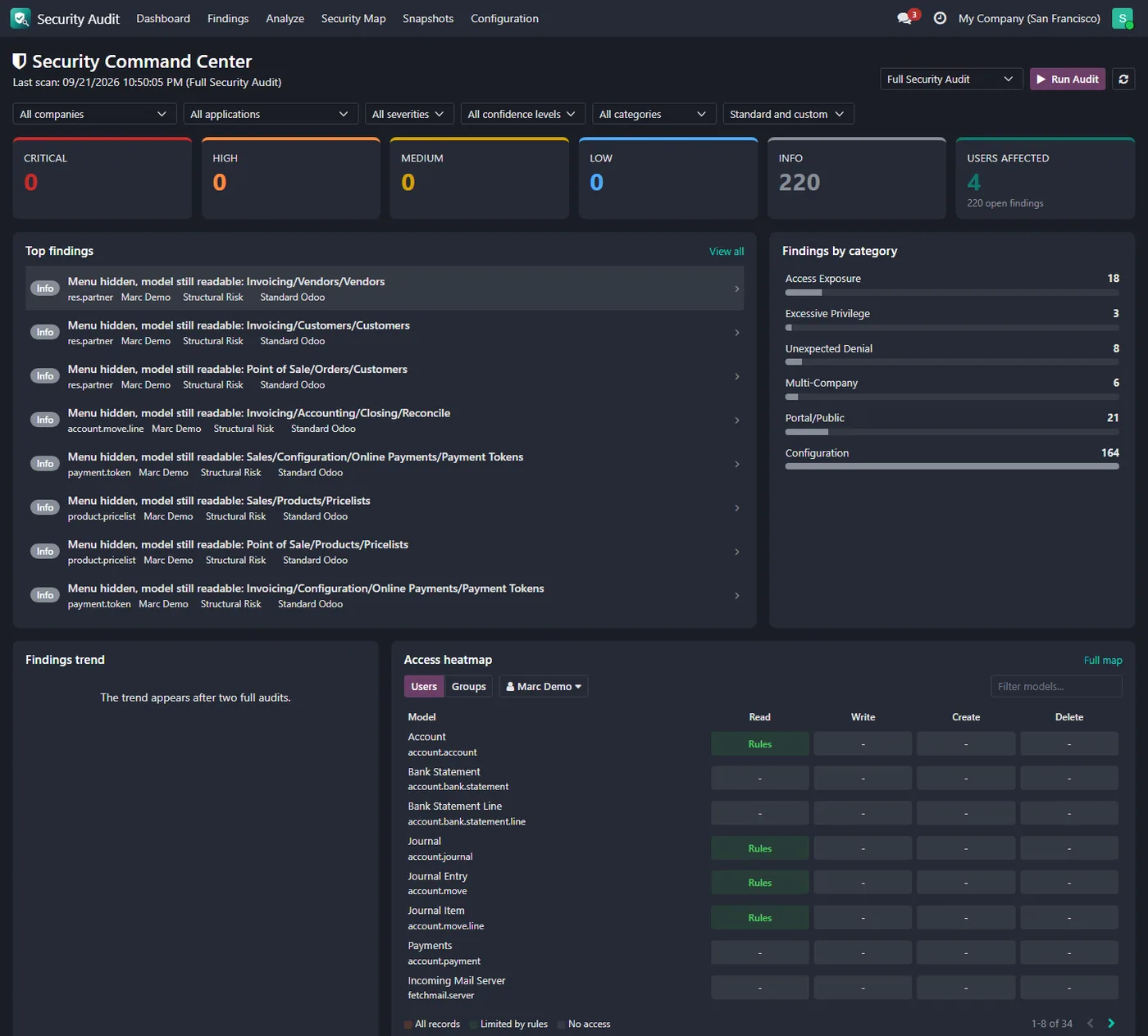
Access Rights Security Audit tells you who can see what in your Odoo database, and why. It audits access rights, record rules, groups, companies and portal access, backs every finding with evidence, and explains what to review, without ever changing your security.
What it does
Odoo security is layered: access rights per group, groups that imply other groups, global and group record rules, allowed companies, field groups and menu groups. After a few years of customisation nobody can say with confidence who can read, change or delete what, and mistakes stay invisible until a salesperson opens another company's customers or a portal user reaches records they should never see. This app reads the security configuration already in your database and reports what looks wrong. Every finding says what happened, why Odoo behaves that way, the users affected and the proof, with a confidence level from Confirmed (measured with a real access check) to Informational. The access tester answers "why can this user do this?" by listing every group, access right and record rule involved, the domain as written and as evaluated, and the verdict of Odoo's own access check run as that user.
- Security Command Center dashboard: severity cards, top findings, categories, trend, model hotspots, users requiring attention, multi-company and portal panels. - Step by step access explanation for any user, model and operation. - Access map of read, write, create and delete per model for any user or group. - Compare two users or two groups side by side. - Snapshots of the security configuration with a diff, and a change log of every edit to access rights, rules, groups and user groups. - Auditor and Administrator roles; auditors never gain access to the business data itself.
How to set it up
1. Install the app and give your reviewers the Security Audit Auditor role. 2. Open Security Audit, Dashboard and click Run Audit. 3. Start with Critical and High findings and read the evidence behind each one. 4. Use Test Access or the access map to see how Odoo decides for a user. 5. Make the change in the native Odoo screens, re-run the audit and the finding is resolved.
Who it's for
Companies with a customised Odoo who need to know their access rights and record rules do what they think, auditors and compliance teams who need evidence rather than guesses, and Odoo consultants who want a fast security review before a go-live, an upgrade or a new app.
Questions
About Access Rights Security Audit.
How do I find out why a user can see a record in Odoo?
Open Test Access, pick the user, the model and the operation. The app lists the groups that grant the access right, every record rule that applies with its domain, and the verdict of Odoo's own access check run as that user.
Will it change my access rights or record rules?
No. It is a read-only auditor. It recommends what to review and links to the native record, but a person always makes the change.
Will a standard Odoo database be flooded with warnings?
No. Observations about how Odoo itself is shipped are kept at Informational. Higher severities are reserved for your own customisations and for problems confirmed by a real access check.
Can users in one company see another company's records?
The multi-company audit answers that. It tries real reads as your users and reports a Confirmed finding only when a user actually reads a record of a company they do not belong to.
Does it work in Odoo Community and Enterprise?
Yes, it runs on both editions of Odoo 19 and Odoo 20 and depends only on Odoo core. On Odoo 20 it audits the new access records: permissions of groups, with their domains, and restrictions that apply to every user. Dark mode follows the Enterprise dark theme.
On the Odoo Store
Get Access Rights Security Audit on the Odoo Store.
Pick your Odoo version and install it in a click, with free updates and real support behind it.
Get it on the Odoo StoreReady to make Odoo work the way your business does?
Book a free call CODEerts
CODEerts is a team of certified Odoo partners and full-stack engineers. We implement, customise and support Odoo ERP, then build the software around it.

