 CODEerts
Productivity app for Odoo
DeepSeek AI Connector
Adds DeepSeek as a first class model provider inside Odoo's own AI Agents, right next to ChatGPT and Gemini. Paste your DeepSeek API key in Settings, test it with one click, then pick DeepSeek V4 Flash or V4 Pro, with or without thinking mode, from the LLM Model dropdown on any agent. Ships only the current model names and redacts your API keys so an agent can never print them into a chat.
Overview
DeepSeek AI Connector.
The DeepSeek AI Connector plugs DeepSeek into the AI Agents that ship with Odoo 19 Enterprise, so you keep Odoo's own agent interface, topics and tools and simply change which model answers. Add your DeepSeek API key under Settings, AI, Providers, exactly where the ChatGPT and Gemini keys live, and press Test Connection to confirm the key authenticates and the account has balance before you rely on it. Four options then appear in the LLM Model dropdown on every agent: DeepSeek V4 Flash, V4 Flash Thinking, V4 Pro and V4 Pro Thinking, because on DeepSeek thinking mode is a separate switch on each model rather than a separate model. The connector speaks DeepSeek's Chat Completions API directly, carries reasoning content correctly across multi step tool calls so agent tool loops do not break, reports cache hit tokens, and retries only the errors that are worth retrying. It also hardens credential handling: API keys are redacted on every ORM read and masked in the Settings form, so an AI agent asking to search configuration parameters gets asterisks instead of your key. Only the current deepseek-v4-flash and deepseek-v4-pro names are ever sent, never the retired deepseek-chat and deepseek-reasoner names.
How it works
Built around what you actually do.
Every screen below is the module running in Odoo, not a mockup.
01
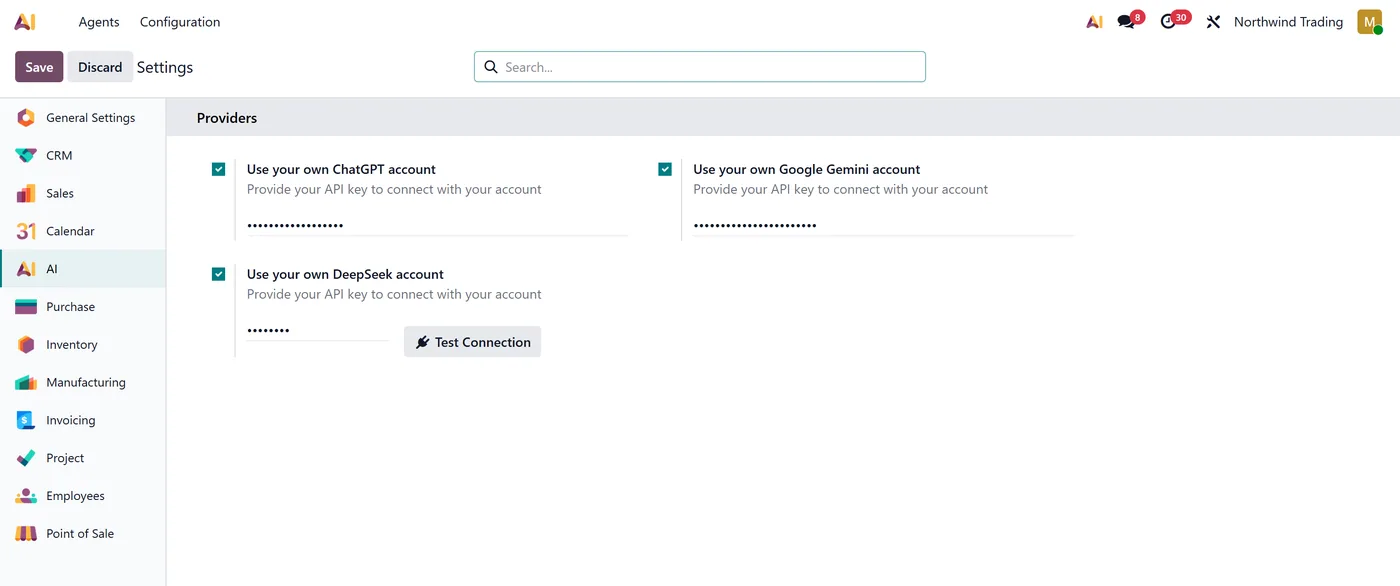
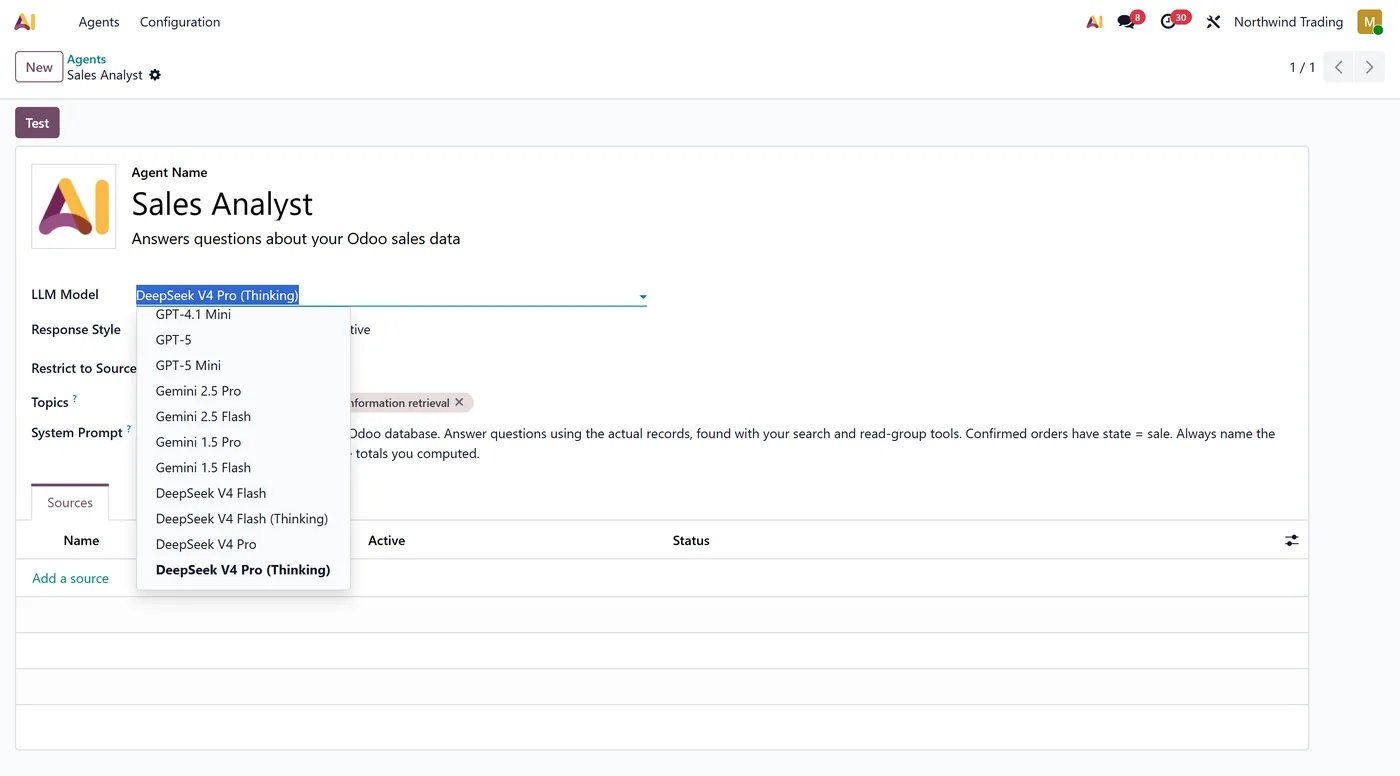
Adds DeepSeek to Odoo's native AI Agent LLM Model dropdown, next to ChatGPT and Gemini
- Four options, DeepSeek V4 Flash, V4 Flash Thinking, V4 Pro and V4 Pro Thinking, because thinking mode is a separate switch per model
- Your own DeepSeek API key, stored in Settings, AI, Providers, alongside the native ChatGPT and Gemini keys
- Test Connection button that checks the key authenticates and the account has balance before you depend on it
02
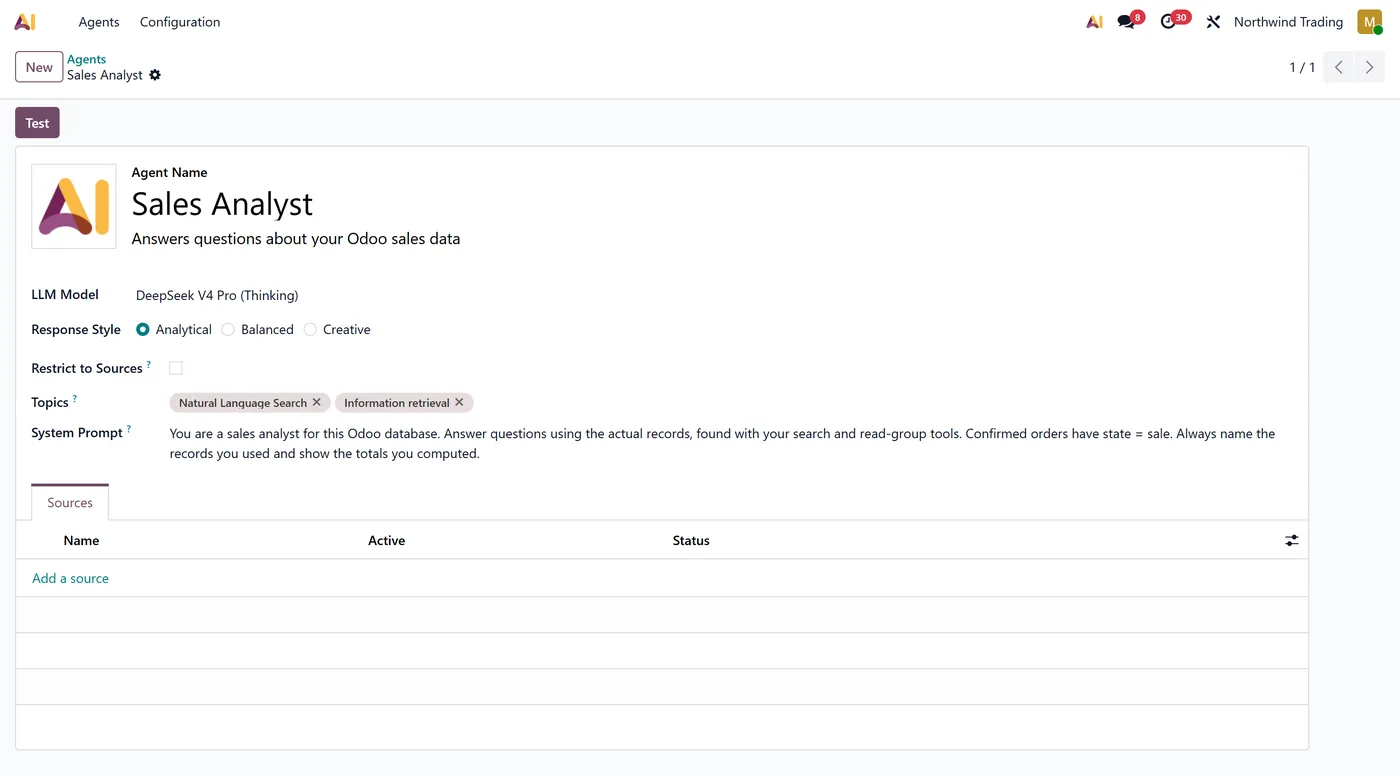
API keys redacted on every ORM read, so an AI agent cannot print your key into a chat
- Key masked in the Settings form instead of being sent to the browser in the page payload
- Speaks DeepSeek's Chat Completions API directly, not a generic OpenAI passthrough
- Carries reasoning content across multi step tool calls, so agent tool loops keep working in thinking mode
03
Reports DeepSeek cache hit tokens into Odoo's AI usage logging
- Records what every agent request cost, input, output, cached and reasoning tokens, plus the model name DeepSeek echoes back, and hands them to your own automations
- Sends only the current model names, never the retired deepseek-chat and deepseek-reasoner
What it does
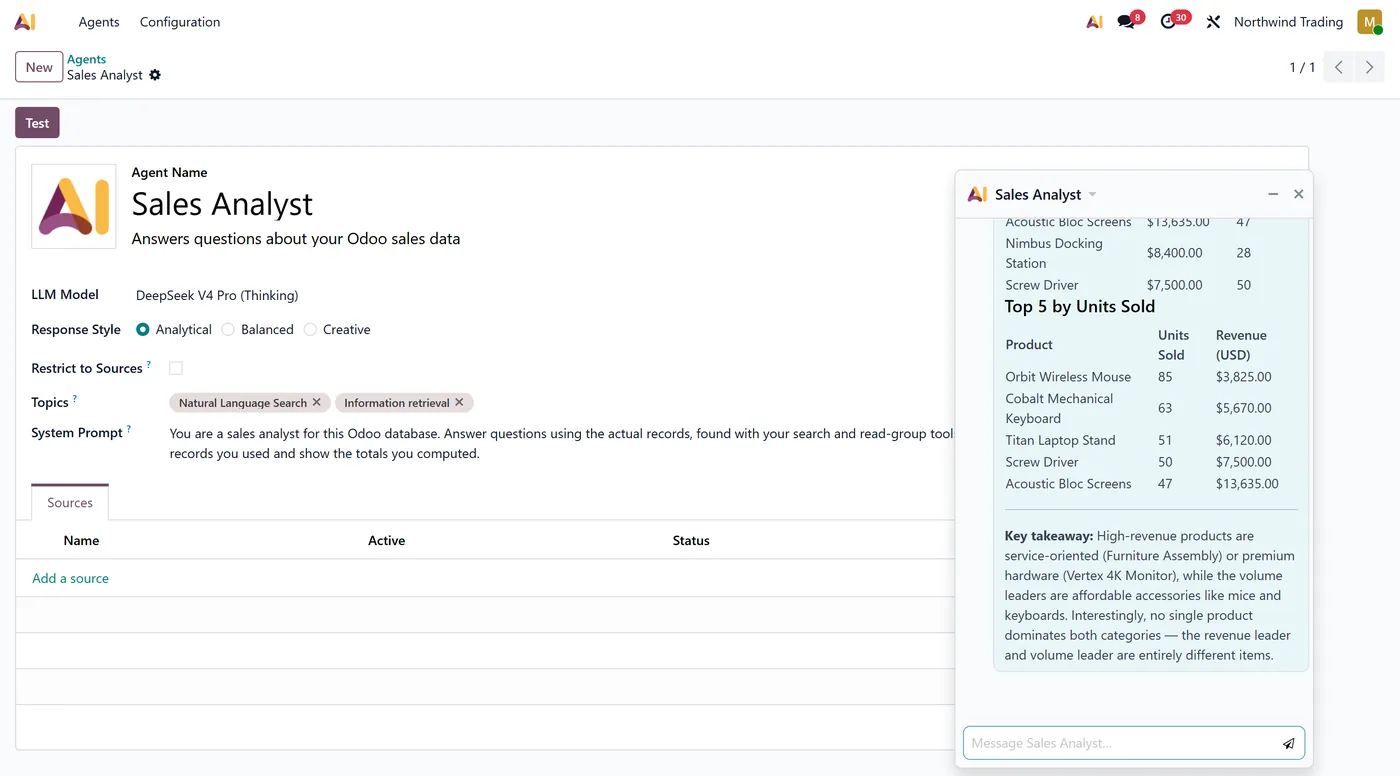
Odoo 19 Enterprise ships its own AI Agents, with a system prompt, topics, tools and a chat window. The one thing you cannot change is which company's model answers: the LLM Model dropdown offers ChatGPT and Gemini only.
This connector adds DeepSeek to that same dropdown. Nothing else about your agents changes. You keep Odoo's agent interface, your topics, your tools and your prompts, and simply choose a DeepSeek model instead.
Add your DeepSeek API key under Settings, AI, Providers, in the same block as the native ChatGPT and Gemini keys, then press Test Connection. The button checks two separate things that are easy to confuse: that the key authenticates, and that the DeepSeek account actually has balance. A key with an empty balance authenticates perfectly and then fails on the first real question, so both are worth knowing before you rely on it.
Four options appear on every agent's LLM Model dropdown:
- DeepSeek V4 Flash and V4 Pro for normal replies
- V4 Flash Thinking and V4 Pro Thinking with reasoning enabled
DeepSeek treats thinking mode as a switch on each model rather than as a separate model, so both models appear twice. Thinking mode is the one to pick when an agent has to reason across your records before answering.
Under the surface the connector speaks DeepSeek's Chat Completions API properly rather than pretending DeepSeek is OpenAI. It carries reasoning content across multi step tool calls, which is what keeps agent tool loops working in thinking mode, feeds DeepSeek's cache hit tokens into Odoo's AI usage logging, and retries only the errors worth retrying instead of burning your balance on requests that will never succeed.
Every call is also costed. The connector keeps the input, output, cached and reasoning token counts DeepSeek returns, along with the model name DeepSeek echoes back in its own response, and makes them available to your server actions and automations. Odoo's own AI module reads those same numbers, writes them to a server log file and throws them away, so on hosted Odoo a request finishes leaving no trace of what it consumed. Keeping them lets you print the cost onto the record an agent just wrote, or price a workflow before rolling it out across a team.
It also takes credentials seriously. API keys are redacted on every ORM read and masked in the Settings form, so an agent asked to go looking through configuration parameters receives asterisks rather than your key. The same protection covers the native OpenAI and Google keys while the connector is installed.
Who it's for
Teams already using Odoo 19 Enterprise AI Agents who want a different model behind them, whether for cost, for context length, or because they prefer DeepSeek's reasoning. It suits agents built on topics and tools that query your Odoo records.
If your agents depend on Sources, keep those on OpenAI or Gemini. DeepSeek publishes no embeddings API, so document indexing cannot work on DeepSeek with any connector, and this one tells you that plainly rather than failing strangely.
Questions
About DeepSeek AI Connector.
Does this need Odoo Enterprise?
Yes. It extends the AI module that ships with Odoo 19 Enterprise, which is where AI Agents, topics and the LLM Model dropdown live. That module does not exist in Odoo Community or in Odoo 18 and 17, so this connector is Odoo 19 Enterprise only.
Do I need anything installed on the database server?
Yes, the PostgreSQL pgvector extension. That is a requirement of Odoo's own AI module, not of this connector: Odoo refuses to install its AI module without it. Most managed Odoo hosting already provides it. On a self managed server install the postgresql-pgvector package for your PostgreSQL version.
Why are there four DeepSeek options instead of two?
Because on DeepSeek thinking mode is a switch applied to a model, not a separate model. V4 Flash and V4 Pro each appear twice, once normal and once with thinking enabled, so you can pick per agent. Thinking mode suits agents that must reason over your records; normal mode is faster and cheaper for simple replies.
Can a DeepSeek agent use Sources and answer from my documents?
No, and no connector can change that. Agent Sources need an embeddings model to index documents, and DeepSeek does not offer an embeddings API at all. A DeepSeek agent with Sources attached tells you so clearly instead of failing in a confusing way. Use an OpenAI or Gemini model on agents that rely on Sources, and DeepSeek on agents that use tools and topics.
Will my API key stay private?
The connector redacts credential values on every ORM read and masks the key in the Settings form, so an AI agent asked to search configuration parameters receives asterisks rather than the key. It applies the same protection to the native OpenAI and Google keys while installed. Odoo still restricts configuration parameters to Settings administrators.
Does it change anything for my existing ChatGPT or Gemini agents?
No. Existing agents keep their model and keep working exactly as before. The connector only adds DeepSeek as an extra choice, and every non DeepSeek call is passed straight through to Odoo's own code.
Replies show asterisks and pipe characters instead of bold text and tables. Why?
Your server is missing the optional markdown2 Python library. Odoo converts an AI reply from Markdown to HTML only when markdown2 is installed, and posts the raw text when it is not. This is Odoo's own behaviour and it affects ChatGPT and Gemini agents in exactly the same way, so we deliberately do not force it as a hard dependency that would block installation. Install markdown2 on your Odoo server and restart the service, and replies render normally.
Can I see what an agent request actually cost?
Yes. The connector records the input, output, cached and reasoning tokens of every DeepSeek call, together with the model name DeepSeek echoes back in its response, and exposes them through the agent so your own server actions and automations can read them. Odoo's native AI module writes these numbers to a server log file and then discards them, which on hosted Odoo means you cannot reach them at all, so a request finishes with no record of what it consumed.
Which DeepSeek models does it use?
deepseek-v4-flash and deepseek-v4-pro, the current models. The older deepseek-chat and deepseek-reasoner names were retired by DeepSeek and are never sent, so your agents do not break when those names stop resolving.
On the Odoo Store
Get DeepSeek AI Connector on the Odoo Store.
Pick your Odoo version and install it in a click, with free updates and real support behind it.
Get it on the Odoo StoreReady to make Odoo work the way your business does?
Book a free call CODEerts
CODEerts is a team of certified Odoo partners and full-stack engineers. We implement, customise and support Odoo ERP, then build the software around it.

