 CODEerts
Administration app for Odoo
Google Drive Backup
Scheduled, verified backups of your Odoo database and filestore to your own Google Drive - resumable uploads, remote verification, ownership-safe retention, automatic retries, failure alerts and a backup health dashboard, with no third-party server in between.
Overview
Google Drive Backup.
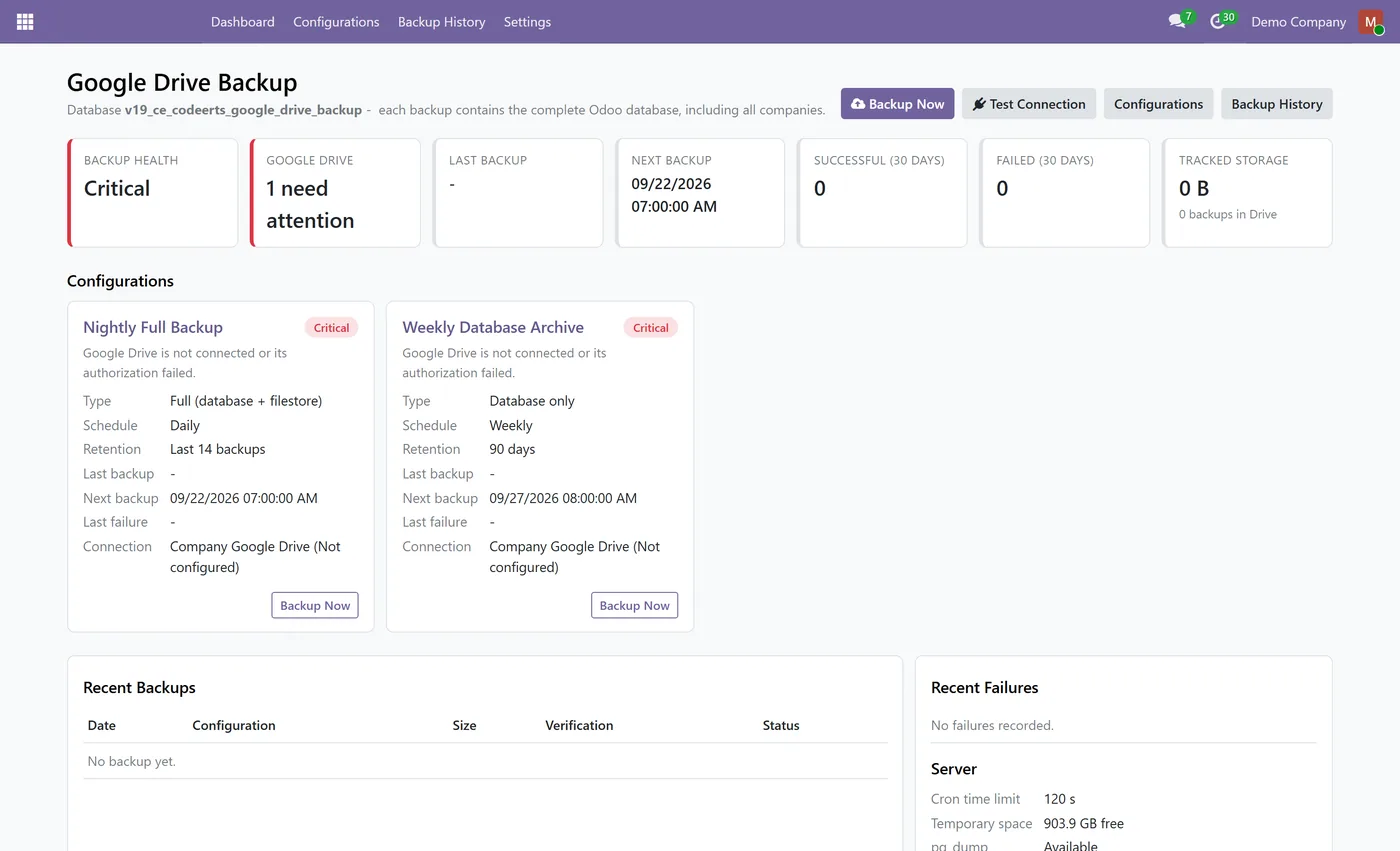
Google Drive Backup takes scheduled and on-demand backups of your Odoo database, with or without the filestore, and uploads them to a Google Drive folder you own over OAuth 2.0 with PKCE. Each archive uses the standard Odoo backup layout (dump.sql, manifest.json and the filestore), so it restores with the regular Odoo database manager or odoo db load, and the module never stores or asks for the database master password. Uploads are chunked and resumable, so a large database that does not fit in one cron run continues where it stopped instead of starting over. A backup is only marked Completed after the archive is hashed with SHA-256, uploaded, found again in the right Drive folder and matched on size and, where Google provides it, on checksum. Retention can keep everything, keep a number of days or keep the last N backups, and it only ever deletes files that private markers prove this module created for this database and this configuration; the newest backup is never removed. Temporary failures retry after 5, 15 and 30 minutes, authorization and configuration problems alert the administrators you choose, and a dashboard shows overall health, Google Drive status, last and next backup, 30-day success and failure counts and tracked storage. A restored or moved copy of the database is detected and pauses remote deletions until an administrator confirms it is the primary database. Only system administrators can see the module, and credentials never appear in logs, URLs, chatter or the dashboard.
How it works
Built around what you actually do.
Every screen below is the module running in Odoo, not a mockup.
01
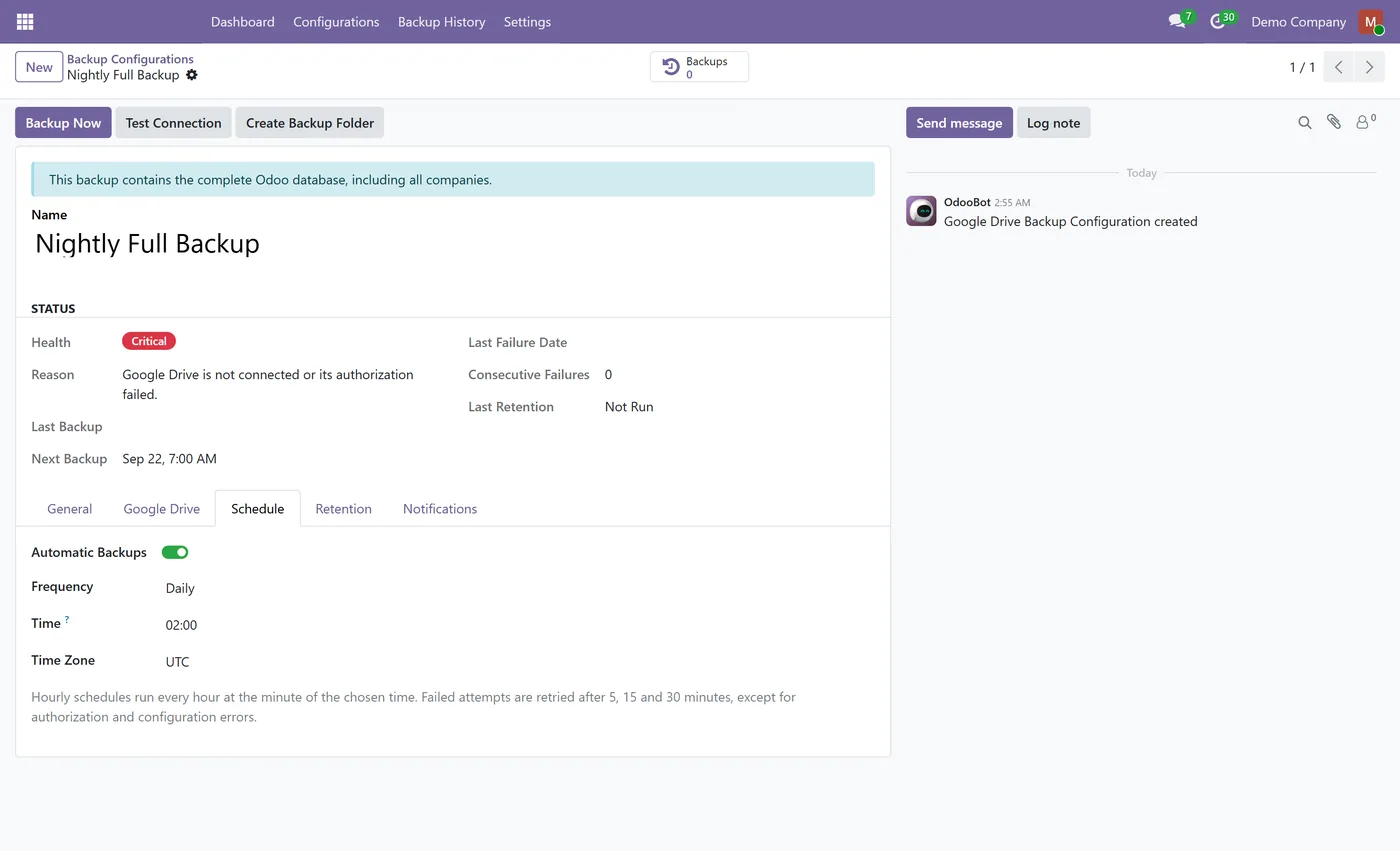
Scheduled backups - hourly, daily, weekly or monthly, at the time you choose, in your own time zone
- Several independent backup configurations, each with its own type, folder, schedule, retention and notifications
- Full backups (database + filestore) or database-only backups
- Standard Odoo restore format - dump.sql, manifest.json and the filestore - restorable with the database manager
02
Resumable chunked upload that continues across cron runs for large databases
- Remote verification - SHA-256 hash, size and Google checksum checked before a backup is marked Completed
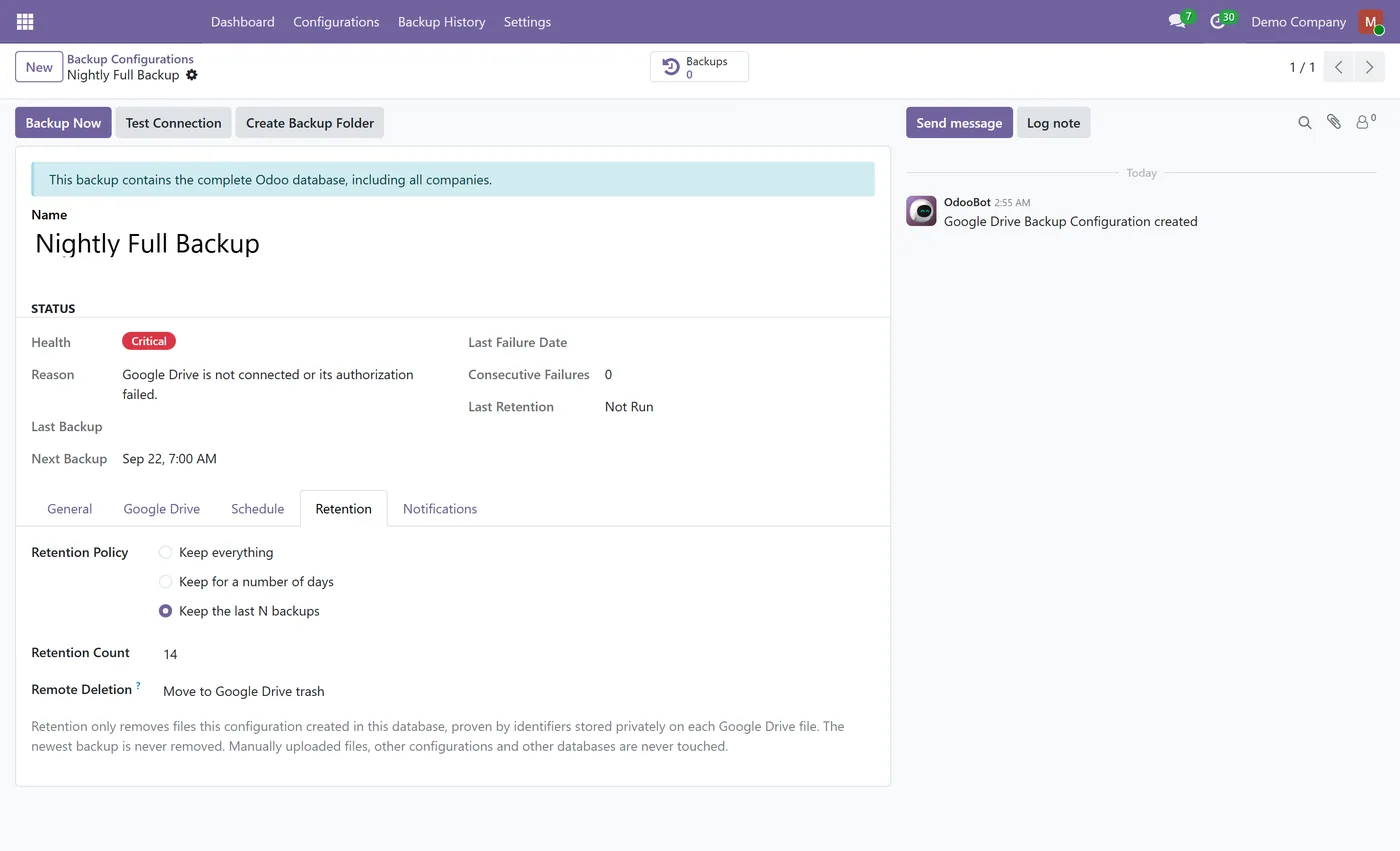
- Ownership-safe retention - keep all, keep X days or keep the last X backups; only this module's own files are ever deleted
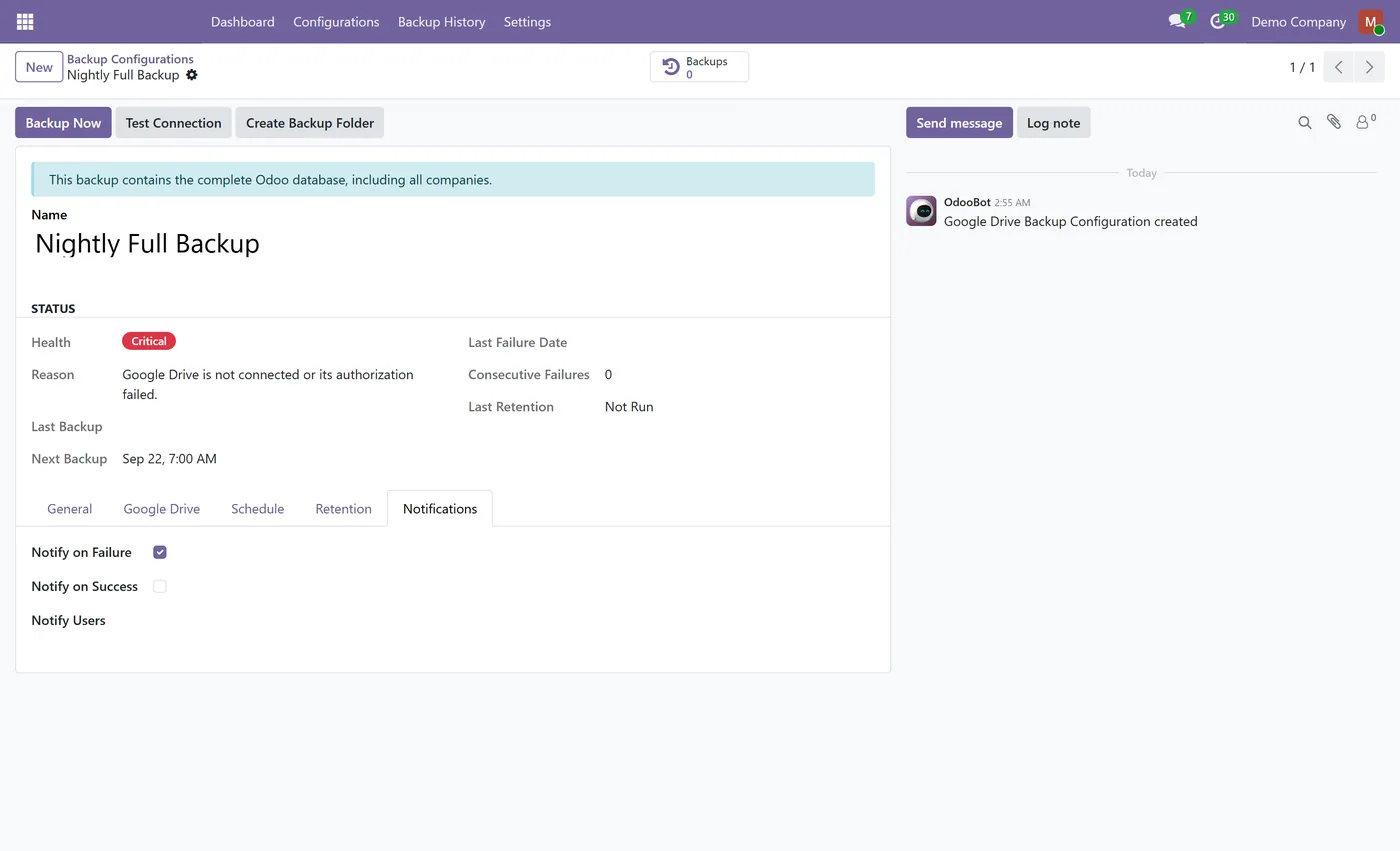
- Automatic retries after 5, 15 and 30 minutes, with failure and optional success notifications
03
Backup health dashboard with fixed Healthy, Warning and Critical rules
- Restored-copy protection that pauses remote deletions on a database copy
- OAuth 2.0 with PKCE, the recommended drive.file scope and a built-in Google Cloud setup guide
- System-administrator-only access; no third-party server and no telemetry
Every screen
The whole module, screen by screen.
The captures the walkthrough above did not use, in the order you meet them in the product.
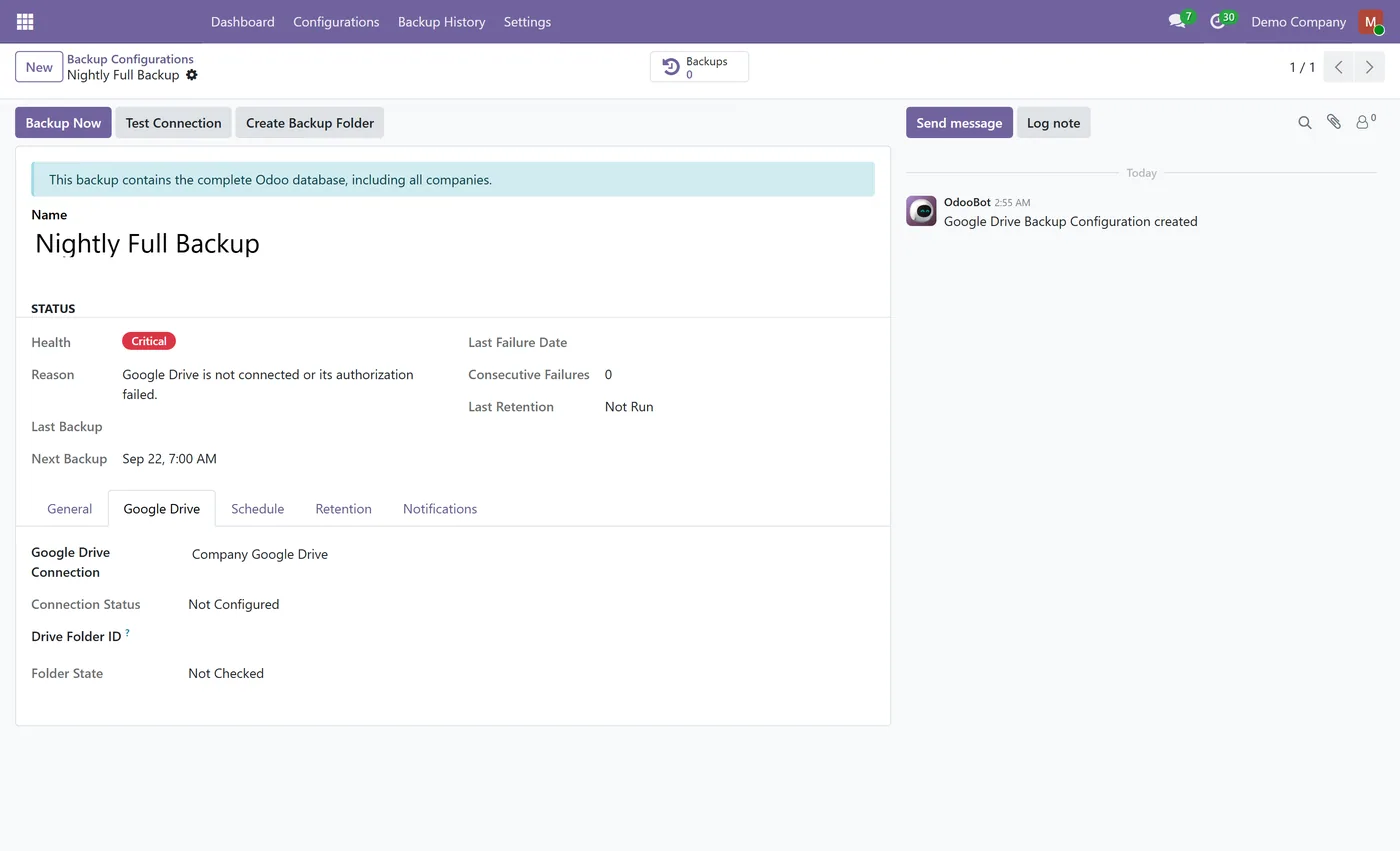
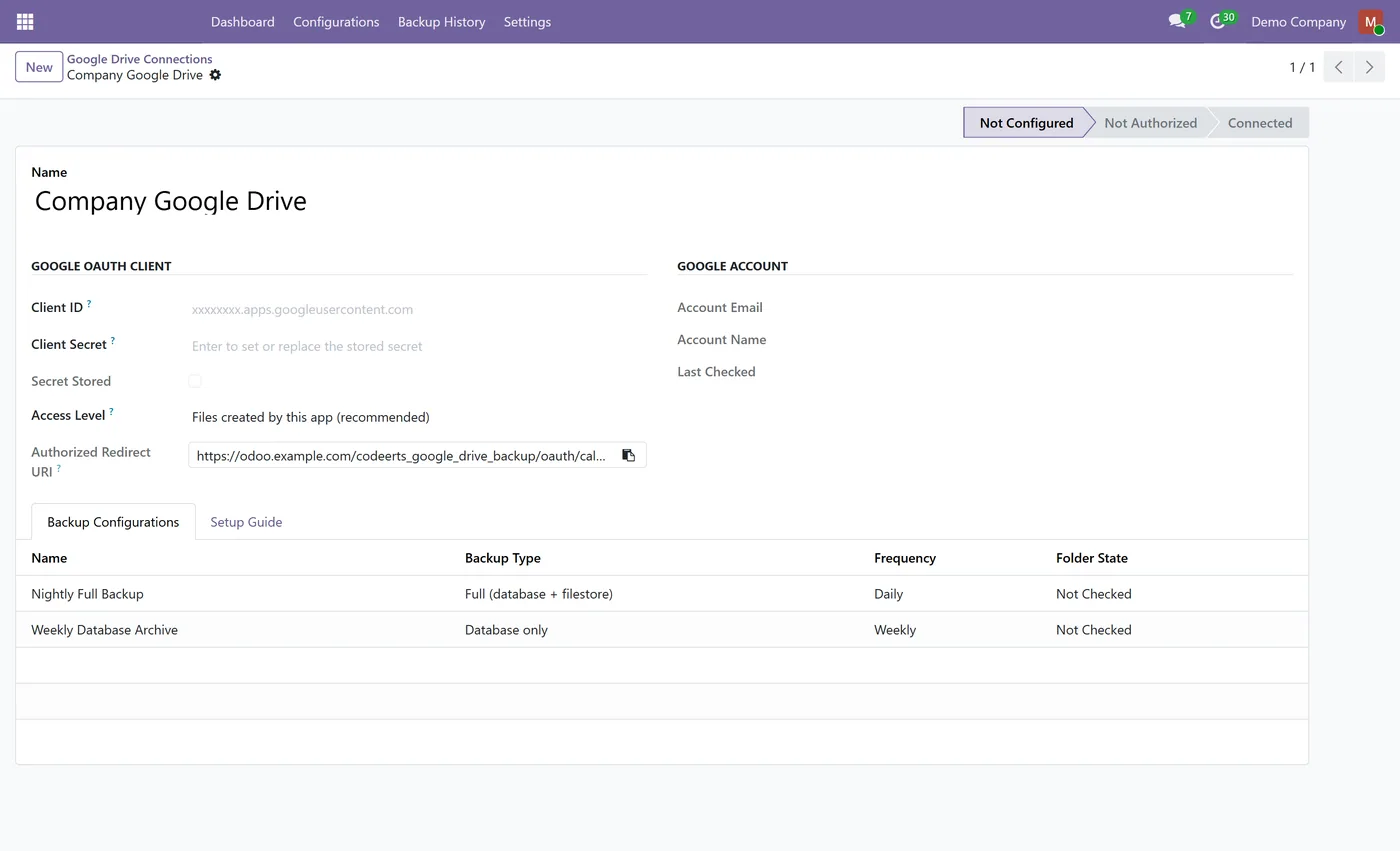
Google Drive Backup gives every Odoo database an off-site copy that you own. It builds standard Odoo backups on a schedule, sends them straight from your server to your own Google Drive, and only calls a backup done once Google Drive confirms the file.
What it does
Each backup configuration has its own type (full with filestore, or database only), Drive folder, schedule, retention and notifications. The archive is built with pg_dump in the standard Odoo layout, hashed, and uploaded in resumable chunks, so a large database that outgrows one cron run simply continues in the next. After the upload the file is looked up again in Drive and checked on size and checksum before the backup is marked Completed.
Retention keeps everything, a number of days or the last N backups, and it is ownership-safe: only files this module created for this database and this configuration are ever removed. Temporary failures retry after 5, 15 and 30 minutes, while authorization and configuration problems notify the administrators you chose. The dashboard shows health, Drive status, the last and next backup and every failure with its reason.
Who it's for
Companies that self-host Odoo or run it on Odoo.sh and want an independent, verified copy of their database in a Google Drive they control, without a third-party backup service in the middle.
Questions
About Google Drive Backup.
How do I back up my Odoo database to Google Drive automatically?
Install Google Drive Backup, connect your Google account with your own Google Cloud OAuth client and create a backup configuration with a schedule. Backups then upload to your Drive folder on their own and are verified in Drive before they are marked Completed.
Can I restore the backup in the standard Odoo database manager?
Yes. The zip has the same layout as an Odoo backup (dump.sql, manifest.json and the filestore) and restores with Restore Database in the database manager or with odoo db load.
Do I need the Odoo master password for backups?
No. The module builds the backup itself with pg_dump and never stores or asks for the master password. You only need it later, to restore through the database manager.
Can retention delete files that are not backups?
No. A file is only removed when its private markers prove it was created by this module, for this database and this configuration, and the newest backup is always kept.
Does my data pass through CODEerts?
No. Your Odoo server talks directly to Google Drive. There is no CODEerts server and no telemetry.
Why did my Google Drive backups stop after a week?
The Google Cloud app is probably still in Testing status, where refresh tokens expire after 7 days. Publish the app to In production and authorize again.
Which Odoo versions does this module support?
Use the version selector at the top of this page to pick your Odoo release. Each branch is published as its own listing for that exact version.
On the Odoo Store
Get Google Drive Backup on the Odoo Store.
Pick your Odoo version and install it in a click, with free updates and real support behind it.
Get it on the Odoo StoreReady to make Odoo work the way your business does?
Book a free call CODEerts
CODEerts is a team of certified Odoo partners and full-stack engineers. We implement, customise and support Odoo ERP, then build the software around it.

