 CODEerts
Services app for Odoo
Helpdesk Dashboard
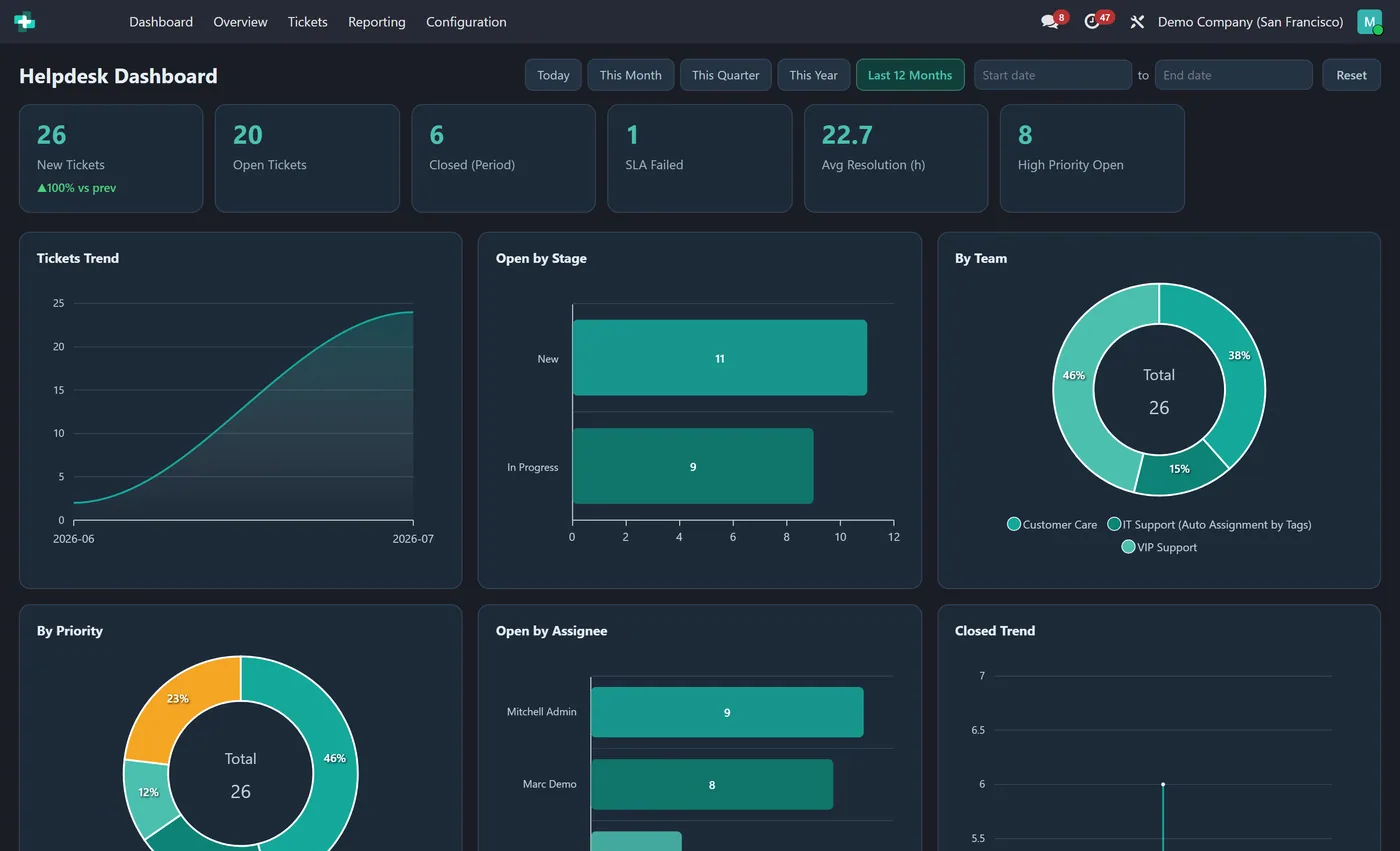
Interactive Helpdesk dashboard inside the Helpdesk app: new, open and closed tickets, SLA failures, average resolution time, tickets by stage, team, priority and assignee.
Overview
Helpdesk Dashboard.
Helpdesk Dashboard gives support leads a live command center inside the Helpdesk app. New tickets, open tickets, closed in the period, SLA failures, average resolution time and high priority open tickets sit across the top as clickable KPI tiles. Eight interactive charts show tickets over time, open tickets by stage, tickets by team, priority and assignee, tickets by customer, closed volume and an SLA success rate gauge. Pick any date range and every chart updates together.
How it works
Built around what you actually do.
Every screen below is the module running in Odoo, not a mockup.
01
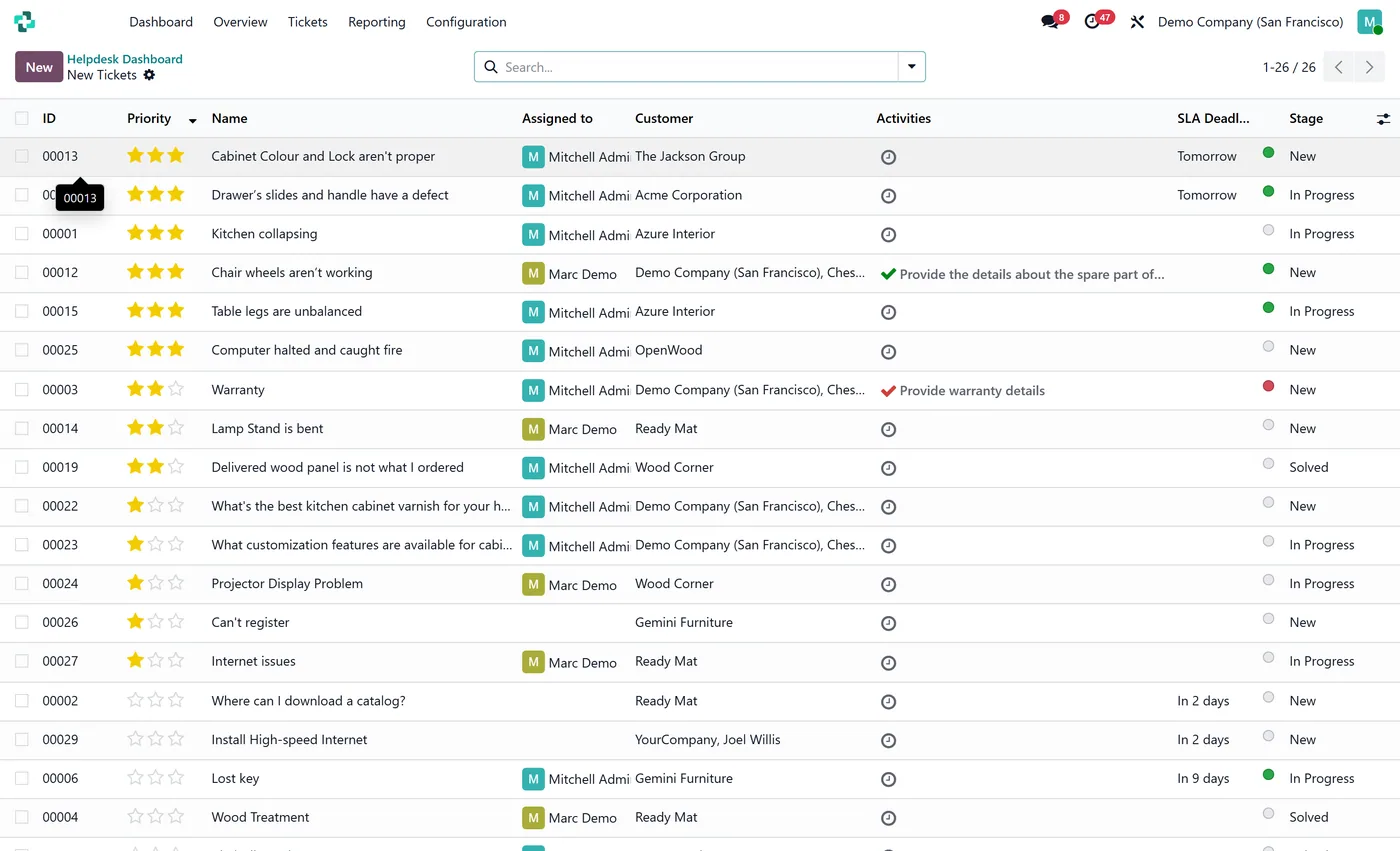
Live KPI tiles for new tickets, open tickets, closed in period and more
- 8 interactive charts including tickets trend, open by stage and by team
Standard across the suite
How every CODEerts dashboard behaves.
These are not this module's selling points, they are the baseline every dashboard we publish shares. Listed so you know what you get, not to pad the page.
Tickets, SLA and resolution time, live, inside Helpdesk.
What it does
Helpdesk Dashboard gives support leads a live command center inside the Helpdesk app. New tickets, open tickets, closed in the period, SLA failures, average resolution time and high priority open tickets sit across the top as clickable KPI tiles.
Eight interactive charts show tickets over time, open tickets by stage, tickets by team, priority and assignee, tickets by customer, closed volume and an SLA success rate gauge. Pick any date range and every chart updates together.
SLA failures are the tile that matters
Ticket counts describe volume. SLA failures describe whether you are keeping the promise you sold, and it is the only number here a customer would recognise. Putting it beside average resolution time separates two things support teams routinely conflate: you can have a good average and still be failing the tickets that carry a commitment.
High priority open tickets is deliberately a raw count, not a rate. If it is above zero at the end of a day, somebody needs to know before they go home.
Who it's for
Support leads and service managers running Helpdesk with SLA policies, especially where support is a contracted deliverable rather than a cost centre. If your current SLA reporting is compiled after the fact for a monthly review, the value here is seeing a breach while there is still time to do something about it.
Questions
About Helpdesk Dashboard.
How do I track helpdesk tickets and SLA on one screen in Odoo?
Install Helpdesk Dashboard. It adds a Dashboard as the first item in the Helpdesk app with live KPIs for new, open and closed tickets, SLA failures and resolution time, plus eight charts by stage, team, priority and assignee.
Can I see average ticket resolution time in Odoo Helpdesk?
Yes. The dashboard shows average resolution time in hours as a KPI and an SLA success rate gauge, both on your live ticket data.
Is the Odoo helpdesk dashboard live or a cached report?
It is live. Every KPI and chart reads directly from your helpdesk tickets when you open it, and picking a date range re-queries the whole screen at once. There is no scheduled sync or stored snapshot, so the SLA and resolution numbers always reflect the current data.
Do support agents only see their own team's tickets on the dashboard?
Yes. Every figure is read as the logged in user, so your normal Helpdesk access rules and team restrictions apply. An agent sees the tickets they can already see, while a support lead sees the full picture across teams.
Can I run the Odoo Helpdesk dashboard on Community, or does it need Enterprise?
You need Enterprise. Odoo's Helpdesk app is an Enterprise app and is not part of Community, so this dashboard has nothing to read from on a Community install. If you are on Community and evaluating, that is the blocker to solve first, not this module.
Which number should I watch if I only watch one?
SLA failures. Ticket counts describe how busy you are. SLA failures describe whether you are keeping the promise you sold, and it is the only figure here a customer would recognise.
On the Odoo Store
Get Helpdesk Dashboard on the Odoo Store.
Pick your Odoo version and install it in a click, with free updates and real support behind it.
Get it on the Odoo StoreReady to make Odoo work the way your business does?
Book a free call CODEerts
CODEerts is a team of certified Odoo partners and full-stack engineers. We implement, customise and support Odoo ERP, then build the software around it.

