CODEerts
Tools app for Odoo
Odoo Health Audit
Scan your Odoo database for missing data and setup issues, get a 0 to 100 health score, and click straight to the records that need fixing.
Overview
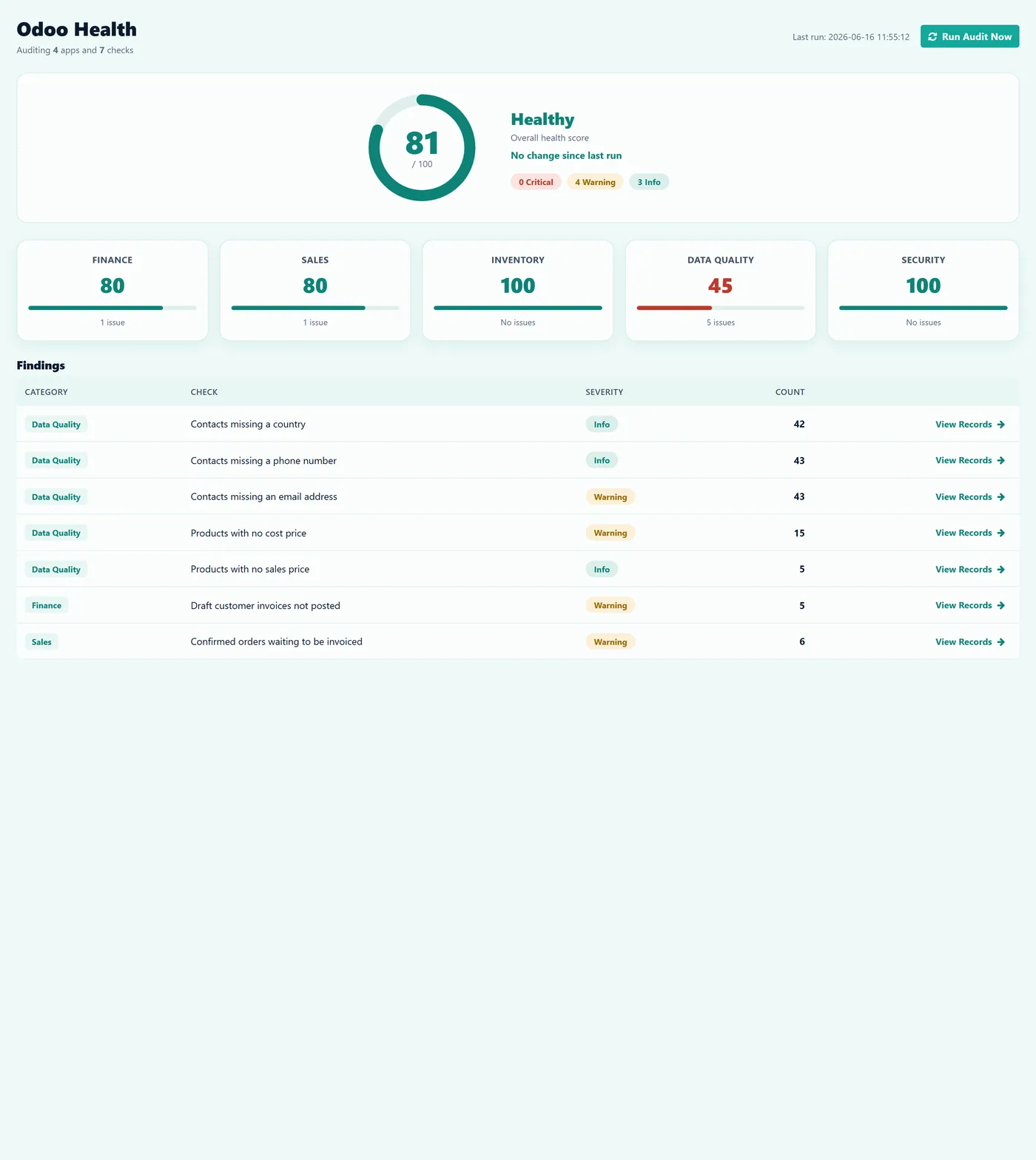
Odoo Health Audit.
Odoo Health Audit adds a one-click health check to your database. Open the dashboard, click Run Audit, and it scans your records against a library of best-practice checks, then gives you a single score out of 100 with every issue grouped by area and severity. It finds contacts with no email or phone, products with no cost or sales price, draft invoices that were never posted, confirmed orders still waiting to be invoiced, and more. The audit detects which apps you have installed and only runs the checks that apply, so its scope grows as your business grows. Every finding links straight to the affected records, and the audit is strictly read-only so it never changes or deletes anything.
How it works
Built around what you actually do.
Every screen below is the module running in Odoo, not a mockup.
01
One click health score from 0 to 100 across Finance, Sales, Inventory, Data Quality and Security
- Auto-detects installed apps and runs only the checks that apply, so scope grows with your setup
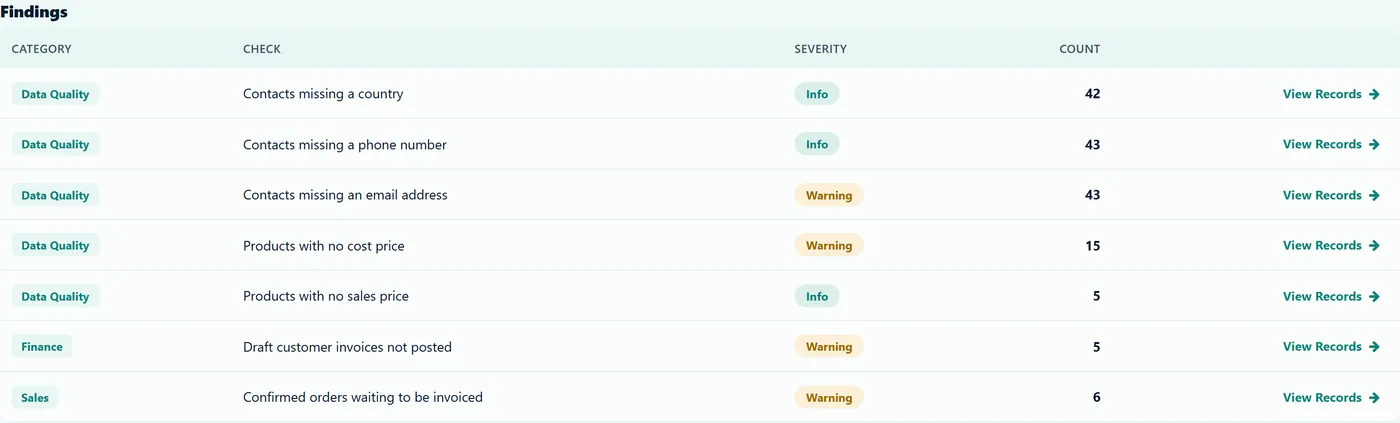
- Finds missing emails and phones, products with no cost or price, draft invoices and uninvoiced orders
02
Every finding links straight to the affected records so fixing is one click away
- Each check is configurable, switch it on or off and adjust its threshold with no code
- Strictly read-only, it reports and links but never changes or deletes any data
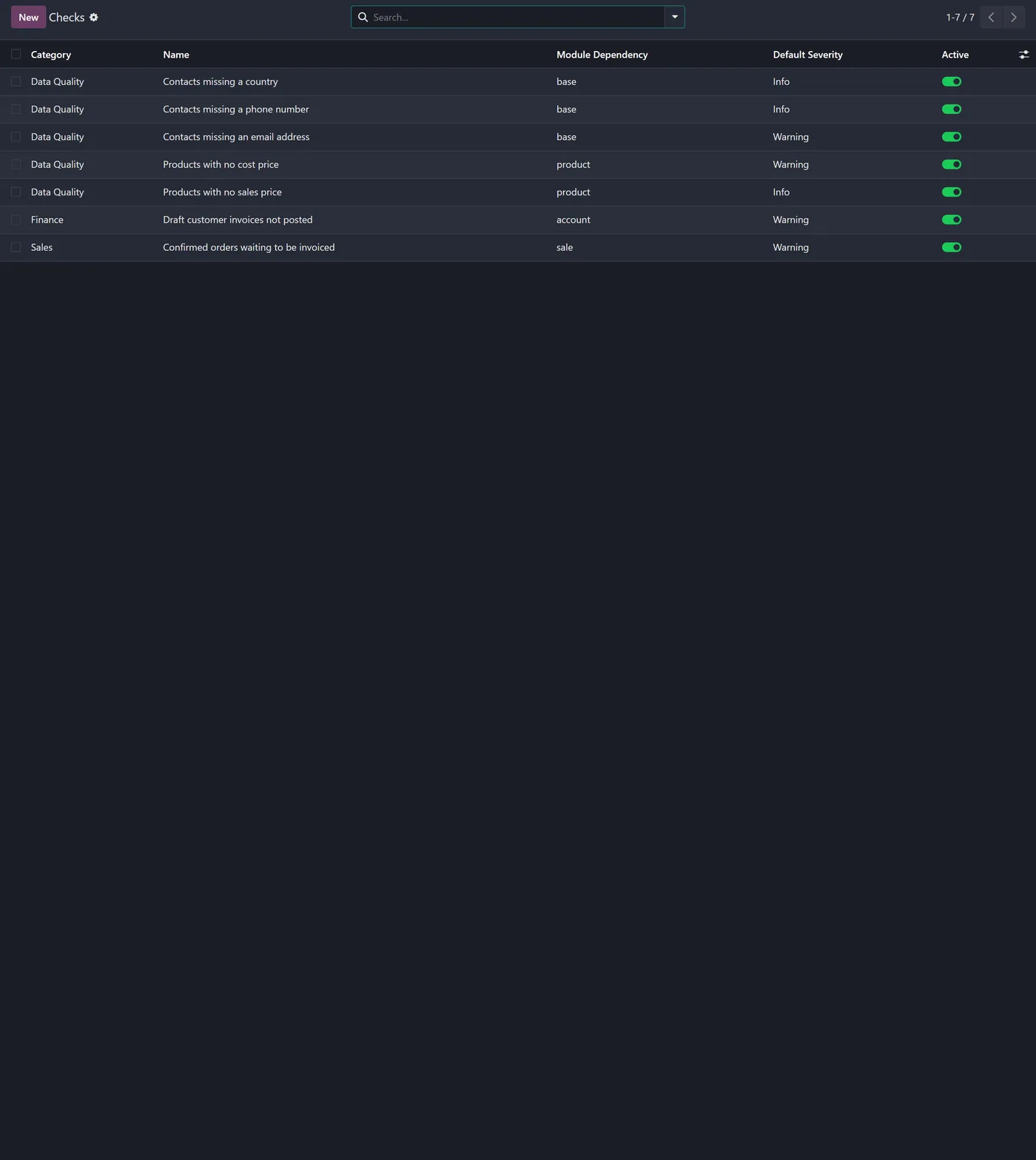
Odoo Health Audit gives you a one click health check for your Odoo database. It scans your records against a library of best-practice checks, scores your database from 0 to 100, and shows you exactly what needs fixing, all without changing a thing.
What it does
Most Odoo databases are set up in a hurry. Contacts get created without an email, products go live with no cost price, and blanks creep into the fields that drive your taxes, margins and reports. Nothing throws an error, so the gaps stay hidden until a report looks wrong or an invoice will not send. Odoo Health Audit finds those gaps for you. Open the dashboard, click Run Audit, and it checks your data, calculates a single health score out of 100, and lists every issue grouped into Finance, Sales, Inventory, Data Quality and Security, each tagged Critical, Warning or Info. The audit reads which apps you have installed and only runs the checks that apply, so install Inventory or Accounting and the relevant checks switch on automatically at the next run. Every finding has a View Records button that opens the exact filtered list behind it, so fixing is one click away. The audit only ever reads your data, so it is completely safe to run on a live database.
- A single health score from 0 to 100, broken down across five business areas. - Auto-detects installed apps and runs only the checks that apply, with no configuration. - Finds missing emails and phones, products with no cost or sales price, draft invoices that were never posted, and confirmed orders still waiting to be invoiced. - Every finding links straight to the affected records so you can fix them immediately. - Each check is configurable, switch it on or off and tune its threshold with no code. - Strictly read-only, so it reports and links but never changes or deletes any data.
How to set it up
1. Install the app and open Odoo Health from the main menu. There is nothing to configure. 2. Click Run Audit. The engine detects your installed apps and scores your database in seconds. 3. Read the dashboard: overall score, five category sub-scores, severity counts and findings. 4. Click View Records on any finding to open the affected data and clean it up. 5. Run the audit again and watch the score climb as you fix each issue.
Who it's for
Companies that implemented Odoo themselves and want to know their database is configured correctly and their data is clean, and consultants who want a fast, repeatable health check they can run on any client database before a go-live or a review.
Proven in production
Not just published.
This module came out of real client work. Here is the engagement it was built in.
Questions
About Odoo Health Audit.
How do I know if my Odoo database is set up correctly?
Install Odoo Health Audit and click Run Audit. It scans your records against best-practice checks and gives you a 0 to 100 health score with every issue listed by area and severity.
How can I find missing or incomplete data in Odoo?
The audit flags records with missing emails, products with no cost or sales price, contacts with no country and other gaps, then links each finding straight to the affected records so you can fix them.
Will it change or delete any of my data?
No. The audit is strictly read-only. It reports and links to records, but you decide what to fix. Nothing is ever modified or removed automatically.
Does it audit accounting and inventory automatically?
Yes. The audit detects which apps you have installed and only runs the relevant checks. Install a new app and its checks switch on at the next run, with no setup.
Does it work in Odoo Community and Enterprise?
Yes, it runs on both editions and depends only on Odoo core. Each Odoo Apps Store listing shows the exact version it supports.
On the Odoo Store
Get Odoo Health Audit on the Odoo Store.
Pick your Odoo version and install it in a click, with free updates and real support behind it.
Get it on the Odoo StoreReady to make Odoo work the way your business does?
Book a free call CODEerts
CODEerts is a team of certified Odoo partners and full-stack engineers. We implement, customise and support Odoo ERP, then build the software around it.