CODEerts
Sales app for Odoo
CRM Booster - Pipeline Dashboard and Forecast
A turnkey CRM analytics dashboard for Odoo, pipeline velocity, funnel conversion, win and loss, source and campaign ROI, team leaderboard, weighted forecast and quota attainment, with global filters and click-through to the underlying leads.
Overview
CRM Booster - Pipeline Dashboard and Forecast.
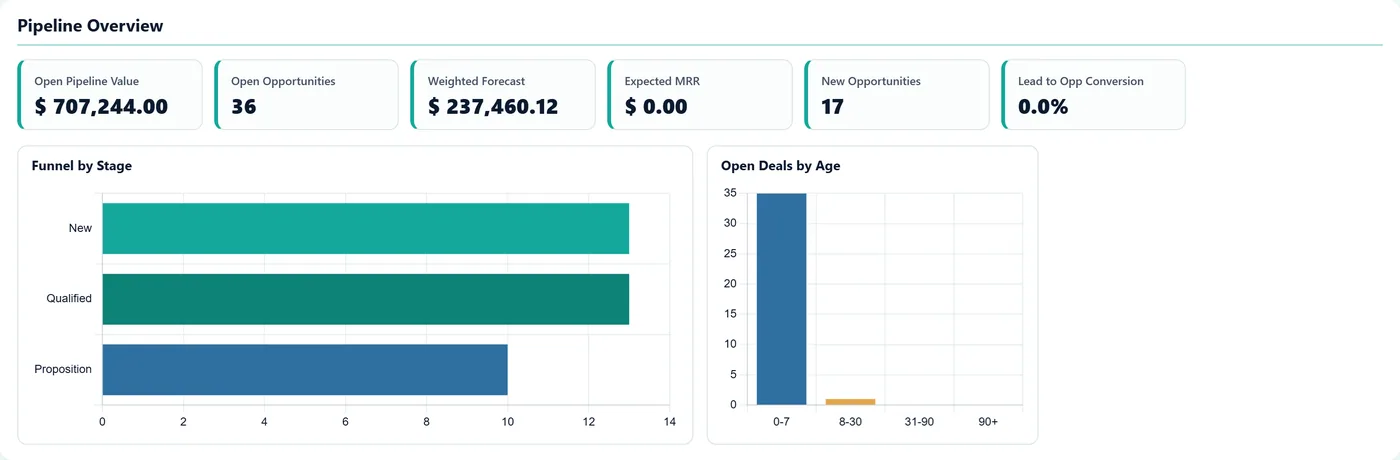
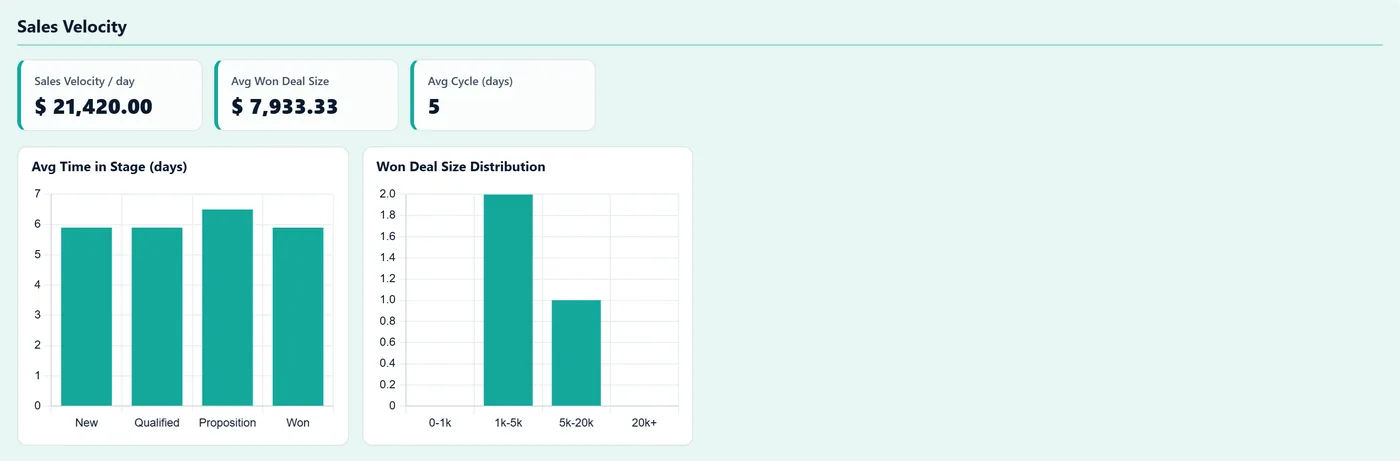
CRM Pipeline Dashboard gives Odoo CRM the rich, actionable analytics it does not ship with. It records full stage history, the per-stage transitions Odoo never keeps, and turns it into real velocity metrics, time in stage, aging, sales cycle and a sales-velocity figure. Six sections cover pipeline overview, velocity, win and loss, source and campaign ROI, team performance and forecast, with thirteen charts and a band of headline KPIs. A global filter bar re-queries everything by period, team, salesperson, stage, source and grade, and every number is clickable, opening the exact list of leads behind it so the figures always reconcile. Sales targets drive a quota-attainment gauge, and rotting-deal and overdue-activity views flag what needs attention. Every figure respects record access, so a rep sees only their pipeline and a manager sees all.
New to Odoo Sales? Read our practical guide to how it works
How it works
Built around what you actually do.
Every screen below is the module running in Odoo, not a mockup.
01
Full stage-history tracking, the per-stage transitions Odoo does not store, populated going forward and backfilled on install
- Pipeline velocity, time in stage, deal aging, sales cycle and a sales-velocity figure
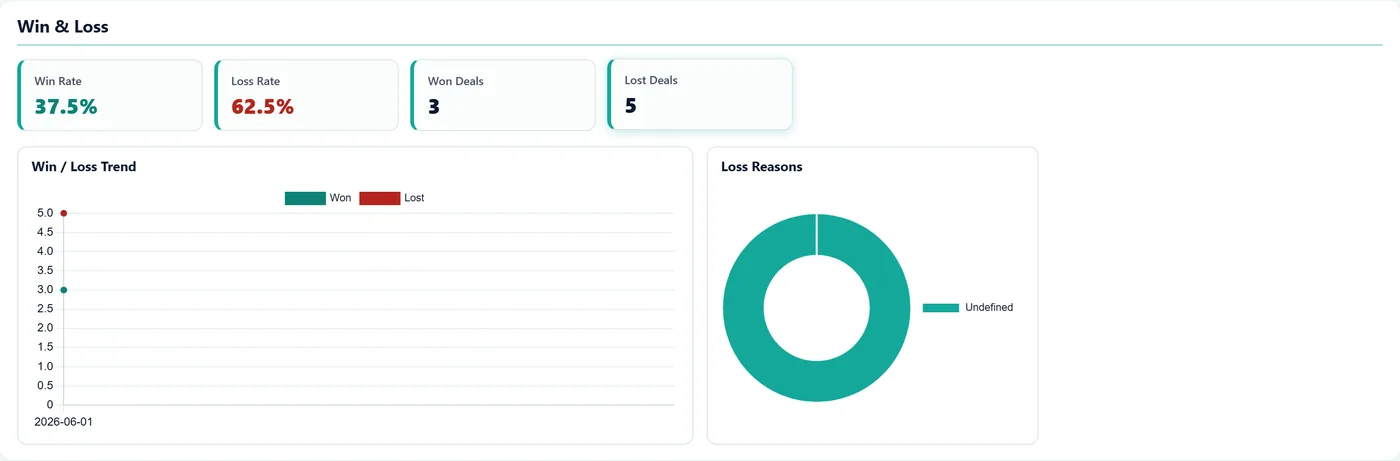
- Funnel with stage-to-stage conversion, win and loss rates and loss-reason breakdown
02
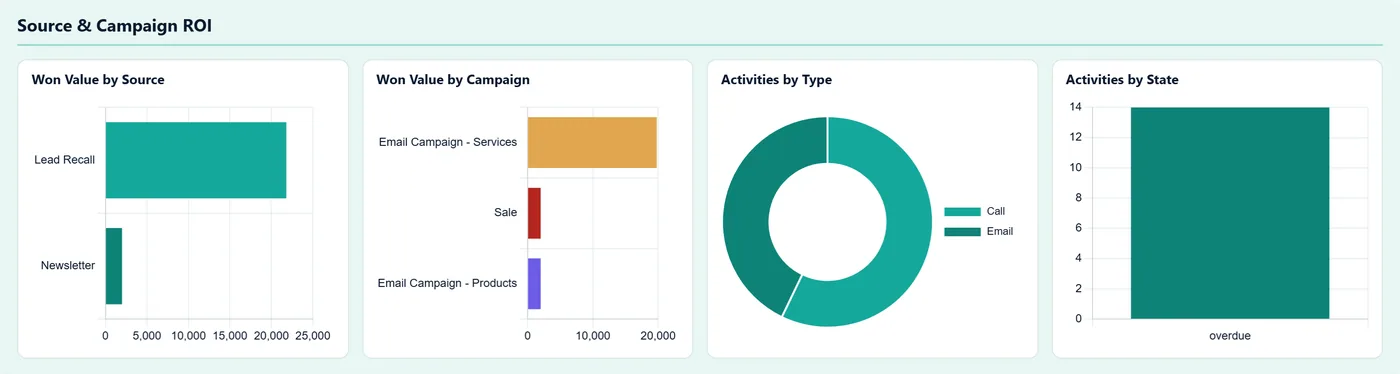
Source and campaign ROI, team leaderboard and weighted forecast by close month
- Sales targets with a quota-attainment gauge, plus rotting-deal and overdue-activity views
- Global filter bar, period, team, salesperson, stage, source and grade, that re-queries every section
03
Every KPI, chart bar and row clickable, opening the exact leads behind the number
- Respects record access, a rep sees only their pipeline, a manager sees everything
Every screen
The whole module, screen by screen.
The captures the walkthrough above did not use, in the order you meet them in the product.
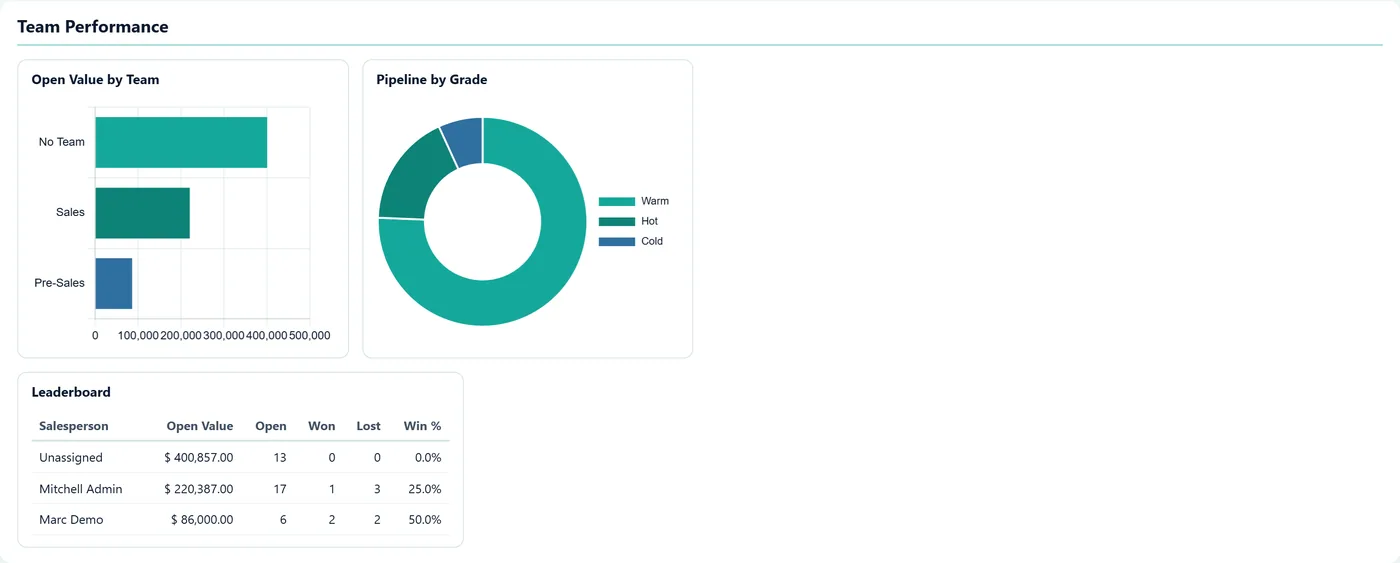
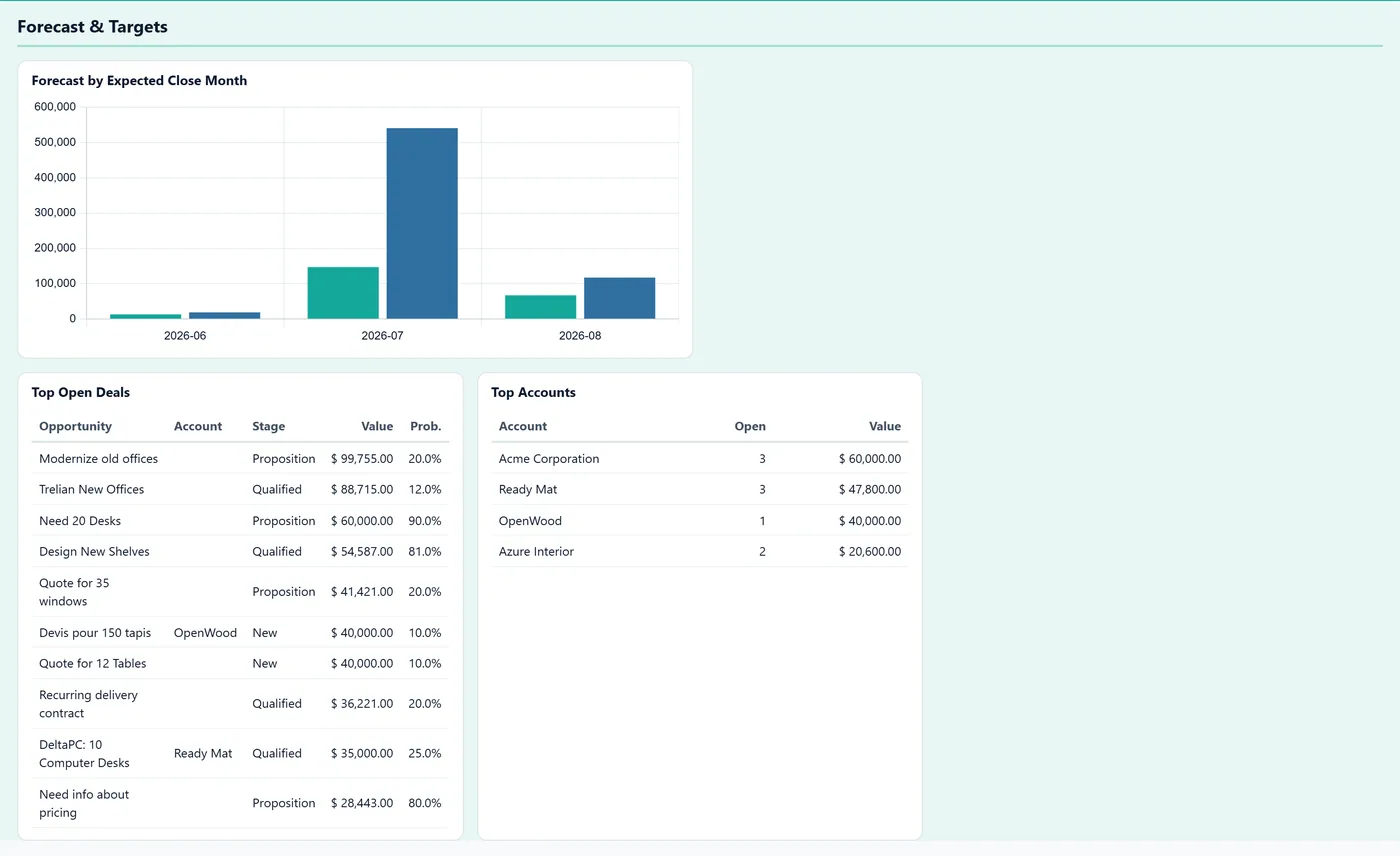
CRM Pipeline Dashboard answers the questions Odoo CRM cannot: how fast deals really move, where they stall, which sources pay off, who on the team is converting, and what is going to close this quarter. It does it with real data, including the per-stage history Odoo throws away, and every number drills straight down to the leads behind it.
What it does
The module records every stage change a lead makes into its own history log, the data standard Odoo does not keep, and backfills your existing leads on install. From that it computes genuine velocity: time in each stage, deal aging buckets, average sales cycle and a sales-velocity figure. Six sections, pipeline overview, velocity, win and loss, source and campaign ROI, team performance and forecast, present thirteen charts and a band of headline KPIs. A global filter bar re-queries everything at once by period, team, salesperson, stage, source and grade. Every KPI, chart bar and row is clickable and opens the exact list of leads behind it, and that list always reconciles with the number. Sales targets drive a quota-attainment gauge, and dedicated views surface rotting deals and overdue activities. Because every figure is read under the current user's access rights, a rep sees only their own pipeline while a manager sees the whole team.
The stage history Odoo does not keep
Odoo records where an opportunity is, not how it got there. Once a deal moves from Qualification to Proposal, the fact that it sat in Qualification for 40 days is gone. This module records every transition going forward and turns that into the metrics a sales operation actually runs on: time in stage, deal aging, sales cycle length and velocity.
That changes what you can ask. Not just "how big is the pipeline" but "where do deals stall", "is this quarter's cycle longer than last", and "which stage is the bottleneck". None of those are answerable from a snapshot.
Who it's for
Sales operations and revenue leaders who have outgrown pipeline value as a metric and need to manage the process rather than the total. It earns its higher price where the sales cycle is long enough that stalling is expensive, so B2B, considered purchases and anything with a proposal step. Stage history builds from installation onward, so the sooner it is running the sooner the velocity numbers mean something.
Questions
About CRM Booster - Pipeline Dashboard and Forecast.
Does Odoo track how long a deal spends in each pipeline stage?
Standard Odoo only keeps the date of the last stage change, not the full history. CRM Pipeline Dashboard records every stage transition into its own log, so it can show real time in stage, stage-to-stage conversion and sales velocity. Existing leads are backfilled on install so you have data from day one.
What does the CRM dashboard actually show?
Six sections: pipeline overview with headline KPIs and a stage funnel, velocity and deal aging, win and loss with loss reasons, source and campaign ROI, a team leaderboard, and a weighted forecast with quota attainment. Thirteen charts in all, plus rotting-deal and overdue-activity views.
Can I drill from a number down to the actual leads?
Yes. Every KPI, chart bar and table row is clickable and opens the exact filtered list of leads behind it, and the count always reconciles with the figure shown. The dashboard is built so the numbers are never a black box you cannot verify.
Can I filter the whole dashboard?
A global filter bar re-queries every section at once by period (month, quarter, year or a custom date range), team, salesperson, stage, source and lead grade, so you can focus on one rep, one team or one campaign and every chart updates together.
Will a salesperson see other people's deals?
No. Every figure is computed under the user's own record access, so a salesperson sees only their pipeline while a manager sees the whole team. Sales-target configuration is read centrally, but the achieved numbers still respect who can see which leads.
Which Odoo versions does this module support?
Use the version selector at the top of this page to pick your Odoo release. Each branch is published as its own listing for that exact version.
On the Odoo Store
Get CRM Booster - Pipeline Dashboard and Forecast on the Odoo Store.
Pick your Odoo version and install it in a click, with free updates and real support behind it.
Get it on the Odoo StoreReady to make Odoo work the way your business does?
Book a free call CODEerts
CODEerts is a team of certified Odoo partners and full-stack engineers. We implement, customise and support Odoo ERP, then build the software around it.