 CODEerts

Odoo Sales
Odoo Sales: From Quotation to Confirmed Order Without the Rework
Odoo Sales is the hinge between a pipeline and an operation. Everything upstream is intent, everything downstream is commitment, and the quotation is where one becomes the other. Most of the pain people report here is really a pricelist decision made too quickly.
Written by Muneeb AhmadOdoo 19 and 17 Certified, Functional Consultant
01
What Odoo Sales actually is
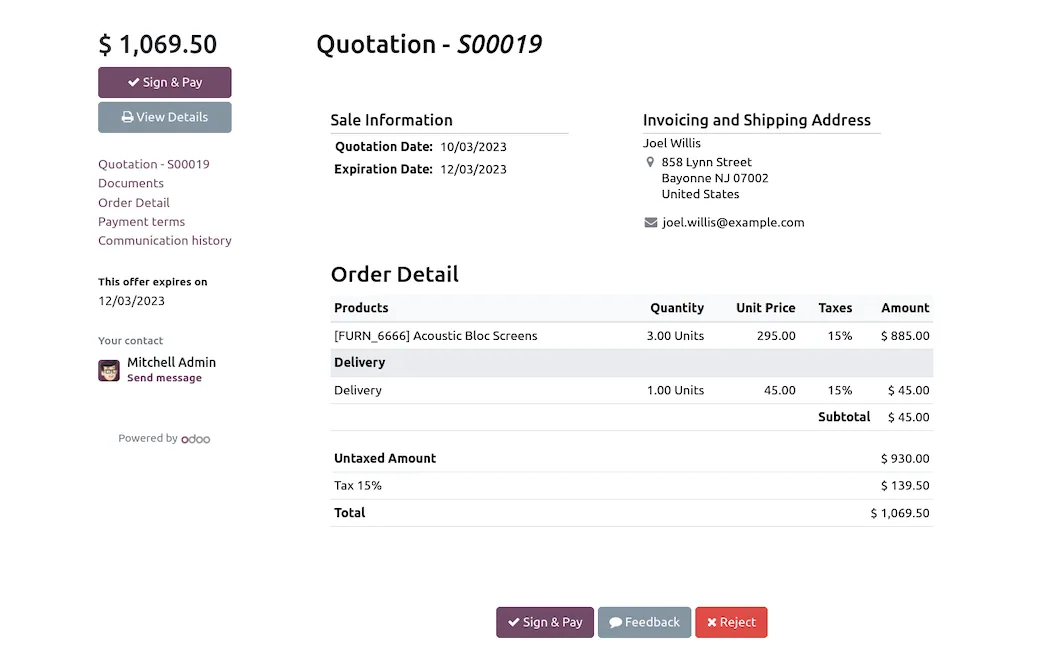
Odoo Sales turns an agreed price into an operational commitment. It owns the quotation, the customer's acceptance, and the confirmed order that everything else reacts to. It is a short module by feature count and a consequential one by position, because a confirmed sales order is what tells Inventory to move goods, Accounting to expect money, and Manufacturing or Purchasing to produce or buy.
The practical implication is that errors here are expensive in a way that errors in CRM are not. A wrong pipeline stage costs you a slightly misleading forecast. A wrong price on a confirmed order costs you margin, a credit note, and an awkward conversation.
02
Quotations, and treating them as versions rather than documents
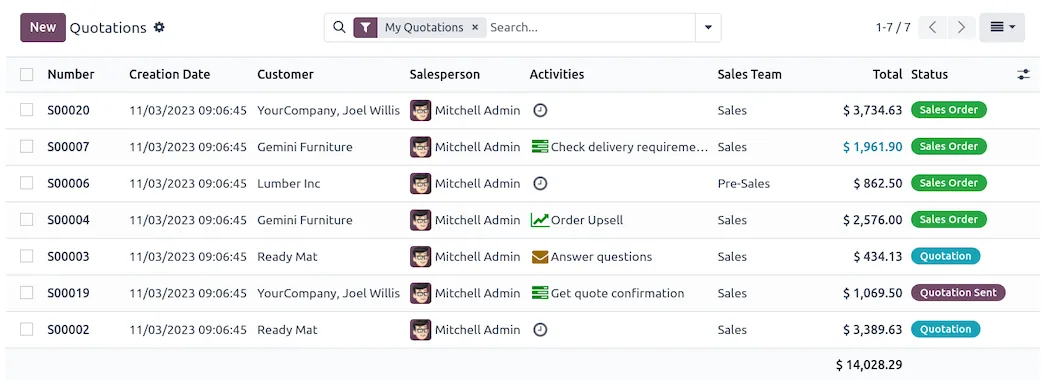
A quotation and a sales order are one record in two states. Confirmation is the event that matters, and until it happens nothing operational occurs.
Odoo tracks a validity date and an order reference, and it keeps the full revision history on the record through the chatter. The habit worth building is to revise the existing quotation rather than creating a new one per round of negotiation, because a customer who receives three separate quotation numbers for one deal will eventually accept the wrong one. Use the same record, let the log show the movement, and send the updated PDF.
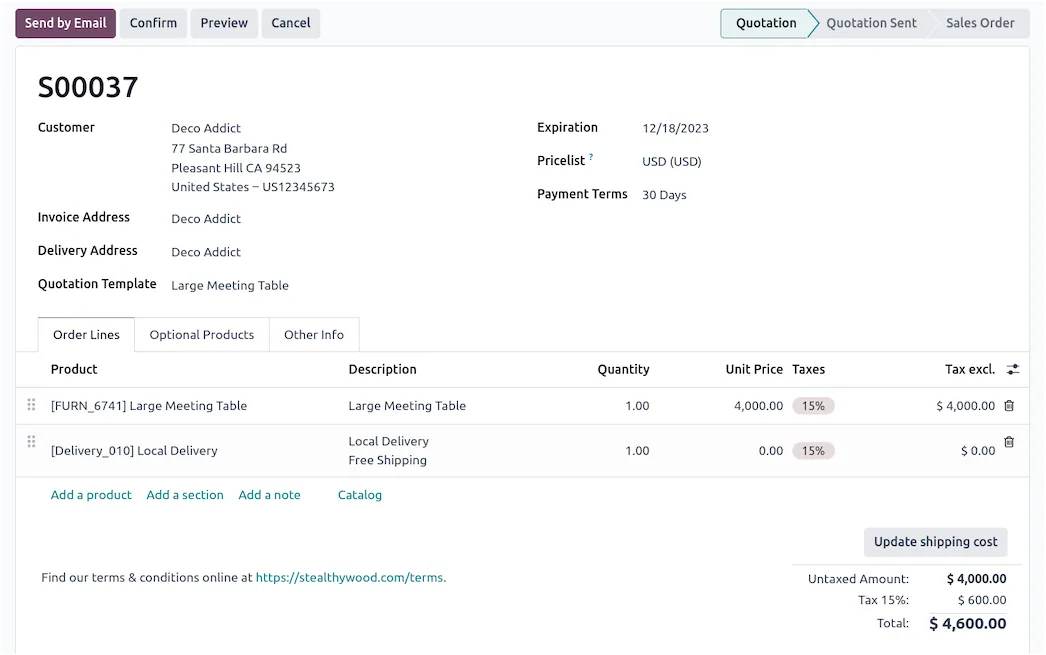
Quotation templates carry lines, optional products, terms and validity into a new quotation in one step. Build one for anything you sell more than occasionally. The value is not the typing saved, it is that the terms and the optional extras stop depending on which salesperson wrote the quote.
03
Pricelists, which are where most implementations go wrong
Pricelists are the single most misconfigured part of Odoo Sales, and the reason is that they are more powerful than most businesses need.
A pricelist can set a fixed price, a percentage discount, a formula based on cost or on another pricelist, and it can scope each rule to a product, a category, a quantity threshold or a date range. Rules resolve by specificity: the most specific matching rule wins.
The failure mode is predictable. Someone builds a rule per customer, then a rule per category, then a seasonal rule, and six months later nobody can explain why one line priced at 12 percent off instead of 15. Before configuring anything, write down in plain language how your prices are actually decided. If that description does not fit in a short paragraph, the problem is your pricing policy rather than Odoo, and building it into software will make it permanent.
Start with the smallest set of rules that produces correct prices, and add only when a real case forces it.
04
Variants and optional products, which solve different problems
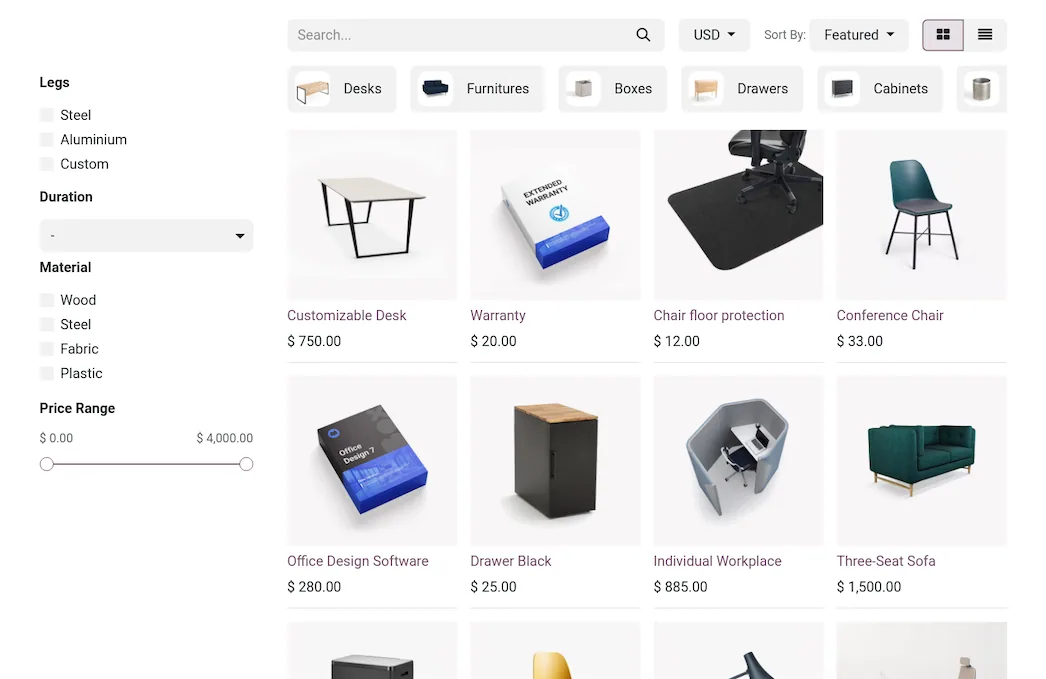
Variants exist when the same product ships in several forms: sizes, colours, capacities. Odoo generates them from attribute combinations, and each variant carries its own stock, cost and barcode. Use variants when the differences are genuinely the same product.
Optional products are suggestions attached to a quotation: the warranty, the installation, the accessory. They appear to the customer in the portal and can be accepted without involving the salesperson.
People reach for variants when they mean options, and the result is a combinatorial explosion of product records that nobody wants to maintain. If a customer would not describe two things as the same product, they are not variants.
Screenshots of Odoo are the property of Odoo S.A. and are shown here to illustrate the app they depict.
What confirmation actually triggers
Confirming an order is the point of no return, and it is worth knowing exactly what fires. Odoo creates the delivery order, reserves stock according to your rules, generates procurement for anything that must be bought or made, and makes the order available to invoice under its invoicing policy.
That policy sits on the product, not the order: ordered quantities allows invoicing straight away, delivered quantities waits for the goods to move. Choosing delivered by default is the safer setting for physical goods, because it prevents invoicing for stock that never left.
Where Odoo Sales will fight you
Discount visibility needs enabling. The discount column on order lines is a setting rather than a default. Teams that discount regularly and never switch it on end up editing unit prices directly, which destroys any analysis of how much margin discounting actually costs.
Multi-currency and multi-company add real complexity. Both work properly, but each doubles the number of pricelist and tax combinations you need to test before going live.
Delivery and invoicing status confuse people early. An order can be fully delivered and not invoiced, or fully invoiced and undelivered. Both statuses are on the order and both matter, and staff who only look at one will misread the state of the business.
Taxes are set on the product and overridden by fiscal position. When the tax on an order looks wrong, check the customer's fiscal position before you touch the product.
How it connects to everything else
A won CRM opportunity becomes a quotation. A confirmed order creates a delivery in Inventory, a procurement in Purchase or Manufacturing, and a draft invoice in Accounting. Timesheets and Project can bill back to the same order. The customer is one res.partner throughout.
This is the reason to run Sales inside Odoo rather than beside it. The order is not a document that gets re-keyed somewhere, it is the record everything else already reads.
Where to start
Decide your invoicing policy before anything else, because it determines how cash timing works. Write your pricing policy in plain English and build the minimum rules that express it. Create quotation templates for your repeat business. Turn on the discount column from day one, even if you rarely use it. Then confirm a small real order end to end, watch what it creates in Inventory and Accounting, and fix what surprises you before the volume arrives.
FAQ
Odoo Sales, answered.
Is Odoo Sales included in Community?
Yes. Quotations, sales orders, pricelists, product variants, quotation templates and the standard reporting are all in Community. Subscriptions and some advanced sales tooling are Enterprise, but the core order-to-invoice flow is complete without a licence.
What is the difference between a quotation and a sales order?
They are the same record in different states. A quotation becomes a sales order when it is confirmed, and confirmation is the moment Odoo starts creating deliveries, reserving stock and making the order invoiceable. Nothing operational happens before that.
How do quotation templates work?
A template pre-loads lines, optional products, terms and a validity period onto a new quotation. They are worth building for anything you sell repeatedly, because they remove the two most common quotation errors: a missing line and an out-of-date term.
Can customers accept a quotation online?
Yes. The customer portal lets a recipient view, comment on, sign and pay a quotation, which confirms the order automatically. For low-value repeat business this removes a whole round of manual follow-up.
How does Odoo decide which price to use?
Pricelists resolve in order of specificity, so a rule on a specific product beats a rule on its category, which beats a global rule. When a price looks wrong, the cause is almost always two rules that both match rather than a bug.
Can I invoice before delivering?
Yes. Each line has an invoicing policy of ordered quantities or delivered quantities, set on the product. Ordered lets you invoice on confirmation, delivered waits for the goods to move. Mixing the two policies across one order is legitimate and common.
Related
Keep exploring.
Other Odoo apps we have written up in the same depth.
With CODEerts
Want this set up properly?
We are certified Odoo partners. We implement, customise and support Odoo Sales, and we publish our own apps on the Odoo Store.
See how we can helpBook a callReady to make Odoo work the way your business does?
Book a free call CODEerts
CODEerts is a team of certified Odoo partners and full-stack engineers. We implement, customise and support Odoo ERP, then build the software around it.

