 CODEerts

Odoo Inventory
Odoo Inventory: How Stock Really Moves, and Where It Goes Wrong
Odoo Inventory is the module that decides whether the rest of your system tells the truth. Stock feeds costing, margin and availability, so a warehouse configured on guesswork produces numbers nobody trusts.
Written by Muneeb AhmadOdoo 19 and 17 Certified, Functional Consultant
01
What Odoo Inventory actually is
Odoo Inventory is a double-entry system for goods. That framing explains more about its behaviour than any feature list, because stock in Odoo is never created or destroyed casually, it moves between locations. When you receive goods, they move from a virtual vendor location into your warehouse. When you sell, they move from stock to a virtual customer location. When you scrap something, it moves to a scrap location.
Every one of those movements is a record. Nothing changes quantity without leaving a trace, which is why the traceability is genuinely good and why the system resists the quick manual fixes people expect from a spreadsheet.
02
Locations, and why they cause most of the confusion
A warehouse is the business entity. Locations are the actual places stock sits, and they nest: WH/Stock, WH/Stock/Shelf A, WH/Stock/Shelf A/Bin 3. Alongside these are the virtual locations that make the double entry balance, covering vendors, customers, production, inventory adjustment and scrap.
The practical consequence is that most reported inventory bugs are location misconfigurations. Stock that "disappeared" is usually sitting in an input or quality-control location because a multi-step receipt route was switched on and nobody completed the second step.
03
Operations, and the multi-step decision
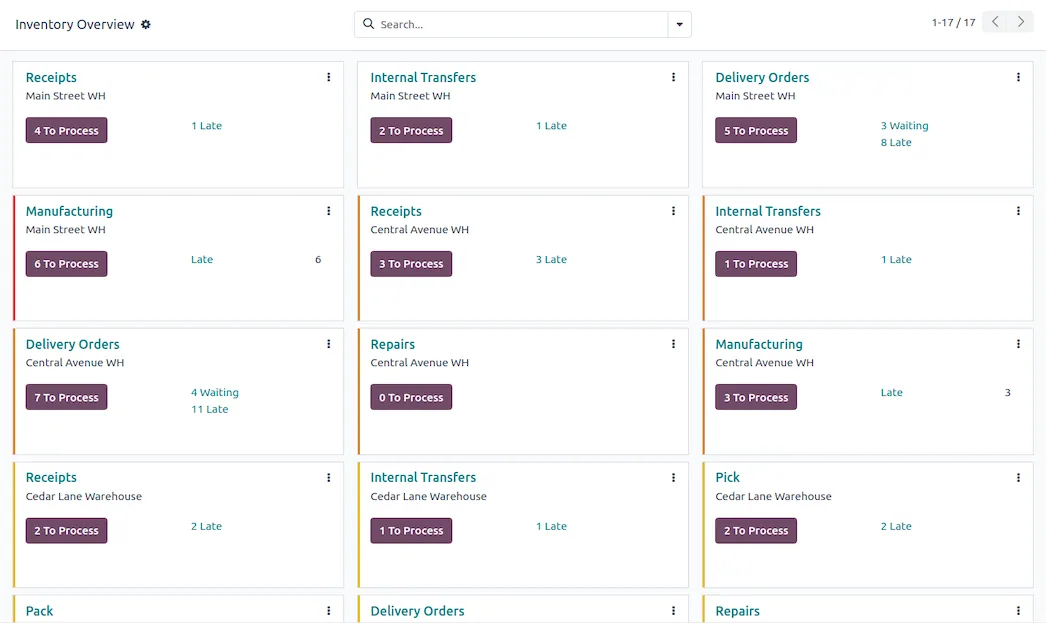
Receipts, deliveries, internal transfers, returns and manufacturing pickings are all the same underlying object, a transfer with an operation type. The important early choice is how many steps each flow takes.
One-step receipt puts goods straight into stock. Two-step adds an input location, so receiving and putting away are separate. Three-step adds quality control between them. Deliveries have the same progression: pick, then pack, then ship.
More steps means more accuracy and more scanning discipline. Businesses routinely enable three-step flows because they sound thorough, then discover the floor completes step one and ignores the rest, which is worse than one step honestly executed. Start at one step and add steps when a real problem demands one.
04
Reservation, and the three numbers people confuse
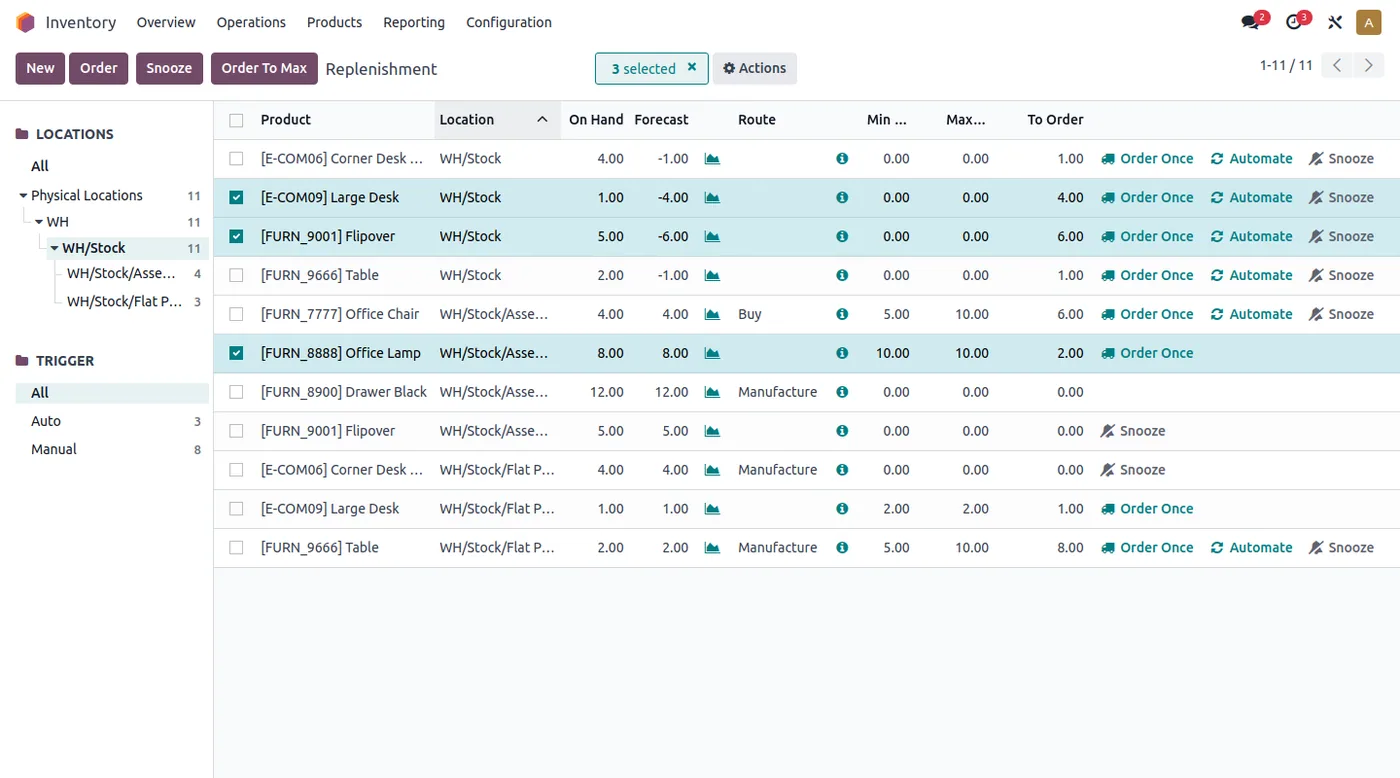
Odoo tracks on hand, forecasted and available, and they are different. On hand is physically present. Forecasted adds incoming purchase orders and subtracts outgoing commitments. Available is on hand minus what is already reserved for other orders.
When a salesperson insists stock exists and the system disagrees, the answer is nearly always that the quantity is reserved elsewhere. Reservation strategy is configurable, at confirmation or manually, and choosing it deliberately prevents a great deal of daily friction.
Screenshots of Odoo are the property of Odoo S.A. and are shown here to illustrate the app they depict.
Replenishment
Reordering rules set a minimum and maximum per product and location, and the scheduler creates the purchase or manufacturing order needed to close the gap. Odoo also supports make-to-order, where demand triggers procurement directly with no stock held.
The rules are only as good as the lead times behind them. A reordering rule with a vendor lead time nobody has updated since go-live will order late, every time, and the module will be blamed for a data problem.
Lots, serials and expiry
Tracking is set per product. Lots group a batch, serial numbers identify single units, and expiry dates enable first-expired-first-out picking on top of lot tracking. Full upstream and downstream traceability follows from this, which matters if you are ever asked to prove where a specific batch went.
The cost is real: tracked products require the lot or serial at every transfer. Enable it where it earns its keep, not everywhere by default.
Valuation, and where inventory becomes accounting
Costing method is FIFO, average cost or standard cost, and valuation is manual or automated. Automated perpetual valuation posts a journal entry on every stock move, keeping the ledger and the warehouse permanently in agreement.
That is what most businesses want, and it has a consequence worth stating plainly: once valuation is automated, a warehouse error is an accounting error the same day. It raises the stakes on stock accuracy considerably, which is a good thing, but only if the floor is ready for it.
Where Odoo Inventory will fight you
Routes are powerful and easy to over-engineer. The routing engine can express almost any flow, including cross-docking, drop-shipping and multi-warehouse resupply. Complex routes are also genuinely hard to debug when a procurement does not fire.
Negative stock is allowed by default. Odoo lets quantities go negative rather than blocking the transaction, which keeps operations moving and quietly hides errors. Decide early whether you want that.
Barcode is Enterprise. Scan-driven picking is where warehouse accuracy actually comes from, and it is not in Community.
The scheduler is a scheduled job. Replenishment does not happen the instant you look at the screen. Teams expecting immediate reaction get confused before they find the run-scheduler action.
How it connects to everything else
Sales reserves it, Purchase replenishes it, Manufacturing consumes and produces it, Accounting values it, Point of Sale sells from it and eCommerce publishes its availability. Inventory is the module with the most downstream dependents, which is exactly why its configuration deserves more design time than it usually gets.
Where to start
Model your real locations before touching routes. Pick the smallest number of steps your process genuinely needs. Decide the costing method with whoever signs off your accounts. Turn on tracking only where traceability is required. Then get lead times and reordering rules right, because those two fields quietly determine whether the system helps you or embarrasses you.
Further reading
From the blog.
Longer pieces that go past what a single app guide covers.
FAQ
Odoo Inventory, answered.
Is Odoo Inventory available in Community?
Yes. The core warehouse engine, including multi-warehouse, multi-step routes, lots and serial numbers, reordering rules and inventory valuation, is in Community. Barcode scanning and the shipping-connector integrations are the main Enterprise additions, and they are the two most people end up wanting.
What is the difference between a location and a warehouse?
A warehouse is the business-level entity that owns addresses, routes and operation types. A location is a specific place stock can sit, and locations nest inside each other. One warehouse holds many locations, and almost every problem people describe as a warehouse problem is really a location problem.
Why does Odoo say a product is unavailable when I can see it on the shelf?
Almost always reservation. Another order has already reserved that quantity, so it is on hand but not available. Odoo distinguishes on-hand from forecasted from available, and reading the wrong one of those three is the single most common source of confusion in the module.
Should I use lots or serial numbers?
Serial numbers track one physical unit each and are right when you need per-unit history, like equipment or high-value goods. Lots track a batch and are right for food, chemicals, pharmaceuticals or anything with an expiry. Serial tracking on a fast-moving consumable creates enormous data entry for very little benefit.
Can Odoo handle multiple warehouses and inter-warehouse transfers?
Yes, natively, including resupply routes where one warehouse replenishes from another automatically. It is genuinely capable. It is also where route configuration gets complicated fastest, so it is worth designing on paper before building it in the system.
How does inventory valuation connect to accounting?
With automated valuation, every stock move posts a journal entry, so your stock value in accounting always matches the warehouse. With manual valuation, it does not, and you post periodic adjustments instead. Automated is what most businesses want, and it means warehouse mistakes become accounting mistakes immediately.
Related
Keep exploring.
Other Odoo apps we have written up in the same depth.
With CODEerts
Want this set up properly?
We are certified Odoo partners. We implement, customise and support Odoo Inventory, and we publish our own apps on the Odoo Store.
See how we can helpBook a callReady to make Odoo work the way your business does?
Book a free call CODEerts
CODEerts is a team of certified Odoo partners and full-stack engineers. We implement, customise and support Odoo ERP, then build the software around it.

