 CODEerts

Odoo CRM
Odoo CRM: Building a Pipeline Your Sales Team Will Actually Use
Odoo CRM is technically straightforward and organisationally difficult. The features are not the hard part. Getting a sales team to keep a pipeline honest is, and that is mostly a design decision, not a software one.
Written by Muneeb AhmadOdoo 19 and 17 Certified, Functional Consultant
01
What Odoo CRM actually is
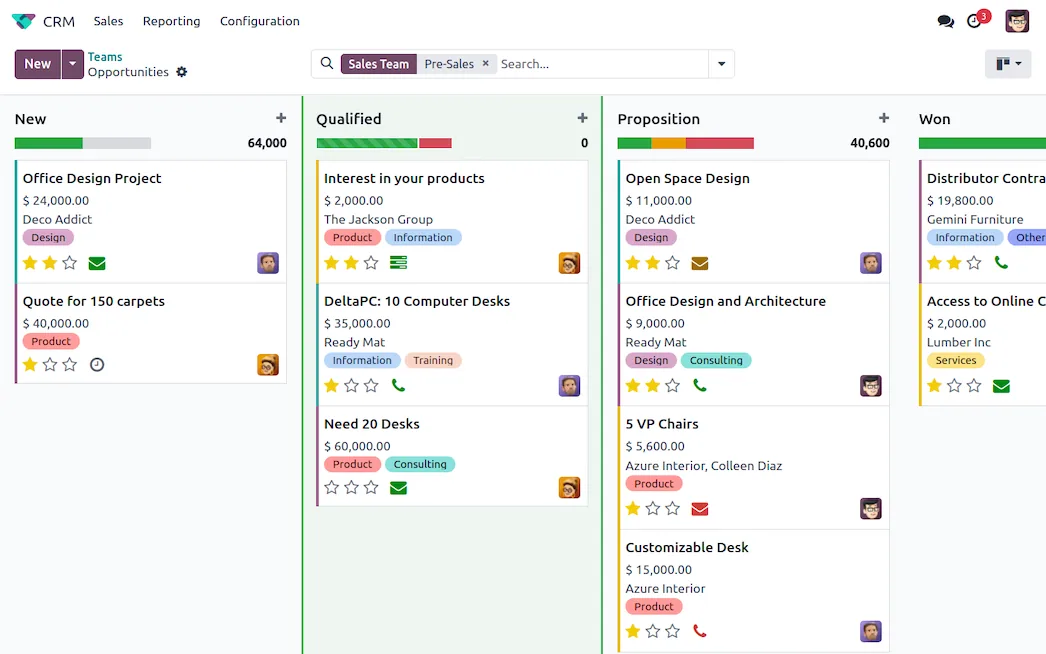
Odoo CRM manages the path from first contact to a won or lost deal. Its distinguishing feature is not any individual capability but its position: the opportunity that closes becomes a quotation in the same database, which becomes a sales order, a delivery and an invoice. There is no handover, no export, no integration to maintain.
That continuity is the reason to choose it. If you only need pipeline tracking in isolation, several dedicated tools do that job well too.
02
Leads and opportunities, and choosing whether to use both
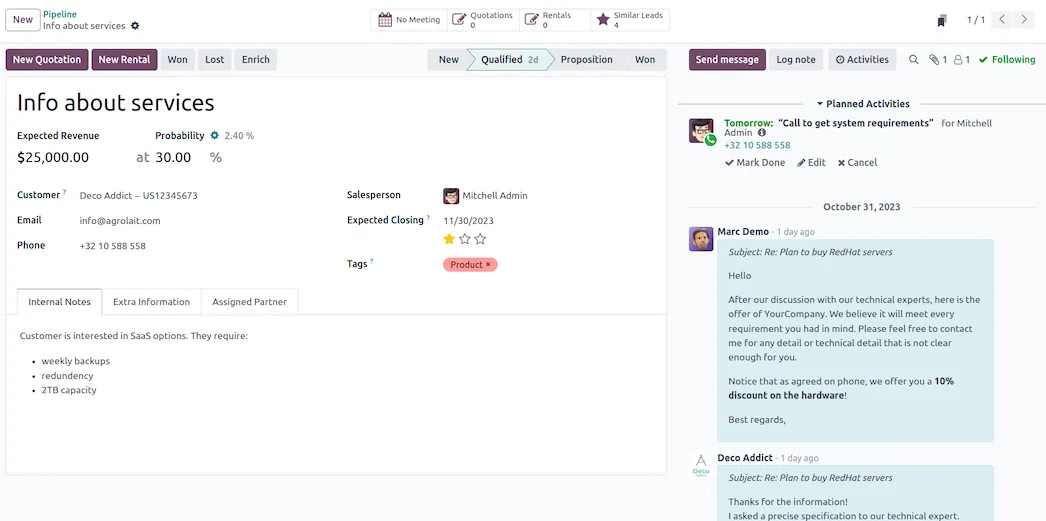
The distinction matters more than it first appears. An opportunity is a qualified potential deal with a value, an expected close date and a stage. A lead is raw unqualified input that has not yet earned a place in the pipeline.
Leads are optional and off by default. Turn them on when volume genuinely requires a filter before the pipeline. If most enquiries you receive are real prospects, adding a lead stage creates an extra step that quietly gets skipped, and a process step that is skipped is worse than one that never existed.
03
The pipeline, and the temptation to over-model it
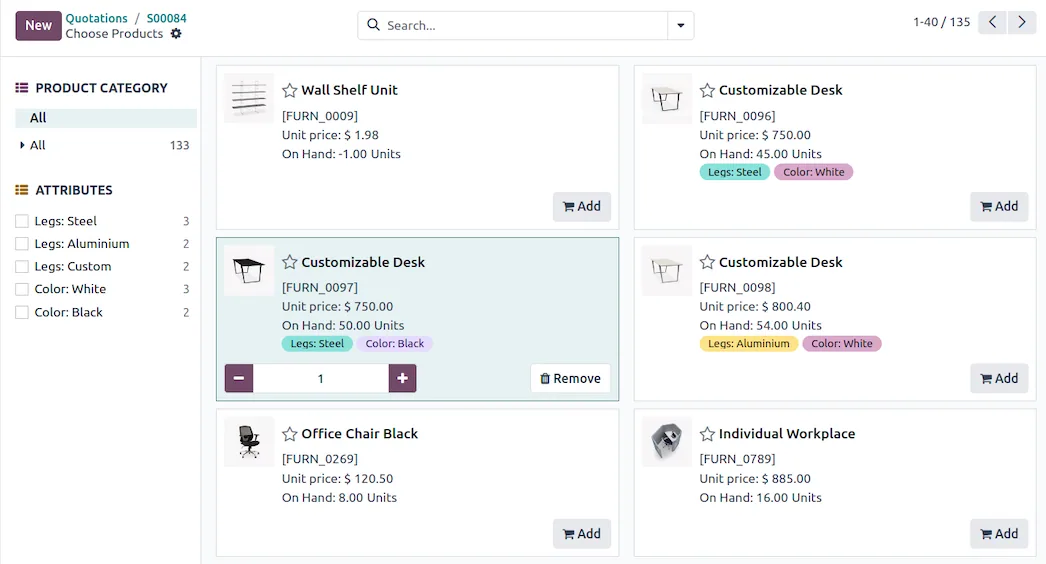
Stages are columns on a kanban board, each carrying a probability that feeds forecasting. The instinct during implementation is to model every nuance of the sales process. Resist it.
A stage should represent a change in the buyer's state, not an internal task. "Proposal sent" is a stage. "Follow-up call scheduled" is an activity. Teams that build ten stages end up with deals parked in whichever column feels least wrong, and the forecast stops meaning anything.
Four to six stages suits most businesses. Each should have a probability you actually believe, because the forecast is nothing more than expected revenue multiplied by that number.
04
Activities, which are the part that changes behaviour
Activities are scheduled next actions on a record: a call, a meeting, an email, a to-do, each with a due date and an owner. This is the single most useful feature in the module, because it converts a pipeline from a list of hopes into a list of commitments.
The rule worth enforcing is simple: every open opportunity has a next activity. An opportunity with no scheduled next step is not being worked. That one convention does more for pipeline hygiene than any amount of reporting.
Screenshots of Odoo are the property of Odoo S.A. and are shown here to illustrate the app they depict.
Where leads come from
Website forms, live chat, incoming email aliases, manual entry and import all create records directly. Because the website is part of the same system, a form submission becomes an opportunity with no connector in between.
Lead assignment can be manual or rule-based, distributing by team, region, product interest or round robin. Getting assignment right early matters more than it sounds: leads that land nowhere in particular get worked by nobody in particular.
Losing deals properly
Odoo asks for a lost reason when an opportunity is closed as lost, and this is worth taking seriously. A pipeline that records why deals die is a source of real intelligence about pricing, competitors, timing and fit. A pipeline where everything is lost to "no budget" tells you only that nobody filled the field in honestly.
Keep the list short and specific, and review it quarterly. Lost opportunities remain in the database and can be reactivated, so a lost deal is not deleted history.
Where Odoo CRM will fight you
Adoption is the whole game. The module is not difficult. Getting a sales team to update stages, log activities and record honest close dates is difficult, and no configuration solves it. Sales leadership using the pipeline as their actual working view is what solves it.
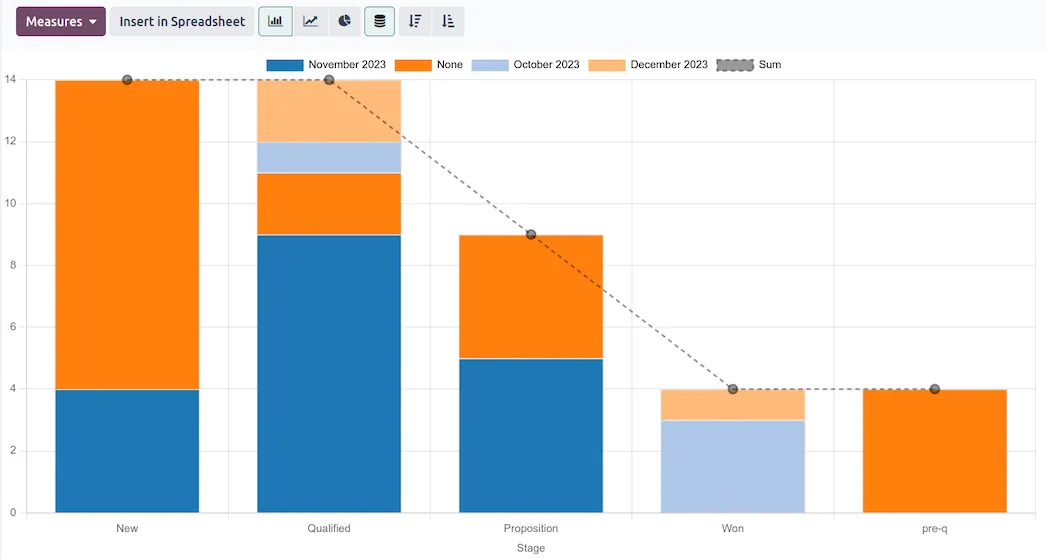
Reporting rewards discipline and punishes its absence. The analysis tools are capable, but expected revenue, probability and close date are all manually maintained. Garbage in, confident graphs out.
Email integration needs real setup. Two-way email tracking works well once configured properly, and configuring it properly means attending to aliases, catchall and deliverability rather than assuming it works out of the box.
Duplicates accumulate. Multiple capture routes into the same database will produce duplicate leads. Merging exists and works, but it is a habit somebody has to own.
How it connects to everything else
A won opportunity converts to a quotation in Sales. The customer record is the same res.partner used by Accounting, Invoicing and Delivery. Marketing hands qualified leads in. Helpdesk shares the same customer. Projects can be created from a won deal.
The pipeline is the front of a chain that runs all the way to cash, which is why keeping it honest pays off well beyond the sales team.
Where to start
Decide whether you need leads before you switch them on. Build the smallest number of stages that describe real buyer states, with probabilities you would defend. Make the next-activity rule non-negotiable from day one. Write a short, specific lost-reason list. Then leave the configuration alone for a quarter and let the data tell you what to change, rather than redesigning the pipeline every time a deal behaves unexpectedly.
FAQ
Odoo CRM, answered.
Is Odoo CRM free?
The CRM app is in Community, so the pipeline, activities, lost reasons and reporting are available at no licence cost. Marketing Automation and some of the deeper email and lead-enrichment tooling sit in Enterprise or in paid services, but the core CRM is genuinely complete on Community.
What is the difference between a lead and an opportunity?
A lead is unqualified raw contact data. An opportunity is a qualified potential deal with a value and an expected close date, and it is what sits in your pipeline. Leads are an optional stage that you switch on, and many small teams are better off without them.
Should I enable the lead stage or go straight to opportunities?
If a person's enquiry almost always represents a real potential deal, skip leads. Turn them on when you get high volumes of unqualified enquiries that would otherwise clutter the pipeline and distort forecasting. Enabling leads by default is a common early mistake that adds a step nobody uses.
Can Odoo CRM capture leads from my website automatically?
Yes. Website form submissions and live chat conversations can create leads or opportunities directly, and incoming email to a configured alias does the same. Because it is the same platform, no integration or middleware is involved.
How does the forecast get calculated?
Odoo multiplies the expected revenue on each opportunity by the probability associated with its stage, then groups by expected close date. This means your forecast is only as meaningful as your stage probabilities and your team's discipline about close dates.
Can I use Odoo CRM without the rest of Odoo?
You can, and it works fine standalone. You lose most of the argument for choosing it though, because the real advantage is that a won opportunity becomes a quotation, then an order, then a delivery and an invoice, without leaving the system or syncing anything.
With CODEerts
Want this set up properly?
We are certified Odoo partners. We implement, customise and support Odoo CRM, and we publish our own apps on the Odoo Store.
See how we can helpBook a callReady to make Odoo work the way your business does?
Book a free call CODEerts
CODEerts is a team of certified Odoo partners and full-stack engineers. We implement, customise and support Odoo ERP, then build the software around it.

