 CODEerts

Odoo Helpdesk
Odoo Helpdesk: Tickets, SLAs and Support That Sees the Customer Record
Helpdesk is an Enterprise app, which makes it a real decision rather than a default. Its case is that a support agent can see the customer's orders, invoices, deliveries and projects on the same screen as the ticket, without asking anyone for context.
Written by Muneeb AhmadOdoo 19 and 17 Certified, Functional Consultant
01
What Odoo Helpdesk actually is
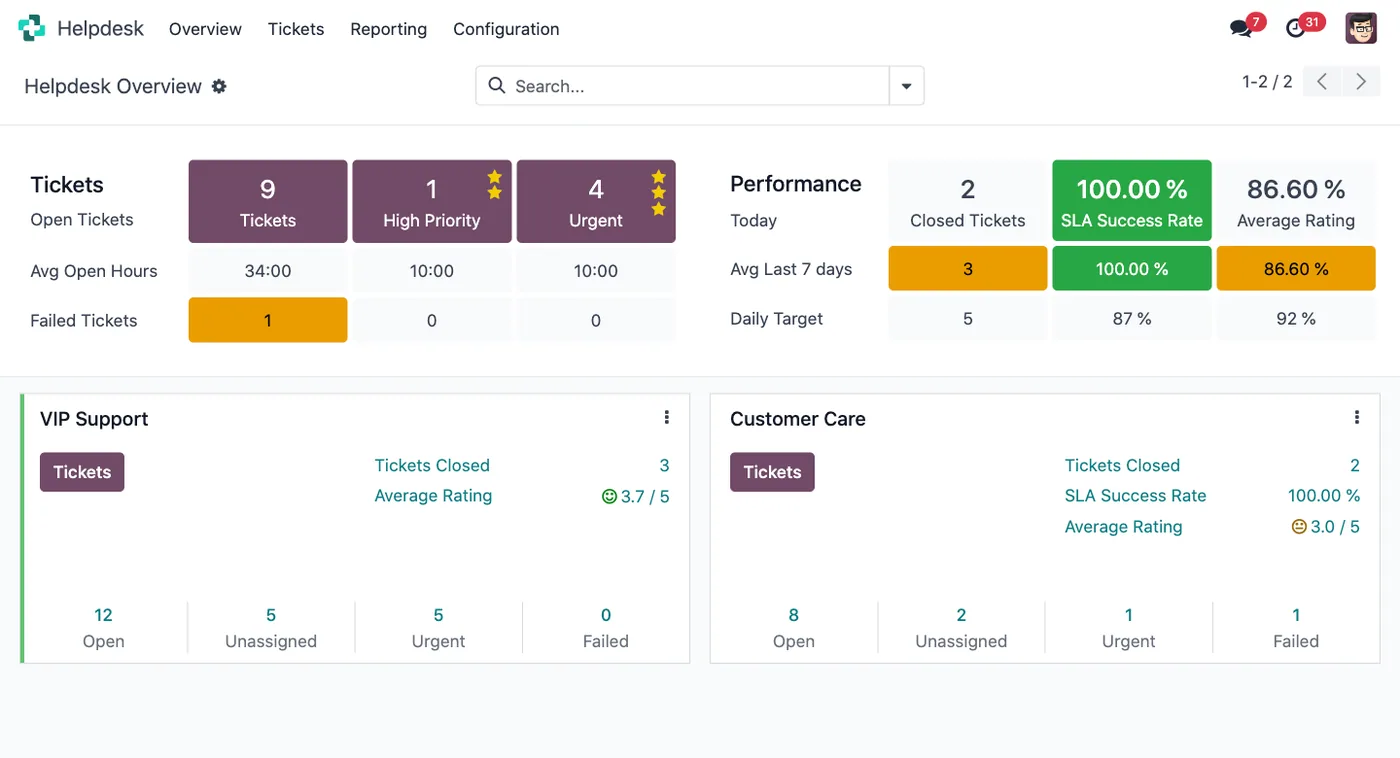
Odoo Helpdesk manages customer support requests as tickets, assigned to teams, moving through stages, measured against service-level targets.
It is an Enterprise app, and that changes the evaluation. Where CRM or Project can be adopted casually because they cost nothing, Helpdesk is a licensing decision that should be justified. The justification, when it exists, is context: an agent answering a ticket can see that this customer has an unpaid invoice, a delivery that was late last month, and an open project, without leaving the ticket or asking a colleague. Standalone support tools reach that state only through integrations that someone has to build and keep working.
Community users sometimes press Project into service as a ticket queue. That works for a simple internal queue and lacks the SLA engine, the portal and the multi-channel intake, so it should be understood as a different tool rather than a free equivalent.
02
Teams, channels and stages
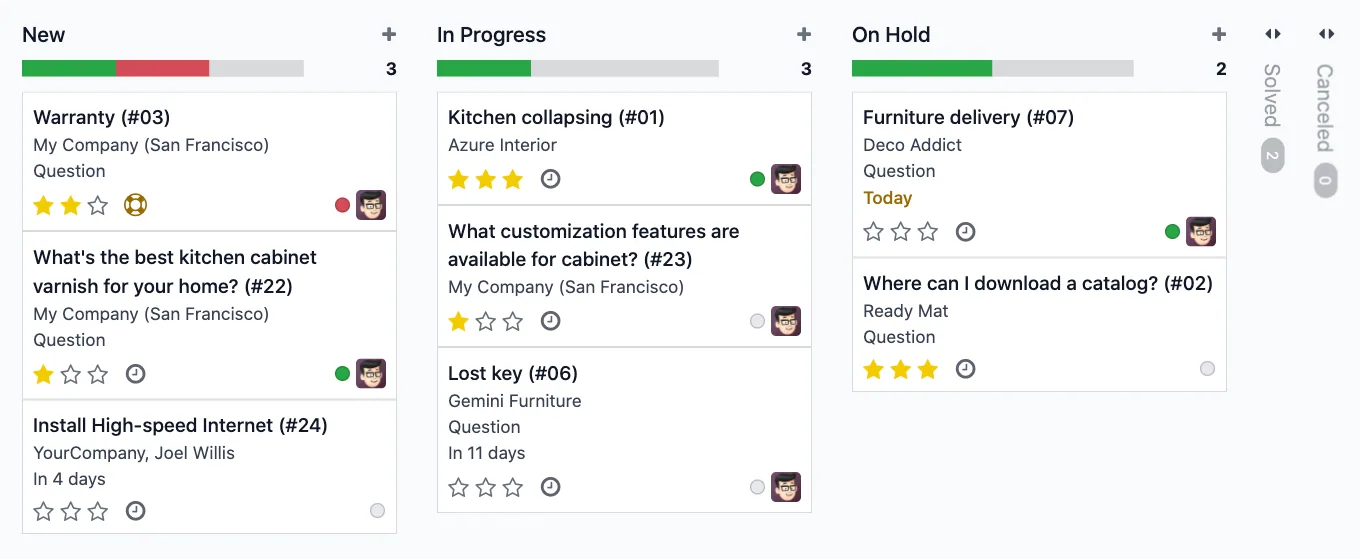
A team is the unit of configuration. Each has its own members, its own stages, its own channels and its own SLA policies, so a first-line team and a technical escalation team can work completely differently within the same system.
Tickets arrive from an email alias per team, a website form, live chat, the customer portal, or direct entry. Email alone covers most support operations and asks nothing of the customer, which is usually the right place to start.
Stages work as they do elsewhere in Odoo: kanban columns representing the ticket's real state. The same restraint applies. New, In Progress, Waiting on Customer and Solved describes most support operations honestly. Teams that build fifteen stages find agents parking tickets in whichever column defers the question.
The Waiting on Customer stage deserves special mention, because tickets stuck there are the largest silent category in most helpdesks, and they need a rule about when they close.
Screenshots of Odoo are the property of Odoo S.A. and are shown here to illustrate the app they depict.
SLA policies, and what they really give you
An SLA policy says: tickets matching these conditions should reach this stage within this time. Conditions can include priority, team, tag or customer, so a high-priority ticket from a contracted customer can carry a tighter target than a general enquiry.
Odoo shows the deadline on the ticket and flags it when missed. Two things are worth being clear about.
First, it measures rather than enforces. Nothing stops a target being missed. The value comes from someone reviewing the misses regularly, and a helpdesk where nobody reads the SLA report has configured a decoration.
Second, targets must be achievable with the staff you actually have. An SLA that is missed routinely trains everyone to ignore the flag, which is worse than having no SLA, because it removes the signal that a genuinely urgent ticket is slipping.
Start with one or two policies you can meet, and tighten once you can see the data.
Billing support, which is the strongest single argument
With Timesheets enabled on a team, agents log time directly on tickets. That time can then be invoiced against a sales order, or drawn down from a prepaid support block that shows the customer's remaining balance.
For any business selling support as a product, this closes a loop that is otherwise held together by spreadsheets: the work is recorded where it happened, the customer's entitlement is visible to the agent handling the request, and the invoice reflects the actual time rather than an estimate assembled at month end.
If you sell support contracts, this alone can justify the module.
Where Odoo Helpdesk will fight you
It is Enterprise, and that is the first hurdle. A small team with light support volume may be better served by a shared mailbox and honesty about it.
Automation is lighter than in dedicated platforms. Routing, escalation and canned responses exist. The elaborate trigger-and-condition builders that mature support platforms offer do not, and complex routing logic tends to become custom work.
Reporting is good rather than specialised. Volume, SLA performance and agent workload are all there. Deep support analytics such as sentiment trends and detailed satisfaction cohorts are not.
Knowledge base content still has to be written. The deflection benefit is entirely a function of somebody maintaining the articles, and that job is real work that rarely gets assigned.
Live chat needs staffing. An unattended chat widget is worse than no chat widget.
How it connects to everything else
The customer on a ticket is the same partner as in Sales, Accounting and Inventory, so the agent sees orders, invoices and deliveries in context. Tickets can convert into project tasks when they turn out to be development work. Timesheets on tickets become billable time. Field Service can dispatch a technician from a ticket. Sales can see support history before a renewal conversation.
That last one is quietly valuable. Renewal conversations go differently when the account manager knows what the past year of support actually looked like.
Where to start
Be honest about whether the Enterprise cost is justified by your volume and by whether you bill for support. Set up one team with an email alias and a small number of real stages. Write one SLA policy you are confident you can meet, and put a recurring slot in someone's calendar to read the report. Add the portal and knowledge base only when you have someone who will maintain the articles. Then enable timesheets on tickets before you need them, because retrofitting billable time to a quarter of history is not possible.
FAQ
Odoo Helpdesk, answered.
Is Odoo Helpdesk available in Community?
No. Helpdesk is an Enterprise app. Community users needing ticketing sometimes use Project as a substitute, which works for basic queues but has no SLA engine and no customer-facing helpdesk portal, so treat it as a different tool rather than a free version.
How do tickets get created?
From an email alias per team, a website form, live chat, the customer portal, or manual entry by an agent. Each team can enable the channels it needs, and email alone covers most support operations without asking customers to change how they contact you.
What does an SLA policy actually do?
It sets a target time to reach a defined stage for tickets matching a priority, team, tag or customer. Odoo then shows a deadline on the ticket and flags it when the target is missed. It measures and reports rather than enforcing, so the value depends on someone reviewing the failures.
Can support time be billed?
Yes. With Timesheets enabled on a helpdesk team, agents log time on tickets, and that time can be billed against a sales order or drawn down from a prepaid support block. This is the main reason paid-support businesses choose it over a standalone tool.
Can customers see their own tickets?
Yes, through the portal, where they can view status, add replies and see the history of their requests. A knowledge base of published articles can sit alongside it so common questions deflect before becoming tickets.
How does it compare to Zendesk or Freshdesk?
Those are deeper support platforms with more mature automation, reporting and integrations. Odoo Helpdesk wins on context: the agent sees the customer's orders, invoices and deliveries natively. Choose on whether that context or that depth matters more to your team.
Related
Keep exploring.
Other Odoo apps we have written up in the same depth.
With CODEerts
Want this set up properly?
We are certified Odoo partners. We implement, customise and support Odoo Helpdesk, and we publish our own apps on the Odoo Store.
See how we can helpBook a callReady to make Odoo work the way your business does?
Book a free call CODEerts
CODEerts is a team of certified Odoo partners and full-stack engineers. We implement, customise and support Odoo ERP, then build the software around it.

