 CODEerts

Odoo Project
Odoo Project: Seeing Where a Project's Margin Actually Goes
Most teams adopt Odoo Project for the kanban board and stay for the profitability report. The board is ordinary. The connection between a logged hour, an analytic account and a margin figure is the thing you cannot easily get from a standalone project tool.
Written by Muneeb AhmadOdoo 19 and 17 Certified, Functional Consultant
01
What Odoo Project actually is
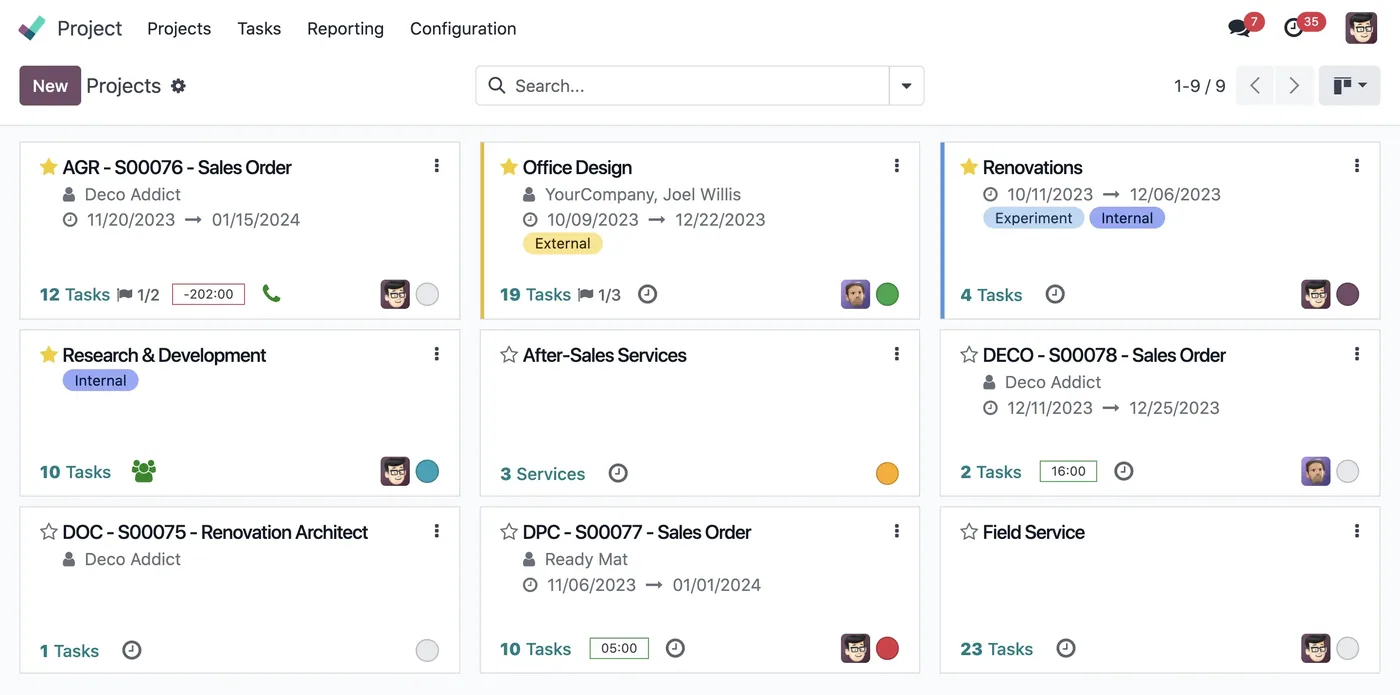
Odoo Project tracks work: tasks, who owns them, what stage they are in, and how long they took. On its own that describes a hundred tools, most of them nicer to look at.
What separates it is the financial thread. A project carries an analytic account, timesheets post cost to it, purchases and expenses can be allocated to it, and invoices credit it. The profitability report is that account read back as revenue against cost. For any business that sells its people's time, this is the difference between believing a project went well and knowing it did.
If you never intend to connect projects to money, you are buying a task board and should judge it as one.
02
Tasks and stages, and keeping the board honest
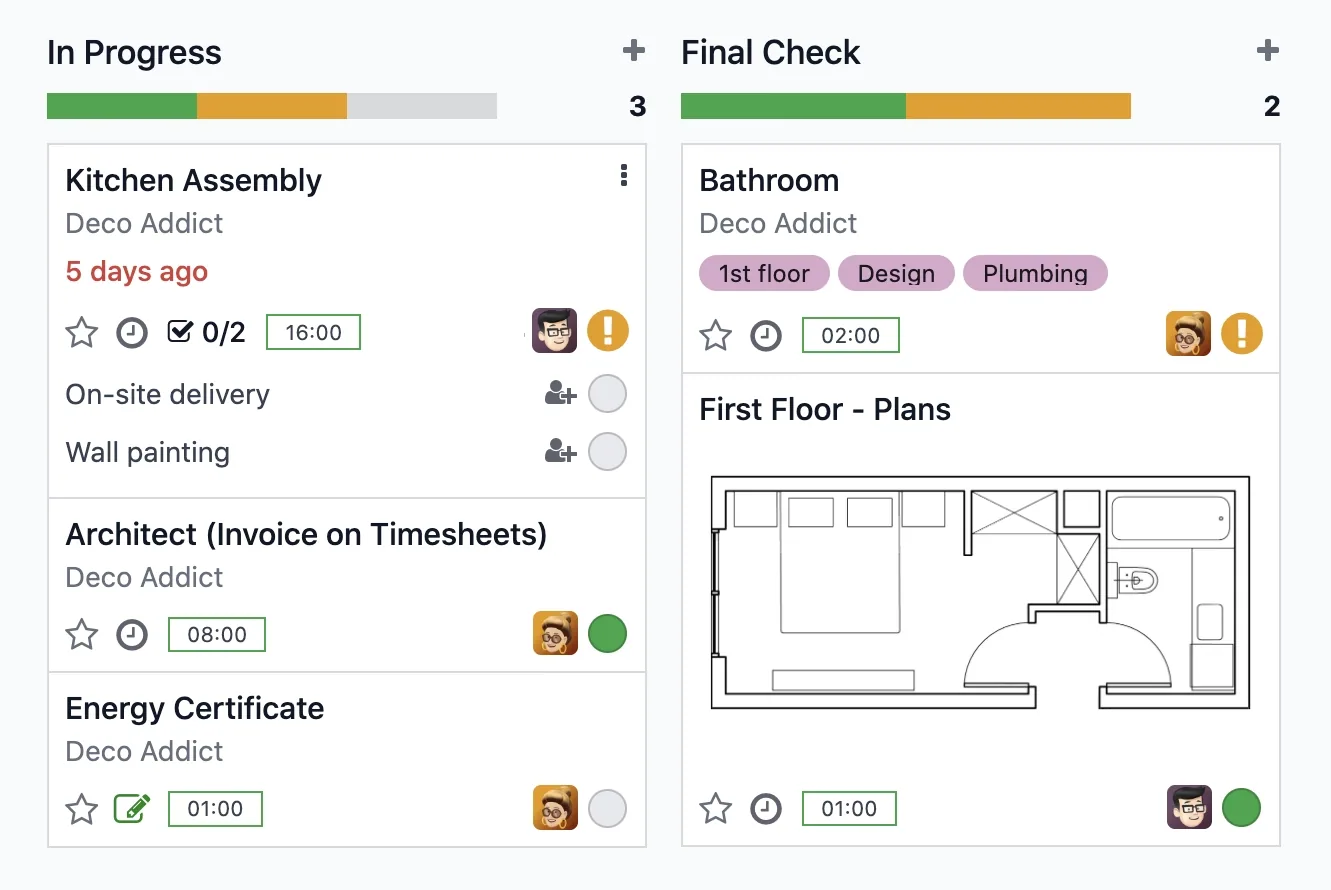
Tasks live in stages on a kanban board, with an assignee, deadline, priority, tags and a description. Sub-tasks handle breakdown. The chatter keeps discussion and file attachments on the record rather than in someone's inbox.
Stages are per project or shared across projects, and the choice matters more than it looks. Shared stages give you comparable reporting across a portfolio. Per-project stages let each team model its own flow and make cross-project reporting close to meaningless. Pick shared unless you have a specific reason not to.
The same restraint that applies to a CRM pipeline applies here: a stage should mean something a person outside the team could verify. "In progress" and "In review" are stages. "Waiting on Sarah" is not.
03
Timesheets, which are the input everything else depends on
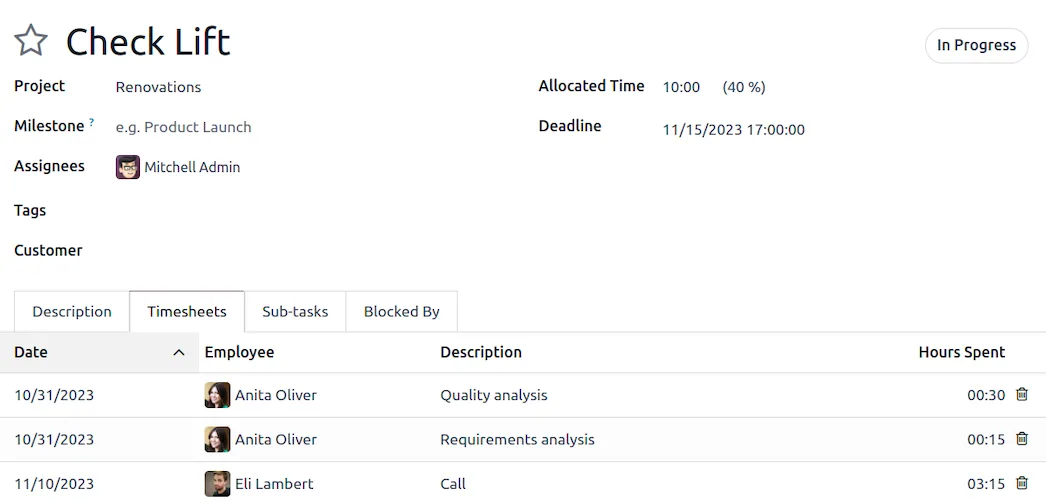
Time is logged against a task, from the task itself, from a timer, or from a weekly grid view. Mobile logging works.
Everything downstream depends on this data existing, and it is the part that fails in practice. Timesheets are a chore, and a team that logs a week's work on Friday afternoon from memory produces numbers that are precise and wrong. The organisational answer is short and unpopular: log daily, keep the categories few enough that choosing one is instant, and have someone actually look at the output so people know it is read.
An employee's cost rate drives what a logged hour costs the project. If those rates are unset or stale, your profitability report is arithmetic performed on fiction.

04
Billing, and choosing the model per project
A project can bill in several ways, and the setting belongs on the project rather than being a global decision.
At employee rate suits time-and-materials work where different people bill differently. At a project rate suits a blended day rate. Fixed price against a sales order line suits fixed-scope delivery, where hours are tracked for margin rather than for billing. Per milestone suits staged delivery.
The useful discipline is to track time even on fixed-price work. You are not billing it, but it is the only way to learn whether your fixed prices are any good, and that answer compounds across every future quote.
Screenshots of Odoo are the property of Odoo S.A. and are shown here to illustrate the app they depict.
Profitability, and the analytic account underneath it
The profitability view shows revenue against cost per project: invoiced amounts, timesheet cost, allocated purchases and expenses. It is genuinely useful and it is entirely dependent on the analytic account being configured and used consistently.
The failure mode is subtle. Everything appears to work, reports render, numbers appear, and they are simply incomplete because a category of cost was never allocated. Subcontractor invoices and travel are the usual omissions. Decide at the start which cost types must reach the project, and check a completed project against reality before trusting the report across the portfolio.
Where Odoo Project will fight you
It is not heavy project management software. Dependencies and a Gantt view exist, but critical-path scheduling with resource levelling across a portfolio is not its strength. For construction-scale planning, expect to supplement it.
Timesheet adoption is the whole game, again. As with CRM, the software is not the obstacle. Nobody has ever solved this with a setting.
Recurring and template projects need setting up. Project templates exist and repay the effort when you deliver the same shape of work repeatedly, but nobody creates them until the tenth time.
Portal sharing needs a decision. What the customer sees is configurable, and the default should be reviewed before you invite anyone in.
How it connects to everything else
A won sales order can create a project automatically. Timesheets against it become invoiceable time. Purchases and expenses allocate to its analytic account. Helpdesk tickets can convert to tasks. Employees, their cost rates and their time off come from HR, so capacity reflects who is actually available.
For a services business this chain is the argument for running the whole operation on one platform: the quote, the delivery, the hours, the invoice and the margin are all the same records.
Where to start
Set up analytic accounts properly before you run a project through the system, because retrofitting them means the early work has no financial history. Put real cost rates on employees. Choose shared stages. Pick one billing model per project type and write it down. Then take one finished project, compare the profitability report against what you know actually happened, and correct whatever the gap reveals before you scale it up.
FAQ
Odoo Project, answered.
Is Odoo Project free?
Project and Timesheets are both in Community, including tasks, stages, kanban and time logging. Some planning, forecasting and field-service extensions are Enterprise, but the core project-to-invoice loop works on Community.
How does Odoo know whether a project is profitable?
Through the analytic account attached to the project. Timesheet hours post their cost there, purchases and expenses can be allocated there, and invoiced revenue lands there too. Profitability is that account read back. Without it, you have a task board and no financial picture.
Can I bill customers for time logged on tasks?
Yes. A project can be set to bill at the employee rate, at a fixed project rate, or per task or per sales order line. Logged time then becomes invoiceable against the linked sales order, which is the standard flow for professional services.
What is the difference between Project and Planning?
Project tracks work that needs doing and time already spent on it. Planning schedules who is going to do it and when, as forward-looking shifts. Services businesses often want both, but Project is the one that connects to billing and profitability.
Can customers see their project?
Yes, through the portal. You control what is shared, so a customer can follow tasks and milestones and comment on them without any access to your internal notes, costs or other clients' work.
Does it handle dependencies and Gantt charts?
Task dependencies and a Gantt view exist, with capability varying by version and edition. For heavy critical-path scheduling with resource levelling, Odoo is lighter than dedicated project management software, and that trade should be made deliberately.
Related
Keep exploring.
Other Odoo apps we have written up in the same depth.
With CODEerts
Want this set up properly?
We are certified Odoo partners. We implement, customise and support Odoo Project, and we publish our own apps on the Odoo Store.
See how we can helpBook a callReady to make Odoo work the way your business does?
Book a free call CODEerts
CODEerts is a team of certified Odoo partners and full-stack engineers. We implement, customise and support Odoo ERP, then build the software around it.

