 CODEerts
Accounting app for Odoo
Post Dated Cheque Management
Record post dated cheques from the standard Register Payment screen your team already uses, keep the invoice open until the cheque actually clears, forecast which cheques mature over the next 30, 60 and 90 days, bank them in batches with a printable deposit slip, control your own cheque books leaf by leaf, and handle bounces with bank charges and linked replacement cheques.
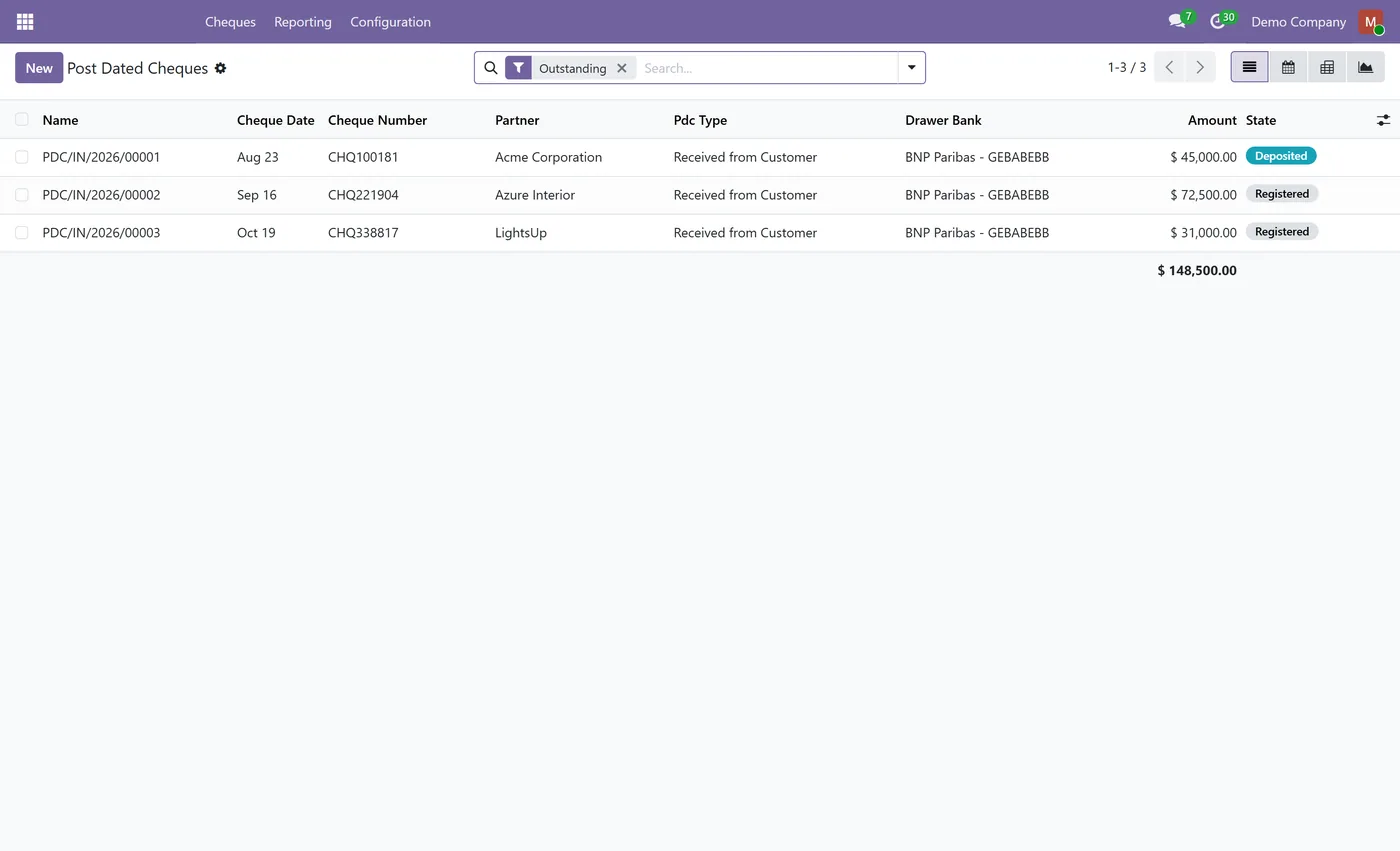
Overview
Post Dated Cheque Management.
Post Dated Cheque Management brings the whole PDC lifecycle into Odoo without asking your team to learn a new screen. You record a cheque exactly where you already register payments, on a customer invoice or a vendor bill, by picking the Post Dated Cheque payment method. Nothing is posted to the ledger at that moment, because a post dated cheque is not currency, so the receivable stays open until the cheque date, which is what accounting practice expects. When the cheque clears, the module creates and posts a standard Odoo payment, reconciles it against the invoice and marks it paid. A maturity calendar with pivot and graph views shows exactly which cheques fall due in the next 30, 60 and 90 days, split between money coming in and money going out, so you can plan cash instead of guessing. Cheques you are banking are grouped into deposit batches per bank journal and moved in one action, with a printable deposit slip listing cheque number, drawer, bank and amount. For cheques you issue, register your own numbered cheque books, confirm them, and let the module consume the next available leaf and block duplicates. When a cheque bounces, the module reverses the clearing entry, records the bank return charge and raises a replacement cheque linked both ways to the one it replaces, so the recovery trail is never lost.
New to Odoo Accounting? Read our practical guide to how it works
How it works
Built around what you actually do.
Every screen below is the module running in Odoo, not a mockup.
01
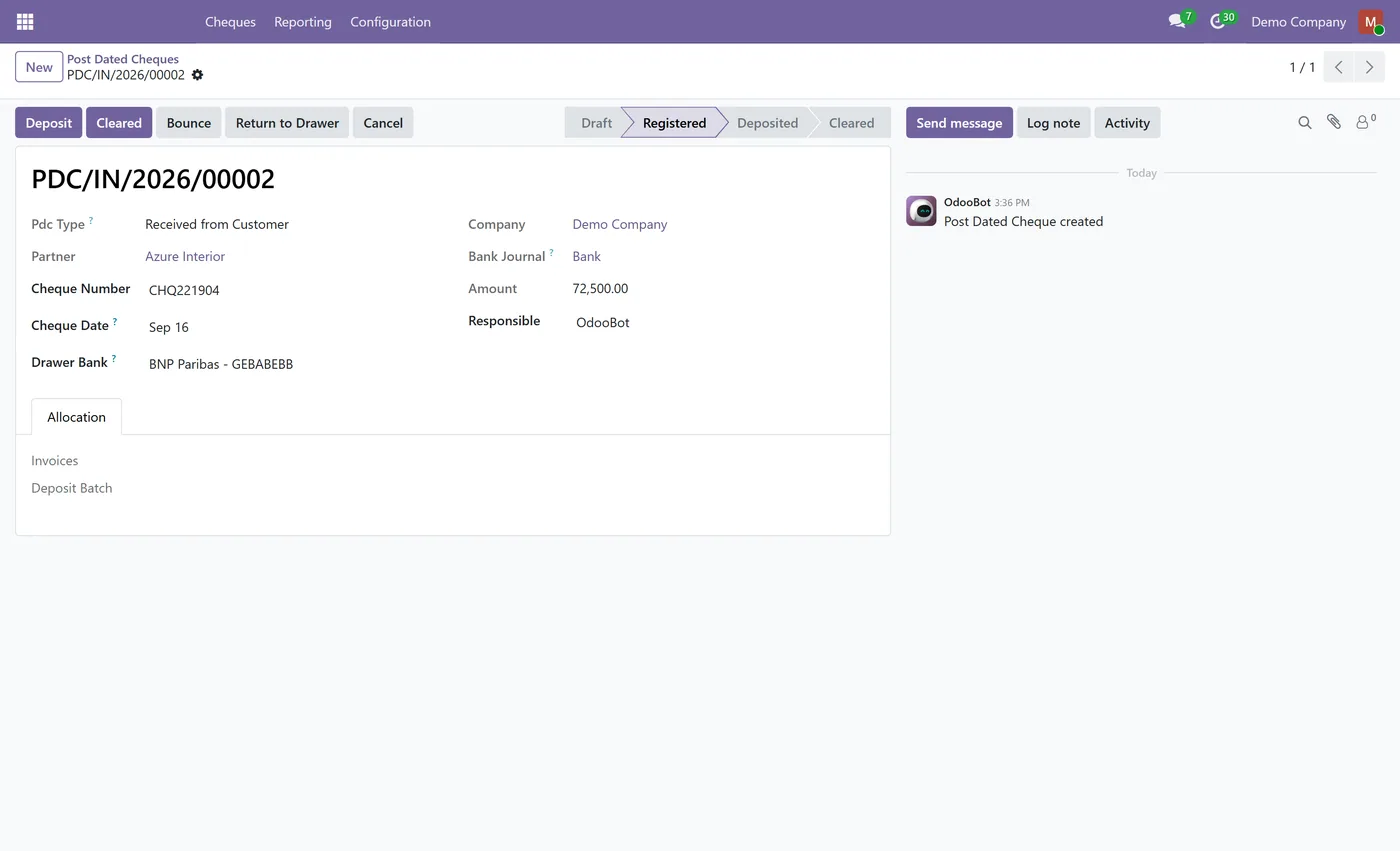
Record a cheque from the standard Register Payment screen on any invoice or bill, with no separate data entry screen to learn
- The invoice stays open until the cheque actually clears, so the receivable is not reduced before the cheque date
- Clearing creates and posts a standard Odoo payment and reconciles it against the invoice automatically
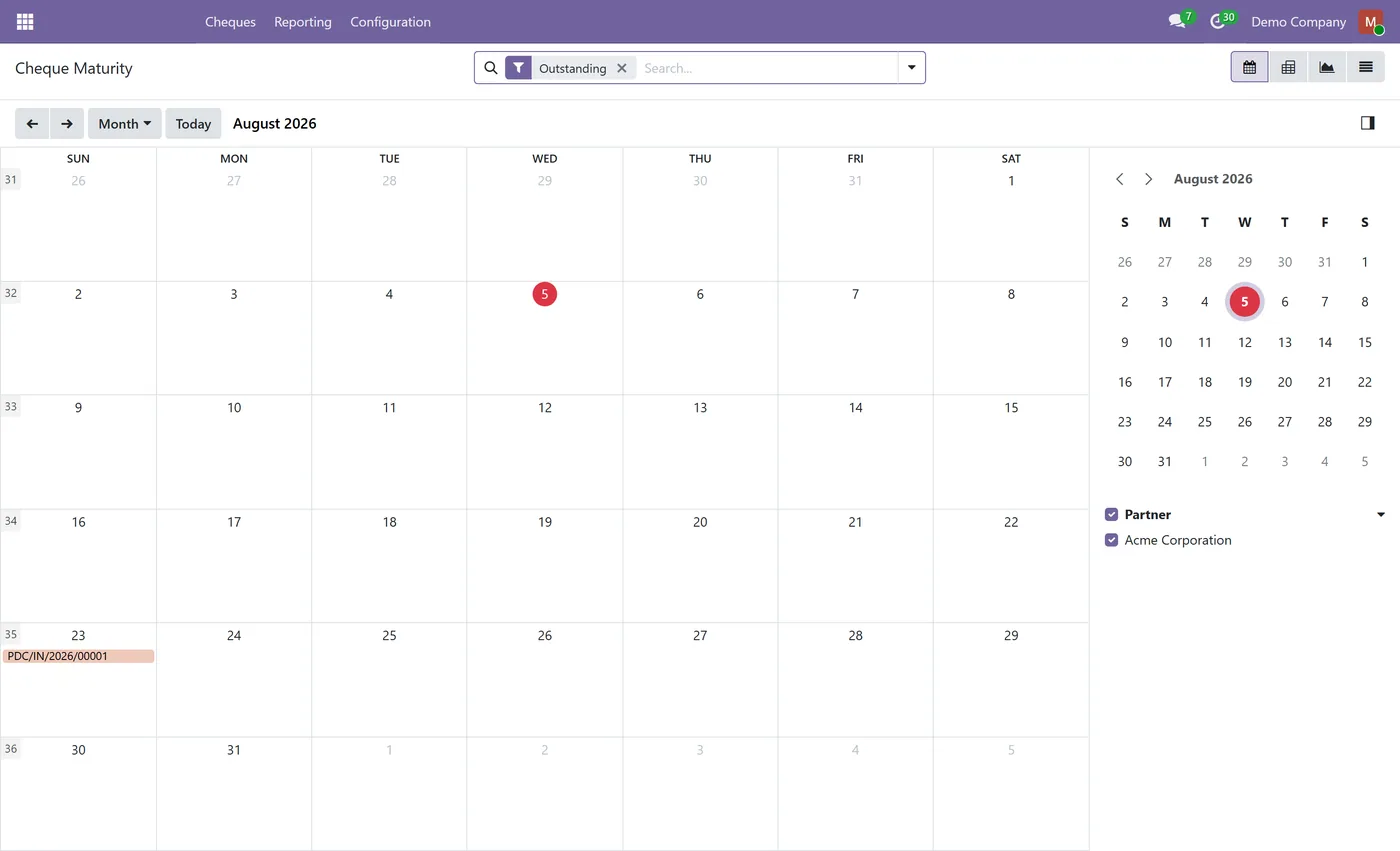
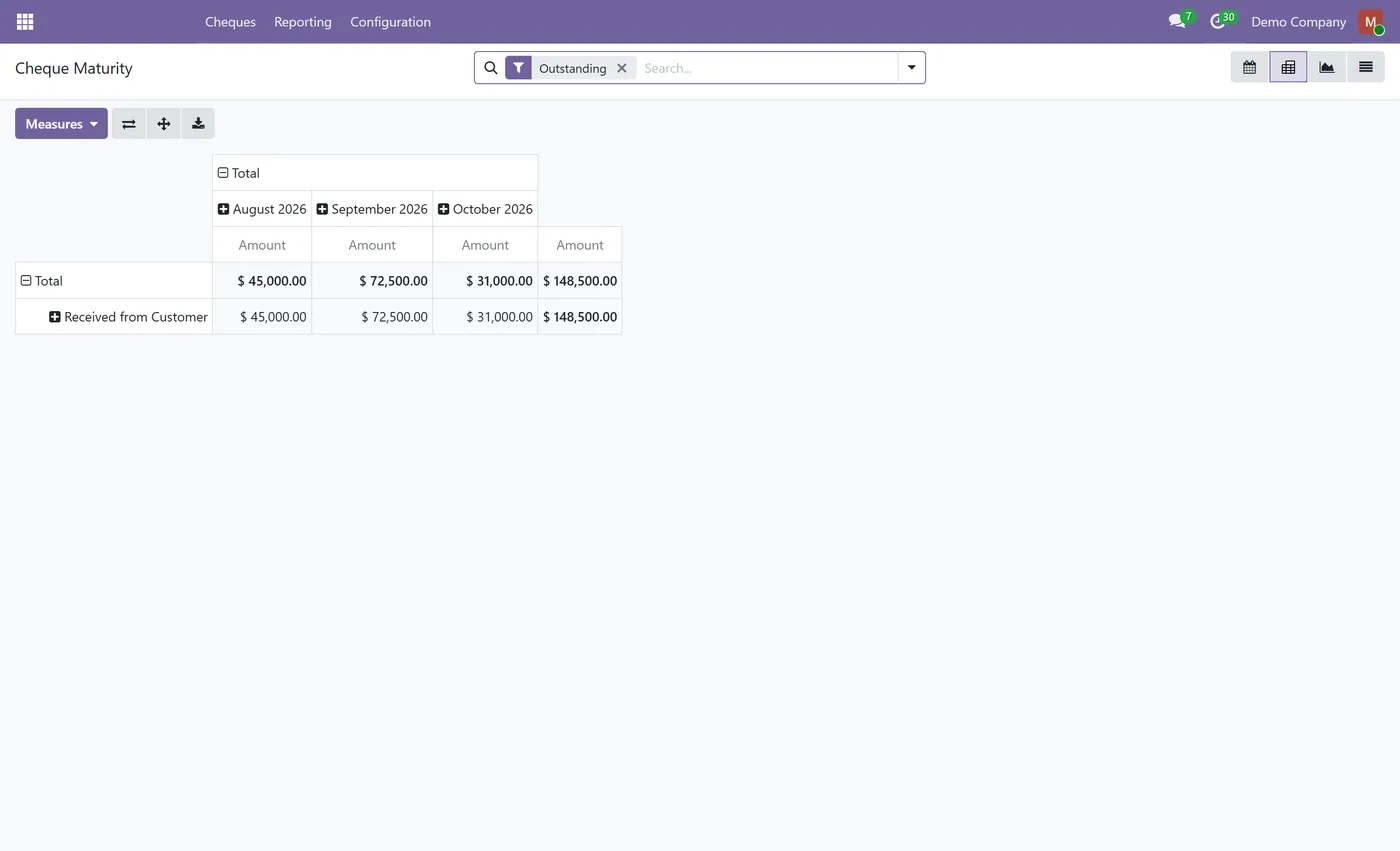
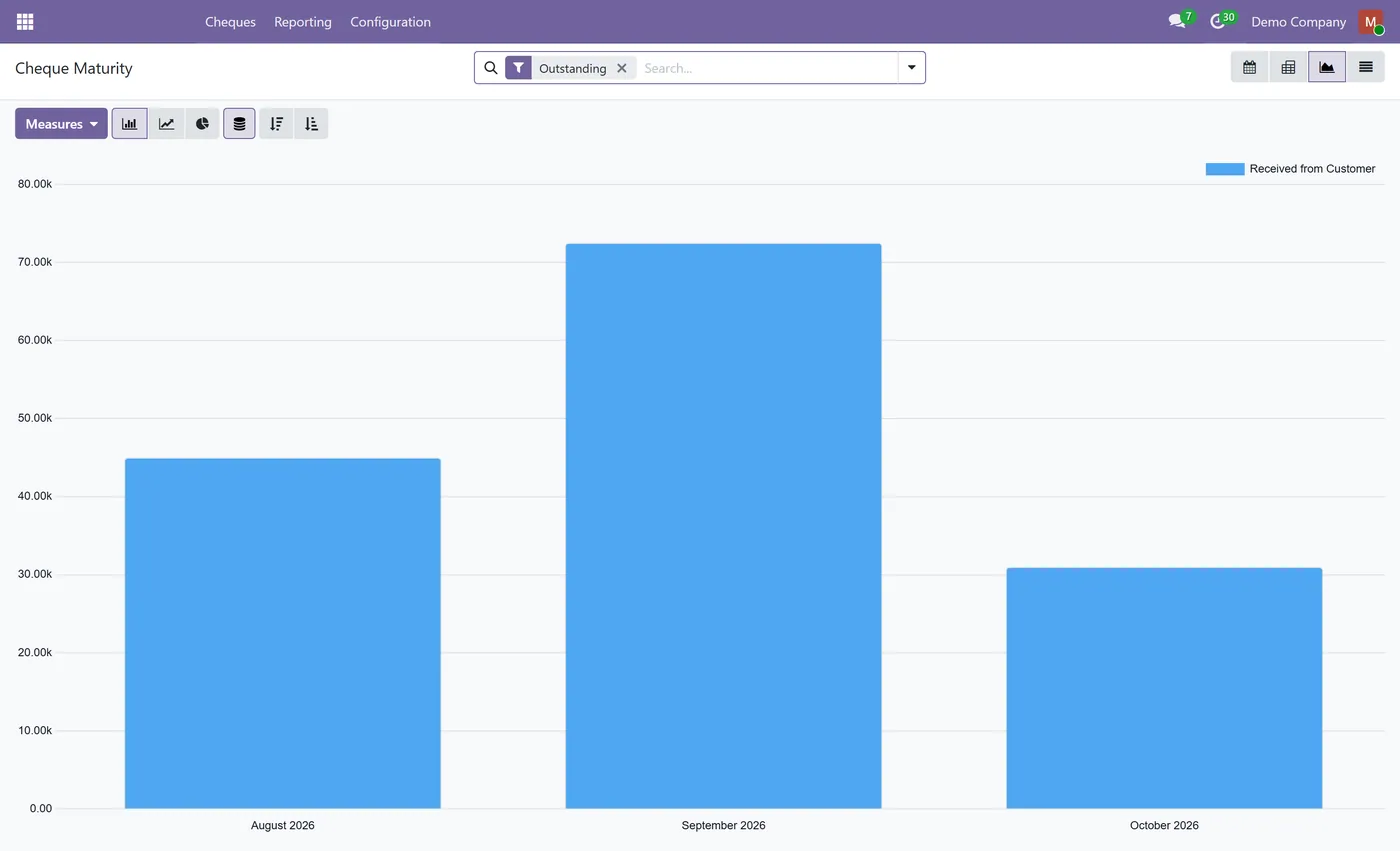
- Maturity calendar plus pivot and graph views showing cheques due in the next 30, 60 and 90 days, split between receivable and payable
02
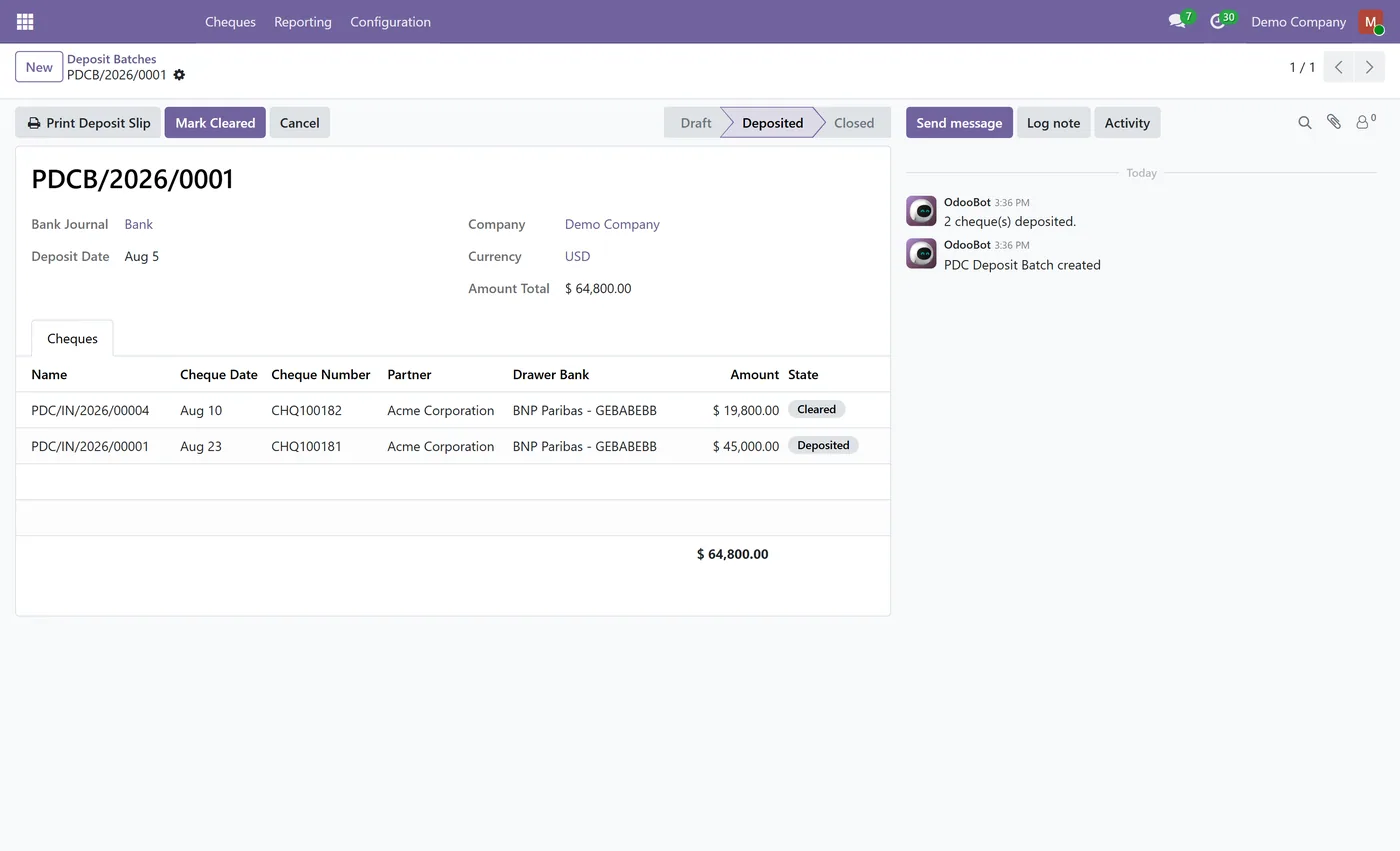
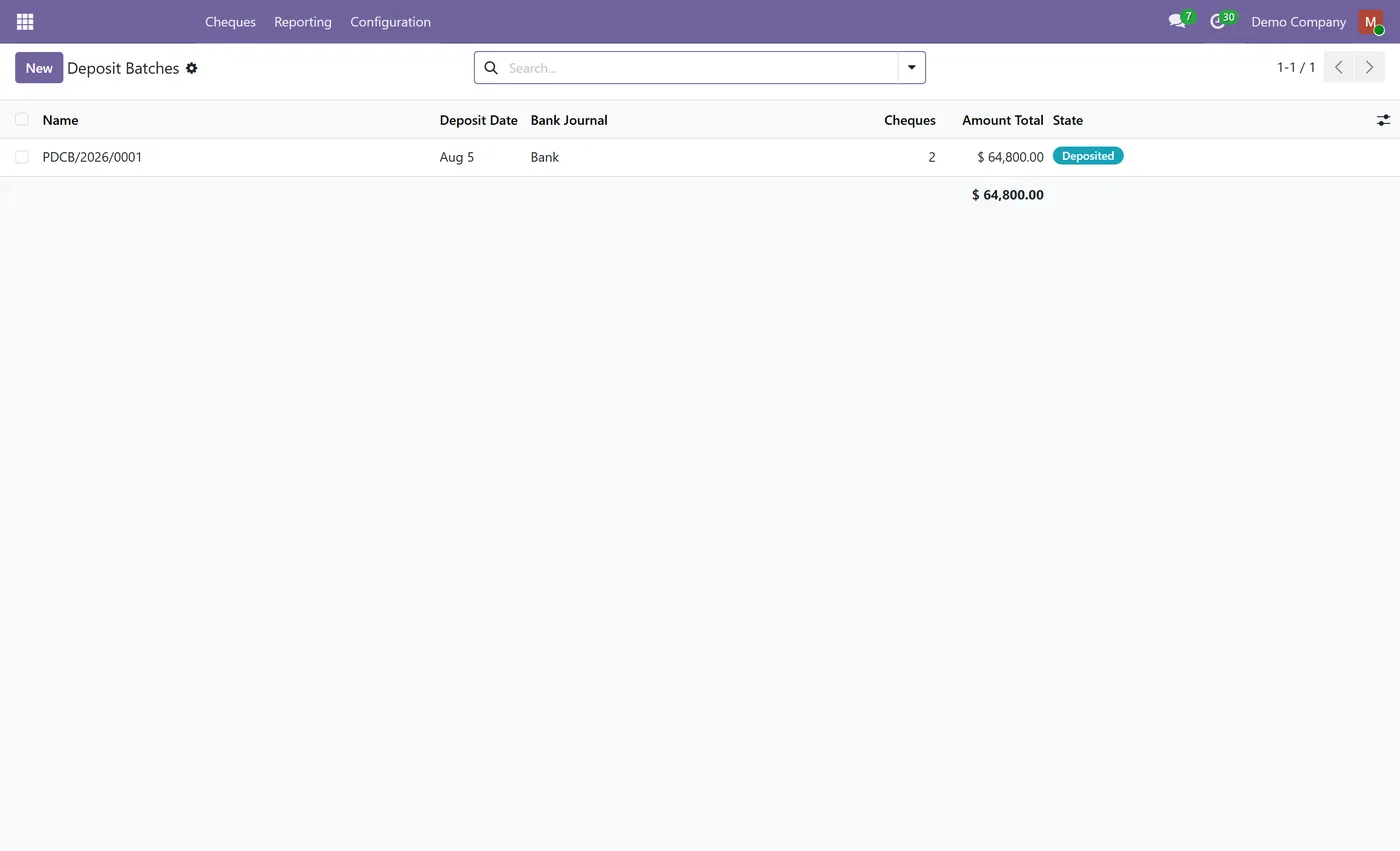
Bank deposit batches per journal with a one action deposit and a printable deposit slip
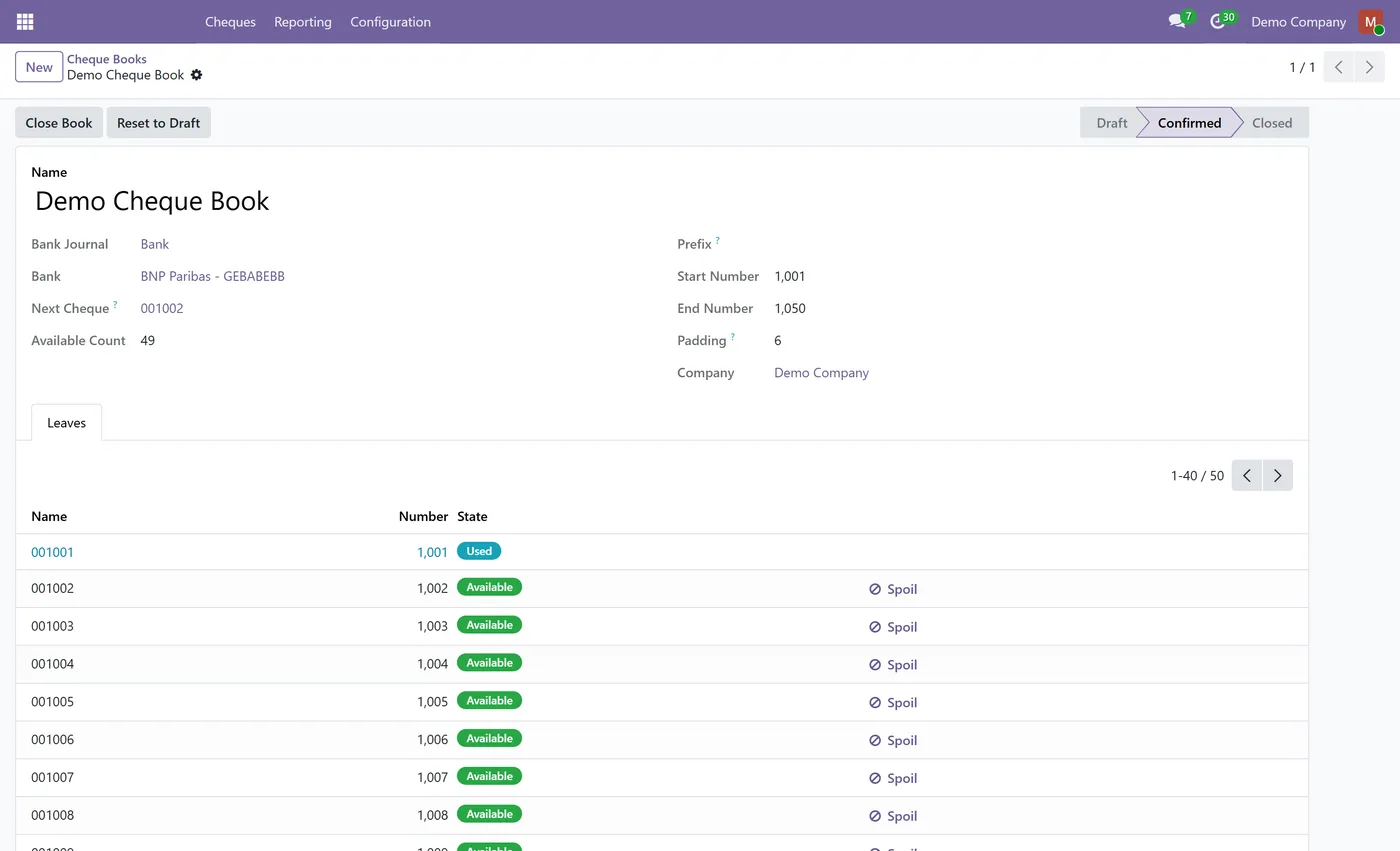
- Cheque book register with draft, confirmed and closed states, and leaf level tracking of available, used, void and spoiled cheques
- Automatic next available leaf when you issue a cheque, with manual override and duplicate blocking
- Bounce handling that reverses the clearing entry, posts the bank return charge and reopens the invoice
03
Replacement cheques linked both ways to the bounced cheque they replace, so the recovery history stays visible
- Customer and vendor cheques in one app, on Odoo Community, with no Enterprise subscription required
Every screen
The whole module, screen by screen.
The captures the walkthrough above did not use, in the order you meet them in the product.
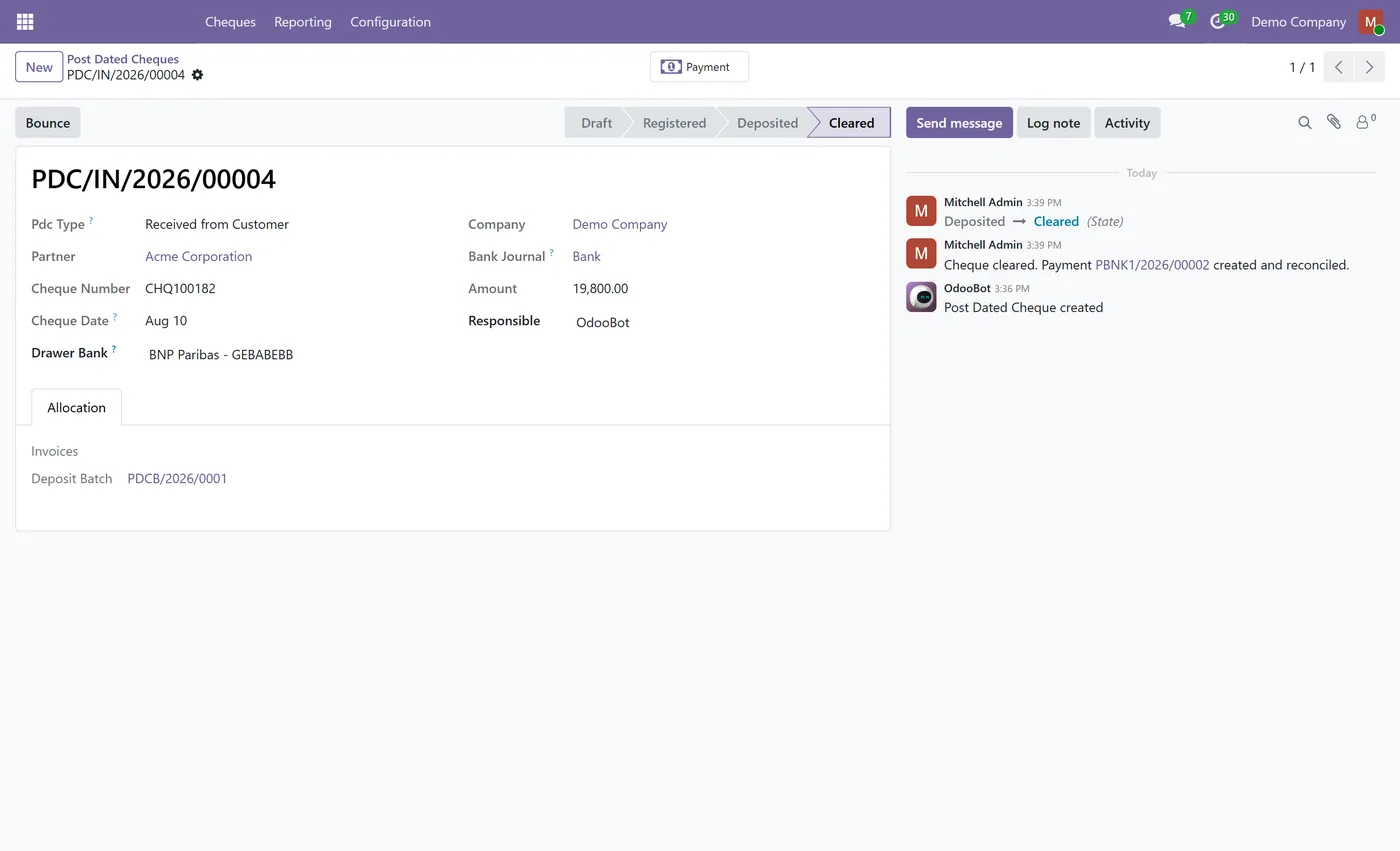
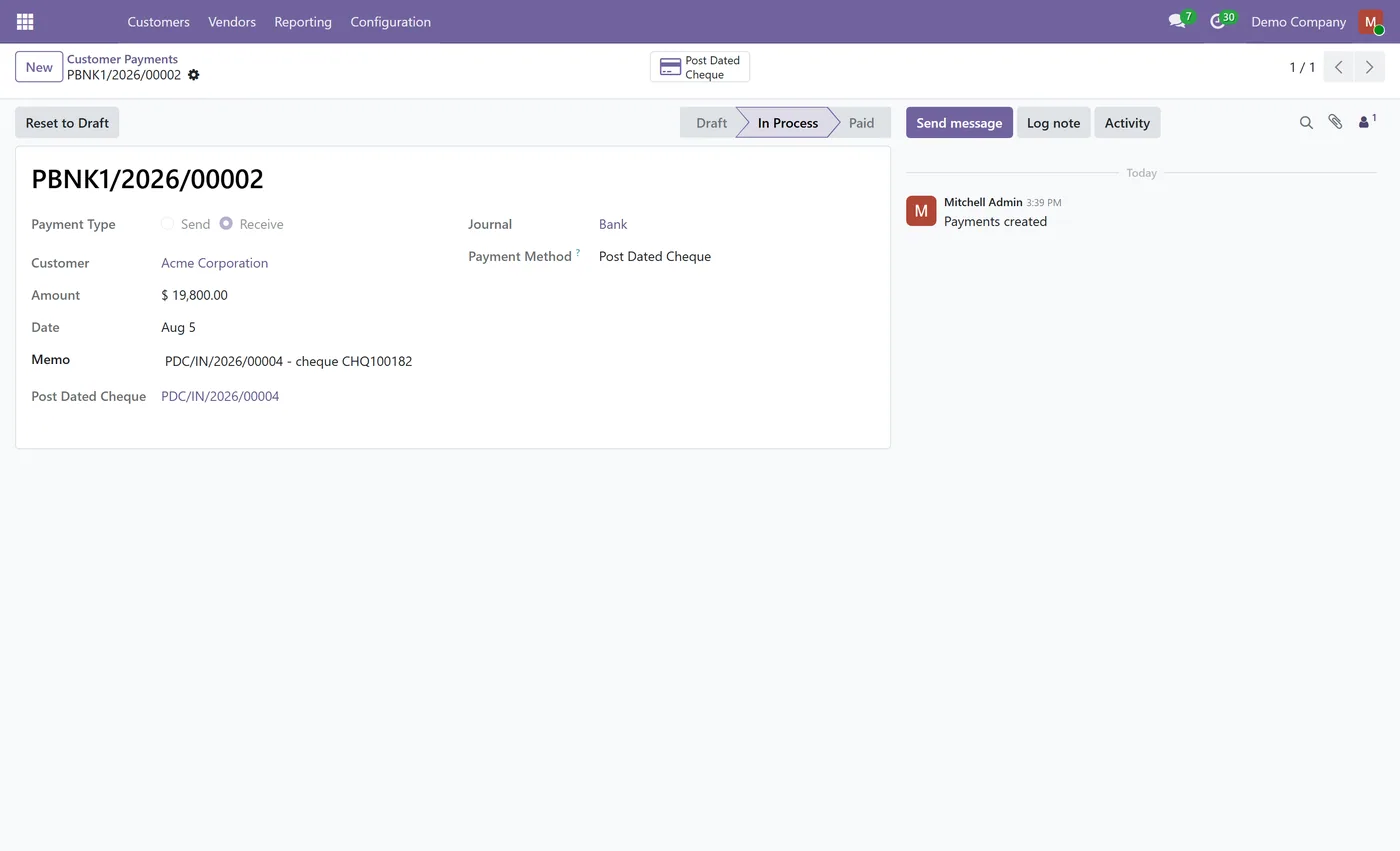
Post dated cheques are how a large part of the world actually pays. The problem is not recording them, it is knowing what is outstanding, what matures next month, which cheque bounced, and which replacement is now covering it. Post Dated Cheque Management puts that whole lifecycle inside Odoo, using the screen your finance team already knows.
What it does
You record a cheque where you already register payments. On a customer invoice or a vendor bill, click Register Payment and pick the Post Dated Cheque method, then enter the cheque number and the date written on the cheque. Nothing is posted to the ledger at that point, and that is deliberate: a post dated cheque is not currency, so the receivable is not reduced until the cheque date. The invoice stays open and the cheque appears in your PDC register.
From there the cheque moves through its life. You group cheques into a deposit batch for the bank you are banking them at, deposit the whole batch in one action, and print a deposit slip to hand in with them. When a cheque clears, the module creates and posts a standard Odoo payment, reconciles it against the invoice, and the invoice becomes paid. If a cheque bounces, the module reverses the clearing entry so the invoice reopens for the full amount, records the bank return charge, and lets you raise a replacement cheque that stays linked to the one it replaces.
For the cheques your own company issues, register your physical cheque books with their number ranges. Once a book is confirmed, issuing a cheque consumes the next available leaf, duplicates are blocked, and every leaf is tracked as available, used, void or spoiled, so a numbering gap is visible instead of silent.
Who it's for
Finance teams in markets where post dated cheques are normal business, including the Gulf, South Asia and North Africa, and any company that holds a rolling book of customer cheques or issues cheques against supplier contracts. It suits organisations that need to answer two questions quickly: how much cash is maturing in the next quarter, and which cheques have bounced and what is covering them now. Because it depends only on Invoicing and Discuss, it runs on Odoo Community as well as Enterprise, and it covers both incoming and outgoing cheques in a single app.
Questions
About Post Dated Cheque Management.
How do I record a post dated cheque in Odoo?
Open the customer invoice or vendor bill, click Register Payment as you normally would, and choose the Post Dated Cheque payment method. Enter the cheque number and the date written on the cheque. There is no separate screen to learn, and nothing is posted to the ledger until the cheque clears.
Does the invoice show as paid as soon as I record the cheque?
No. The invoice stays open until the cheque actually clears. A post dated cheque is not currency, so the receivable is not reduced before the cheque date. When you mark the cheque cleared, the module creates and posts a standard Odoo payment, reconciles it against the invoice, and the invoice becomes paid.
What happens when a cheque bounces?
It depends on when it bounces. A cheque that has not cleared yet has posted nothing, so bouncing it is only a status change. A cheque that already cleared has its clearing entry reversed, which reopens the invoice for the full amount. In both cases you can record the bank return charge and raise a replacement cheque that is linked both ways to the one it replaces.
Can I forecast the cash coming from post dated cheques?
Yes. The maturity view shows every outstanding cheque by due date as a calendar, a pivot and a graph, with filters for cheques falling due in the next 30, 60 and 90 days, split between cheques you have received and cheques you have issued.
Can I track the cheque books my company issues cheques from?
Yes. Register each physical cheque book against a bank journal with its number range, confirm it, and the module tracks every leaf as available, used, void or spoiled. Issuing a cheque takes the next available leaf automatically, you can override it, and duplicate numbers are blocked.
Does this work on Odoo Community?
Yes. The app depends only on Invoicing and Discuss, so it runs on Community with no Enterprise subscription. Customer cheques and vendor cheques are both included in the one app rather than sold as separate products.
Can I print a deposit slip for the cheques I take to the bank?
Yes. Group the cheques you are banking into a deposit batch for that bank journal, then print the deposit slip. It lists the cheque number, drawer, drawn on bank, cheque date and amount, with a total and signature lines.
On the Odoo Store
Get Post Dated Cheque Management on the Odoo Store.
Pick your Odoo version and install it in a click, with free updates and real support behind it.
Get it on the Odoo StoreReady to make Odoo work the way your business does?
Book a free call CODEerts
CODEerts is a team of certified Odoo partners and full-stack engineers. We implement, customise and support Odoo ERP, then build the software around it.

