 CODEerts
Project app for Odoo
Gantt Chart and Critical Path
A real Gantt for Odoo Community: drag-and-drop timeline, four dependency types with lead and lag, critical path with float, baselines and schedule analytics.
Overview
Gantt Chart and Critical Path.
Odoo Community ships no Gantt chart at all. This adds one: a drag-and-drop timeline with a WBS outline, four dependency types with lead and lag in working days, critical path with total and free float, working calendars, schedule baselines with an ahead or behind overlay, and an analytics panel that forecasts the finish, measures velocity from daily history, runs a Monte Carlo delay probability and grades the plan against the DCMA schedule checks.
New to Odoo Project? Read our practical guide to how it works
How it works
Built around what you actually do.
Every screen below is the module running in Odoo, not a mockup.
01
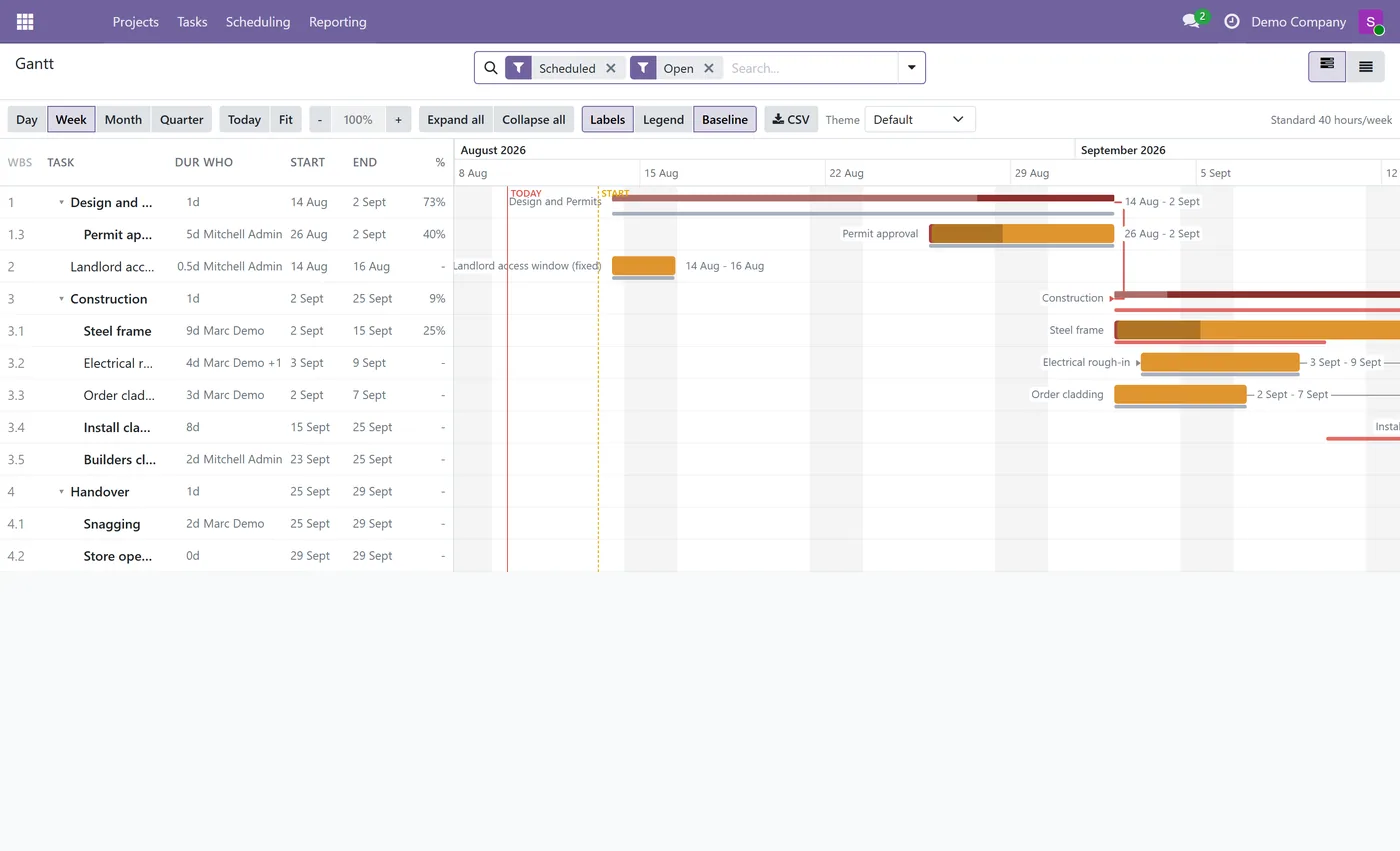
Drag-and-drop Gantt timeline for Odoo Community, no Enterprise subscription needed
- Left pane data grid: WBS, task, duration, assignee, start, end and percent complete
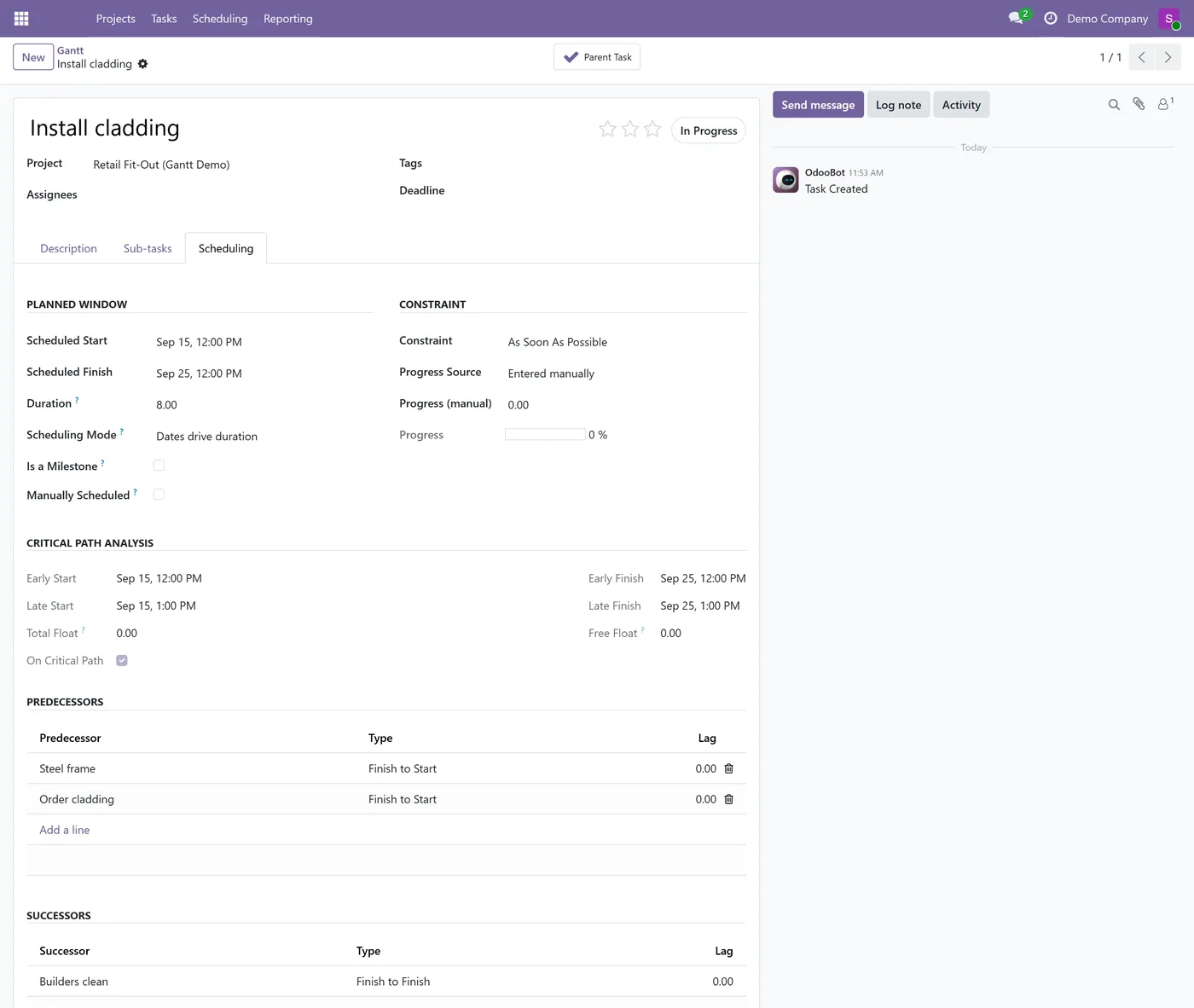
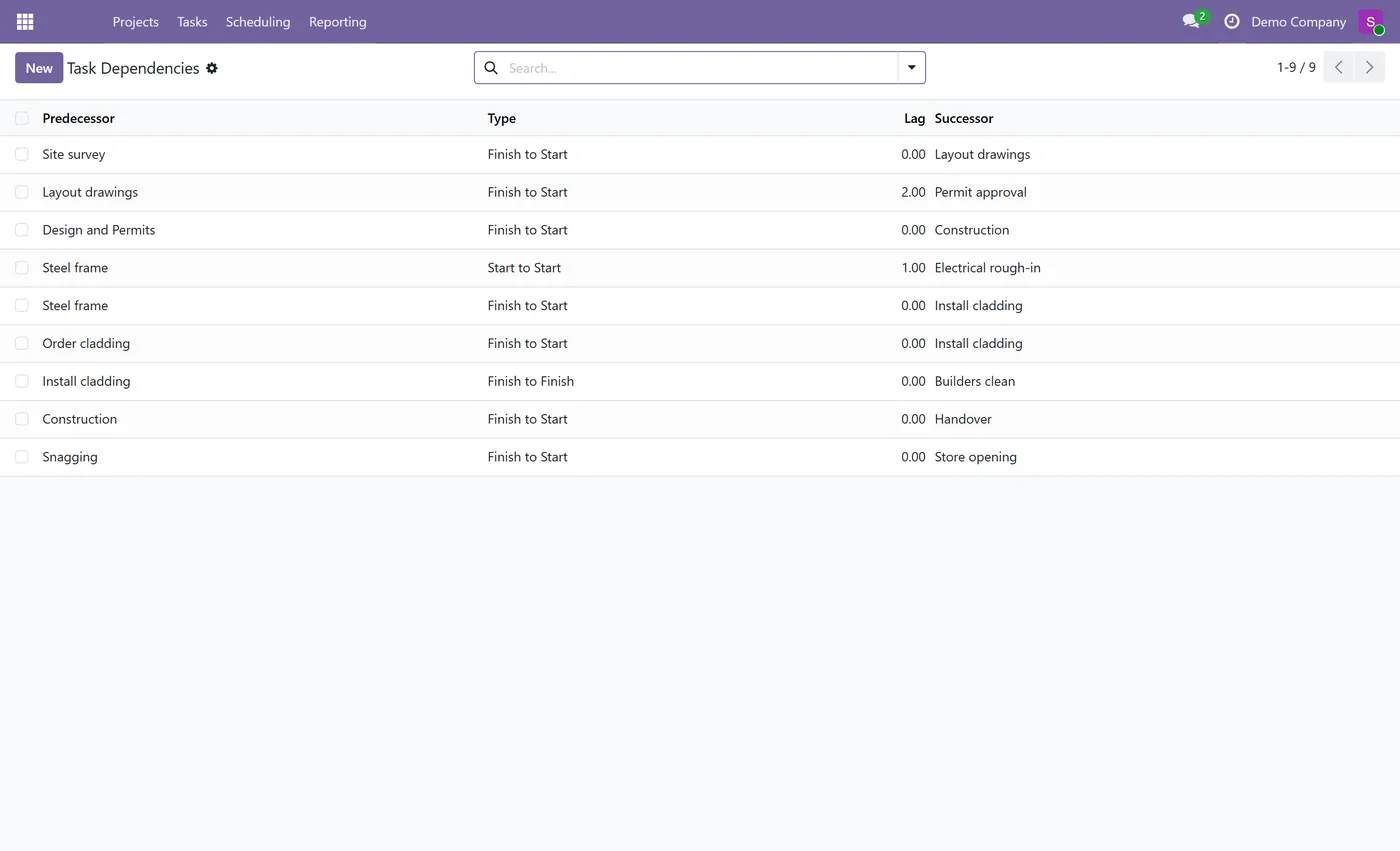
- Four dependency types (Finish-to-Start, Start-to-Start, Finish-to-Finish, Start-to-Finish)
- Lead and lag in working days on any relationship
- Critical path with both total float and free float
- Constraint types: As Soon As Possible, Start No Earlier Than, Finish No Later Than, Must Start On, Must Finish On
- Manual pin mode for bars whose dates are a decision rather than a calculation
- Working calendar arithmetic, so durations respect weekends, hours and time off
02
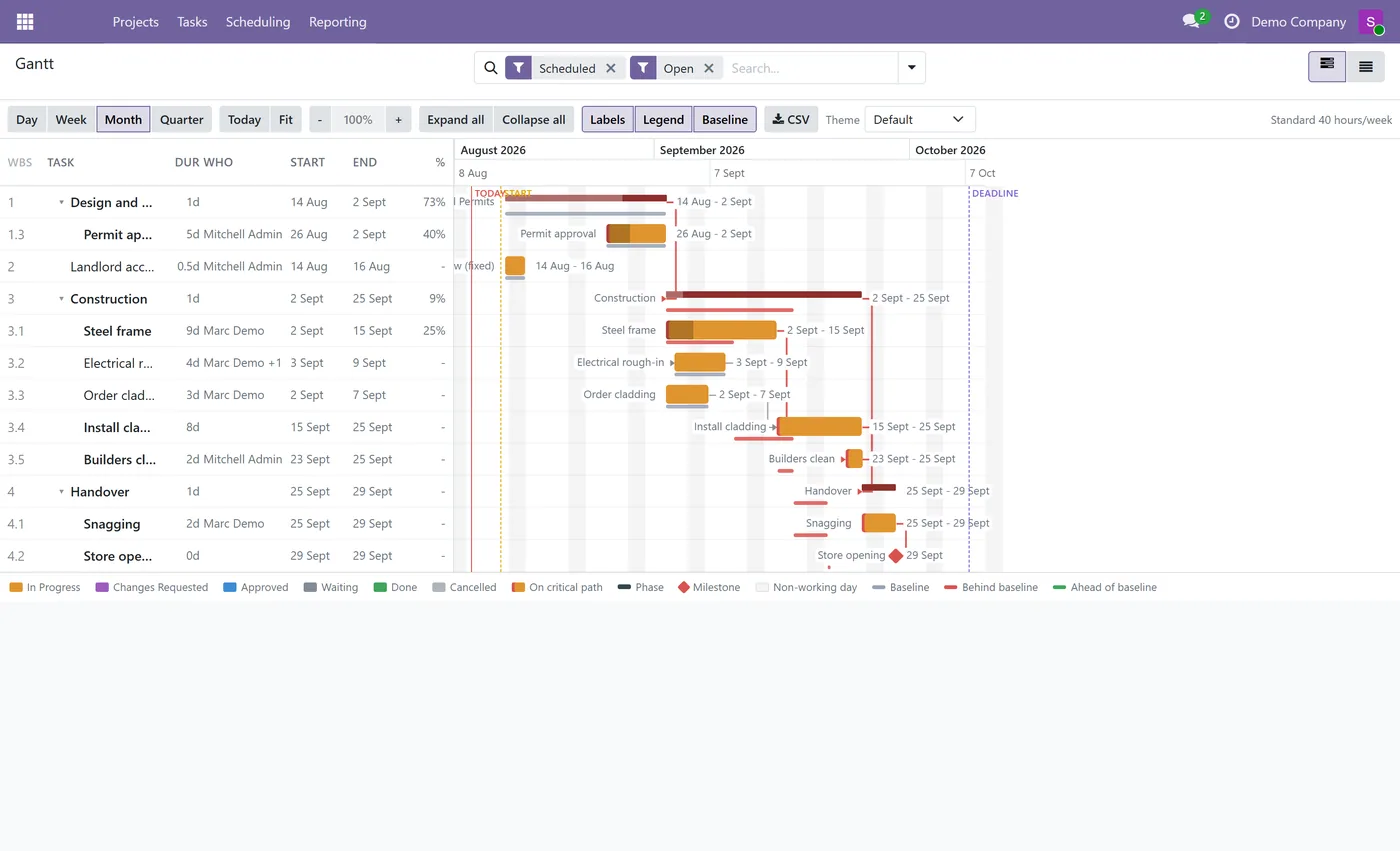
Non-working days shaded in the timeline, with Today, project Start and Deadline guides
- WBS outline numbering with summary and phase rollup
- Cycle detection that names both tasks in the loop
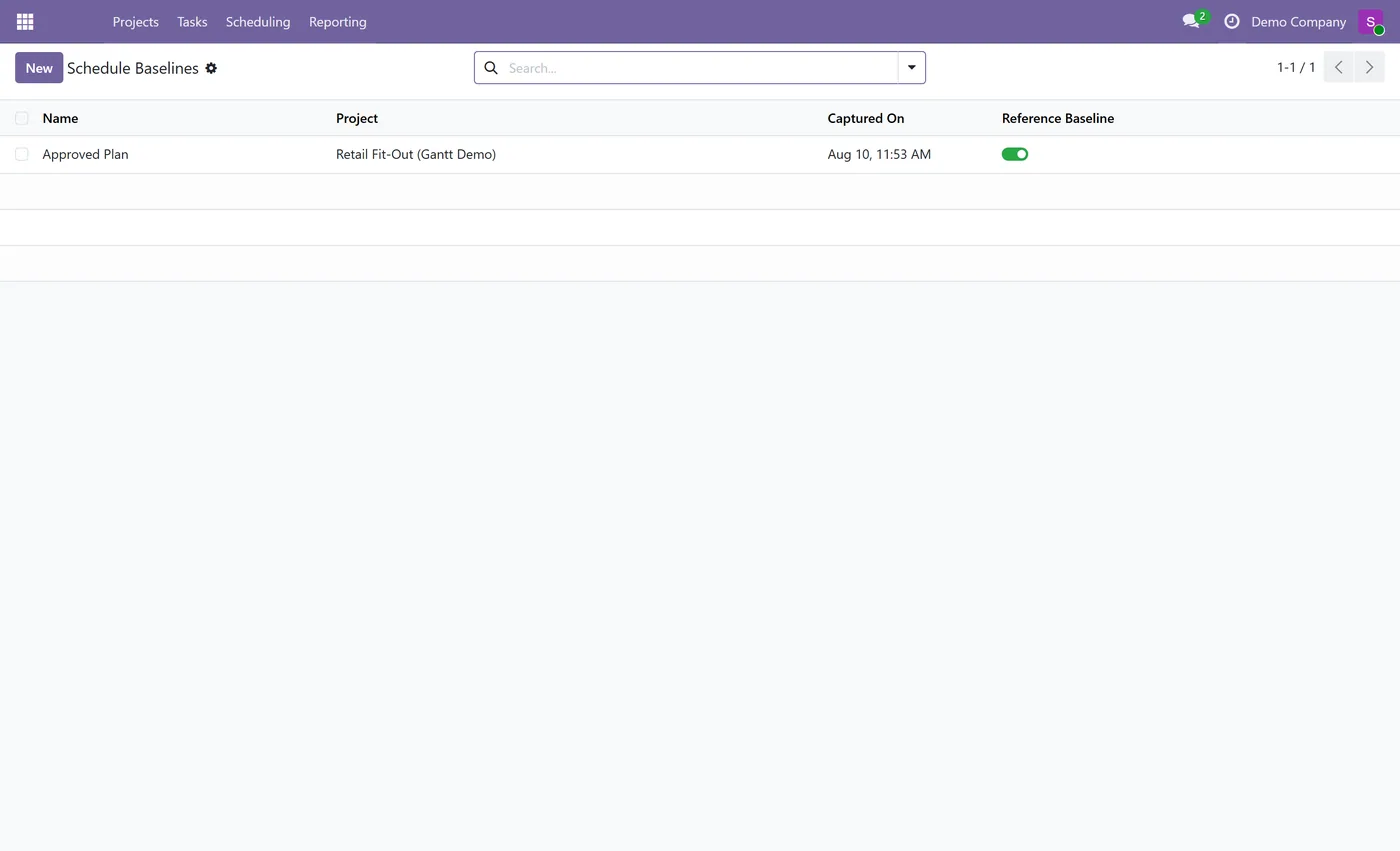
- Schedule baselines with a ghost overlay and ahead or behind markers per bar
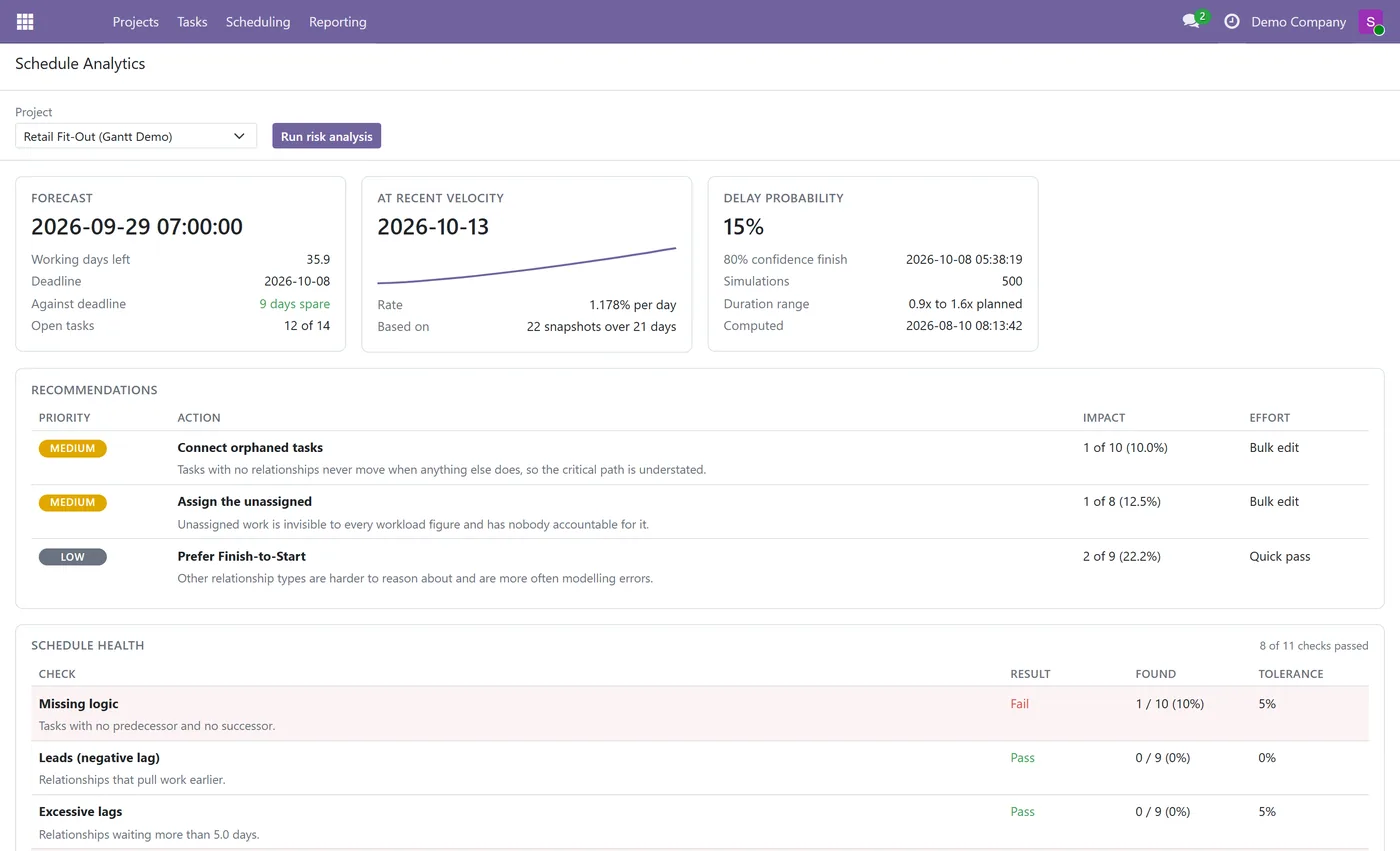
- Forecast finish with working days remaining and slip against the deadline
- Completion predicted from measured velocity, with the sample size shown beside it
- Monte Carlo delay probability over the whole network, with an 80 percent confidence finish
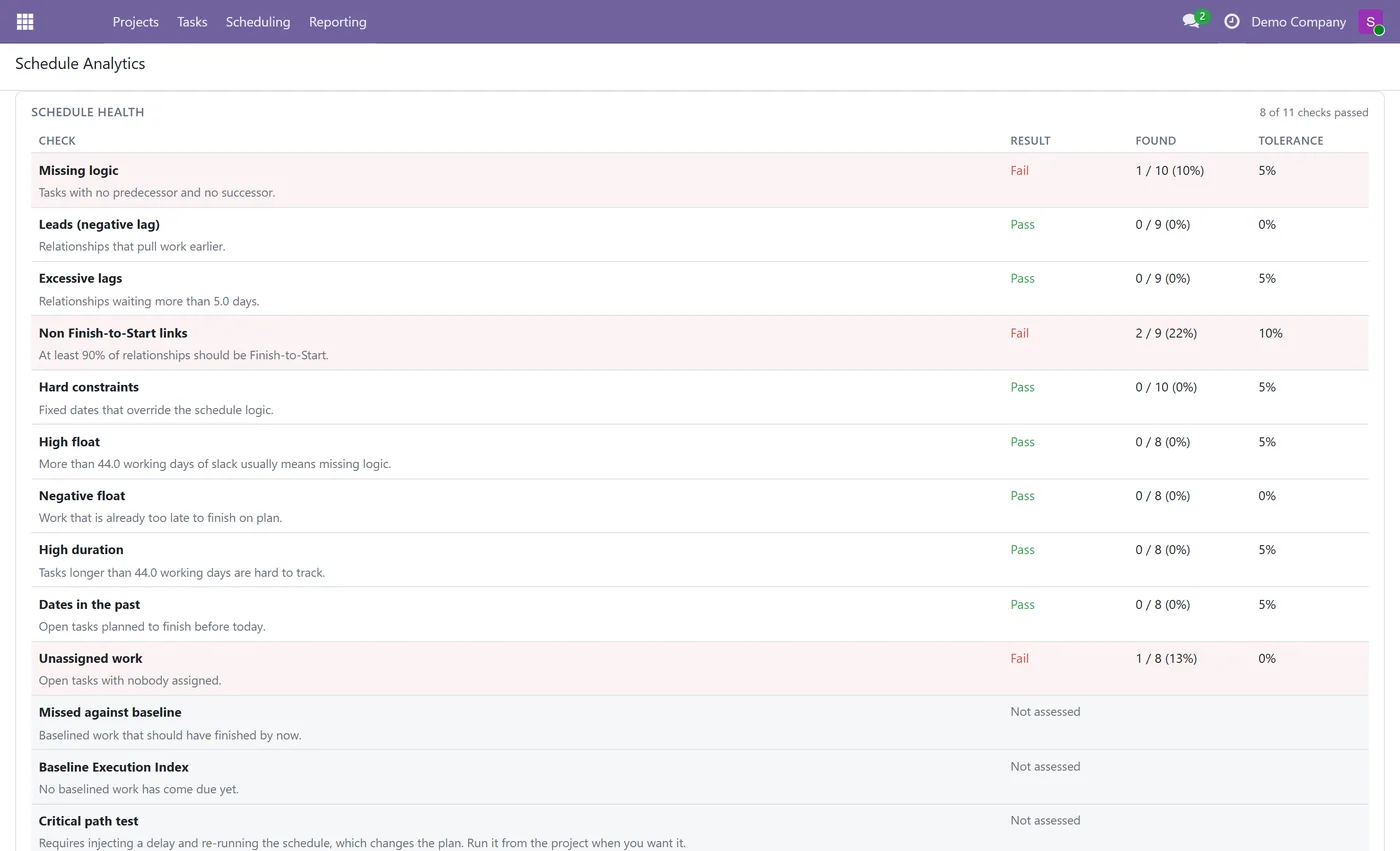
- DCMA schedule health checks, reporting Not assessed rather than passing on missing input
03
Prioritised recommendations, each carrying the evidence it was derived from
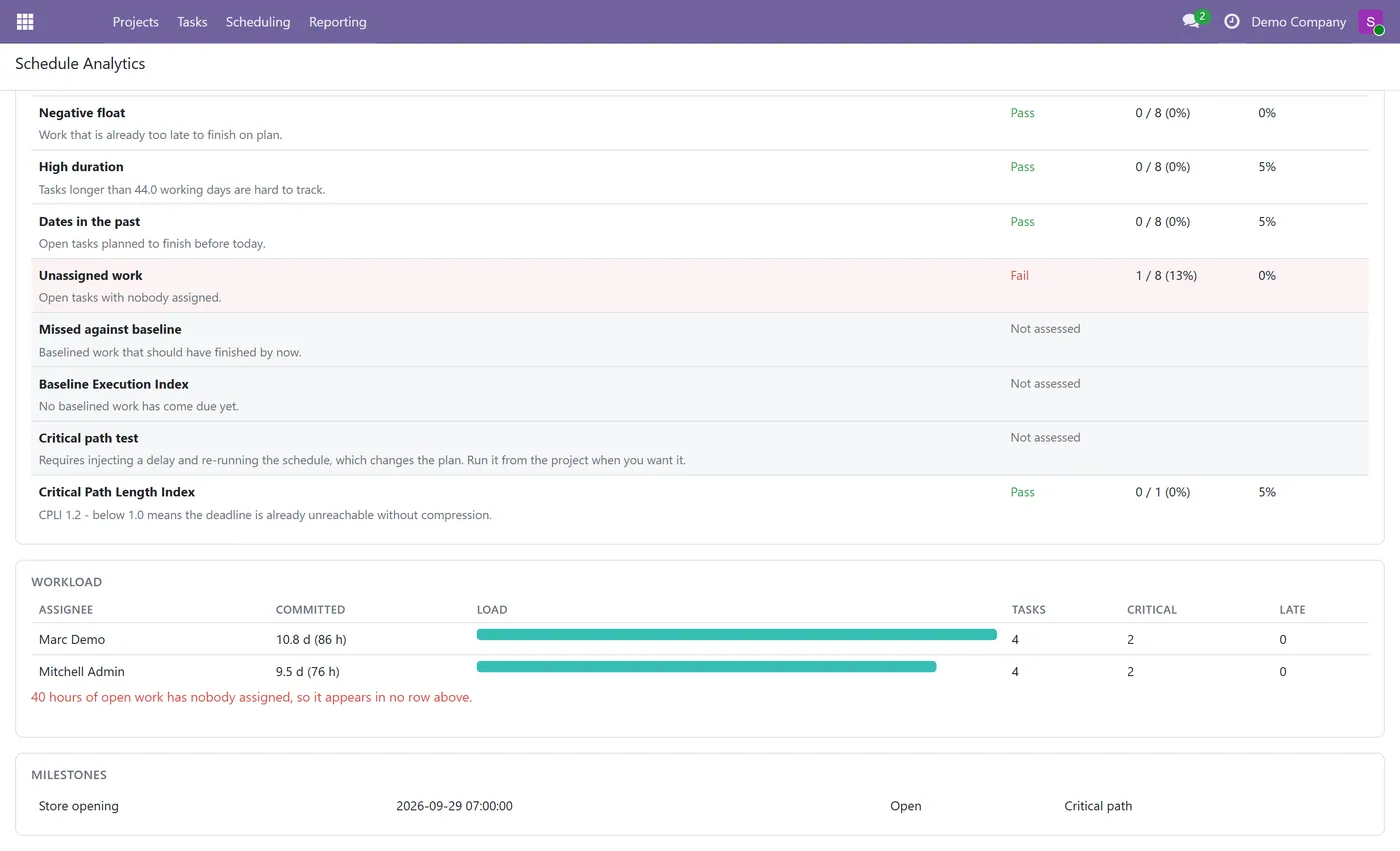
- Workload by assignee with committed days, critical and late counts, and unassigned hours called out
- Daily schedule history captured by a scheduled job, one row per project per day
- Colour by stage with criticality as an overlay, plus a collapsible legend and theme picker
- CSV export, inline task add and delete, and hover quick-stats
- Multi-company ready, with record rules that replicate core task visibility
Every screen
The whole module, screen by screen.
The captures the walkthrough above did not use, in the order you meet them in the product.
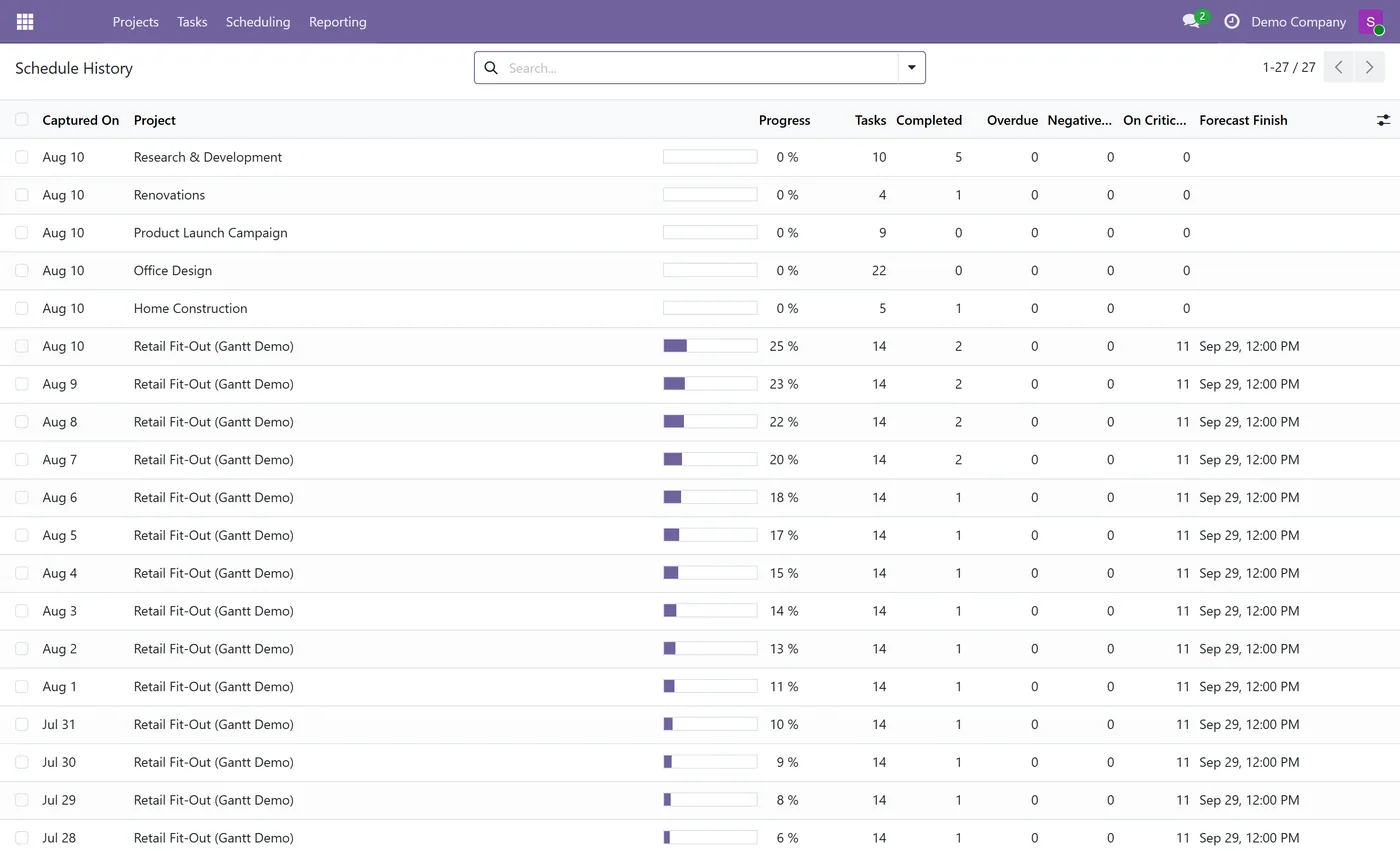
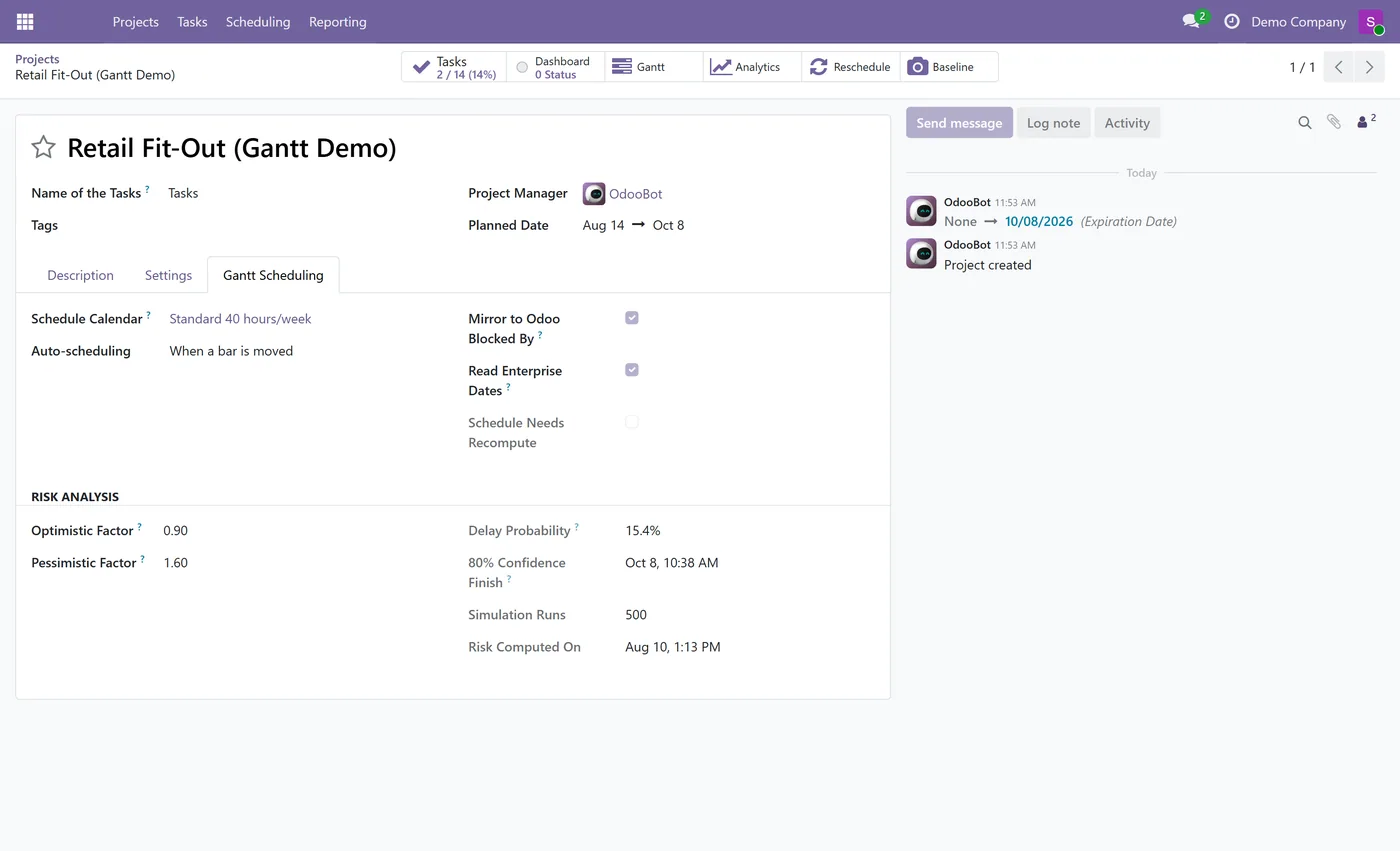
What it does
Odoo Community has no Gantt chart. The timeline view every project manager expects, the one that shows what depends on what and which delay actually matters, lives in Enterprise. This module adds a real one to Community, and it is a scheduling engine rather than a picture of your task list.
Tasks are linked with any of the four standard dependency types, each able to carry a lead or a lag in working days. From that network it computes the critical path with both total and free float, so you can see not only which tasks cannot slip but also which ones can slip a little without moving anything else. Durations are planned against the project's working calendar, which means weekends, daily hours and public holidays are all accounted for rather than approximated.
Capture a baseline once the plan is agreed, and every bar afterwards draws a ghost of where it was supposed to be, marked ahead or behind. That is the difference between knowing a task is late today and knowing the project is slipping.
The chart itself carries a WBS outline with summary rollup, a left pane data grid of duration, assignee, dates and progress, a two tier time header, shaded non working days, and Today, Start and Deadline guides. Bars take their colour from the task stage while criticality is drawn as an overlay, so a plan with a genuinely long critical chain reads as information rather than as an alarm. There is a collapsible legend, a theme picker, CSV export and inline task management.
The analytics panel turns the schedule into a forecast. It reports the finish date and the working days left, the slip against your deadline, and a completion prediction derived from velocity measured out of daily history, always printed with the number of snapshots behind it. A Monte Carlo simulation reschedules the entire network hundreds of times to give a delay probability and an eighty percent confidence finish. The plan is graded against the DCMA schedule checks, and the recommendations that follow are computed from those same results, each one carrying the evidence that produced it.
All of it is deterministic arithmetic. There is no AI, no API key, no per call cost and no outbound traffic, which matters because a hallucinated delay probability is worse than no delay probability at all, and because plenty of Odoo customers run on premise and will not permit an external call.
Who it's for
Anyone running delivery work in Odoo Community who has outgrown a task list: construction and fit out, professional services, engineering, manufacturing projects, events, and internal programmes where one late task quietly moves everything behind it. If you have ever been asked when the project will actually finish and had to guess, this is the module that answers with a date and shows its working.
Questions
About Gantt Chart and Critical Path.
Does Odoo Community have a Gantt chart?
No. The Gantt view in Odoo is part of the Enterprise web_gantt module, and project_enterprise is Enterprise only, in Odoo 17, 18 and 19 alike. This module adds a Gantt chart to Community without any Enterprise dependency.
What is the critical path and how is it calculated?
The critical path is the chain of tasks with no slack, so any delay on it delays the whole project. It is computed with the Critical Path Method: a forward pass for the earliest each task can run, a backward pass for the latest it can run without pushing the finish, and the difference is the float. Tasks with zero float are on the critical path.
Can a dependency wait a few days, or start early?
Yes. Every relationship takes a lead or a lag in working days, so a task can start three days after its predecessor finishes, or overlap it by two. Waiting time is counted against the project calendar, not the calendar month.
What is a schedule baseline for?
A baseline is a snapshot of the approved plan. Once captured, every bar draws a ghost of where it was supposed to be, and the chart marks each task as ahead of or behind that plan. It is how you answer whether the project is slipping rather than merely late today.
How is the delay probability calculated, and does it use AI?
It is a Monte Carlo simulation and it uses no AI at all. Every task duration is sampled from a range you control, the whole network is rescheduled hundreds of times, and the delay probability is the share of those runs that finished after your deadline. Nothing is sent anywhere, no API key is needed, and your project data never leaves your database.
What are the DCMA schedule checks?
A published fourteen point assessment of whether a schedule is built well: missing logic, leads, lags, relationship types, hard constraints, high float, high duration, dates in the past, unassigned work and more. Each check reports what it found against a tolerance, and a check that cannot be assessed says so instead of quietly passing.
Does it work with my working hours and public holidays?
Yes. Durations are planned against the project's working calendar, so weekends, daily hours and time off are all respected, and non working days are shaded in the timeline.
Which Odoo versions and editions are supported?
It is built for Odoo Community and works on Enterprise too. Each Odoo Apps Store listing shows the exact version it supports.
On the Odoo Store
Get Gantt Chart and Critical Path on the Odoo Store.
Pick your Odoo version and install it in a click, with free updates and real support behind it.
Get it on the Odoo StoreReady to make Odoo work the way your business does?
Book a free call CODEerts
CODEerts is a team of certified Odoo partners and full-stack engineers. We implement, customise and support Odoo ERP, then build the software around it.

