 CODEerts
Purchases app for Odoo
Purchase Dashboard
Interactive Purchase dashboard inside the Purchase app: spend KPIs, top vendors and products, buyer performance, RFQ pipeline and receipt tracking with dynamic date filters.
Overview
Purchase Dashboard.
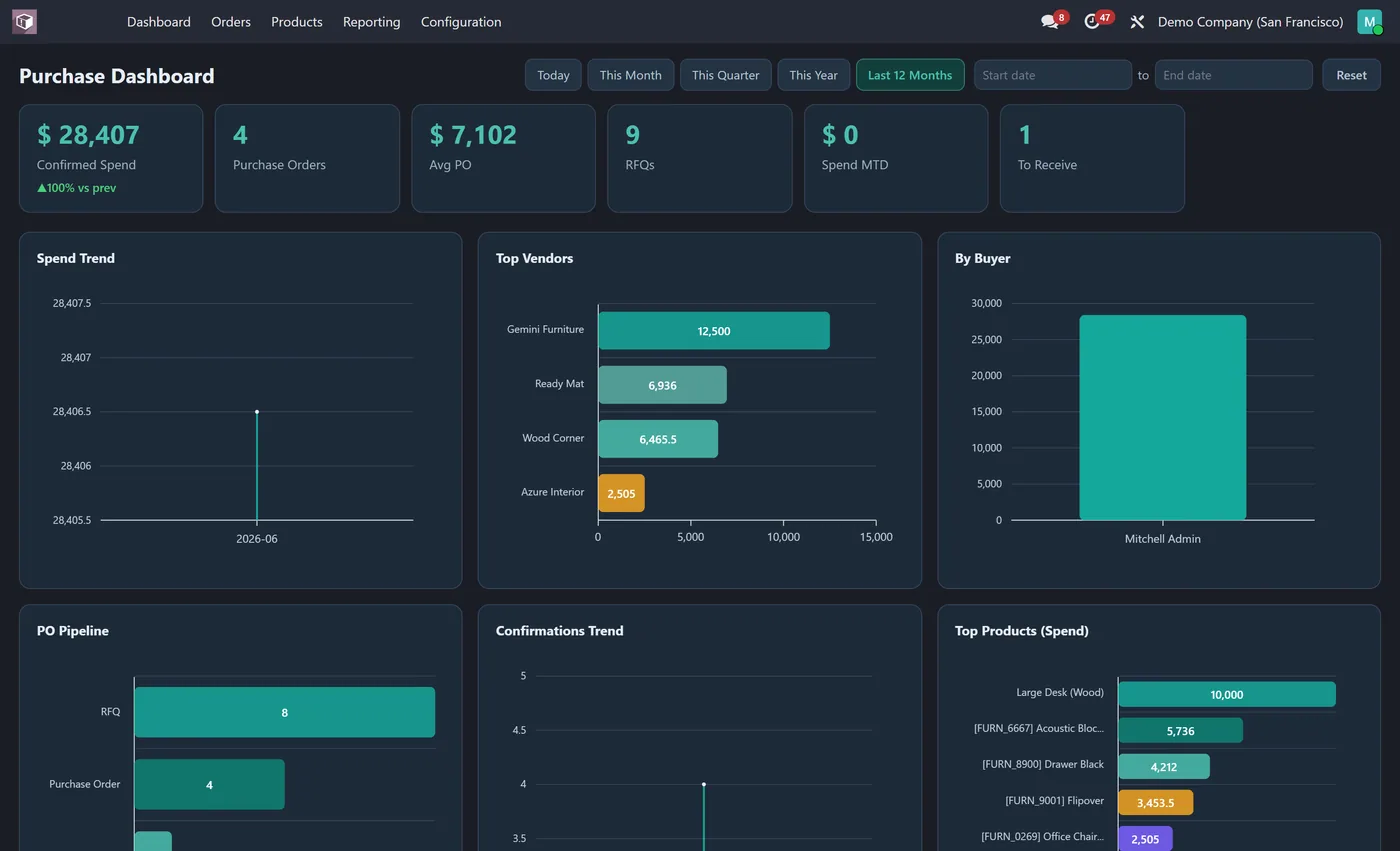
Purchase Dashboard gives buyers and managers the full procurement picture on the first screen of the Purchase app. Confirmed spend, order count, average order value, open RFQs, month to date spend and orders still to receive sit across the top as clickable KPI tiles. Ten interactive charts show how spend trends over time, your top vendors and products, buyer performance, the RFQ to order pipeline and how much has been received. Pick any date range and every chart updates together. Install it and open the app, there is nothing to configure.
New to Odoo Purchase? Read our practical guide to how it works
How it works
Built around what you actually do.
Every screen below is the module running in Odoo, not a mockup.
01
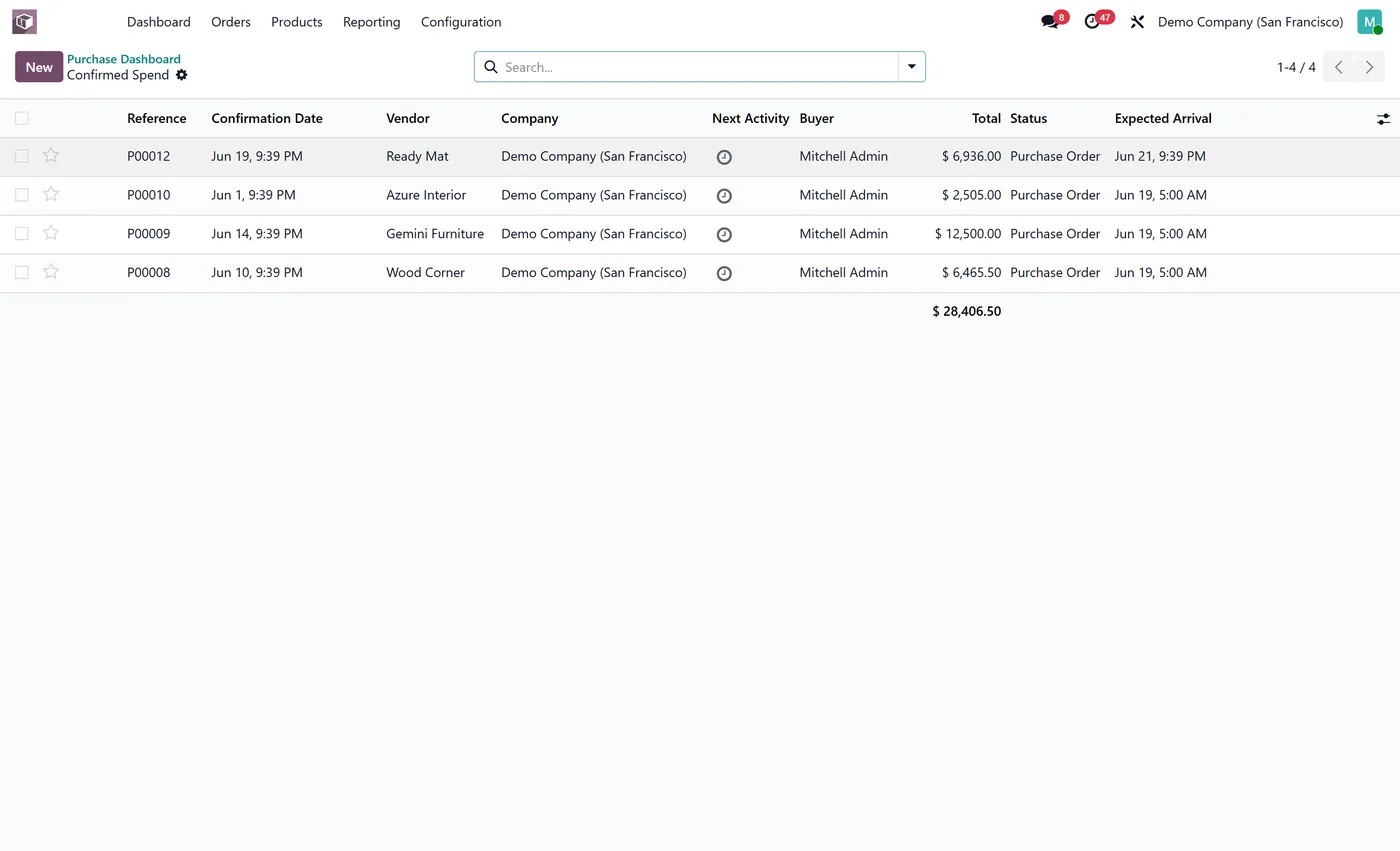
Live KPI tiles for confirmed spend, purchase orders, avg po value and more
- 10 interactive charts including spend trend, top vendors and by buyer
Standard across the suite
How every CODEerts dashboard behaves.
These are not this module's selling points, they are the baseline every dashboard we publish shares. Listed so you know what you get, not to pad the page.
Spend, vendors and receipts, live, the moment you open the Purchase app.
What it does
Purchase Dashboard gives buyers and managers the full procurement picture on the first screen of the Purchase app. Confirmed spend, order count, average order value, open RFQs, month to date spend and orders still to receive sit across the top as clickable KPI tiles.
Ten interactive charts show how spend trends over time, your top vendors and products, buyer performance, the RFQ to order pipeline and how much has been received. Pick any date range and every chart updates together. Install it and open the app, there is nothing to configure.
Open RFQs and orders still to receive
Confirmed spend is the number finance wants. Open RFQs and orders still to receive are the numbers procurement can act on: one is a decision nobody has made, the other is a delivery somebody is waiting for. Both are commitments that do not yet appear in your spend figure, which is exactly why they get missed.
Top vendors is where concentration risk shows up, and spend by buyer is worth reading as workload as much as performance. Average order value quietly tells you whether you are raising too many small POs, which is usually a process cost rather than a purchasing one.
Who it's for
Buyers, procurement managers and the finance lead who signs off spend. It suits companies where several people raise purchase orders and the total is only visible after the fact. The to-receive tile earns its place in any operation where a late inbound delivery stops something downstream.
Questions
About Purchase Dashboard.
How do I track purchase spend and vendors on one screen in Odoo?
Install Purchase Dashboard. It adds a Dashboard as the first item in the Purchase app with live KPIs for confirmed spend, orders, RFQs and receipts, plus ten interactive charts for vendors, buyers, products and the pipeline.
Can I filter the Odoo purchase dashboard by date range?
Yes. One-click ranges (Today, This Month, This Quarter, This Year, Last 12 Months or custom) re-query every KPI tile and chart at once, so you can compare a month, a quarter or a full year of procurement spend in seconds. You can also drill from a segment to the exact purchase orders behind it.
Can I run the Odoo Purchase dashboard on Community, or does it need Enterprise?
It works on both. Odoo's Purchase app ships in Community, so the dashboard runs on a standard Community install with no Enterprise subscription. It is maintained for the current major Odoo versions; use the version selector on this page to pick your release.
Why show open RFQs and orders still to receive separately from spend?
Because both are commitments that do not appear in your spend figure yet. An open RFQ is a decision nobody has made and a pending receipt is a delivery somebody is waiting on. That is exactly why they get missed.
What does average order value tell a buyer?
Usually whether you are raising too many small purchase orders. A low average across many POs is a process cost rather than a purchasing one, and it is the kind of thing that is invisible in a total.
On the Odoo Store
Get Purchase Dashboard on the Odoo Store.
Pick your Odoo version and install it in a click, with free updates and real support behind it.
Get it on the Odoo StoreReady to make Odoo work the way your business does?
Book a free call CODEerts
CODEerts is a team of certified Odoo partners and full-stack engineers. We implement, customise and support Odoo ERP, then build the software around it.

