 CODEerts
Human Resources app for Odoo
Recruitment Dashboard
Interactive Recruitment dashboard inside the Recruitment app: new applicants, in progress, closed and refused, pipeline by stage, applicants by job and department with dynamic filters.
Overview
Recruitment Dashboard.
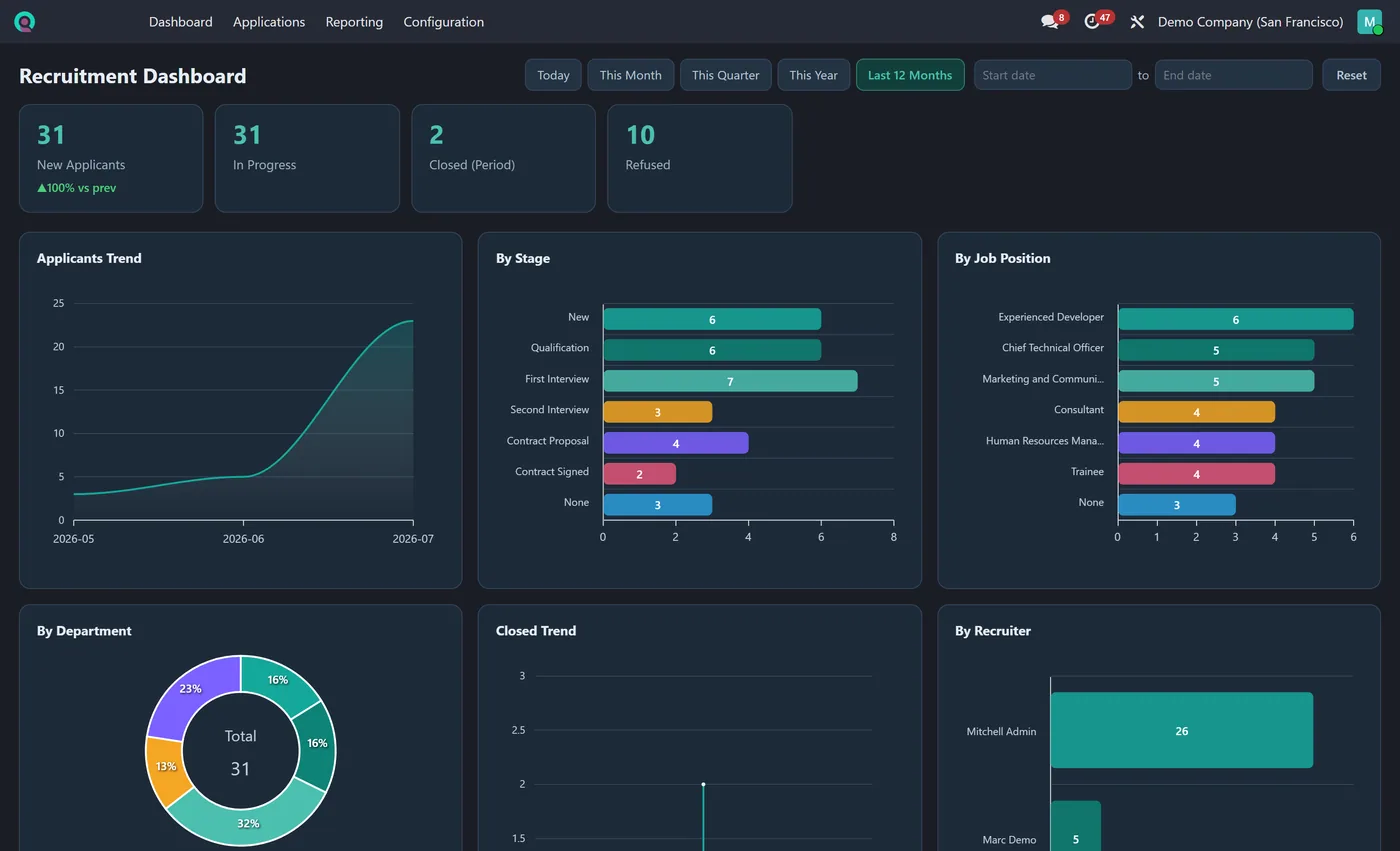
Recruitment Dashboard gives recruiters the full hiring picture on the first screen of the Recruitment app. New applicants, applications in progress, closed in the period and refused sit across the top as clickable KPI tiles. Eight interactive charts show applicants over time, the pipeline by stage, applicants by job position, department, recruiter, source and evaluation and closed applications over time. Pick any date range and every chart updates together.
New to Odoo Employees? Read our practical guide to how it works
How it works
Built around what you actually do.
Every screen below is the module running in Odoo, not a mockup.
01
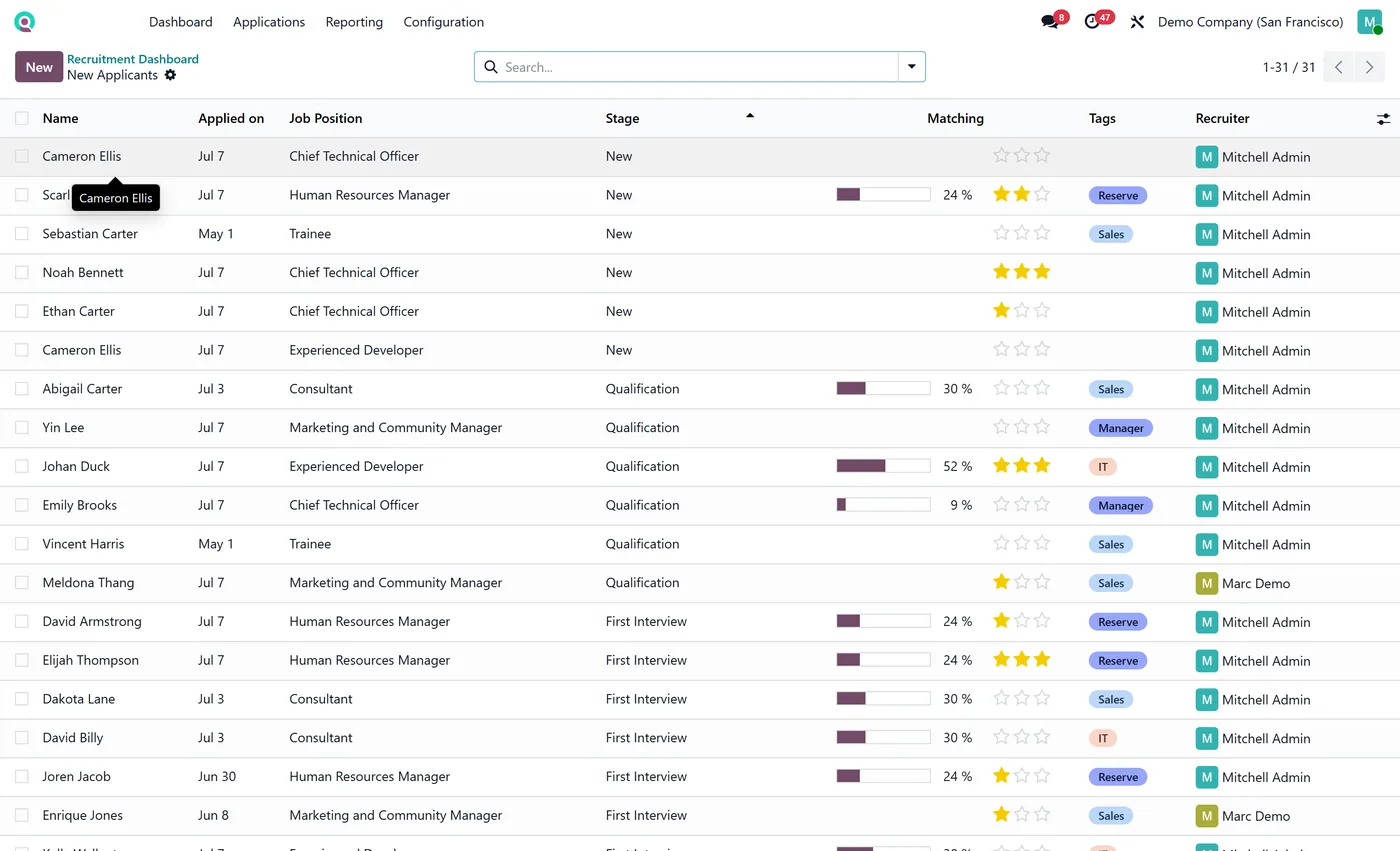
Live KPI tiles for new applicants, in progress, closed in period and more
- 8 interactive charts including applicants trend, by stage and by job position
Standard across the suite
How every CODEerts dashboard behaves.
These are not this module's selling points, they are the baseline every dashboard we publish shares. Listed so you know what you get, not to pad the page.
Applicants, stages and hiring flow, live, in one screen.
What it does
Recruitment Dashboard gives recruiters the full hiring picture on the first screen of the Recruitment app. New applicants, applications in progress, closed in the period and refused sit across the top as clickable KPI tiles.
Eight interactive charts show applicants over time, the pipeline by stage, applicants by job position, department, recruiter, source and evaluation and closed applications over time. Pick any date range and every chart updates together.
In progress, closed and refused
Refused is the count most recruitment reporting leaves out, and it is the one that tells you whether the pipeline is being filtered or just filled. A high refused count next to a low closed count means sourcing is working and selection is not, or the brief is wrong.
Applicants by stage shows where candidates stall, and stalling costs you the good ones first because they have other offers. By job position tells you which roles are genuinely hard to fill rather than which ones have been open longest, which is not the same thing.
Who it's for
Recruiters and hiring managers running Recruitment in Odoo, particularly where several roles are open at once and attention has to be rationed. It suits a team that wants to know which vacancy needs intervention this week, rather than a monthly hiring report that arrives after the candidate has accepted elsewhere.
Questions
About Recruitment Dashboard.
How do I track applicants and hiring pipeline on one screen in Odoo?
Install Recruitment Dashboard. It adds a Dashboard as the first item in the Recruitment app with live KPIs for new, in progress, closed and refused applicants, plus eight charts by stage, job, department and recruiter.
Do I need to configure anything to use the Odoo recruitment dashboard?
No. Install it and open the Recruitment app, the Dashboard is already the first menu item with your live hiring KPIs and charts by stage, job and recruiter. There are no reports to build or settings to set.
Does the Odoo recruitment dashboard respect applicant record access?
Yes. Every KPI and chart is read as the logged-in user, so recruiters only see the applicants their Odoo access rights allow. It reads your real recruitment records live when you open the dashboard rather than a cached copy.
Can I run the Odoo Recruitment dashboard on Community, or does it need Enterprise?
It works on both. Odoo's Recruitment app ships in Community, so the dashboard runs on a standard Community install with no Enterprise subscription. It is maintained for the current major Odoo versions; use the version selector on this page to pick your release.
Why does the refused count matter?
It tells you whether the pipeline is being filtered or just filled. A high refused count next to a low closed count means sourcing is working and selection is not, or the brief is wrong. Most recruitment reporting leaves this number out entirely.
On the Odoo Store
Get Recruitment Dashboard on the Odoo Store.
Pick your Odoo version and install it in a click, with free updates and real support behind it.
Get it on the Odoo StoreReady to make Odoo work the way your business does?
Book a free call CODEerts
CODEerts is a team of certified Odoo partners and full-stack engineers. We implement, customise and support Odoo ERP, then build the software around it.

