CODEerts
Sales app for Odoo
Lot Reservation from Sales Orders
Pick and hard-reserve lot or serial numbers directly on the quotation in removal-strategy order, lock them so no other quotation can take them, and push the exact same lots to the delivery on confirmation.
Overview
Lot Reservation from Sales Orders.
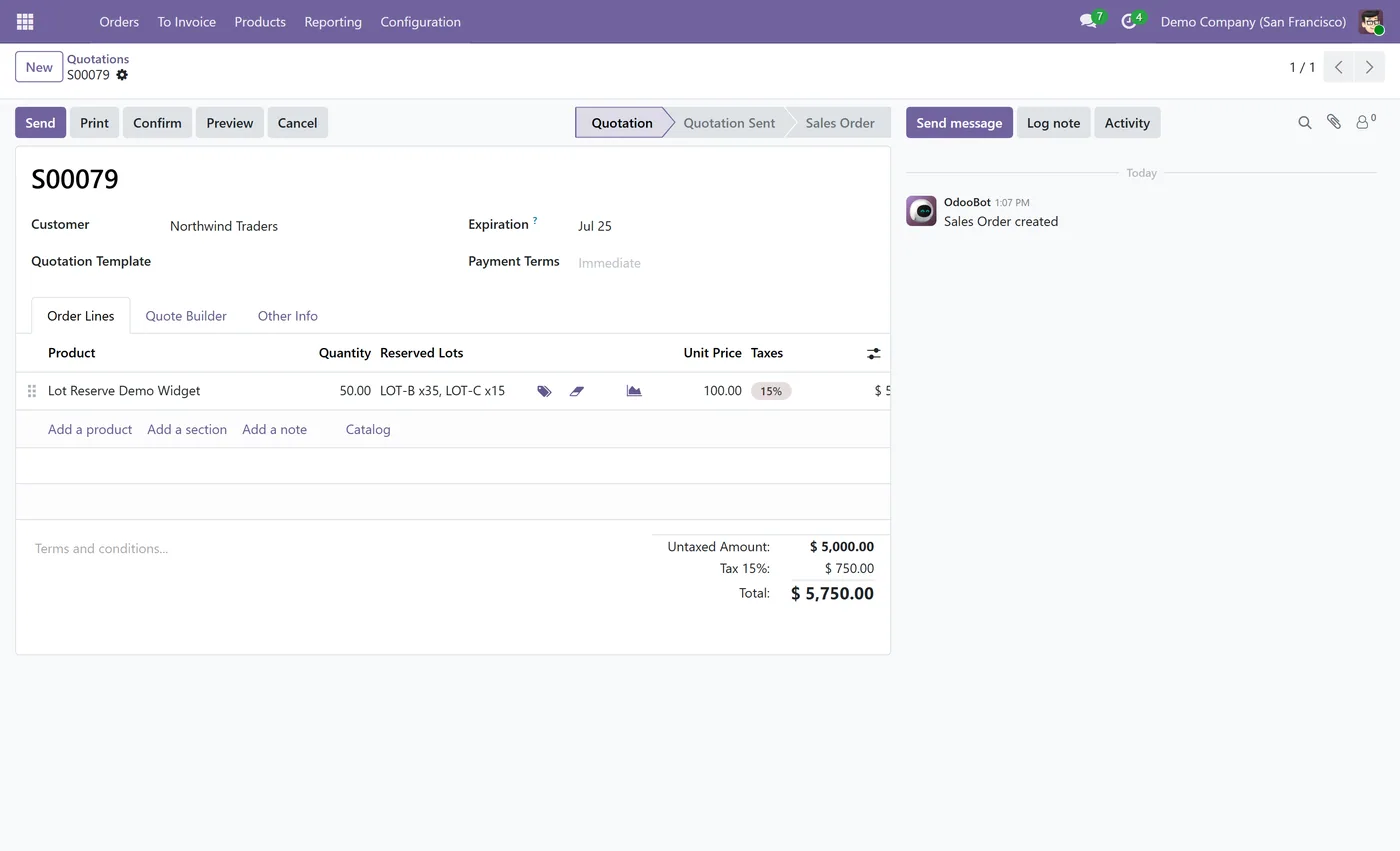
Lot Reservation from Sales Orders lets your sales team commit specific lot or serial numbers on the quotation itself. As soon as a lot-tracked product is added, the module auto-selects available lots in the product category's removal strategy (FIFO, FEFO or LIFO, defaulting to FIFO), splitting across several lots when one is not enough. Selected lots are hard-locked, so no other open quotation can reserve the same lot until it is released. A Manage popup shows each lot's free-to-reserve quantity and blocks over-committing. On confirmation the chosen lots flow straight to the delivery as Odoo's standard reservation. A Quote Reserved column on the product and inventory reports shows how much stock is held by open quotations, which moves to standard Reserved on confirmation and frees when the quotation is cancelled.
New to Odoo Sales? Read our practical guide to how it works
How it works
Built around what you actually do.
Every screen below is the module running in Odoo, not a mockup.
01
Auto-select available lots on the quotation in the category removal strategy (FIFO, FEFO or LIFO)
- Hard-lock reserved lots so no other open quotation can take them until released
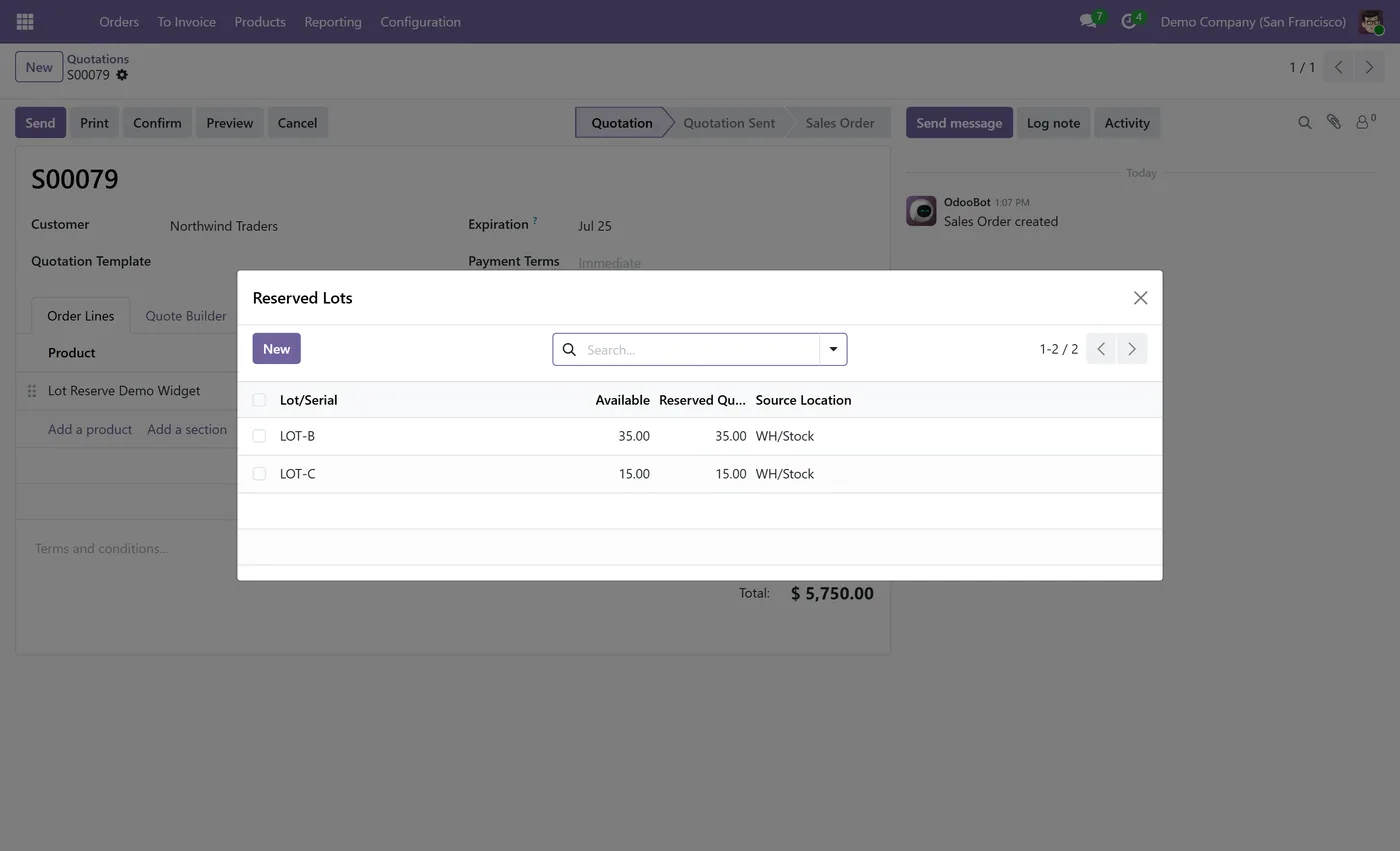
- Available column in the Manage popup showing each lot's free-to-reserve quantity, with over-commit blocked
02
Automatic split across several lots when a single lot does not cover the line
- One-click release to free a lot for any other quotation
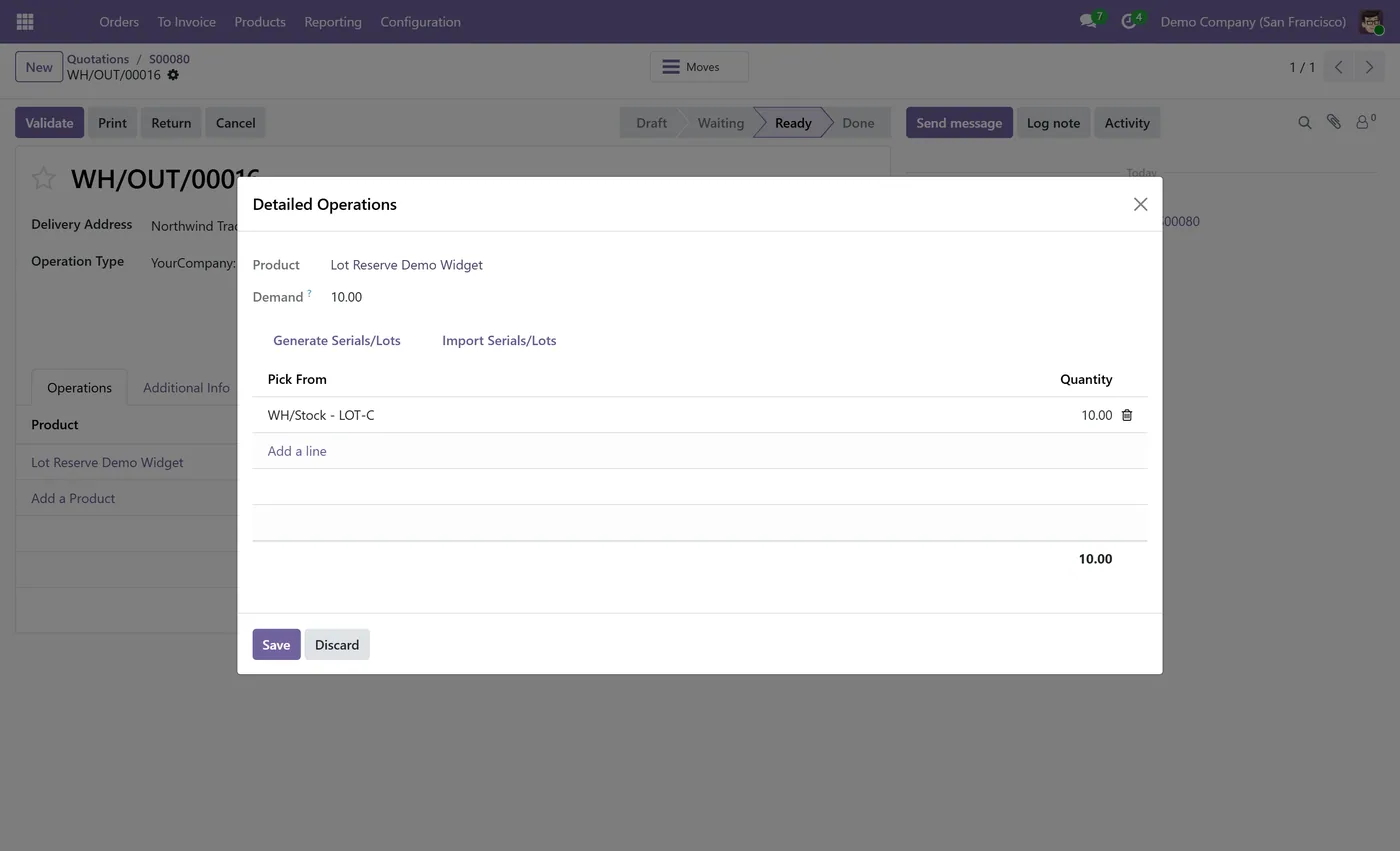
- Reserved lots flow to the delivery as Odoo's standard reservation on confirmation
03
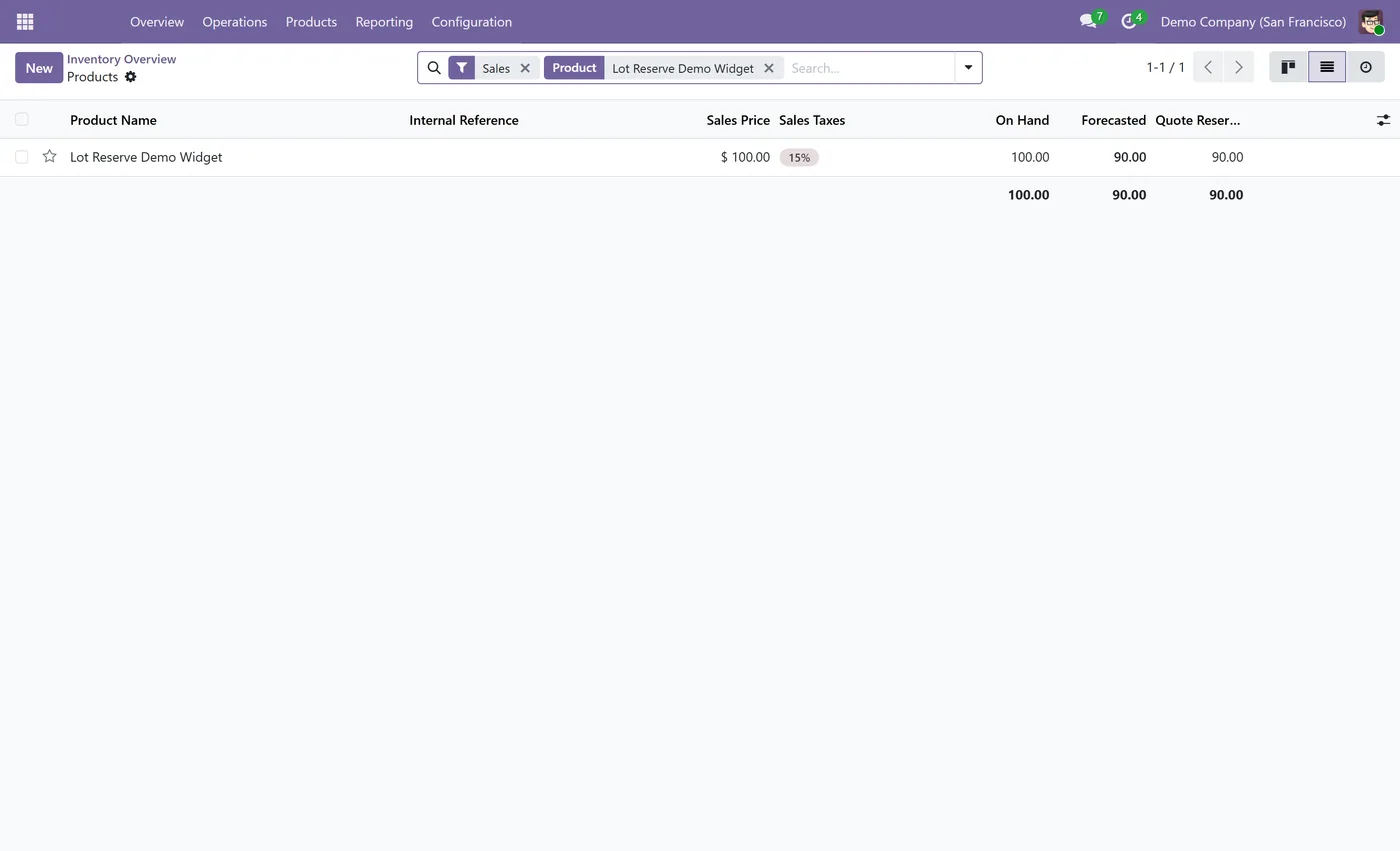
Quote Reserved column on product and inventory reports for stock held by open quotations
- Shortfall is shown, not blocked, and the remainder is handled by Odoo's native reservation
Lot Reservation from Sales Orders moves lot and serial selection out of the warehouse and onto the quotation, where your sales team already works. The moment a lot-tracked product is added to an order, the module reserves real, available lots for that customer and keeps them locked until the order ships or the lots are released.
What it does
When you add a lot-tracked product to a quotation, the module looks at the product category's removal strategy, FIFO, FEFO or LIFO, and auto-selects available lots in that order, defaulting to FIFO. If one lot does not cover the ordered quantity it splits across several lots. The reserved lots are hard-locked, so no other open quotation can grab the same lot until it is released. A Manage popup on the line shows each lot, its free-to-reserve quantity in a clear Available column, and the amount you are holding, and it blocks any attempt to reserve more than is actually free. When you confirm the order, the exact lots you reserved are pushed to the delivery as Odoo's standard reservation, so the warehouse picks precisely what was promised. A Quote Reserved column on the product and inventory reports shows how much stock is tied up by open quotations, separate from the standard Reserved figure, so planners always know what is really available to sell.
Who it's for
Distributors, manufacturers and traders who sell lot or serial tracked goods and need to promise a specific lot to a customer at quotation time, keep that lot from being double-sold, and have the warehouse ship exactly what was reserved. It is ideal for teams working with expiry-dated stock, batch-controlled products, or any inventory where which lot the customer receives actually matters.
Questions
About Lot Reservation from Sales Orders.
How do I reserve a specific lot number on a sales order in Odoo?
Add a lot-tracked product to the quotation and the module auto-picks available lots in the product category's removal strategy. Open the Manage popup on the line to see, adjust or release the reserved lots. The chosen lots are held for that quotation until you release them or confirm the order.
Can I stop two quotations from reserving the same lot in Odoo?
Yes. Reserved lots are hard-locked. Once a lot is committed on one open quotation, no other draft or sent quotation can reserve the same lot until the first one releases it or is cancelled, so two customers never get promised the same lot.
How does the module decide which lots to pick?
It follows the removal strategy set on the product category, FIFO, FEFO or LIFO, and defaults to FIFO when none is set. It reads real on-hand availability and splits the quantity across several lots automatically when one lot does not cover the line.
What happens to the reserved lots when I confirm the order?
On confirmation the exact lots you reserved are pushed to the delivery order as Odoo's standard reservation, so the warehouse picks the same lots that were promised on the quotation. Nothing extra to do at the delivery step.
How can I see how much stock is reserved by quotations that are not yet confirmed?
A Quote Reserved column on the product and inventory reports shows the quantity held by open quotations. When a quotation is confirmed that amount moves into the standard Reserved figure, and when a quotation is cancelled the amount is freed automatically.
What if there is not enough stock to cover the line?
The module reserves everything that is available and shows the shortfall instead of blocking the order. The remaining quantity is handled by Odoo's native reservation when more stock arrives, so the order is never stuck.
Which Odoo versions does this module support?
Use the version selector at the top of this page to pick your Odoo release. Each branch is published as its own listing for that exact version.
On the Odoo Store
Get Lot Reservation from Sales Orders on the Odoo Store.
Pick your Odoo version and install it in a click, with free updates and real support behind it.
Get it on the Odoo StoreReady to make Odoo work the way your business does?
Book a free call CODEerts
CODEerts is a team of certified Odoo partners and full-stack engineers. We implement, customise and support Odoo ERP, then build the software around it.