 CODEerts
eCommerce app for Odoo
Shopify Connector
Connect one or many Shopify stores to Odoo over the Shopify Admin GraphQL API. Products with native variants, customers, orders, multi location inventory, fulfillments, returns, refunds, Shopify Markets pricing and Shopify Payments payouts, in one installable module.
Overview
Shopify Connector.
Shopify Connector keeps one or many Shopify stores and one or many Odoo companies in step, in both directions, over the Shopify Admin GraphQL API rather than the REST API Shopify is retiring. Shopify tells Odoo what changed through signed webhooks, and Odoo sends its changes back through a job queue that survives a restart and never blindly replays a write whose outcome is unknown. Products arrive as real Odoo attributes and variants, orders follow the workflow you choose, inventory is sent as adjustments against what Shopify last reported so two systems selling at once do not overwrite each other, and refunds can restock through a real return picking. Nothing is posted in accounting unless you choose a posting option. Credentials are readable only by a system administrator, and every model is scoped by company.
New to Odoo eCommerce? Read our practical guide to how it works
How it works
Built around what you actually do.
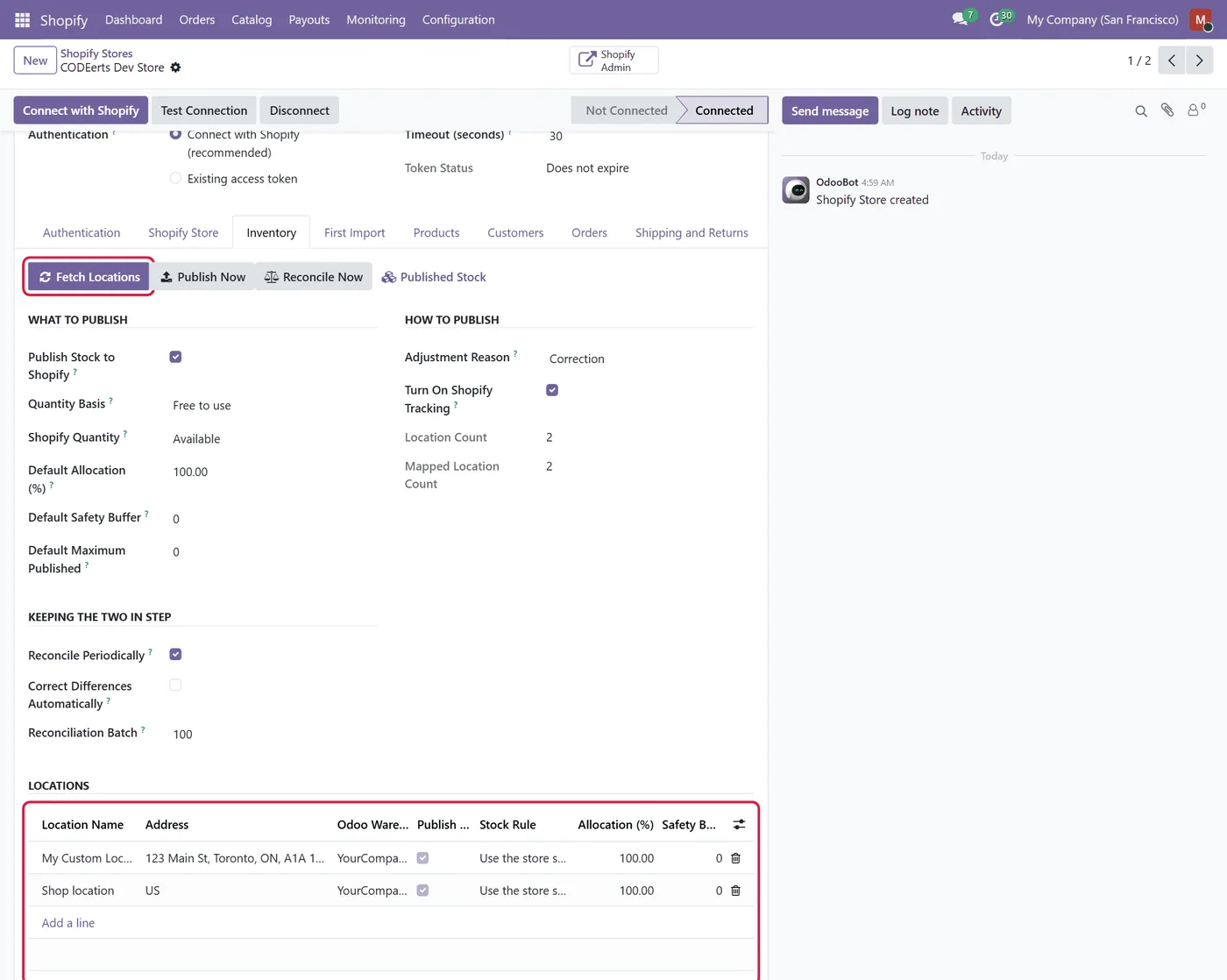
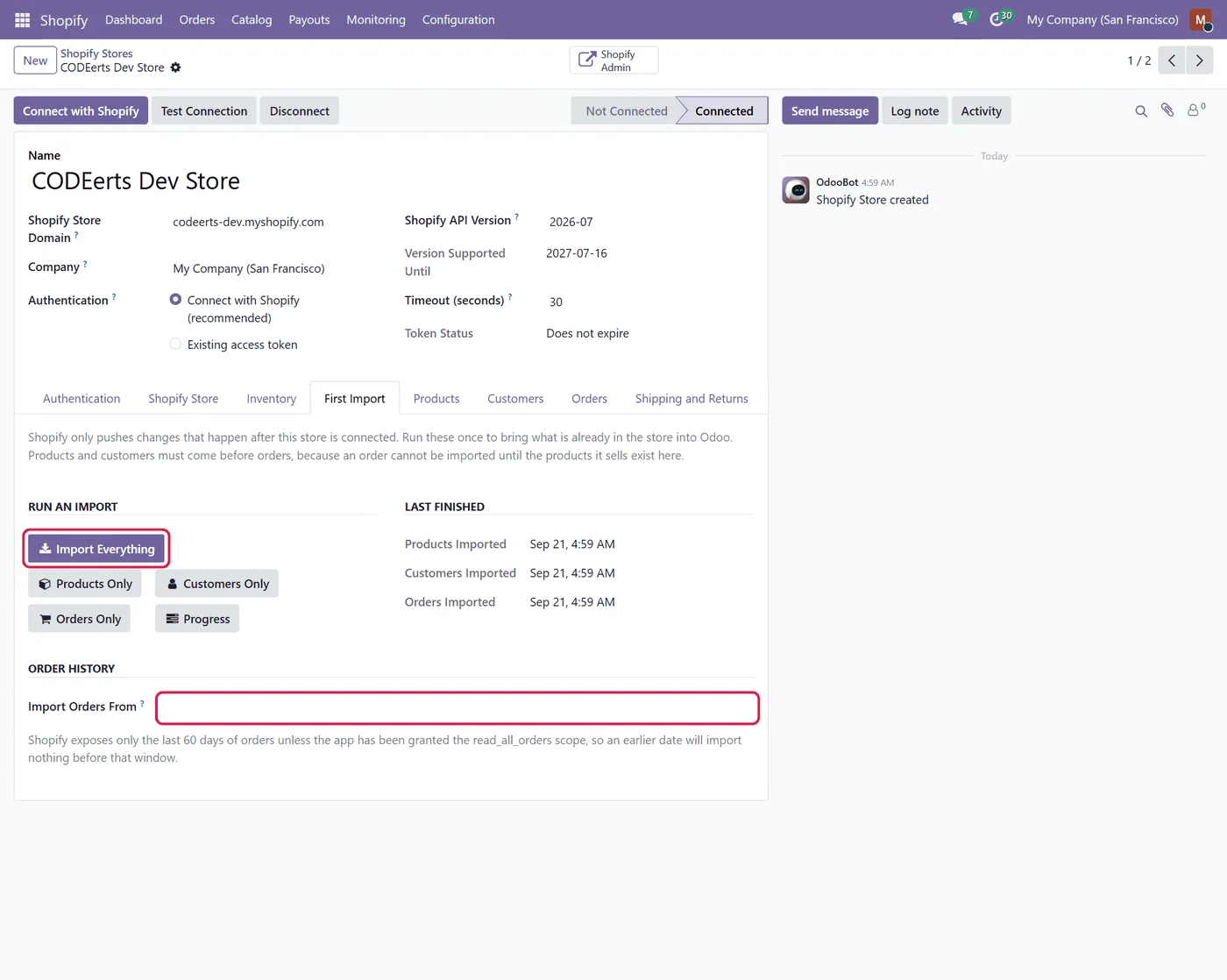
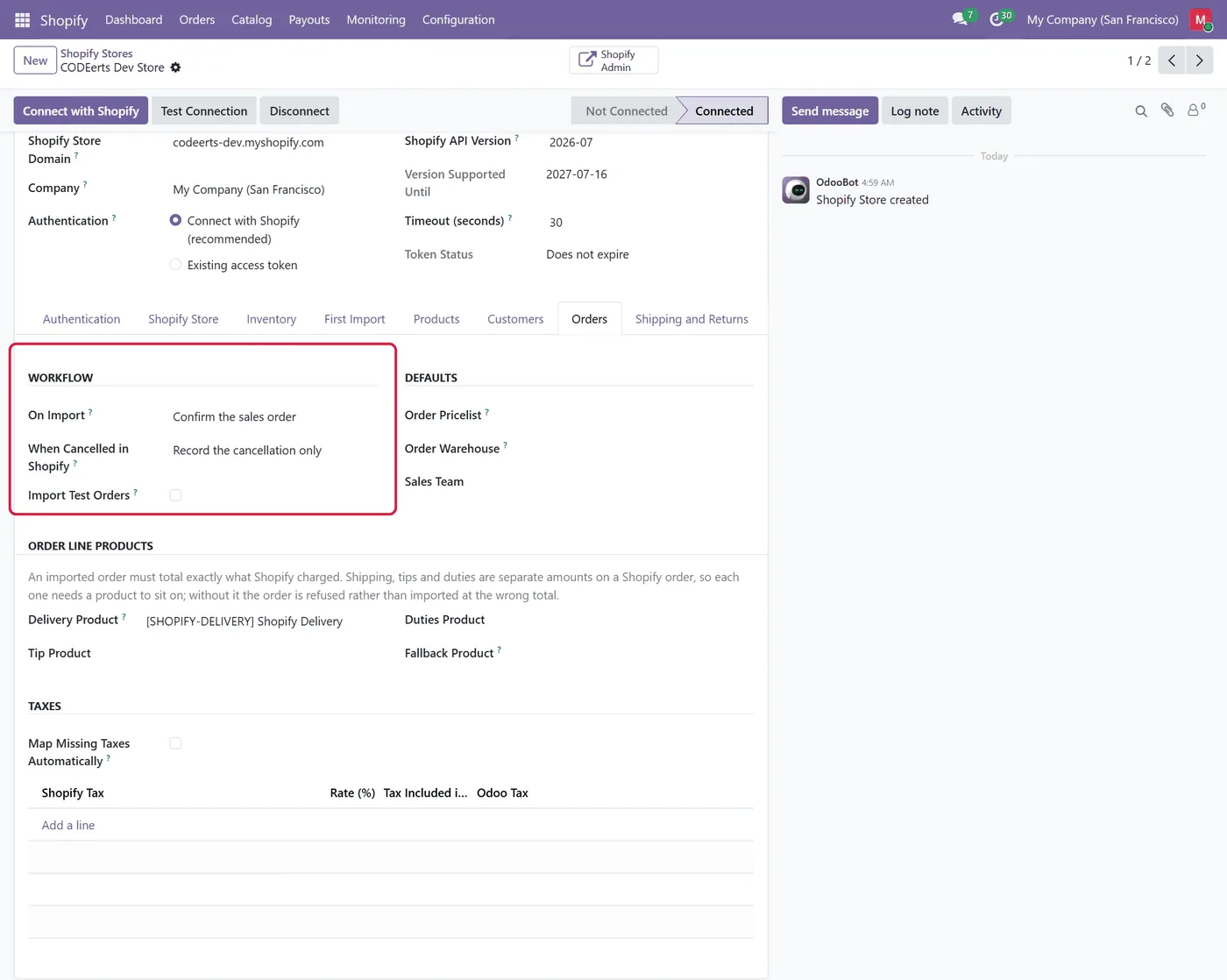
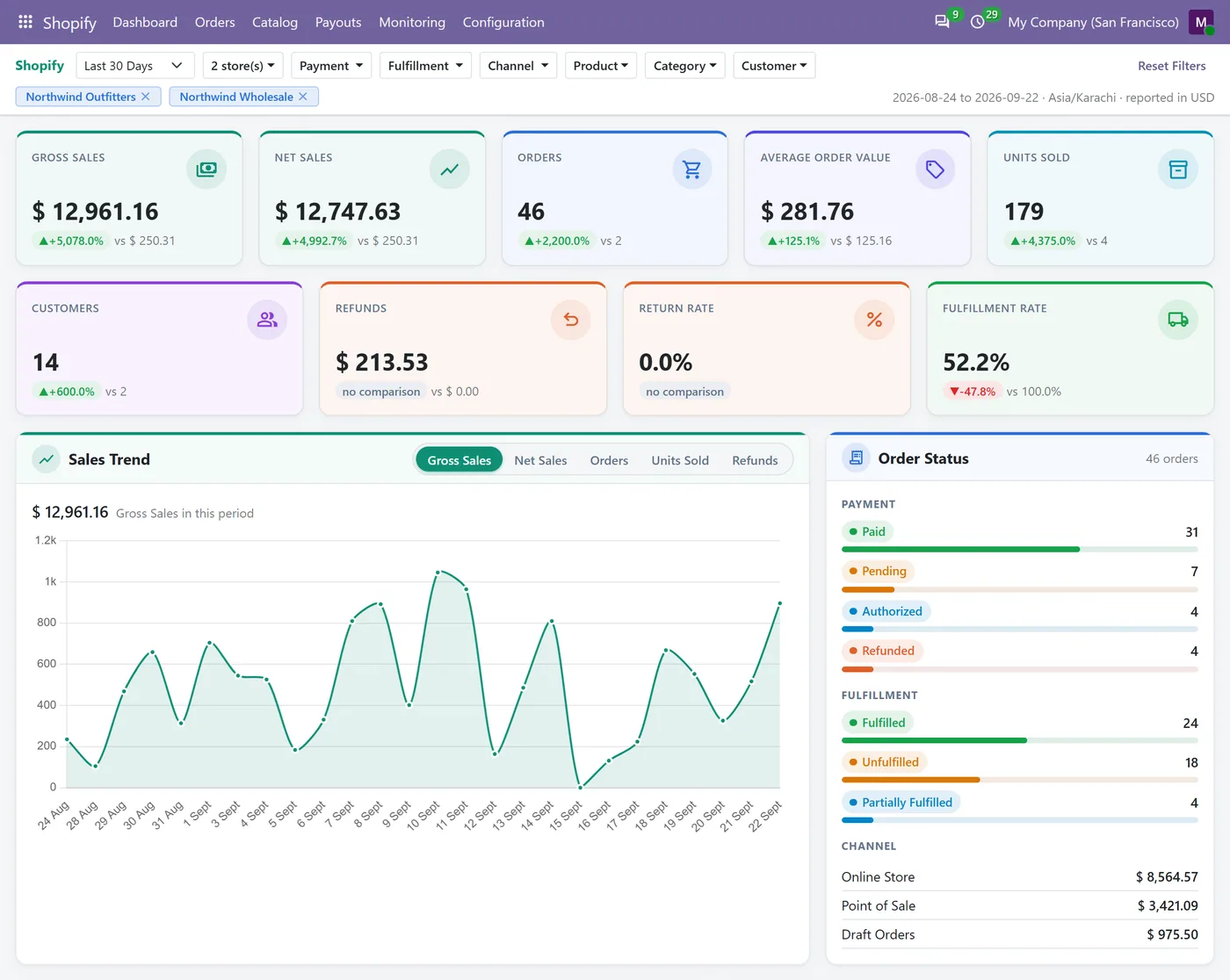
Every screen below is the module running in Odoo, not a mockup.
01
Built on the Shopify Admin GraphQL API, with cost based throttling, cursor pagination and idempotency keys
- Products and native variants mapped to real Odoo attributes, with images, SKUs, barcodes, weights and HS codes
02
Orders with a workflow you choose, mapped taxes, and discounts, shipping and gift cards on their own lines, plus an hourly check for orders Shopify never delivered
- Multi location inventory sent as deltas, with a safety buffer, an oversell switch, scheduled reconciliation and kits that follow their components
03
Fulfillments both ways, returns and refunds with real return pickings, Markets pricing and Payments payouts
- Signed webhooks, a resumable job queue and a dashboard that names what is wrong and links to the rows behind it
Every screen
The whole module, screen by screen.
The captures the walkthrough above did not use, in the order you meet them in the product.
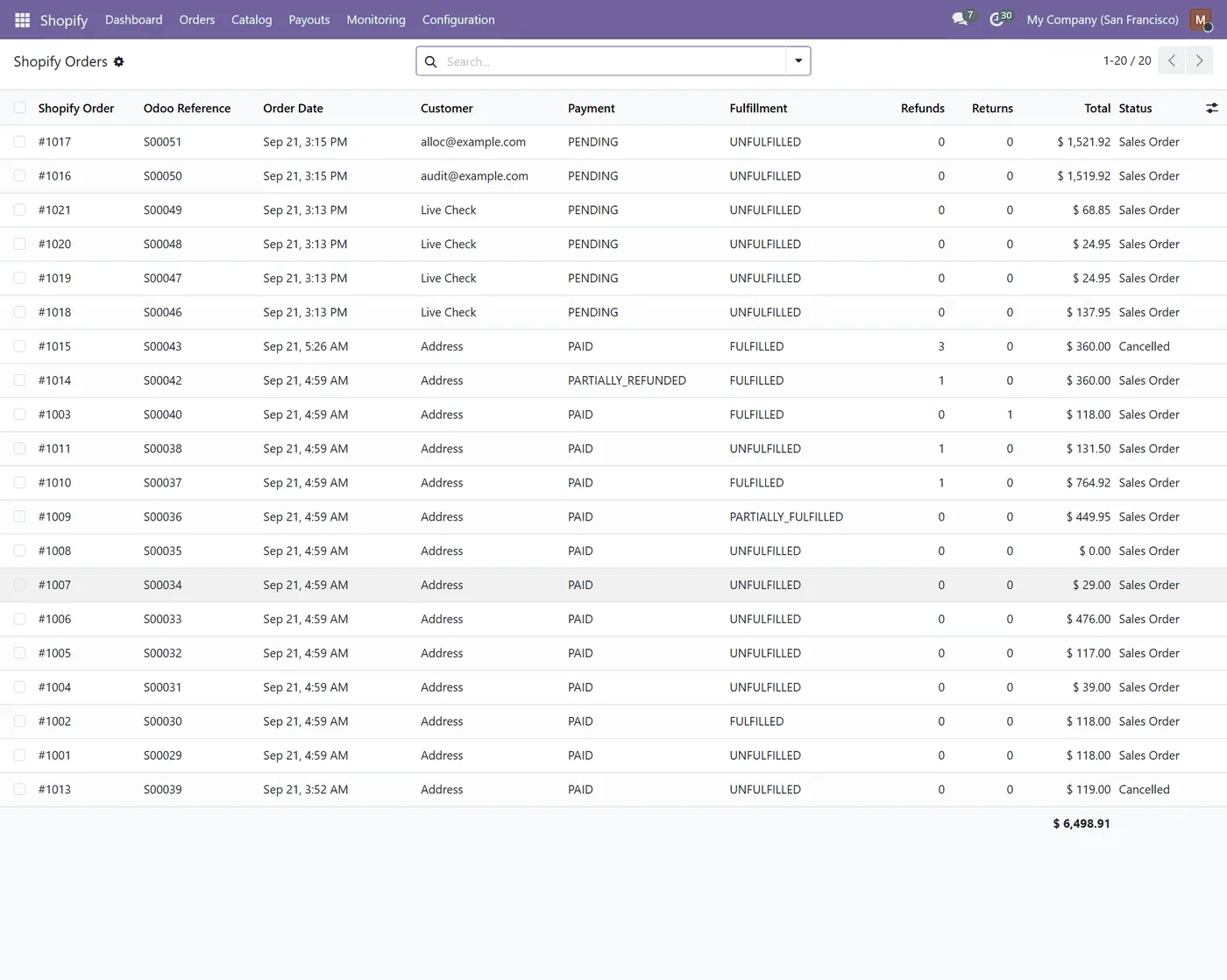
Shopify Connector links Shopify and Odoo in both directions over the Shopify Admin GraphQL API, for one store or many, and one Odoo company or many, in a single installable module.
What it does
Most connectors still call the Shopify REST API, which Shopify is retiring, and many need a bridge module for every Odoo application they touch. This one talks GraphQL only and installs as one addon. Shopify tells Odoo what changed through webhooks whose signatures are verified before anything is written, and Odoo sends its own changes back through a job queue that coalesces repeated requests, survives a restart and never blindly replays a write whose outcome is unknown. Products arrive as real Odoo attributes and variants rather than a flat list of products. Orders follow the workflow you pick, with discounts, shipping and gift cards on their own lines so the Odoo total matches the Shopify total. Inventory is sent as an adjustment against the quantity Shopify last reported, so a sale made in between is never erased.
- Products and native variants, images, SKUs, barcodes, weights, HS codes and country of origin. - Customers and addresses, with optional matching against existing contacts. - Orders as quotations, confirmed orders or waiting for payment, with mapped taxes. - An Order Import Policy that picks which new orders come in, with a preview and a reason for every skipped order. - Multi location inventory per warehouse, with a safety buffer, an oversell switch and a scheduled reconciliation. - Fulfillments and tracking in both directions, including fulfillment order holds and moves. - Returns and refunds, with restocking through a real return picking and an optional credit note. - Shopify Markets pricing from an Odoo pricelist, collections, and Shopify Payments payouts. - A per store dashboard and a monitoring menu where every count opens the rows behind it.
How to set it up
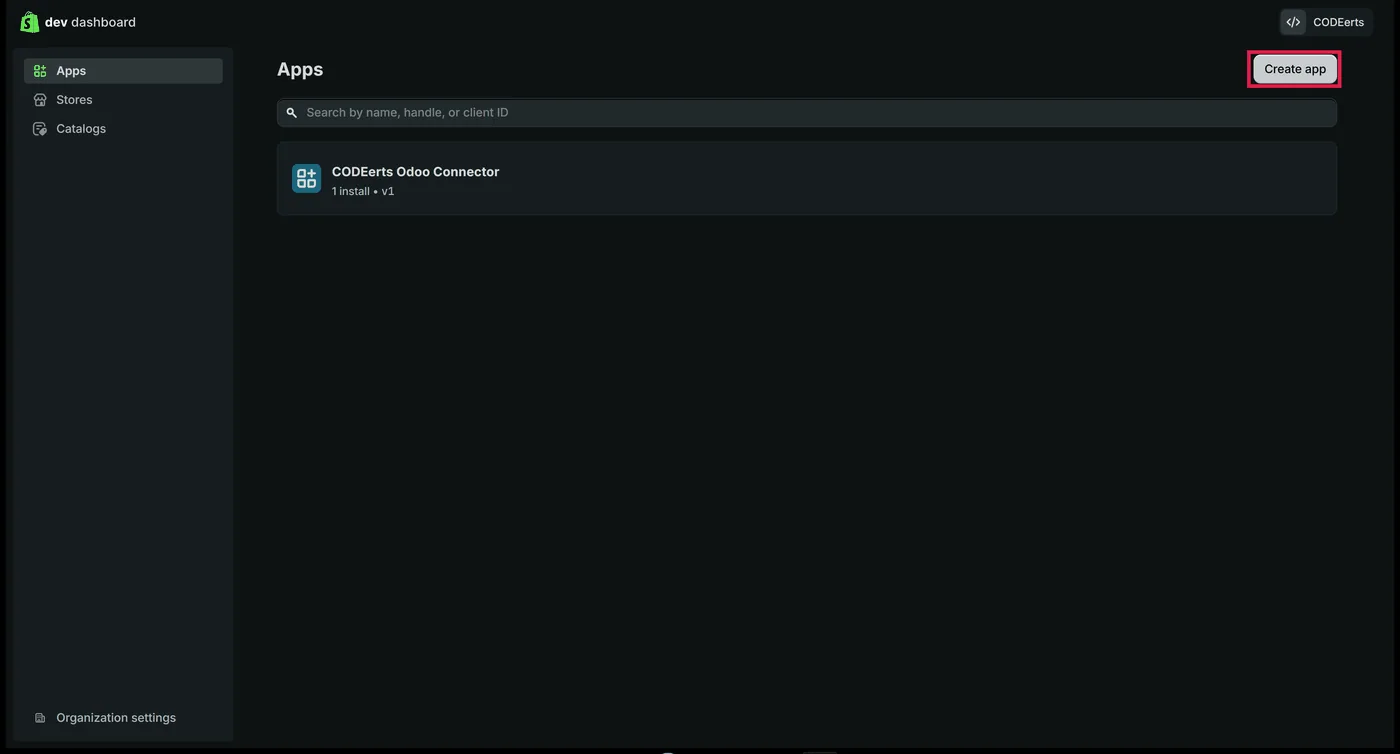
1. In the Shopify Dev Dashboard, create an app, paste the scopes from the setup guide, set the App URL and redirection URL that Odoo shows you, and release the version. 2. In Odoo, open Shopify, Configuration, Stores, create a store and paste the app's API key and secret. 3. In the Shopify Partners dashboard, under API access requests, allow the app to use protected customer data (name, email, phone and address). An app for your own store only needs the selection, not a Shopify review. 4. Press Connect with Shopify and approve the permissions in Shopify, then press Register Webhooks on the store's Webhooks tab and check every topic reads Active. 5. Map locations to warehouses, choose the order workflow, and run the first import.
Every purchase includes 10 hours of free implementation, so our team can do these steps with you. Write to support@codeerts.com within 40 days of your purchase, with your Odoo Apps Store order reference, to book your hours.
Who it's for
Merchants who sell on Shopify and run their operations in Odoo, businesses with several Shopify stores or several Odoo companies, and Odoo partners who need a Shopify integration they can explain to a client, line by line, when something goes wrong.
Questions
About Shopify Connector.
How do I connect Shopify to Odoo?
Create an app for your store in the Shopify Dev Dashboard, paste its API key and secret into a new Shopify store in Odoo, and press Connect with Shopify. Shopify asks you to approve the permissions and sends you back to Odoo connected. The listing has a step by step guide with screenshots.
Does it work on Odoo Community?
Yes. It depends only on standard applications that ship with Odoo Community: Sales, Inventory, Invoicing, Delivery and Discuss. It runs the same on Enterprise.
Does it work on Odoo Online?
No. Odoo Online cannot install a module that carries its own Python code, and this connector does. It runs on Odoo.sh and on an Odoo you host yourself.
My Shopify store sells in a different currency from my Odoo company. Does that work?
Yes, with one setting. Give the store an Order Pricelist in the Shopify store's currency, and orders are recorded in that currency with the exact amounts Shopify charged. Without it, an order whose currency does not match is refused with a message that names the fix, instead of being imported with the wrong currency.
Does it use the Shopify REST API that is being retired?
No. Every call uses the Shopify Admin GraphQL API, and webhooks are subscribed through GraphQL as well.
Will it create duplicate products or customers?
No. Records are linked once and found again through that link. A Shopify product is matched to the Odoo product whose variants carry the same SKUs, only within the store's own company, and only an unambiguous match is used. You choose whether a product that does not match is created or listed under Not Matched for you to fix. Contacts are matched on email address, and that can be switched off.
I already have the same products in Odoo and in Shopify. What happens when I connect?
Each Shopify product is linked to the Odoo product whose variants carry the same SKUs, and that product keeps its own attributes, variants, name and description. Its variants are linked one by one, by SKU or by option values, and any variant that cannot be linked is listed under Not Matched with the reason. Prices are written only when every variant's Shopify price can be reproduced exactly; otherwise Odoo keeps its prices and the log says why. Catalog, Product Variants shows every variant with its SKU and whether it is linked.
Can I choose which Shopify orders come into Odoo?
Yes. The Order Import Policy filters new orders by payment status, fulfillment status, sales channel, required and excluded tags, an Import Orders From date and whether test orders are included. Preview Matching Orders shows how many would be imported and skipped, and why, before anything is imported. Every skipped order is recorded with its reason, and an order already in Odoo always keeps updating.
Will it post accounting entries on its own?
Only if you choose it. By default an imported order stops at a confirmed sales order and a refund is recorded without a credit note. Invoicing and posting are separate settings, and payout entries are always left as drafts.
Is implementation help included?
Yes. Every purchase includes 10 hours of free implementation: creating the Shopify app, connecting your store, mapping locations to warehouses, choosing the order workflow and running the first import. Write to support@codeerts.com within 40 days of your purchase, with your Odoo Apps Store order reference, to book your hours. 60 days of free support is included as well.
Can I connect more than one store or more than one company?
Yes. Each store belongs to one Odoo company, several stores can share a company, and two companies can even connect the same Shopify store. Record rules keep every company's data apart.
On the Odoo Store
Get Shopify Connector on the Odoo Store.
Pick your Odoo version and install it in a click, with free updates and real support behind it.
Get it on the Odoo StoreReady to make Odoo work the way your business does?
Book a free call CODEerts
CODEerts is a team of certified Odoo partners and full-stack engineers. We implement, customise and support Odoo ERP, then build the software around it.

