 CODEerts
Inventory app for Odoo
Inventory Movement Report
Track opening balance, purchases, sales and closing stock per product over any period.

Overview
Inventory Movement Report.
Inventory Movement Report shows stock movement per product in Odoo, with opening balance, quantities in (purchases), quantities out (sales) and closing balance over any date range, ideal for stock audits and reconciliation.
New to Odoo Inventory? Read our practical guide to how it works
How it works
Built around what you actually do.
Every screen below is the module running in Odoo, not a mockup.
01
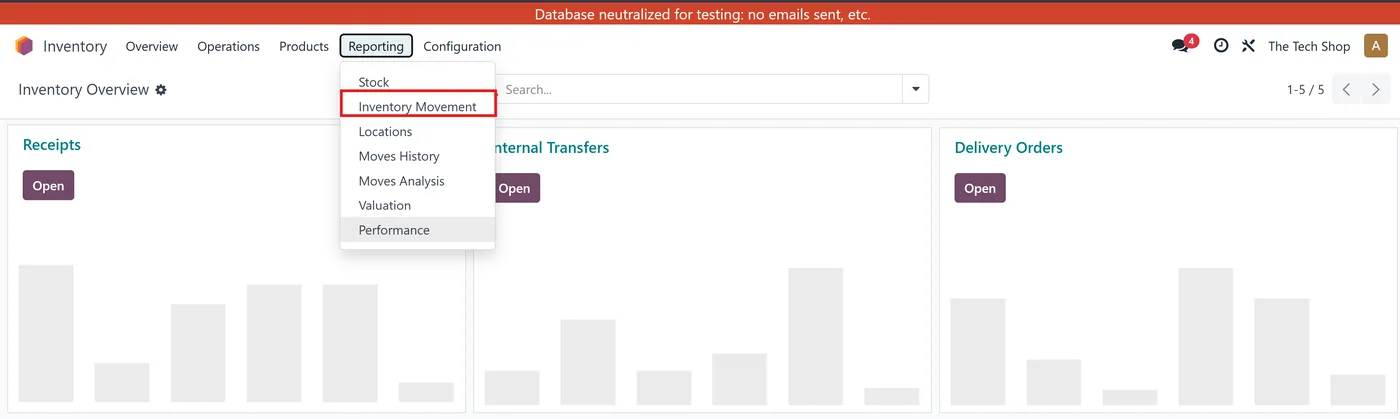
Opening balance, in, out and closing per product
- Any date range
02
Built for stock audits and reconciliation
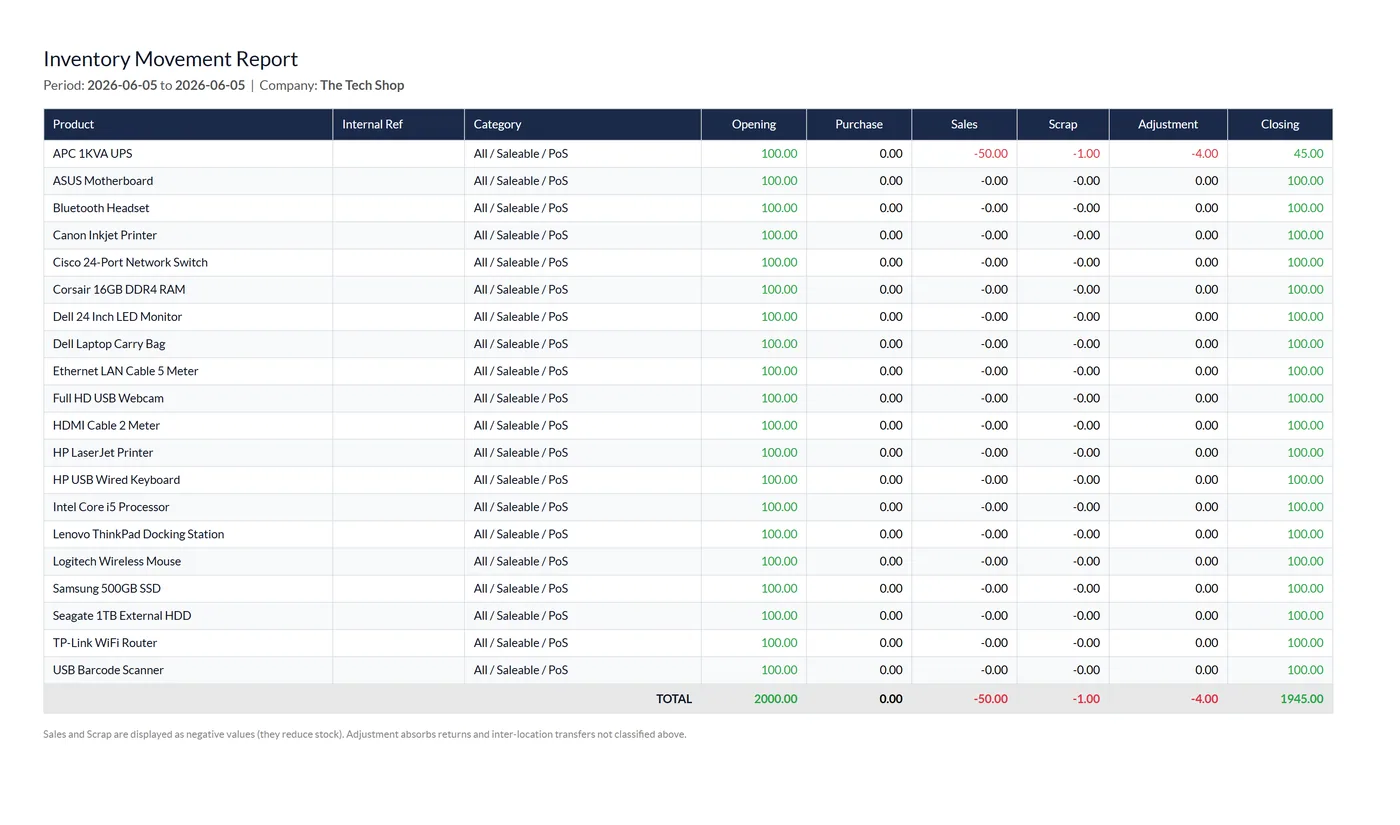
Inventory Movement Report shows exactly how stock moved in Odoo over any period. For each product it breaks down the opening balance, quantities in, quantities out and the closing balance, giving you a clear, reconciliation-ready view of inventory flow.
What it does
Choose a date range and the report calculates, per product, the opening stock, the quantities received (in), the quantities issued (out) and the resulting closing stock. It is ideal for periodic stock audits, reconciliations and spotting unexpected movements, replacing the manual spreadsheets teams often build from raw stock moves.
Who it's for
Inventory managers, warehouse teams and accountants who need a straightforward stock movement and reconciliation report from Odoo.
Questions
About Inventory Movement Report.
How do I see opening and closing stock per product in Odoo?
Inventory Movement Report shows opening balance, purchases in, sales out and closing stock per product over any period.
Can Odoo report stock in and out over a date range?
Yes, you choose any period and it summarises movements per product.
Can I export the inventory movement report?
Yes. The report uses a clear, exportable layout, so you can pull the opening, in, out and closing figures out of Odoo for audits, reconciliation or sharing with accountants. That removes the manual spreadsheet work teams often build from raw stock moves.
Where does the Odoo stock movement report get its numbers from?
It reads your actual inventory movements to calculate the opening balance, quantities received, quantities issued and closing stock for each product. Because it is based on real stock data over the date range you pick, it is reliable for periodic stock audits and reconciliation.
Can I run the stock card report for a specific date range in Odoo?
Yes. You choose any period and the report summarises each product's movement across that window, showing what you started with, what came in, what went out and what remains. This makes it easy to reconcile a month, a quarter or a custom audit window.
Does the Inventory Movement Report work on Odoo Community and Enterprise?
It builds on the standard Inventory app, so it runs on both Community and Enterprise editions. Each Odoo Apps Store branch listing shows the exact version it supports.
On the Odoo Store
Get Inventory Movement Report on the Odoo Store.
Pick your Odoo version and install it in a click, with free updates and real support behind it.
Get it on the Odoo StoreReady to make Odoo work the way your business does?
Book a free call CODEerts
CODEerts is a team of certified Odoo partners and full-stack engineers. We implement, customise and support Odoo ERP, then build the software around it.

