

Nobody remembers a finance cutover that went well. Everyone remembers the one where, three weeks after go-live, the balance sheet was off by an amount nobody could explain. The difference is rarely the software. It is whether the cutover was planned as three separate loads, each with its own proof, or as one big import and a hopeful afternoon.
Applies to: Odoo 20, Community and Enterprise, with the Accounting app.
What does a finance cutover in Odoo include?
Three things move into Odoo at one agreed date: your balance sheet, every unpaid customer invoice and vendor bill, and your bank positions. We treat them as three loads, because each one is proven in a different way:
| Load | What goes in | How you know it is right |
|---|---|---|
| 1. Balance sheet | The closing balance of every balance sheet account at the cutover date | Odoo's trial balance matches the old system's, account by account |
| 2. Open items | Each unpaid invoice and bill, as its own document | Aged receivables and payables match the old ageing, customer by customer |
| 3. Bank and cash | The closing balance of each bank and cash account | The first statement in Odoo starts where the old one ended |
The cutover date changes what you carry over. At a year end, only balance sheet accounts come across: Odoo does not carry income, expense or current-year earnings into a new fiscal year, so last year's result should already be sitting in retained earnings. Mid-year, you also need the income and expense to date. We usually load those as one entry per month, so that month-on-month reports still make sense after go-live.
How does Odoo 20 hold opening balances?
Each company has one opening journal entry. The Chart of Accounts step in the Accounting setup opens a list of your accounts with Opening Debit and Opening Credit columns, and whatever you type or import there lands in that single entry. You can also import a spreadsheet with an opening balance column; Odoo gathers every row and updates the entry in one go.
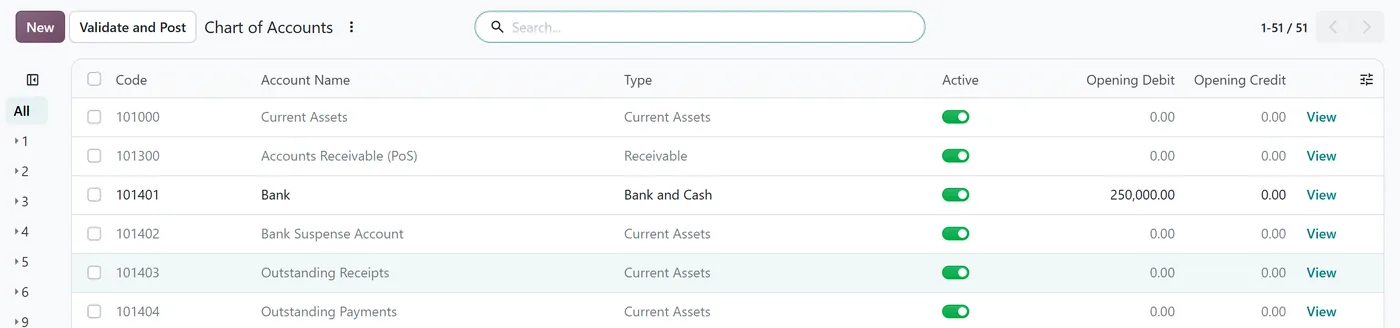
Three behaviours are worth knowing before you load a single number.
1. An imbalance is absorbed quietly. This is the one that worries us most. If your debits and credits do not match, Odoo does not stop you. It adds an Automatic Balancing Line to the company's current-year earnings account, whatever that account is called in your chart, and creates one called Profit or Loss Appropriation if you have none. The entry balances. Your data does not, and the difference now sits in equity where few people look.
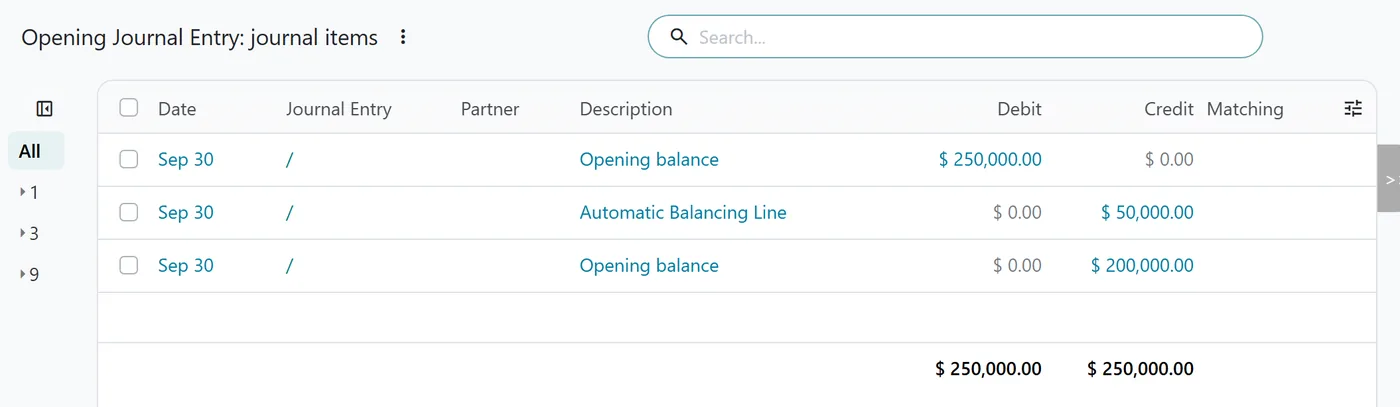
2. Opening lines have no customer or vendor. A receivable total typed into the chart is just a number on an account. It cannot be matched against anyone's payment.
3. Once posted, the opening entry is locked. Odoo refuses a new import until someone resets the entry to draft.
One more small trap: the opening date defaults to the day the company was set up, not your cutover date. Set it on purpose.
Why load open invoices one by one?
Because the payments come later. When a customer pays invoice 1043 in your second week on Odoo, your accountant needs invoice 1043 sitting open against that customer to match the payment. A single receivables total gives them nothing to match against.
The approach we recommend uses a temporary cutover clearing account:
- In the balance sheet load, put the receivable and payable balances on the clearing account instead of the usual control accounts.
- Import each open invoice and bill with its original number, date, due date and amount still owed. Point the income or expense side of each one at the same clearing account, so revenue is not counted twice.
- When both loads are done, the clearing account must be exactly zero. Anything left over is an invoice you missed or an ageing that does not agree.
If you invoice in foreign currencies, load the historical exchange rates for those invoice dates first. Odoo converts each invoice at the rate for its own date, so without them the amounts in your home currency will drift away from your old ageing, even when the foreign amounts are right.
How do you reconcile before posting?
We do not post the opening entry until every one of these passes, in this order:
- The cutover clearing account is zero.
- The trial balance matches the old system account by account. Matching totals prove very little, because two errors can cancel each other out.
- Aged receivables and payables match customer by customer and vendor by vendor.
- There is no Automatic Balancing Line on the current-year earnings account. Search the journal items for that label; if you find one, it is your unexplained difference.
- Each bank journal's first statement starts at the old closing balance.
- The lock date is set to the day before go-live. Odoo 20 offers a general lock date plus separate sales, purchase and hard lock dates. The hard lock date can never be moved back, so agree it with your finance lead first.
What goes wrong most often?
| Mistake | What it causes | How to avoid it |
|---|---|---|
| No agreed cutover moment | Invoices raised in the old system after the extract go missing | Freeze posting at a named date and time, then extract |
| Loading receivables and payables as totals | Payments cannot be matched and the ageing is empty | Load documents, not balances |
| Accepting the automatic balancing line | A difference buried in equity for months | Treat that line as a failed check |
| Re-importing after posting | The import is refused, and a rushed reset rewrites the opening position | Rehearse the full load on a copy first |
| Leaving the default opening date | An opening entry dated months away from the cutover | Set the date before the first import |
If we could keep only one control, it would be the rehearsal. Run the complete load on a copy of the production database at least once, reconcile it, and keep the workbook. The go-live load should feel like a repeat, not a first attempt.
FAQ
Can I change opening balances after go-live?
Yes, but only by resetting the opening journal entry to draft, because Odoo will not update it while it is posted. Do it before your first period close, note who approved the change, and run the reconciliation checks again afterwards.
Should I import historical paid invoices too?
Not for the accounts. Only open items are needed to match future payments. Paid history is handy for customer service and sales analysis, but it can be imported separately, or kept in an archive, without touching the ledger.
Which date should the opening entry carry?
The cutover date you agreed with finance, usually the first day of a period. Odoo defaults it to the date the company was set up, so change it before you load anything.
Why does my opening entry balance when my trial balance does not?
Because Odoo added an Automatic Balancing Line to the current-year earnings account to force the entry to balance. Find that line and trace the difference back to the account that caused it before you post.
Next step
The cutover is where an implementation earns, or loses, finance's trust. If you would like the plan, rehearsal and reconciliation run alongside your team, have a look at our Odoo implementation service. For the account structure itself, start with designing your Odoo chart of accounts, and for the rest of your data, see legacy data migration and how to validate a migration.


