 CODEerts
Accounting app for Odoo
AP Payment Security and Vendor Fraud Control
Risk based controls on the money going out of Odoo. Fourteen deterministic checks score every vendor payment, a maker checker gate stops the person who changed a bank account from trusting it, and no supplier payment can be released until it has been cleared. Governance lives on its own record, never on an accounting state.
Overview
AP Payment Security and Vendor Fraud Control.
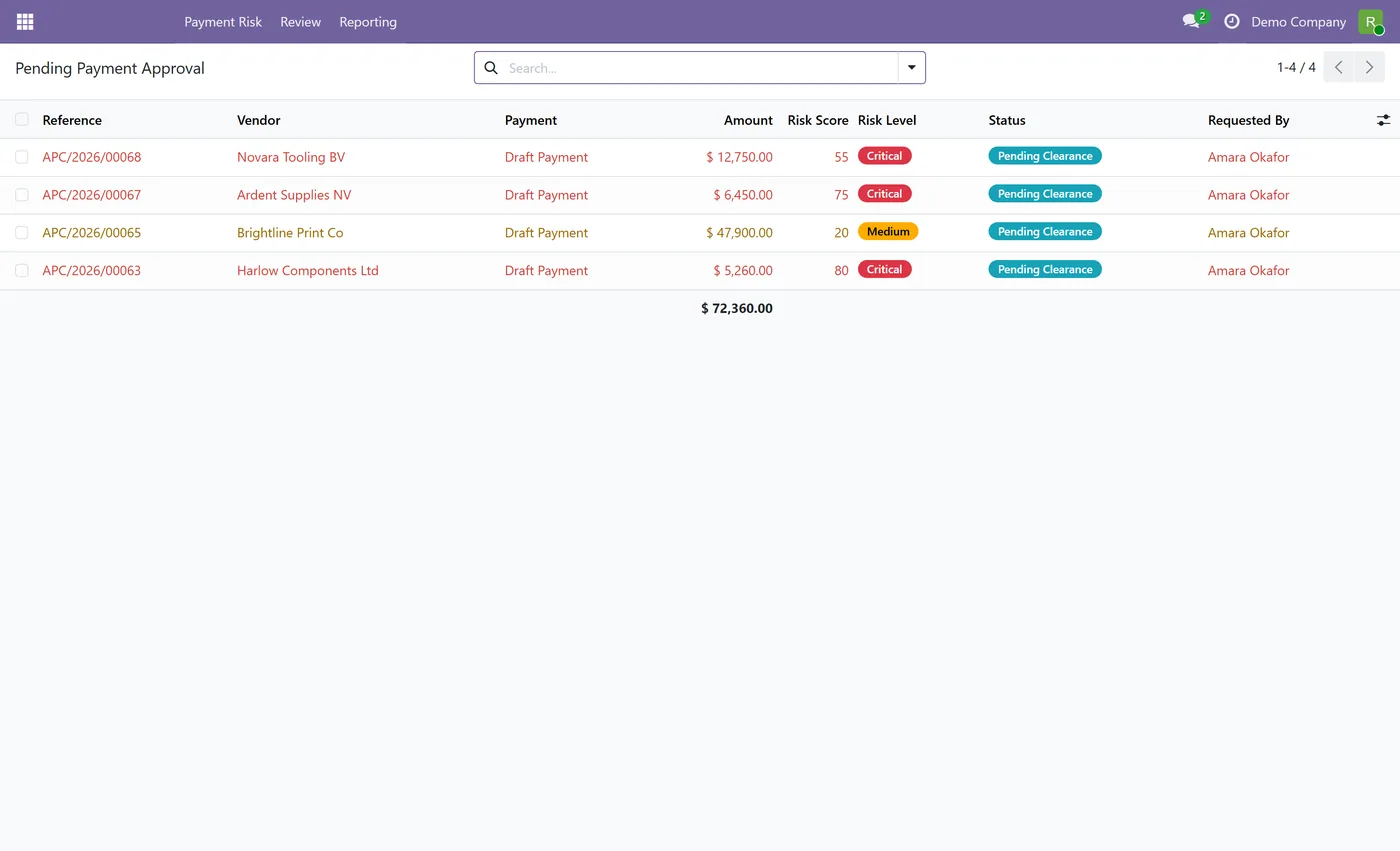
AP Payment Security and Vendor Fraud Control protects the whole risk chain that ends in a payment leaving your bank, from vendor master data to the vendor bill to the payment release itself. Fourteen deterministic controls run against each supplier payment and score it, covering a newly created or recently changed beneficiary bank account, a bank account and contact email that both changed inside a configurable window, a first ever payment to a supplier, an amount well outside that vendor's own history, duplicate bill references, a bill that does not match its purchase order, a beneficiary bank in a different country, an untrusted bank account, a payment above the approving user's threshold and more. Every rule is a plain, inspectable condition with a weight you control per company. There is no black box scoring and no invented fraud AI. Payments that trip nothing and score below your hold threshold clear themselves and interrupt nobody, so this is a risk based control rather than a blanket approval queue. Anything above the threshold, or anything tripping a blocking rule, is held until a second person clears it. Segregation of duties is enforced throughout. The user who created or edited a vendor bank account cannot be the one who marks it trusted for outgoing payments, and the person who requested a payment clearance, or who entered the bill, cannot approve it. Governance state is kept on a dedicated clearance record and never written onto account.move.state or account.payment.state, so a held payment is simply a payment that never left draft and your ledger is never put into an invented state. A blocked release creates no journal entry at all. Every decision, approval, hold, rejection and administrator override is written to an append only audit log that no user can edit or delete, including the administrator, and every override requires a written reason before it is accepted.
New to Odoo Accounting? Read our practical guide to how it works
How it works
Built around what you actually do.
Every screen below is the module running in Odoo, not a mockup.
01
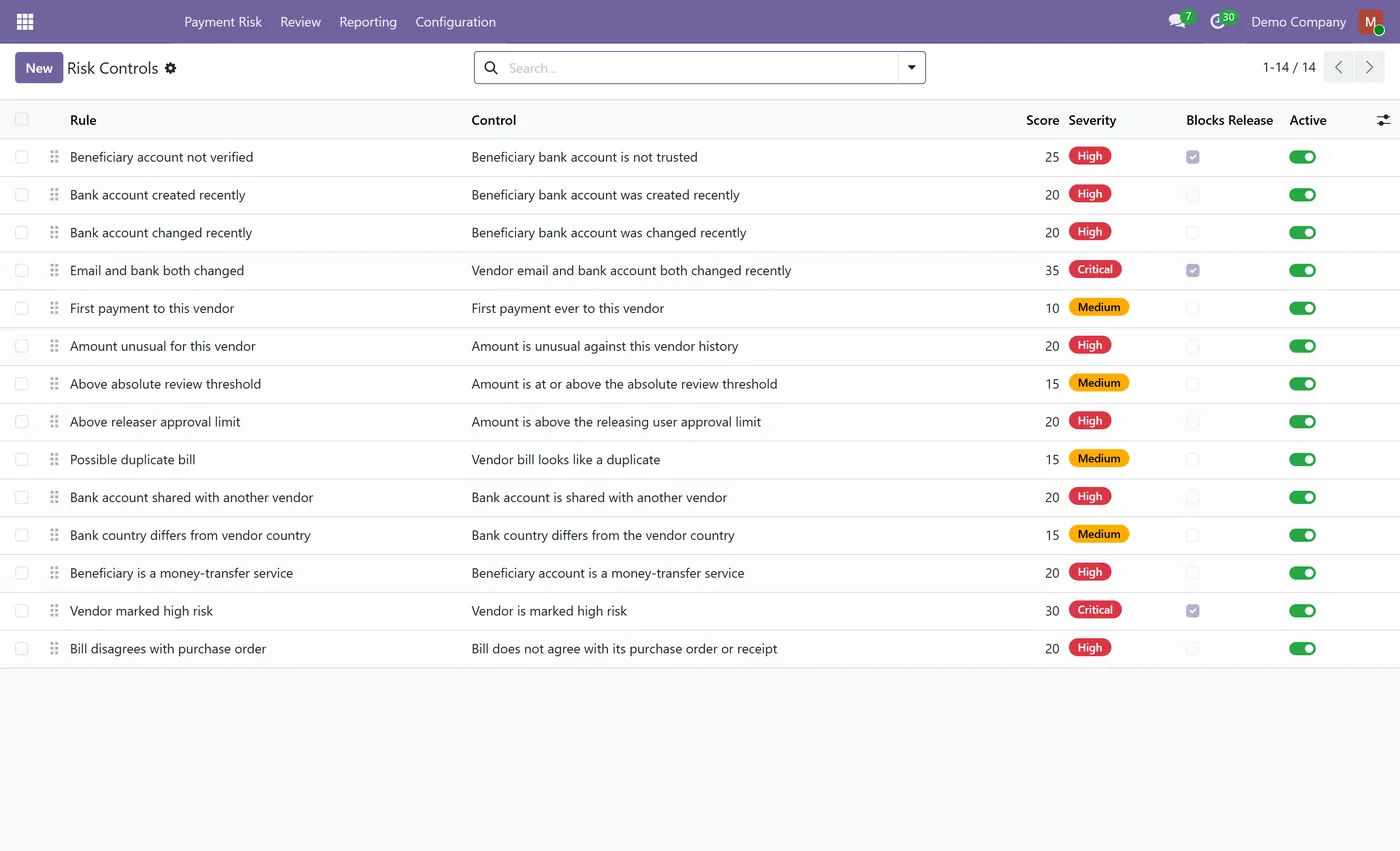
Fourteen deterministic risk controls score every outbound supplier payment, each one inspectable and weighted per company
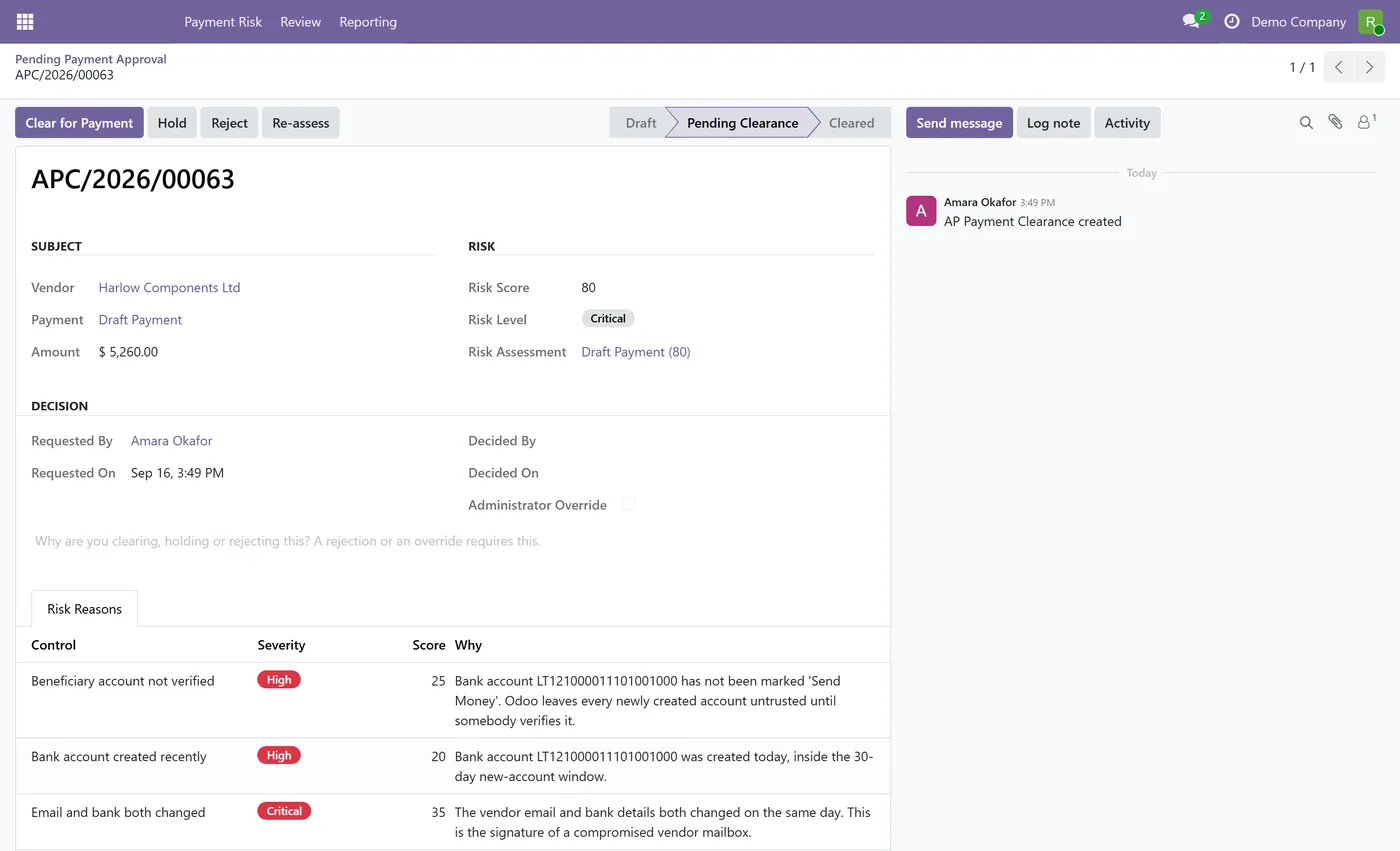
- Maker checker on vendor bank details, the user who created or changed an account cannot be the one who trusts it for outgoing payments
- Payment release gate, a supplier payment cannot reach in process or paid until its clearance is approved
- A blocked release creates no journal entry and leaves the payment in draft, so accounting is never left half done
- Detects newly created and recently changed beneficiary bank accounts, within a period you configure
- Flags a bank account and a contact email that both changed inside the same window
02
Flags the first ever payment to a supplier and amounts far outside that vendor's own payment history
- Duplicate bill reference detection and purchase order to bill mismatch checks
- Flags a beneficiary bank in a different country from the vendor
- Payment amount above the approving user's own threshold requires a higher approver
- Segregation of duties, the requester of a clearance and the creator of the bill cannot approve it
- Governance state lives on its own clearance record, never on an accounting state
03
Append only audit log that cannot be edited or deleted by any user, including the administrator
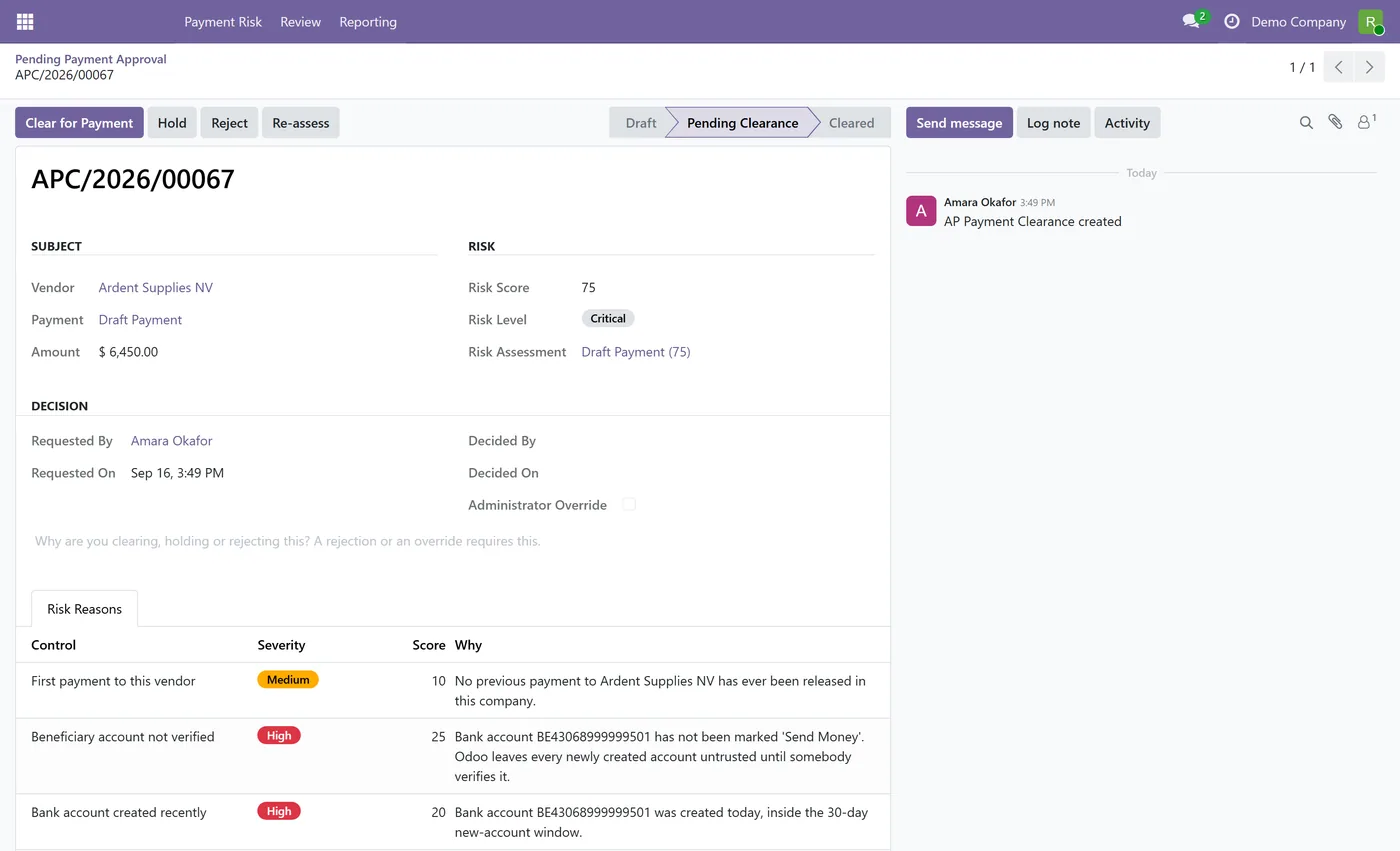
- Administrator override is allowed but never silent, it requires a written reason and is logged as critical
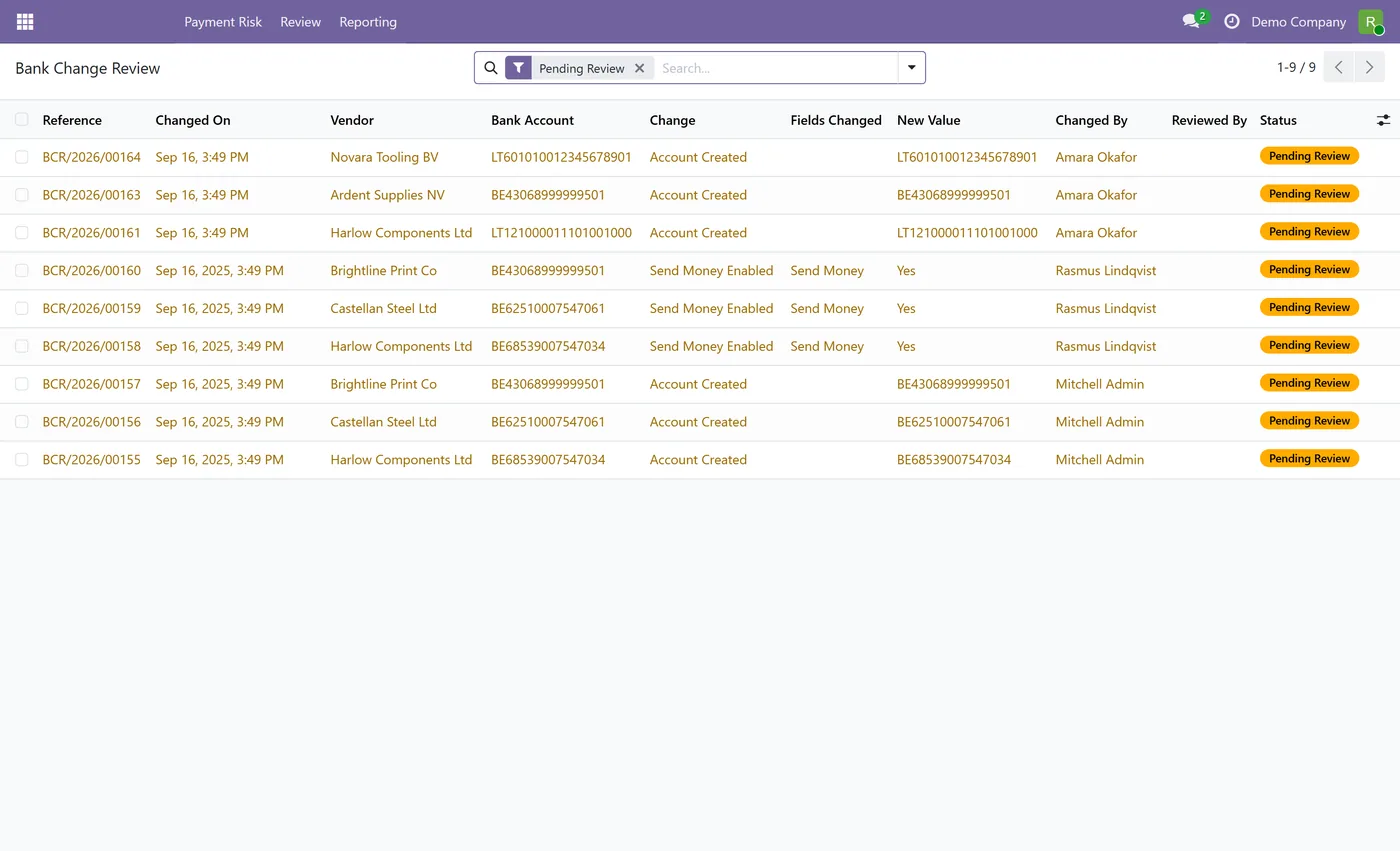
- Bank Change Review queue with the full change history of every vendor bank account
- Risk reasons are visible from the payment, the bill and the vendor, with smart buttons and badges
- Multi company isolation, including branch companies, with no cross company bank details
- Every control can be switched off per company, and the hold threshold is yours to set
Every screen
The whole module, screen by screen.
The captures the walkthrough above did not use, in the order you meet them in the product.
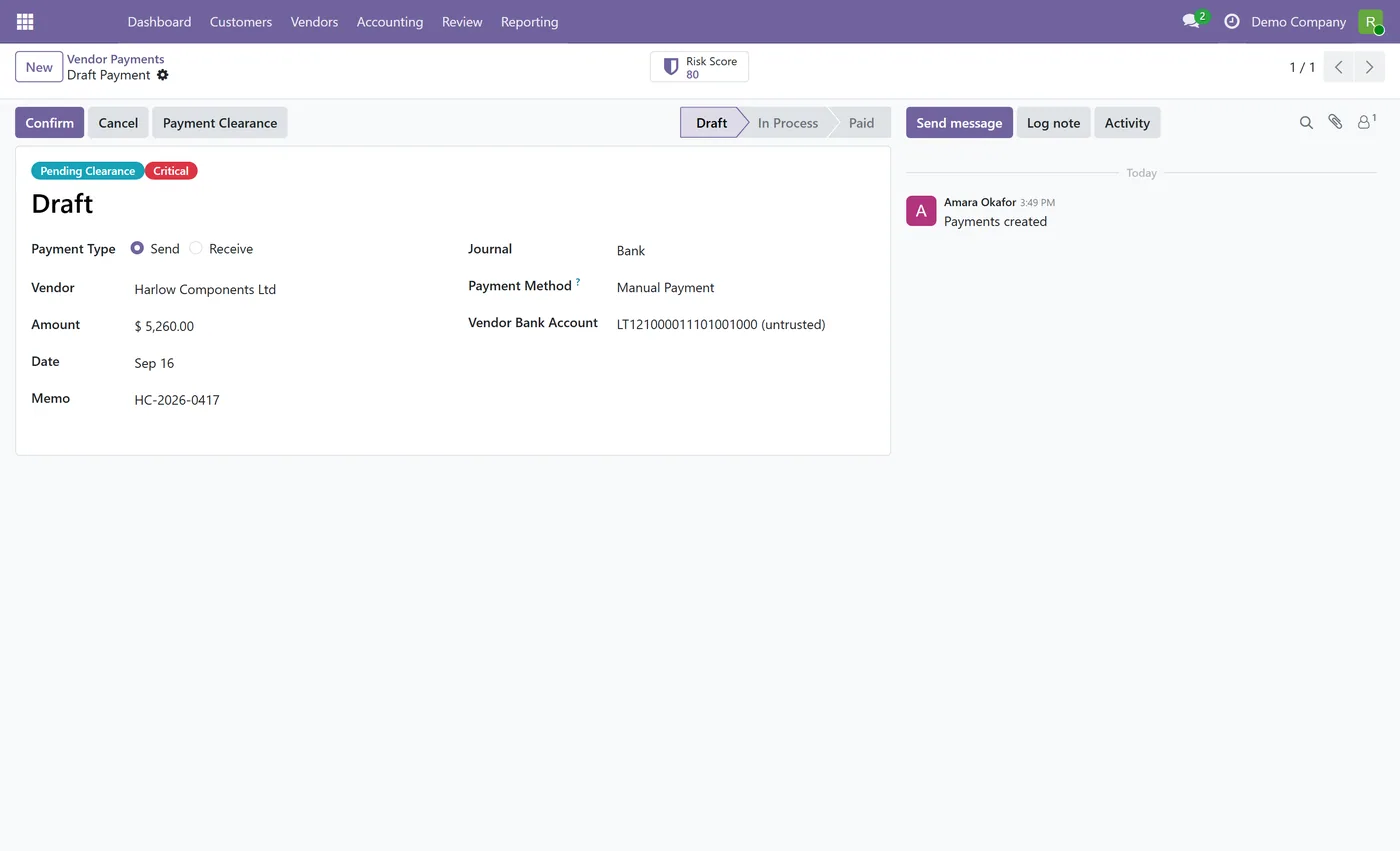
AP Payment Security and Vendor Fraud Control puts risk based controls on the money leaving your Odoo database. Most payment fraud does not happen at the payment, it happens earlier, when a beneficiary bank account is quietly changed or a plausible bill arrives from a supplier nobody has paid before. So this module covers the whole chain, vendor master data, the vendor bill, and the release of the payment itself, instead of bolting an approval step onto the end.
What it does
Every outbound supplier payment is scored against fourteen deterministic controls before it is allowed to leave draft. The controls look at things that are genuinely knowable from your own data: whether the beneficiary bank account was created or changed recently, whether the bank account and the contact email both changed inside the same window, whether this is the first payment this supplier has ever received, whether the amount sits far outside that vendor's own history, whether the bill reference is a duplicate, whether the bill matches its purchase order, whether the beneficiary bank is in a different country, and whether the amount is above the approving user's threshold.
Each control is a plain condition with a weight you set per company, and each can be switched off. A payment that trips nothing and scores below your hold threshold clears itself and interrupts nobody. Anything above it, or anything tripping a blocking control, is held until a second person clears it. That is the difference between a risk based control and a blanket approval queue.
Deterministic by design
There is no fraud AI here, and that is a deliberate product decision rather than a missing feature. Every score in this module comes from a rule you can open, read, re-weight or disable, evaluated against records already in your database. Nothing is sent anywhere, no model is trained on your payments, and no number appears that you cannot trace to a named control. A risk score you cannot explain to an auditor, or to the supplier you just refused to pay, is not a control.
Accounting safety
A security module that damages the ledger it is protecting has failed. Three design rules keep that from happening. Governance state lives on its own clearance record, so a held payment is just a payment that never left draft and a held bill is an ordinary posted bill. The release check runs before Odoo generates the journal entry, so a blocked payment leaves no entry, no line and no reconciliation behind. And the outcome is binary, either the payment proceeds through standard Odoo untouched, or it is refused and nothing at all has happened.
Who it's for
Finance teams who pay suppliers from Odoo and need the controls an auditor asks about: who can change a beneficiary bank account, who signed off the payment, and whether the same person could have done both. It suits companies where several people can register payments, organisations carrying an audit or insurance requirement for segregation of duties on outgoing payments, and any finance function that has seen a supplier bank change request arrive by email and wants a second pair of eyes on it by default.
Related
Vendor Bill Payment Approval is the lightweight, free sibling of this module. It puts a single group controlled Approved badge on overdue vendor bills and never touches accounting. If all you need is a visible sign off marker on overdue bills, start there. This module is for the case where the control has to actually stop the payment, cover the bank details behind it, and leave an audit trail.
Questions
About AP Payment Security and Vendor Fraud Control.
Does this module use AI to detect fraud?
No. Every control is a deterministic rule, a plain condition you can read and a weight you can change, evaluated against data already in your database. There is no machine learning model, no external scoring service and no black box. That is deliberate, a control you cannot explain to an auditor is not a control.
Can a blocked payment corrupt my accounting?
No. The gate runs before Odoo generates the journal entry for a payment, so a blocked release leaves the payment in draft with no entry created at all. Governance state is kept on a separate clearance record and is never written onto the payment or bill state, so your ledger is never put into a state Odoo did not create.
How is this different from a multi level approval module?
An approval module queues everything and asks a human every time. This scores each payment against fourteen risk controls and only asks for a human when the risk warrants one, so routine payments on a verified bank account pass straight through. It also covers the risk chain before the payment, the vendor bank account and the bill, which an approval workflow on its own does not.
What stops the person who changed a vendor bank account from approving it?
The module records who created or last modified each vendor bank account, and blocks that same user from setting it as trusted for outgoing payments. A different person has to complete the change. This extends Odoo's own Send Money trust flag rather than replacing it, and it can be switched off per company if your process does not need it.
Can an administrator still force a payment through?
Yes, and that is intentional, a control with no escape hatch gets disabled entirely. An AP Security Manager can override a held clearance, but the override requires a written reason before it is accepted, marks the record as overridden, and is written to the append only audit log at critical severity with the user and the reason.
Does it work with multiple companies and branches?
Yes. Every control record is scoped to its company and is not visible from another company. Branch companies can see their parent company's records, which is the behaviour Odoo itself uses. Bank details are never shared across companies, and each company gets its own set of risk rules and its own thresholds when it is created.
Do I have to use all fourteen controls?
No. Every control has an on and off switch and its own weight, set per company, and the score at which a payment is held is yours to choose. You can start with the bank change controls alone and add more as you go.
Which Odoo versions does this module support?
Use the version selector at the top of this page to pick your Odoo release. Each branch is published as its own listing for that exact version.
On the Odoo Store
Get AP Payment Security and Vendor Fraud Control on the Odoo Store.
Pick your Odoo version and install it in a click, with free updates and real support behind it.
Get it on the Odoo StoreReady to make Odoo work the way your business does?
Book a free call CODEerts
CODEerts is a team of certified Odoo partners and full-stack engineers. We implement, customise and support Odoo ERP, then build the software around it.

