

Odoo 20 ships a rebuilt chart of accounts for Pakistan: new 7-digit codes, a proper account hierarchy, and accounts for further tax, sales tax withholding, income tax withholding and the POS service fee that the old chart simply did not have. If you start a new company on Odoo 20, you get all of it. If you upgrade an existing database from Odoo 19, you get none of it automatically, and nothing on screen tells you so.
Applies to: Odoo 20 Community and Enterprise with Invoicing or Accounting, companies using the Pakistan chart of accounts.
What changed in the Pakistan chart?
In short, almost everything except the idea behind it.
| Odoo 19 | Odoo 20 | |
|---|---|---|
| Postable accounts | 123 | 153 |
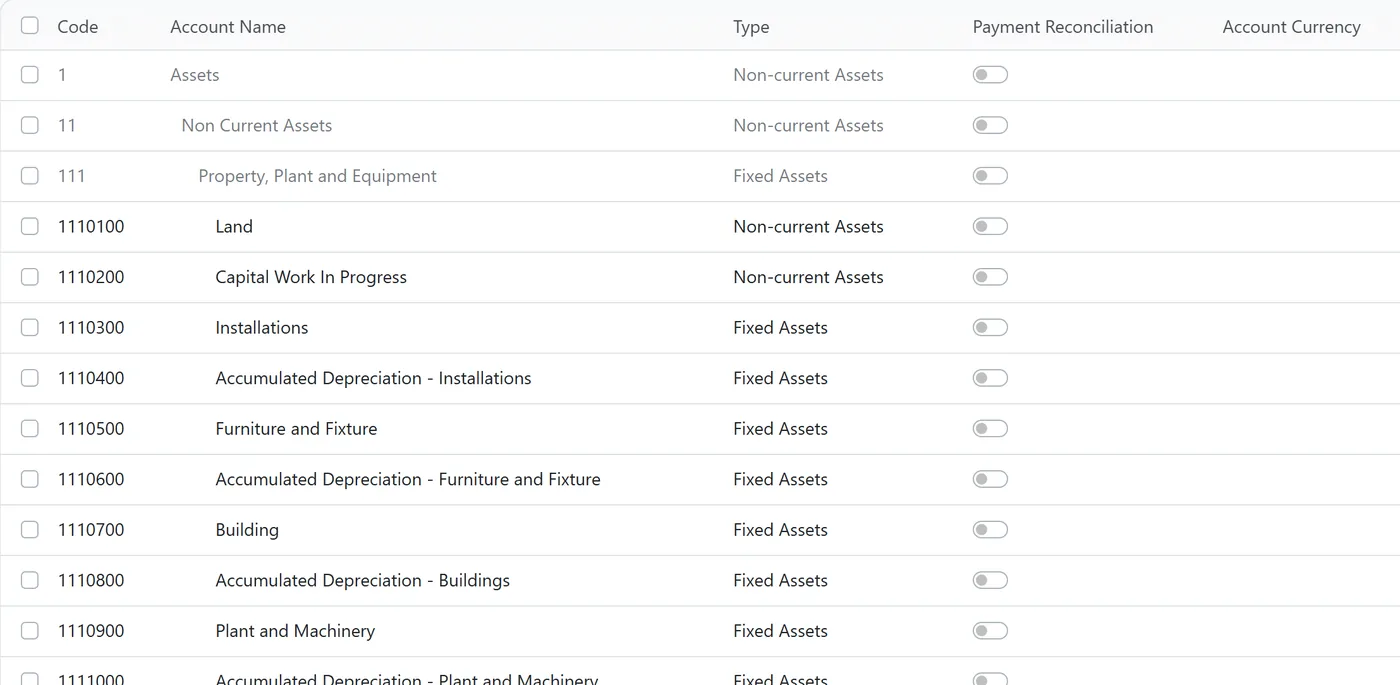
| Grouping | Separate account groups | A tree of parent accounts (Assets > Non Current Assets > Property, Plant and Equipment) |
| Codes | e.g. Building 1111001 | e.g. Building 1110700 |
| Codes reused from Odoo 19 | None |
The useful additions, grouped the way a finance team would read them:
- Fixed assets: Capital Work in Progress, IT Equipment, and a separate accumulated depreciation account for each asset class (buildings, plant and machinery, furniture, installations, tools, IT equipment, vehicles, vehicle accessories), plus accumulated amortization for software.
- Sales tax: Further Tax Payable, Received and Refundable; Sales Withholding Tax Payable, Refundable and Advance.
- Income tax: Income Tax Withholding Payable, Refundable and Advance, and an Income Tax Liability account.
- Retail: POS Receivable and a Point of Sales Rs.1 Fee liability for the FBR service fee Tier-1 retailers collect on each receipt.
- Everyday housekeeping: export sales, deferred revenue and expense, exchange gains and losses split into two accounts, cash difference gain and loss, outstanding receipts and payments.
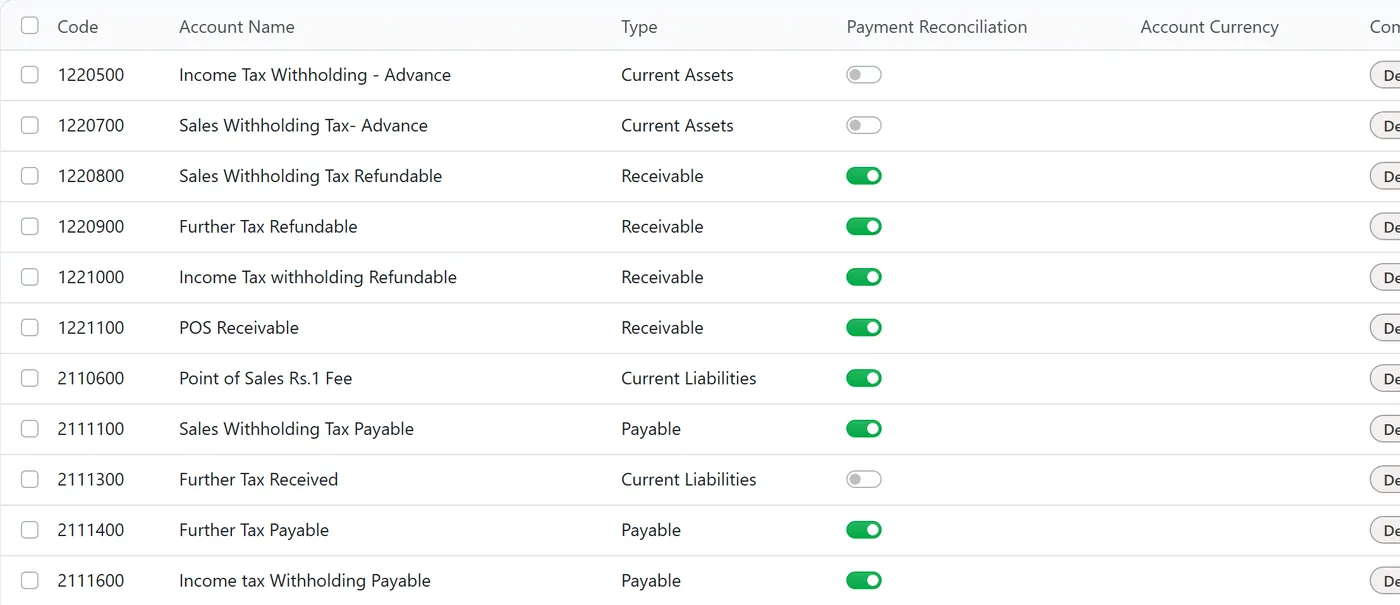
Nine accounts also changed type. The ones that matter most day to day: Salaries Payable and Mark-up Accrued are now ordinary current liabilities instead of the Payable type, which in Odoo forces reconciliation against a partner; Cost of Goods Sold and Carriage Inwards moved from expenses to cost of revenue, which changes where they sit in your profit and loss; and Land is no longer typed as a fixed asset.
Why doesn't an upgraded database get the new chart?
Because Odoo protects your existing accounts on purpose. When the Pakistan localization is updated, Odoo reloads the chart in a careful mode: it looks for each template account in your database by its code, touches only the tax tags of accounts it finds, and does not create the ones it cannot find.
Every code changed between Odoo 19 and 20, so the reload finds nothing, changes nothing and adds nothing. Your upgraded database keeps its Odoo 19 chart, with the old codes, the old types and without the new tax accounts. No error, no warning.
We think that is the right default, since silently rewriting a ledger with years of history would be far worse. But it means the new chart is something you adopt deliberately, not something you receive.
Should you move an upgraded database to the new structure?
Not by default. Ask what you are actually missing.
| Your situation | Our recommendation |
|---|---|
| You charge further tax, or suffer sales tax or income tax withholding, and book it to a catch-all account today | Add the specific accounts you need, with your own codes, and point the taxes at them |
| You run POS as a Tier-1 retailer | Add a liability account for the Rs 1 service fee, so it never sits in revenue |
| Salaries Payable is typed Payable | Review it with your accountant; it is the type change with the most day-to-day effect |
| You want the new numbering for reporting consistency across companies | Plan it as a small project at a period boundary, never mid-month |
| None of the above | Keep your chart. A different code on a sound account adds nothing |
If you do renumber, work from a mapping sheet (old code, old name, new code, new name, new type), do it on a copy first, and print the trial balance before and after. Renaming and renumbering an account keeps its history; the totals must come out identical. If they do not, stop and find out why before you touch production.
Limits and what to check
- Taxes follow accounts. After adding tax accounts, open each Pakistan tax you use and check where its tax amount posts on invoices and on refunds. A new account nobody posts to fixes nothing.
- Multi-company databases. Each company has its own chart. A new company created on Odoo 20 gets the new chart, while its upgraded sister company keeps the old one, and consolidated reports then compare different codes. Decide on one structure before you add a company.
- Your opening balances. If you are starting a new company on Odoo 20, the new chart changes where your opening balances land. Map them to the new codes before the cutover, not after.
FAQ
Does upgrading to Odoo 20 change my Pakistan chart of accounts?
No. The localization update only touches accounts it can match by code, and every code changed in Odoo 20, so an upgraded database keeps its Odoo 19 chart unchanged. New accounts have to be added deliberately.
Where are account groups in Odoo 20?
The Pakistan chart now uses parent accounts instead of separate account groups. Assets, Non Current Assets and Property, Plant and Equipment are accounts in their own right, with the postable accounts nested beneath them.
Which account should the FBR POS Rs 1 fee go to?
The Odoo 20 chart has a Point of Sales Rs.1 Fee liability account for it, because the fee is collected from customers and paid over to FBR. On an upgraded database, create a similar liability account rather than letting the fee sit in revenue.
Is it safe to renumber accounts that already have entries?
Changing an account's code or name keeps its history, and your trial balance totals should not move. Do it on a copy first, compare the trial balance before and after, and change the types only with your accountant.
Next step
A chart of accounts is easier to get right before the first entry than after the thousandth. If you are planning an upgrade to Odoo 20, our Odoo migration and upgrade service covers the chart review as part of the plan. For the principles behind a good structure, read designing your Odoo chart of accounts, and if you are starting fresh, our guide to the finance cutover shows how to load opening balances into it.


