

User acceptance testing is the point where the people who will use Odoo every day confirm that it does their job. Not that it works in general, but that a buyer can raise and confirm a purchase order the way your company does it, that the warehouse can receive a partial delivery, and that finance can close a month.
Most UAT problems we see are not about Odoo at all. The test database sends real emails. The tests are run by the consultant, logged in as administrator. The test script says "check that sales works". And nobody agreed in advance what "passed" means. This guide covers how to avoid all four.
Applies to: any recent Odoo version. Screens are from Odoo 20 Enterprise; the database manager and user settings work the same way in Community.
What is UAT, and what is it not?
Your implementation partner tests that each configured feature behaves as designed. That is system testing, and it should be finished before UAT starts. UAT is different in three ways:
- It is run by your users, not by the partner.
- It follows your processes end to end, from a customer order to cash in the bank, not one screen at a time.
- It ends in a decision. Either the business accepts the system for go-live, or it lists what must change first.
If UAT becomes the place where configuration is still being built, it turns into an endless loop. Go back to your requirements and fit-gap decisions: every test case should trace back to one of them.
Which database should UAT run on?
A copy of your real configuration, with realistic data, that cannot reach the outside world. In the Odoo database manager, both Duplicate and Restore have a Neutralize checkbox. Tick it for every test copy.
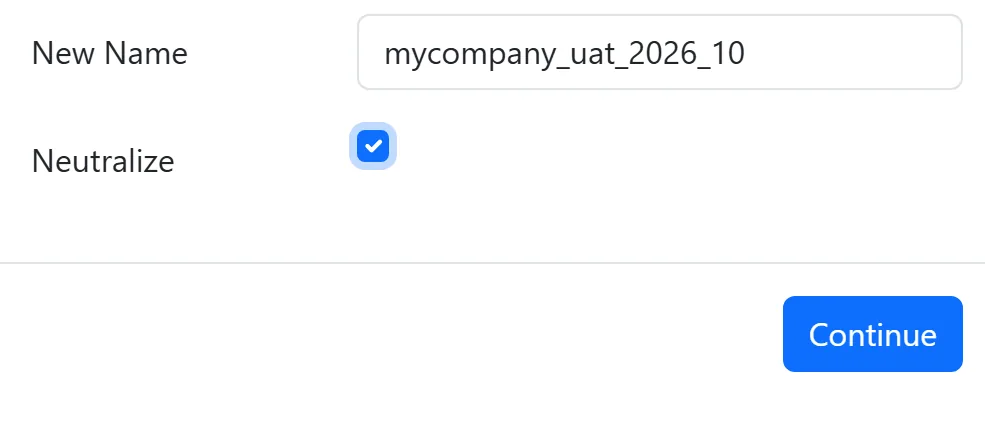
A neutralized copy:
- switches off the outgoing mail servers, clears their passwords, and adds a dummy server so emails cannot go out;
- switches off incoming mail fetching;
- deactivates scheduled actions (except the database cleanup job);
- disables webhooks to other systems;
- takes payment providers out of live mode;
- disables in-app purchase service tokens.
That protection has a side effect testers need to know about: anything that normally runs on a schedule will not run by itself. Reminders, recurring invoices, automatic reordering and similar jobs have to be started by hand. An administrator can open the job under Settings > Technical > Scheduled Actions (with developer mode on) and use Run Manually. Write that into the test case, otherwise someone will fail the test because nothing happened overnight.
Who should test, and logged in as whom?
Each tester logs in as themselves, with the access rights they will have on go-live day. On the user form in Odoo 20, the Role is Light, User or Administrator, and each app then has its own access level.
Testing as administrator hides the two most expensive kinds of problem:
- Access errors. An administrator can open almost everything, so a missing access right only appears on go-live morning, for the real user.
- Approval rules that silently do nothing. For example, with purchase order approval switched on, an order above the limit goes to To Approve. But if the person confirming is a purchase administrator, Odoo approves it straight away. Tested as an administrator, the approval step looks like it never triggers.
Create the test users with the real role for each person, or better, give each tester their own login on the test copy.
What does a good test case look like?
One process, one role, clear data, and an expected result that anyone can check without asking the consultant. We use these columns:
| Column | What goes in it |
|---|---|
| ID | Short and unique, for example P2P-07 |
| Process | The business process, in your words: "Buy stock items from a local supplier" |
| Role | Which user runs it: "Buyer" |
| Preconditions | What must exist first: vendor, product, price list |
| Steps | Numbered actions, one per line |
| Test data | The exact vendor, product, quantity and amount to use |
| Expected result | What should happen, including documents, statuses and amounts |
| Actual result | What did happen |
| Status | Pass, Fail or Blocked |
| Defect reference | Link to the defect log entry if it failed |
Here is one written out, for a company that uses purchase order approval:
| Field | Example |
|---|---|
| ID | P2P-07 |
| Process | Buyer orders above the approval limit |
| Role | Buyer (Purchase: User) |
| Preconditions | Purchase Order Approval switched on with your agreed minimum amount |
| Steps | 1. Create an RFQ for the test vendor. 2. Add lines so the total is above the limit. 3. Confirm the order. |
| Expected result | Order status is To Approve. The buyer cannot approve it. The purchase manager sees it waiting and can approve it. |
Notice what makes it testable: a named role, exact data, and an expected result that includes what should not be possible.
Which scenarios should UAT cover?
Aim for coverage of how your company actually works, not a count of test cases.
- End-to-end flows. Order to cash, procure to pay, stock receipt to delivery, and record to report. Each one run from the first document to the last accounting entry.
- Exceptions. Partial deliveries, returns, credit notes, a cancelled order, an overpayment, a price change in the middle of an order. These are where real days go wrong.
- Period-end tasks. Reconciliation, closing checks, and the reports management reads each month.
- Documents customers and vendors will see. Invoice layout, quotation, delivery slip. Print them and read them.
- Negative tests. A salesperson should not be able to see a colleague's pipeline if that is your rule. A warehouse user should not be able to post a journal entry. A buyer should not be able to approve their own large order. These are the tests that find security gaps before an auditor does.
How do you run UAT without chaos?
Plan cycles. A first cycle finds most issues. Fixes go in. A second cycle retests the failures and reruns the most important end-to-end flows, because fixes can break neighbours.
Keep one defect log. Each defect gets an ID, the test case it came from, steps to reproduce, a screenshot, a severity and an owner. Agree the severity scale before testing starts:
| Severity | Meaning | Go-live impact |
|---|---|---|
| Critical | A core process cannot be completed, or data is wrong | Blocks go-live |
| High | Process works only with a workaround that users would not reliably follow | Blocks go-live unless the business accepts the workaround in writing |
| Medium | Wrong but manageable, for example a report column | Fix date agreed, can go live |
| Low | Cosmetic, wording, layout | Backlog |
Separate defects from change requests. "The system does not do what we agreed" is a defect. "Now that I see it, I want it to work differently" is a change request. Both are valid, but they are paid for and scheduled differently, and mixing them is how UAT loses a month.
What does sign-off mean?
Sign-off is a short document, signed by the process owners, that says: these test cases were run, these passed, these defects remain open with these agreed dates, and we accept the system for go-live. It is the trigger for the cutover plan, not a formality at the end.
FAQ
How long should UAT take?
Long enough for every critical process to pass at least once after the last fix. The length depends on the number of processes and how available your testers are, so plan tester time as carefully as the calendar. A UAT with testers who can spare an hour a day will take much longer than the same scope with people freed up.
Can we run UAT on the live database?
No. Test on a neutralized copy. On a live database, a test invoice is a real invoice, a test email reaches a real customer, and a test payment can be real money.
Who should write the test cases?
The partner can draft them from the requirements, but the process owners must review and own them. Users know the exceptions that never made it into a workshop.
What if a test fails because of bad test data?
Mark it Blocked, not Failed, fix the data, and rerun it. Keep the distinction, because a list full of false failures hides the real ones.
Next step
If you are preparing for UAT on an Odoo project, our Odoo implementation team can prepare the test copy, draft test cases from your requirements and run the defect triage with your process owners. For version upgrades, see our upgrade testing strategy.


