

Trade customers want to reorder at 11 at night without calling anyone. Sales teams want to keep control over who sees which price. Both are reasonable, and a B2B portal in Odoo can satisfy both, as long as a few settings are chosen on purpose rather than left at their defaults.
Applies to: Odoo 20, Website, eCommerce and Sales. Screens are from Odoo 20 with demo data.
What makes B2B ordering different from a public shop?
A public shop shows one price to everyone. A trade portal usually needs:
- Access control. Only approved accounts should browse the catalog or order.
- Customer-specific prices. Distributors, dealers and key accounts each have their own terms.
- Tax-exclusive display. Business buyers think in net prices.
- Documents on demand. Quotations, orders and invoices in one place, without emailing the account manager.
How do you restrict the shop to approved customers?
In the website settings, the eCommerce section has an Ecommerce Access option with two choices: All users or Logged in users.
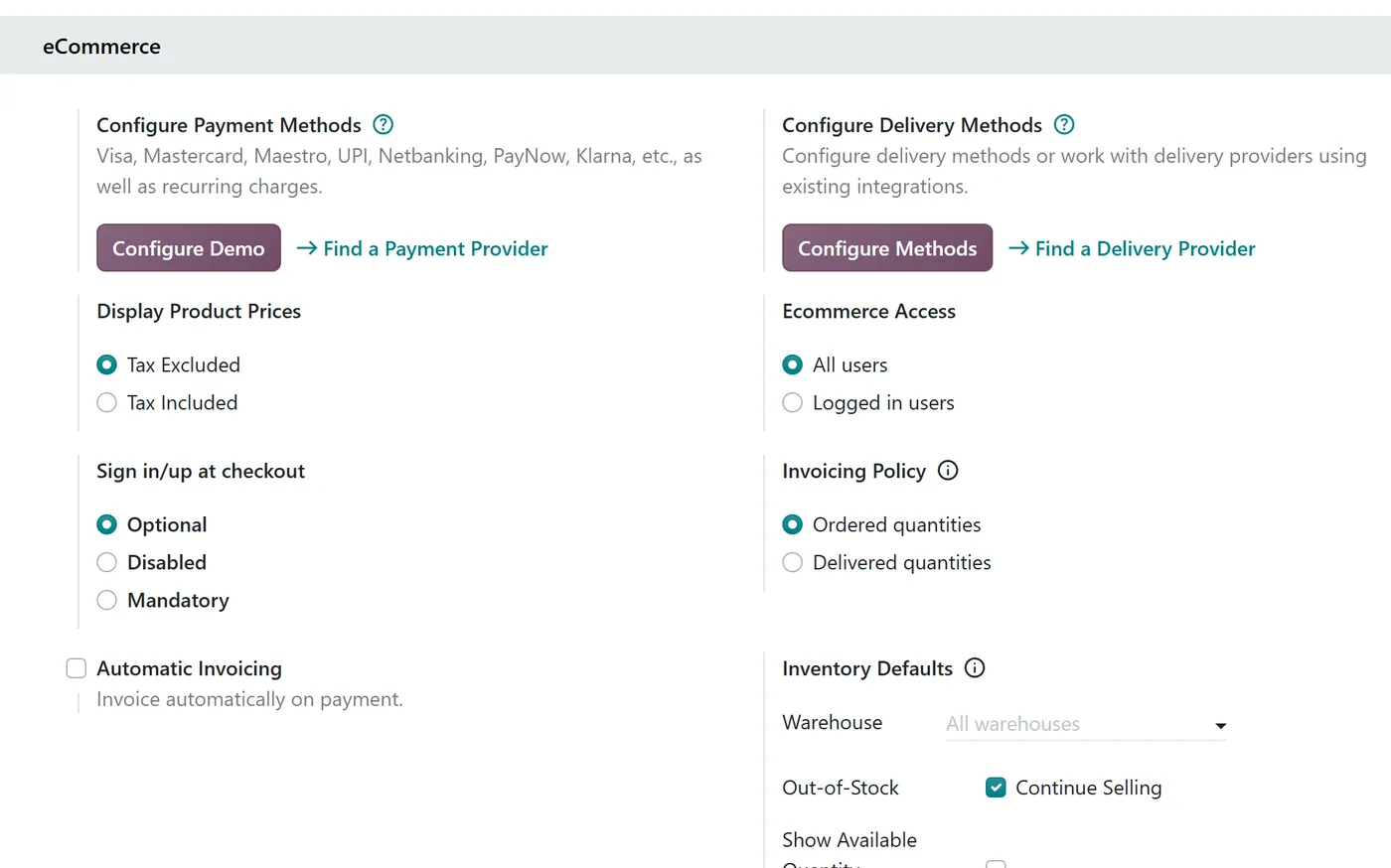
Choose Logged in users for a trade-only portal. Then only customers you have given portal access can shop. Next to it:
- Display Product Prices: Tax Excluded suits business buyers.
- Sign in/up at checkout: Mandatory ensures every order is tied to a known account.
How do customers see their own prices?
Give each trade customer a pricelist on their contact. When that customer is logged in and the pricelist is available on the website, the shop shows prices from it.
That means one catalog can serve several customer tiers:
| Customer type | Pricelist idea |
|---|---|
| Distributor | Deepest discount, minimum quantities |
| Dealer | Standard trade discount |
| Key account | Negotiated prices on specific products |
For products you never price online, such as configured machinery, there is an option to show Contact Us instead of the cart button for zero-priced products or specific categories. The customer can still find the product, but the conversation goes to your sales team.
What does the customer portal give them?
Beyond the shop, the portal holds the customer's quotations, orders and invoices. From an order they can download the document and use Order Again to repeat it, which is often the single most used feature in a trade portal.
If you switch on online signature and online payment in Sales settings, customers can also accept a quotation and pay without printing anything.
Where do you keep commercial control?
Self-service does not mean giving up judgment. Useful guardrails:
- Who gets portal access. Grant it deliberately, account by account.
- Which pricelist each account uses. Review it at contract renewal.
- What stays offline. Products that need a conversation stay on "Contact Us".
- Payment. Decide which accounts may order without paying online, and how the checkout handles them.
FAQ
Can a B2B portal and a public shop run on the same database?
Yes. Odoo supports more than one website, and each has its own settings, so a trade portal and a public shop can run side by side.
What happens if a customer's pricelist is not available on the website?
The shop falls back to a pricelist that is available on that website. Check website availability when you create trade pricelists.
Do customers need a separate login for the portal and the shop?
No. The same portal account signs them in to both.
Next step
Planning a trade portal? Our implementation team can design access, pricelists and ordering rules around your customer tiers. For more background, see our eCommerce guide and Sales guide.


