

Consulting firms, agencies and engineering practices sell time. The margin question is always the same: did the hours we billed cover the hours we spent, at what those people actually cost us? Most firms answer it once a quarter in a spreadsheet. Odoo can answer it from the records you already keep, if the service products and costs are set up with that goal in mind.
Applies to: Odoo 20, Sales, Project and Timesheets. Screens are from Odoo 20 with demo data.
Where does margin leak in a services business?
Usually in three gaps:
- Sold versus planned. The quote promised 40 hours, the project plan assumed 30, and nobody compared them.
- Logged versus billed. Time was logged, but on the wrong task, or never reached an invoice.
- Billed versus cost. Revenue is known; the real cost of a senior consultant's hour is a guess.
Odoo closes each gap by connecting the sales order, the project and the timesheet, so every hour has a price and a cost attached.
How do you sell time so it bills itself?
It starts with the service product. Set the product type to Service, then choose how it creates work and how it invoices.
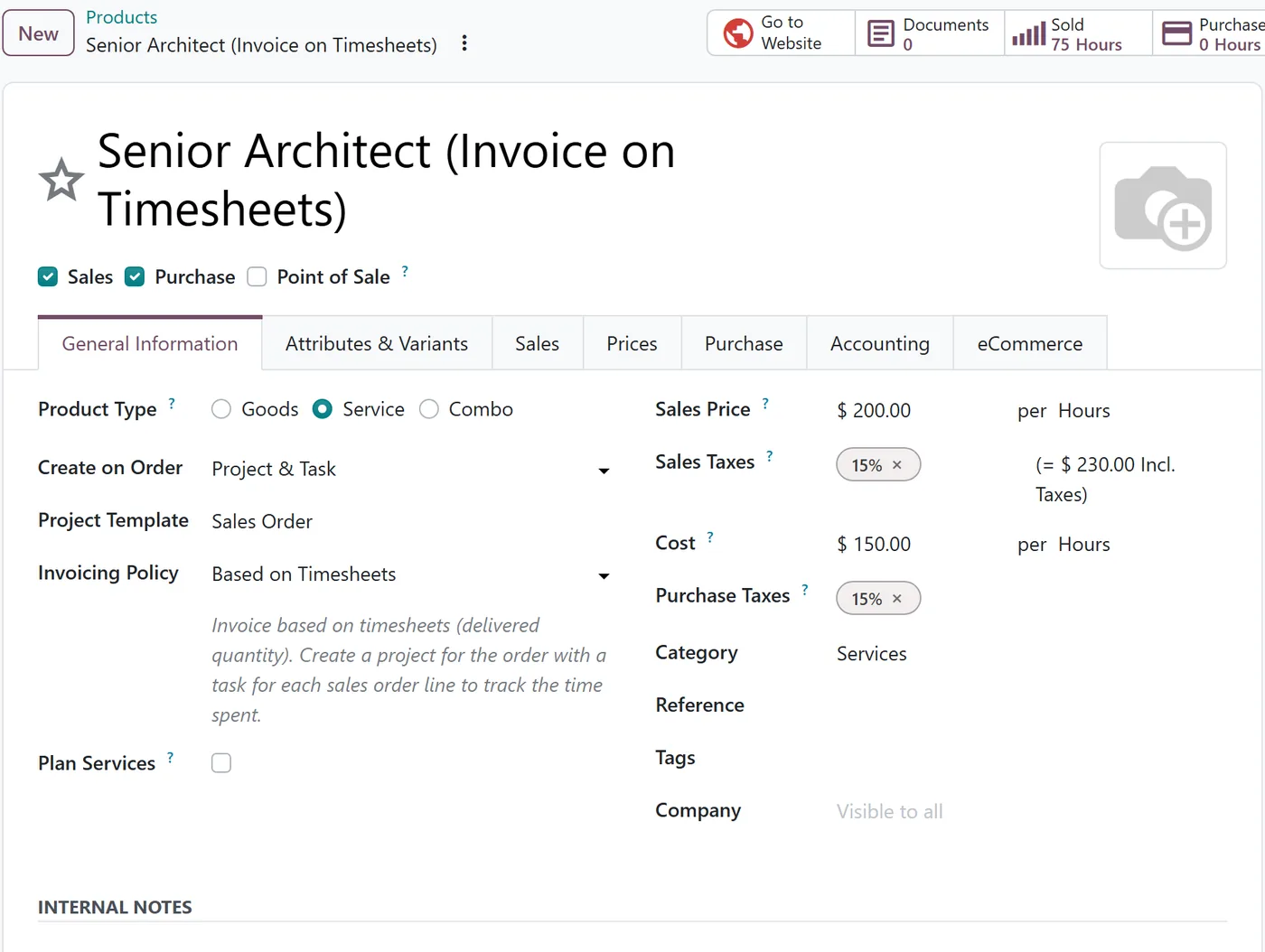
Create on Order: Project & Task means confirming the sales order creates the project and a task for the line, so the team logs time against the thing the client bought.
Invoicing Policy decides what gets billed:
| Policy | Bills | Typical use |
|---|---|---|
| Prepaid/Fixed Price | The ordered quantity | Fixed-fee packages, retainers paid up front |
| Based on Timesheets | Hours logged on the task | Time and materials work |
| Based on Milestones | Milestones marked as reached | Phased projects |
| Based on Delivery (Manual) | A quantity you set by hand | Work measured outside Odoo |
With Based on Timesheets, the order line's delivered quantity comes from the time logged. Invoicing then picks up exactly those hours, so "logged but not billed" becomes visible on the order itself.
How does Odoo know what an hour costs?
Each employee has an Hourly Cost on their HR record. When someone logs a timesheet, Odoo values it at hours multiplied by that cost and stores the result on the project's analytic account.
That is the piece most firms skip. Without it, timesheets measure effort but not money. With it, the project carries both revenue from invoices and cost from time, in the same place.
Keep the hourly cost realistic: salary plus the overheads you want each project to carry. Review it when pay changes, because timesheets are valued at the cost at the time they are recorded.
What does a margin review look like?
Once products, projects and costs are connected, a project review stops being a data-gathering exercise:
- Open the sales order and check hours ordered against hours delivered.
- Open the project and review logged time by task and by person.
- Compare the project's revenue with its timesheet cost on its analytic account.
The conversation moves from "what happened?" to "why did phase two take twice as long?", which is the one worth having.
Common setup mistakes
- One generic "Consulting" product for everything. Separate products by role or rate so margin can be read by type of work.
- Hourly costs left empty. Timesheets then carry no cost at all, and every project looks profitable.
- Time logged on internal projects by habit. Make the client task the default so billable hours are not lost.
FAQ
Can one sales order mix fixed-price and time-based work?
Yes. The policy belongs to each product, so a fixed-fee discovery phase and time-based delivery can sit on the same order.
Can people who log time avoid seeing colleagues' costs?
Hourly Cost is restricted to HR users, so ordinary timesheet users do not edit it on employee records.
Do we need the Accounting app for this?
Invoicing and the analytic accounts are part of the standard setup. A full accounting rollout adds bills and overheads, which gives a more complete picture of project profitability.
Next step
If your project margins still live in a spreadsheet, our implementation team can set up your service catalog, costs and billing rules around the way you sell. Read more in our Timesheets guide and Project guide.


