

Chatting with an AI agent helps one person at a time. The bigger change in Odoo 20 is that an automation rule can now hand a record to an agent with a written instruction, with nobody in the loop: a new lead arrives and the agent reads it, fills in what it can and logs a summary; every Monday morning an agent pulls last week's overdue invoices and posts them for the finance team. It works, and it needs more care than a chat, because the safeguards that protect a chat are switched off when nobody is there to click.
Applies to: Odoo 20 Enterprise with the AI app. Running an agent from an automation rule is new in Odoo 20.
How do you connect an agent to an automation rule?
Create an automation rule as usual. Pick the model and the trigger, then set the new AI Agent field. The moment an agent is set, the usual Actions tab is replaced by a Prompt tab with a single Instructions field. That text is what the agent is asked to do each time the rule fires.
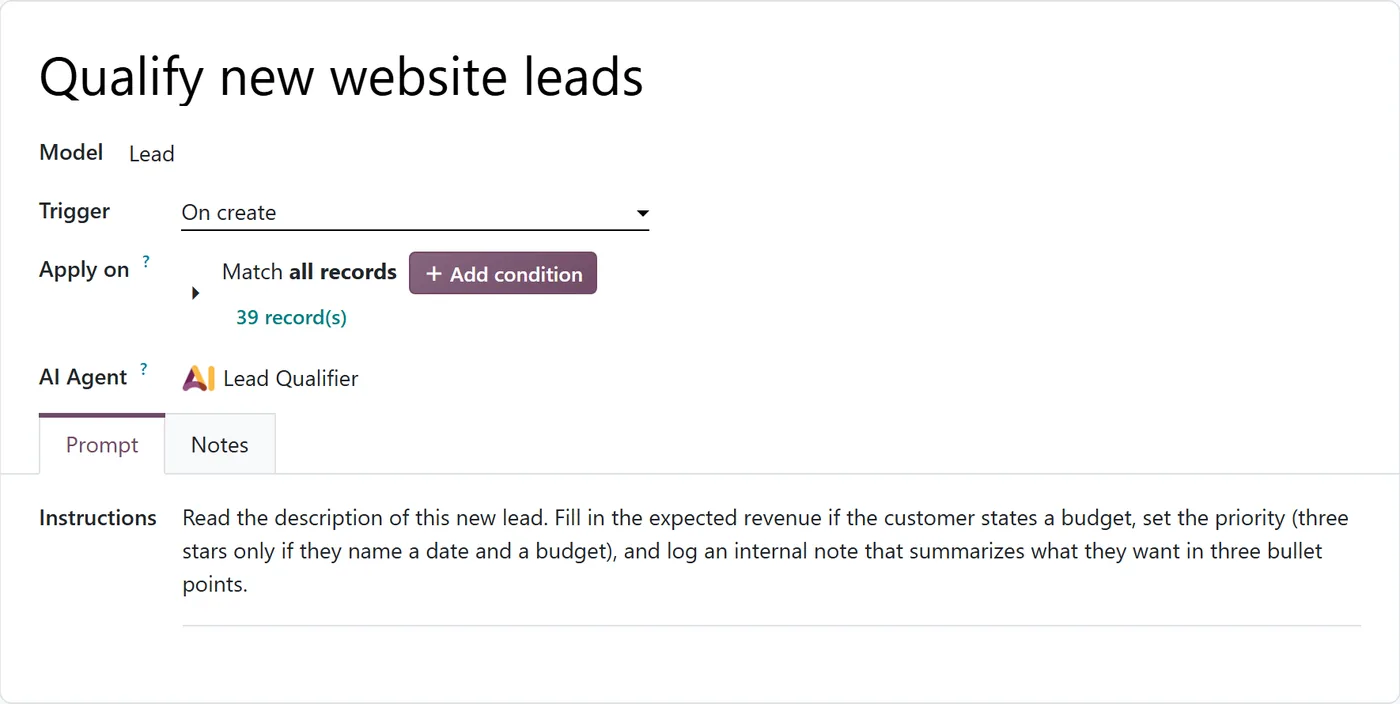
Everything you know about automation rules still applies: trigger on create, on update, on a date field, with conditions under Apply on. The difference is only what happens when it fires. You can also insert fields of the record into the instructions; they are replaced with the record's values when the run starts, so the agent begins with the facts in front of it.
How do you run an agent on a schedule?
For work that is not tied to one record, such as a weekly report, create a rule on the model AI Automation Trigger with a date-based trigger. The form then shows two simple fields: an Interval (for example 7 days) and a Next Trigger Date.
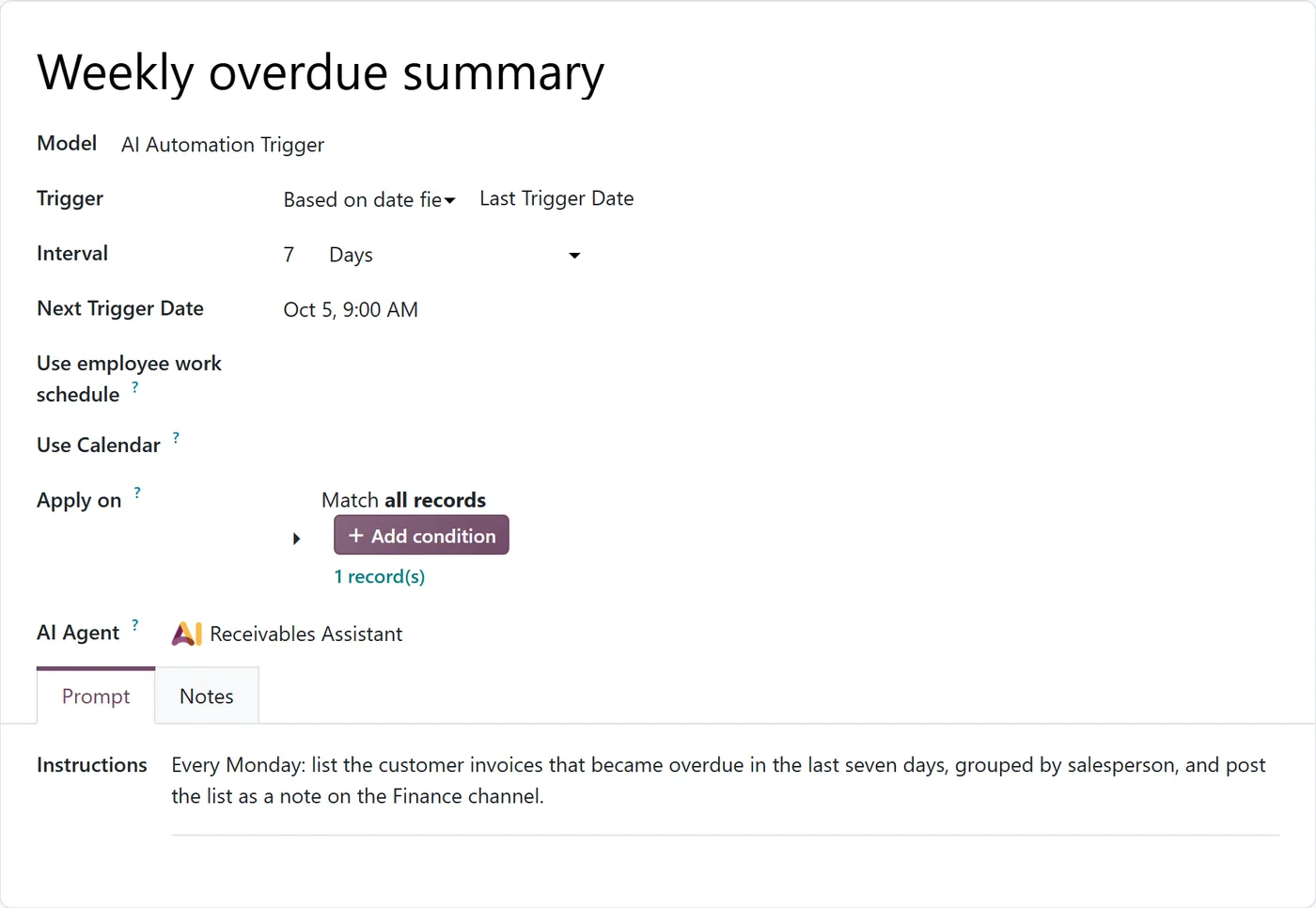
Two timing details catch people out:
- It will not fire to the minute. Time-based rules are checked by a background job whose frequency depends on your shortest time-based rule, and for a weekly rule that means every four hours at most. "Monday 9:00" really means "Monday morning, sometime before lunch".
- A failed run is not retried. Odoo moves the next date forward before the agent runs, so a run that fails costs one slot rather than being repeated on every check. Good for your credits, but it means a failed Monday report simply does not appear until next Monday.
What changes when nobody is in the chat?
In a normal chat, the agent shows a preview and waits before it creates or changes records. In an automation run there is nobody to ask, so every create and update is approved automatically. The field's own help text says so. That single fact should shape how you write these rules. In a chat, the same changes go through the confirmation step described in our AI agent governance guide.
The agent also runs under a few fixed rules of its own. It posts an internal note only when your instructions ask for one. It sends an email only by queuing a real outgoing email, so "email the customer" in your instructions means an email really goes out. It does not assign records to the account running the automation just because it cannot find the person you named. And it finishes each run with a report of what it did, what it found and what it skipped.
Where do you see what it did?
Every run gets its own chat, named after the rule and the record, and every administrator is added to it. It shows the instructions it started from, each step the agent took and the final report. On the agent, the Triggers tab lists every rule that runs it.
An administrator can also ask an agent that has the Build Automation skill to create such a rule from a chat ("every Monday, send me the overdue list"). It shows a confirmation card first, and only administrators can manage automation rules. The result is the same kind of rule, so review it the same way.
Read those chats. For the first few weeks, someone should read every run of every new rule. After that, a weekly sample is enough for low-risk rules.
The traps we would plan for
Running out of credits quietly. When an interactive user runs out of AI credits, Odoo shows a clear "Not enough credits" message. A scheduled run shows nothing to anyone; the run just does not happen. Set a low-credit email alert on the Odoo AI account and give it a real recipient.
Rules that fire more than you think. An agent on "on update" of sales orders runs every time any watched field changes. Narrow the trigger fields and conditions, or you will pay for many runs that do nothing useful.
Instructions that invite improvisation. "Handle the new lead appropriately" gets you different behaviour every run. "Fill in expected revenue only if the customer states a budget" gets you the same behaviour every run.
Outgoing emails. Keep customer-facing emails out of automated agents until you have read at least a few dozen runs. Draft into an internal note first and let a person send.
A safe first rule
Start with something that only reads and writes notes:
- Trigger: a new lead from the website form.
- Instructions: summarise the request in three bullet points and log them as an internal note. Change nothing else.
- Agent skills: search the database and create records (for the note). No update skill yet.
- Review: read every run chat for two weeks, then decide whether the agent may also fill fields.
FAQ
Can an Odoo 20 automation rule run an AI agent?
Yes. Set the AI Agent field on the rule and write the instructions on the Prompt tab. The agent runs each time the rule fires, on a record trigger or on a schedule.
Are changes made by automated AI agents approved automatically?
Yes. There is nobody to confirm them, so create and update calls are approved automatically. Each run is recorded in a chat that administrators can read.
How exact is the timing of a scheduled AI automation?
Not exact. Time-based rules are checked by a background job, at most every four hours for a weekly rule, so expect the run within a few hours of the time you set.
What happens if a scheduled AI run fails or credits run out?
The run does not happen and is not retried; the rule moves on to its next date. Nobody gets an on-screen warning, so set a credit alert and check the run chats.
Can I still use normal actions on a rule with an AI agent?
No. Once an agent is set, the rule's action is the agent's instructions. Use a separate rule for regular actions.
Next step
Automated agents pay off when they take a boring, well-defined step off someone's plate. If you want help picking that step and writing rules that behave, see our AI transformation service. For the building blocks underneath, read about server actions and automated actions and scheduled actions.


