
If you ship goods by road across borders in Europe and neighbouring countries, every consignment travels with a CMR note: the international consignment note used under the CMR convention. Many companies still fill it in by hand or in a spreadsheet, copying names, addresses and weights from the delivery order. Odoo 20 prints it from the delivery itself. This guide shows how to switch it on, how to print it automatically, and which parts Odoo fills in for you.
Applies to: Odoo 20 Inventory (Community and Enterprise). Screens are from Odoo 20.
How do you enable the CMR in Odoo 20?
In Inventory > Configuration > Settings, tick Transport Management ("Organize deliveries by dock, assign drivers and vehicles, and print consignment notes."). This installs the transport module together with Fleet.
Once enabled, delivery orders and batch transfers have a print option Consignment Note (CMR).
Can it print automatically when a delivery is validated?
Yes. Open Inventory > Configuration > Operation Types, choose your delivery type, and go to the Hardware tab. Under Print on Validation, tick Consignment Note (CMR).
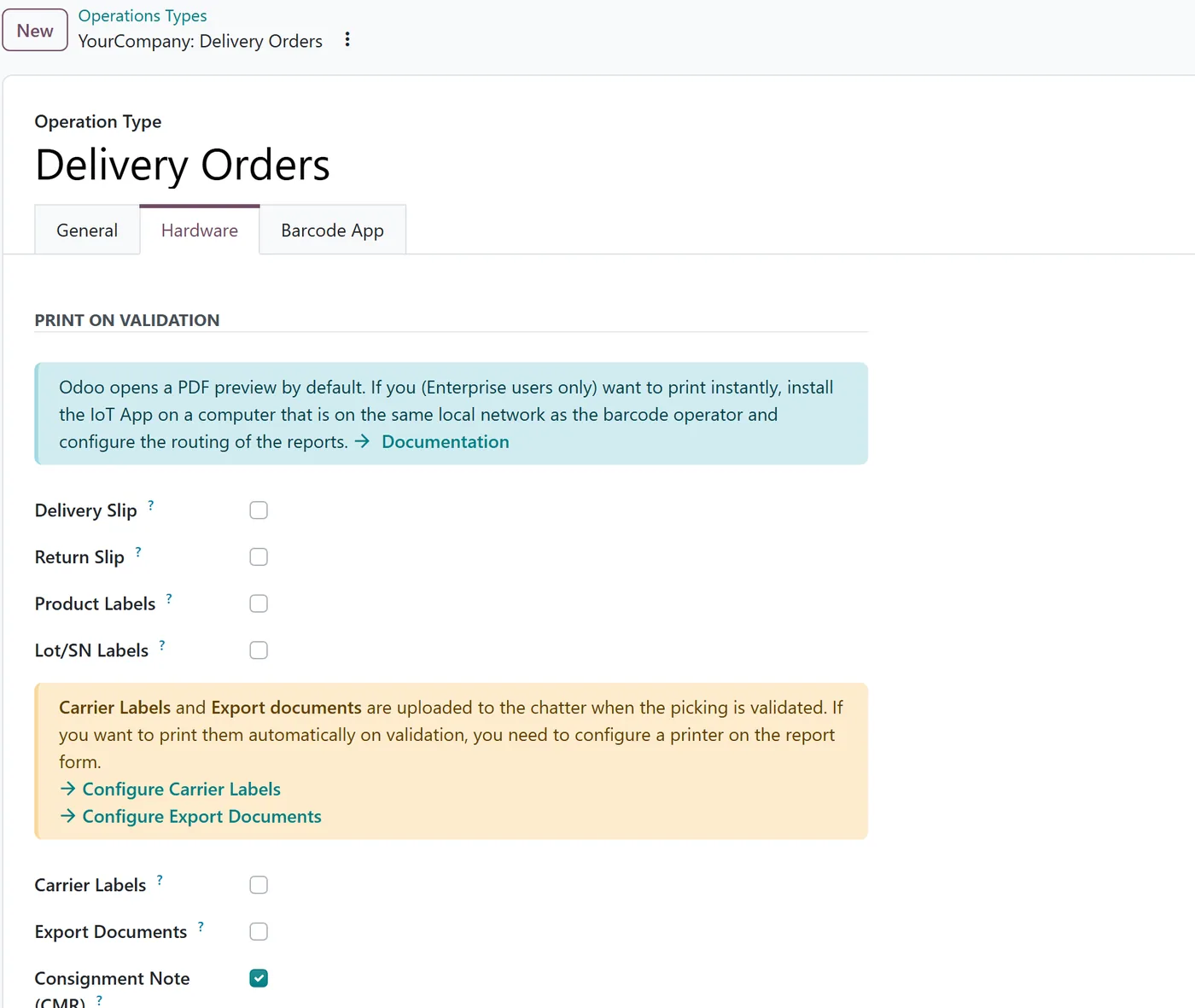
The option is only offered on delivery-type operations.
What does Odoo fill in?
Here is the sender's copy of a CMR printed from an Odoo 20 delivery:
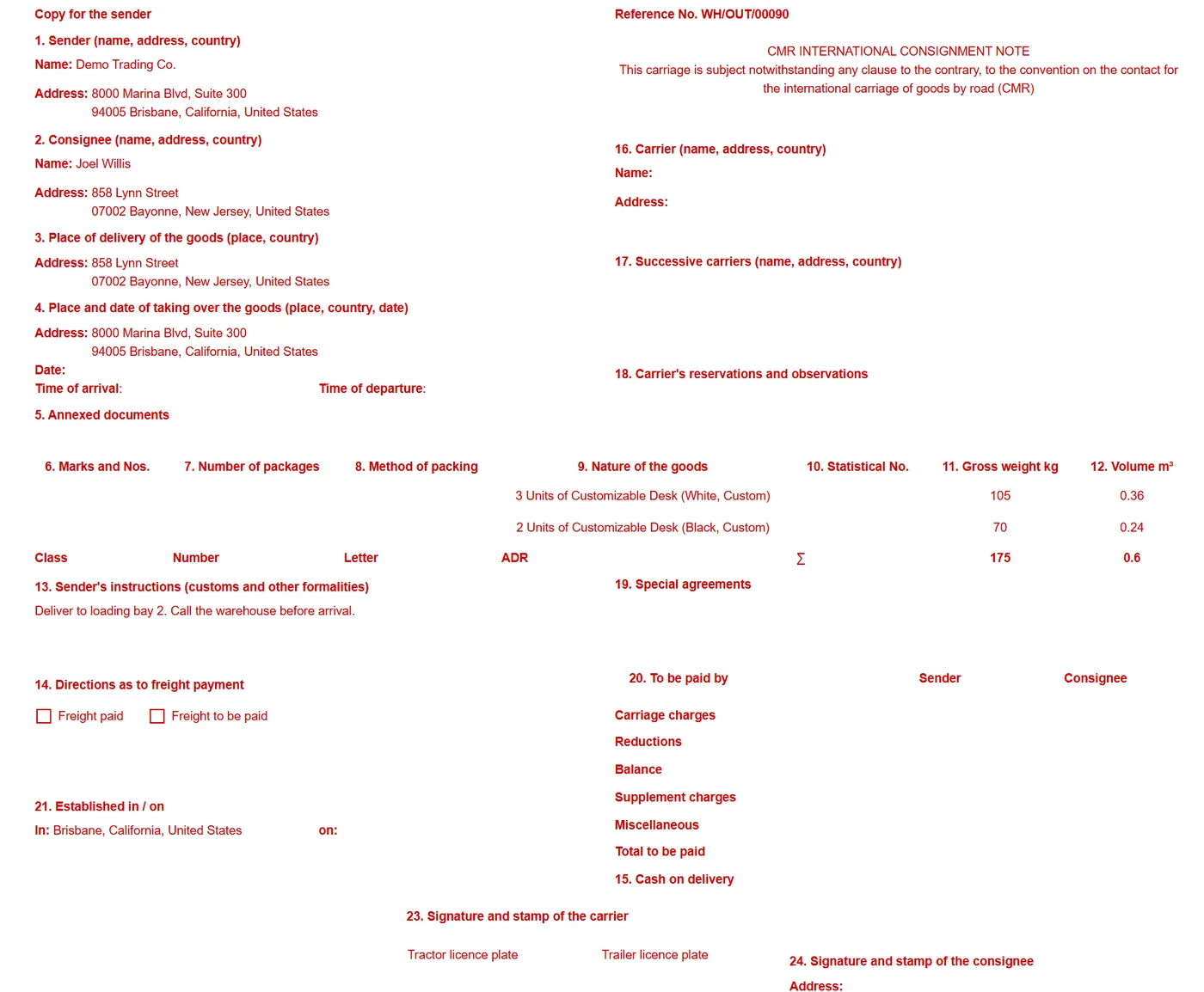
Odoo fills in what it knows from the delivery and its sales order:
| CMR box | Where Odoo takes it from |
|---|---|
| 1. Sender | Your company |
| 2. Consignee | The customer on the sales order |
| 3. Place of delivery | The delivery address |
| 4. Place and date of taking over the goods | The warehouse |
| 6 to 9. Goods | Quantity and product per line, with package details when packages are used |
| 11. Gross weight | Product weight (or package weight), in kilograms |
| 12. Volume | Product volume, in cubic metres |
| 13. Sender's instructions | The note on the transfer |
| Reference | The delivery reference |
If the delivery has a carrier, the carrier box is filled too, and if you use HS codes on products they print as the statistical number.
Boxes that belong to the actual transport stay blank on purpose: licence plates, signatures and stamps, and the freight charges. The driver and the parties complete those on paper.
Three details worth knowing
- Weights come from your product data. A CMR with 0 kg is almost always a product with no weight set. Fill in weight and volume on products you ship; it pays off on every document.
- Long deliveries get a loading list. With more than six product lines, the goods box says "See the attached loading list of products" instead of listing everything.
- Two languages. Labels print in English plus the consignee's language when it differs, which helps at borders and at the receiving dock.
Each CMR prints as four copies: for the sender, the consignee and the carrier, plus a fourth copy.
Batch transfers
Printing the CMR from a batch transfer produces one set of notes per consignee and carrier combination, not one per delivery. That matches how a truck is loaded: one note per customer on the load.
FAQ
Is the CMR available in Community?
Yes. Transport Management and the CMR report are part of standard Odoo Inventory in Odoo 20.
Can I change the layout?
The report is a standard Odoo report, so it can be adapted by a developer. Keep changes minimal; the value of a CMR is that everyone recognises the standard boxes.
Does Odoo send the CMR electronically?
No. It produces the printable document. Electronic consignment notes are a separate topic that depends on the countries and platforms involved.
Next step
If your deliveries still leave with handwritten transport documents, our implementation team can set up Transport Management, product data and printing so the paperwork comes out of Odoo. For the rest of the warehouse, see our Odoo Inventory guide.