
Many distribution groups are several companies under one owner: an importer, a regional wholesaler, sometimes a retail arm. They buy from each other constantly, and each purchase needs a matching sale on the other side, with matching invoices and bills. Done by hand, that doubles the paperwork and invites mismatches. Odoo can generate the other side automatically.
Applies to: Odoo 20, Sales, Purchase and Accounting. Inter-company rules are an Enterprise feature. Screens are from Odoo 20 with demo data.
Why is inter-company trade so error-prone?
Every internal deal is really two deals. When the wholesaler buys from the importer:
- The wholesaler needs a purchase order and, later, a vendor bill.
- The importer needs a sales order and, later, a customer invoice.
If one side is keyed differently, the group's intercompany balances stop agreeing, and month-end becomes a reconciliation hunt.
What does Odoo generate automatically?
In Settings > General Settings > Companies, switch on Inter-Company Transactions: "Create corresponding in/out orders and bills when you sell/buy between your companies."
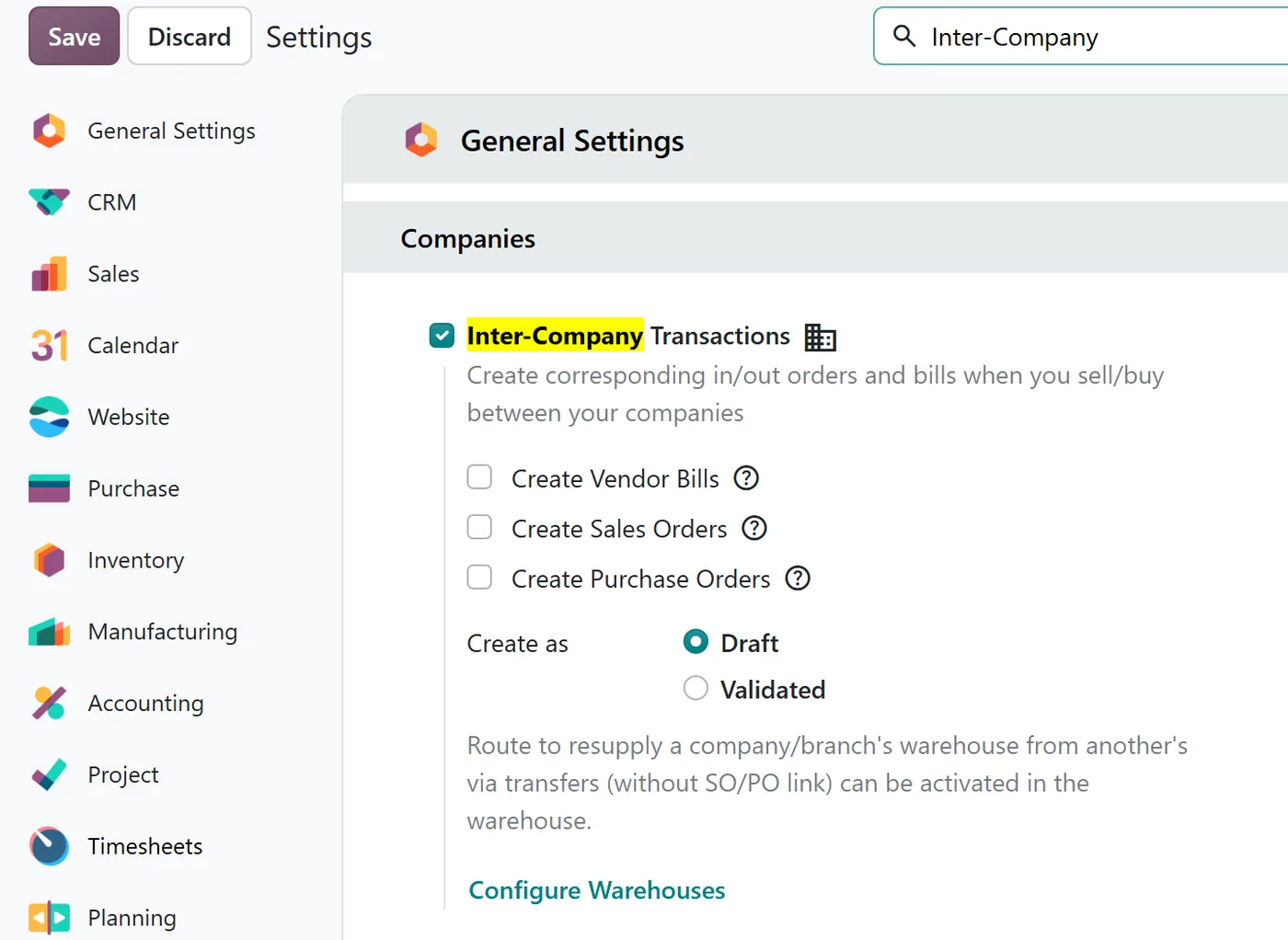
Then choose what to mirror:
| Option | What happens |
|---|---|
| Create Sales Orders | When another company confirms a purchase order with this company, a sales order is created |
| Create Purchase Orders | When another company confirms a sales order with this company, a purchase order is created |
| Create Vendor Bills | When another company confirms an invoice to this company, a bill is created in the chosen purchase journal |
Create as decides whether the generated documents arrive as Draft, for review, or Validated.
Draft or validated?
Start with Draft. The receiving company's team checks the first few weeks of generated orders and bills, confirms prices and taxes are right, and only then do you consider switching to validated.
Validated saves effort once you trust the setup, but a pricing mistake then lands directly in both companies' books.
What about moving stock without an order?
Not every internal movement is a sale. When one company simply resupplies another company's warehouse, the settings note that resupply through transfers, without a sales or purchase link, can be activated in the warehouse configuration. Use this for stock that is not invoiced between companies.
What should be shared across companies?
- Products. A product with no company set is visible to all companies, which keeps one catalog for the group.
- Contacts. Each company exists as a contact, which is how the other companies buy from and sell to it.
- Pricelists. Transfer pricing between companies is usually a dedicated pricelist, agreed with your accountants.
FAQ
Do the companies need the same currency?
No. Each company keeps its own currency, and the generated documents follow normal multi-currency rules. Agree transfer prices with your accountants first.
Can a user work in several companies at once?
Yes. A user with access to several companies can switch between them, or select more than one to see combined lists.
What if one company is not on Odoo?
Inter-company rules only work between companies in the same database. Trade with an outside company is ordinary buying and selling.
Next step
Group structures need careful design before the first internal order. Our implementation team can model your companies, transfer pricing and inter-company flows. Background reading: our Purchase guide and Accounting guide.