

Master data is the information every transaction reuses: customers, vendors, products, prices, units, bank accounts. When it is right, nobody notices. When it is wrong, it is wrong on every order, invoice and report that touches it, and usually for a long time before someone finds out.
The fix is rarely technical. It is deciding who owns each kind of record, and then using Odoo's access rights so the decision holds after the consultants leave.
Applies to: Odoo 20, with notes for earlier versions. Data Cleaning is an Enterprise app; the access rights discussed are in Community too.
What counts as master data in Odoo?
For most companies, these records:
| Record | Where it lives | What goes wrong when nobody owns it |
|---|---|---|
| Customers and vendors | Contacts | Duplicates, wrong tax IDs, invoices to old addresses |
| Products | Sales, Purchase, Inventory | Wrong unit, wrong category, so wrong accounts and wrong stock valuation |
| Prices | Pricelists, vendor prices | Quotes that disagree with the price list |
| Vendor bank accounts | Contacts, Accounting | Payments to the wrong account |
| Chart of accounts, taxes | Accounting | Reports that no longer reconcile |
The last two belong to finance in almost every company. The first three are where the arguments happen.
Who should own each record?
Ownership means one team decides how a record is created and changed, and answers for its quality. It does not mean only one person can see it.
A pattern that works for many companies:
- Customers: sales operations or finance, not every salesperson. Sales can request a new customer; one team creates it with the right tax details and payment terms.
- Vendors: purchasing, with finance approving payment details.
- Products: one product owner, often in purchasing or operations, because the product category decides the accounts and the stock valuation.
- Vendor bank accounts: finance only. Always.
Write the decision down in one table and put it where people will find it. Then make Odoo enforce it.
Which access rights enforce the decision?
In Odoo 20, the user form has a Master Data section with three settings.
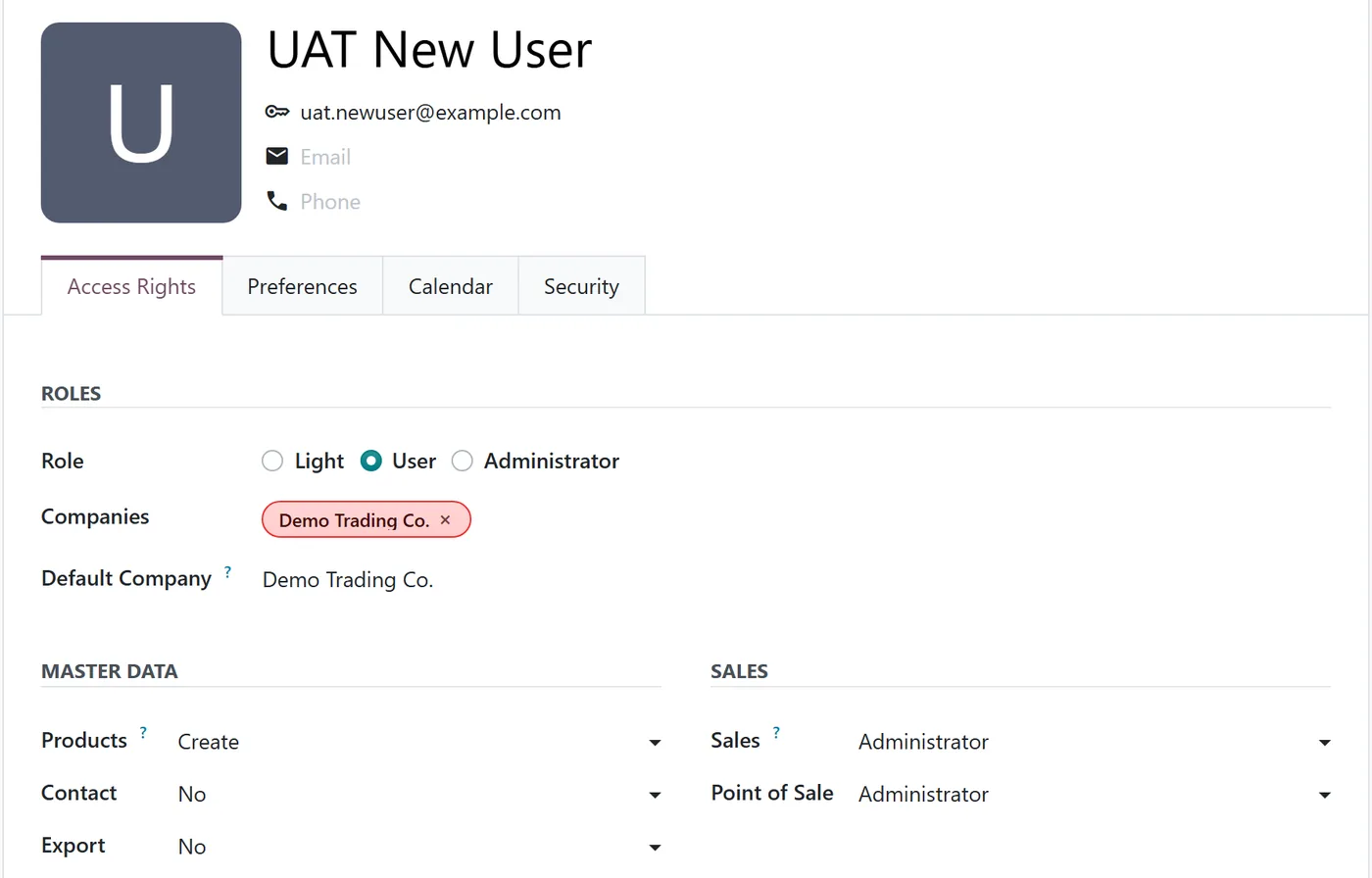
- Products. The Create level gives the product manager rights. Without it, users can use products on orders but not create them.
- Contact. Without Creation, a regular internal user can read contacts and edit only their own contact card. With it, they can create and edit contacts, merge duplicates, and create or edit bank accounts.
- Export. Controls who can export lists of records, which matters for customer lists and prices.
Two practical notes. First, access changes as apps and settings are added during the project, so check these three lines for every user after the configuration is final. Second, check the Default Access Rights setting in Settings, which decides what new users receive, so the rule still holds for the person hired next year.
Why are vendor bank accounts special?
Because changing one is the classic way to redirect a real payment. Odoo 20 treats them with more care than other records:

- Changes are tracked. The account number, BIC, holder name, partner and active flag are logged, and the change also appears on the contact's history.
- Trust is a separate step. The Trust bank account switch can only be set by users with the right to validate bank accounts, or administrators. Automated processes cannot trust an account.
- Trusted accounts are locked. Once trusted, the account number, holder and owner cannot be edited until someone removes the trust again, which is itself tracked.
- Warnings appear. Odoo flags patterns that look like phishing, for example a bank account country that does not match the holder's country, as in the screenshot above.
Our recommendation: the person who enters a bank account should not be the person who trusts it, and every change of vendor bank details should be confirmed with the vendor by phone, on a number you already had.
How do you stop duplicates?
Duplicates come from three places: data migration, several people creating the same customer on the same day, and imports from other systems. Prevention is ownership. Detection is Data Cleaning (Enterprise).
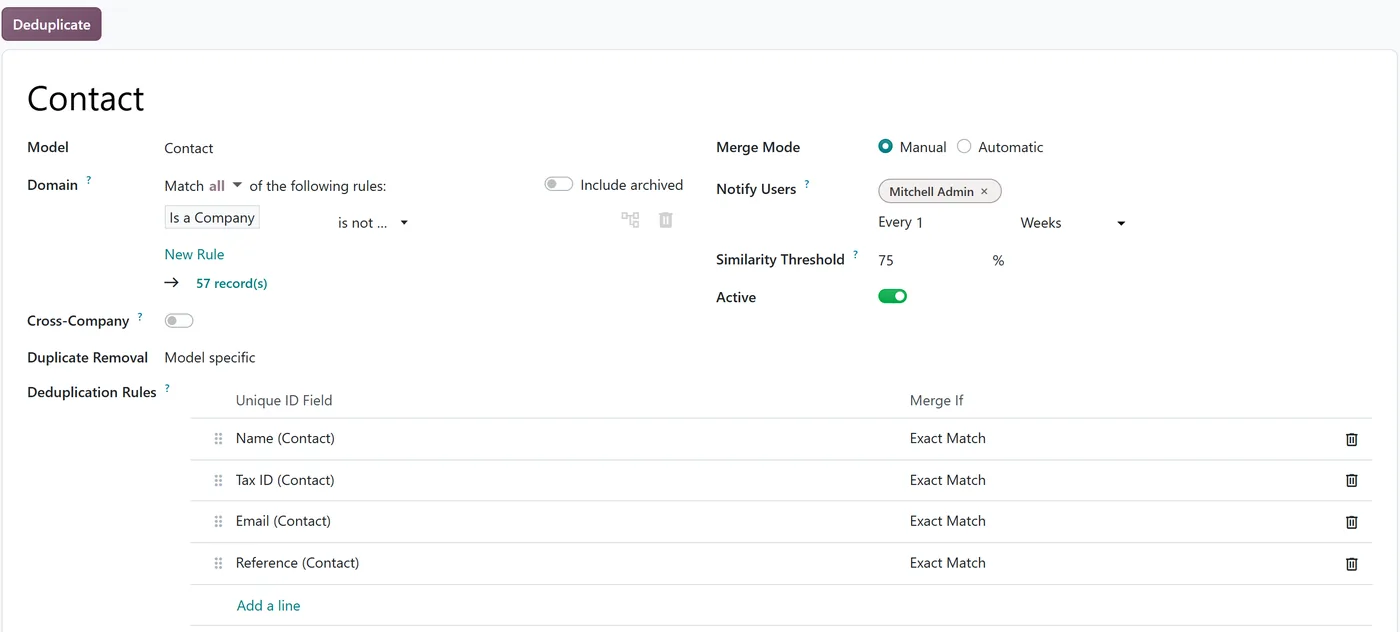
A deduplication rule sets:
- Which records to check, with a domain, for example companies only.
- Which fields identify a duplicate, such as name, tax ID, email or reference, each with exact matching or matching that ignores case and accents.
- Merge mode. Manual means someone reviews each group; automatic merges above the similarity threshold. Start with manual.
- Who is notified and how often, for example weekly.
- Cross-company checking, if you run several companies in one database.
Data Cleaning also has Field Cleaning rules that tidy values as they come in: trimming spaces, fixing letter case, formatting phone numbers and removing HTML. Those are low risk and worth switching on for contact names and phones early.
Merging needs care. The links from the duplicate move to the record you keep, so treat a merge as permanent, and let the data owner review merges, not whoever sees the notification first.
What should you check before go-live?
- The ownership table exists and the process owners have agreed it.
- Every user's Master Data settings match it, and UAT includes negative tests that prove it: a salesperson who tries to create a vendor bank account should be stopped.
- Only finance can create, edit or trust vendor bank accounts.
- Migrated contacts and products have been through a duplicate check. See our legacy data migration guide for the load itself.
- Product categories are correct, because they drive the accounts.
FAQ
Can salespeople create customers?
They can if you give them Contact Creation, and many companies do. The risk is duplicates and missing tax details. A middle path: sales creates, one owner reviews new contacts weekly with the deduplication rule's help.
Is there an approval workflow for new products or customers?
Not as a standard master data feature. Companies that need one usually use the Studio approval rules on a button, or a simple status field and a report. We cover approvals in a separate guide.
Does tracking tell us who changed a price?
The product's sales price is tracked on the product's history. Vendor prices and pricelist rules are separate records, so check them explicitly if price control matters.
Next step
If your Odoo already has duplicates and unclear ownership, our audit and support team can review access rights and data quality. Starting fresh? Our implementation team builds the ownership table into the project from day one.


