

Odoo 20 is the release where AI stops being a side panel and becomes part of how the apps work: agents with their own skills and tools, and a built-in MCP server so outside AI assistants can work with your data. Around that, Field Service moves into Planning, several add-on modules are folded into the main apps, and the technical floor rises to Python 3.12 and PostgreSQL 16. The AI features are Enterprise-only; most of the other changes reach Community too.
Every feature below was checked against the Odoo 20.0 source code, Community and Enterprise, and compared with Odoo 19. The screenshots are from our own Odoo 20 test database, not from marketing material.
What's new in Odoo 20 at a glance
| Area | What changed | Edition |
|---|---|---|
| AI | AI agents with instructions, skills, sources and tools, built into Sales, Purchase, Inventory, Project, Helpdesk, Calendar and more | Enterprise |
| AI | Built-in MCP server, so tools like Claude or ChatGPT can work with Odoo under a user's permissions | Enterprise |
| Field Service | Rebuilt inside the Planning app instead of Project | Enterprise |
| Inventory | Batch transfers are now part of Inventory itself | Community |
| Purchase | Purchase alternatives become their own module, separate from purchase agreements | Community |
| Shipping | New ShipStation connector | Enterprise |
| CRM | Create a project straight from an opportunity | Community |
| Attendance | Biometric attendance: ZKTeco BioTime, eSSL and Mantra | Enterprise |
| Employees | Remote work locations and the org chart are part of Employees | Community |
| eCommerce | Wishlist and product comparison are part of eCommerce; address autocomplete added | Community |
| Payments | Intercompany payments and the PayU provider move to Community; Bancontact Pay and Wero for Point of Sale | Community |
| Retail | Electronic shelf labels with Pricer | Enterprise |
| Reports | A second PDF engine, Paper Muncher, alongside wkhtmltopdf | Community |
| Platform | Python 3.12 to 3.14, PostgreSQL 16, Owl 3 | Both |
In module terms, Odoo 20 adds 33 new Community modules and 118 new Enterprise modules, not counting country localisations and tests. Many of those are bridges between two apps rather than new apps, so the table above lists what you will actually notice.
AI agents and the MCP server
The headline feature. An AI agent in Odoo 20 is a record you configure: what job it does, which skills it may use, which documents it can read, and which actions it may take. Odoo ships several agents ready to use, you can build your own, and AI reaches Sales, Purchase, Inventory, Project, Helpdesk, Calendar, Timesheets, Email Marketing, Website and eCommerce.
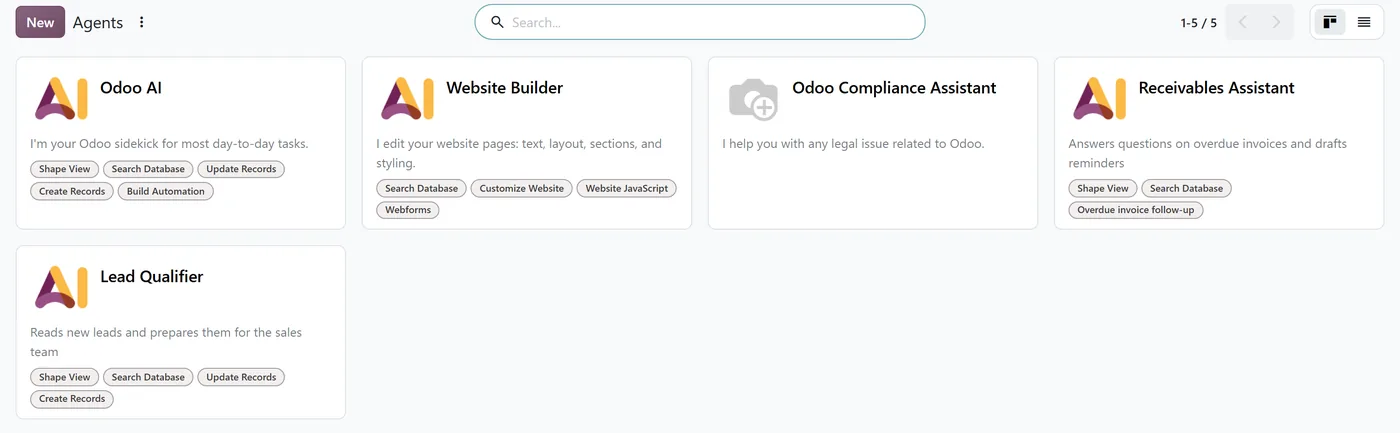
The second half is the MCP server. MCP is the standard that assistants like Claude and ChatGPT use to connect to other systems. With it, an outside assistant can search and, if you allow it, update Odoo records, always as a specific Odoo user with that user's access rights.
Both are Enterprise features: neither module exists in the Community code. We cover them in detail in Odoo 20 AI agents: instructions, skills, sources and tools and the Odoo 20 MCP server: what it exposes and how to connect safely.
Field Service moves into Planning
In Odoo 19, Field Service was built on Project tasks. In Odoo 20 it is rebuilt inside the Planning app: an intervention is a planned shift with a customer, an address and a technician, scheduled on the same timeline as the rest of your team. The old Field Service modules are gone from the Odoo 20 code, replaced by a new set covering stock, timesheets, worksheets, subscriptions, barcodes and SMS updates, plus a helpdesk link and a website form for intervention requests.
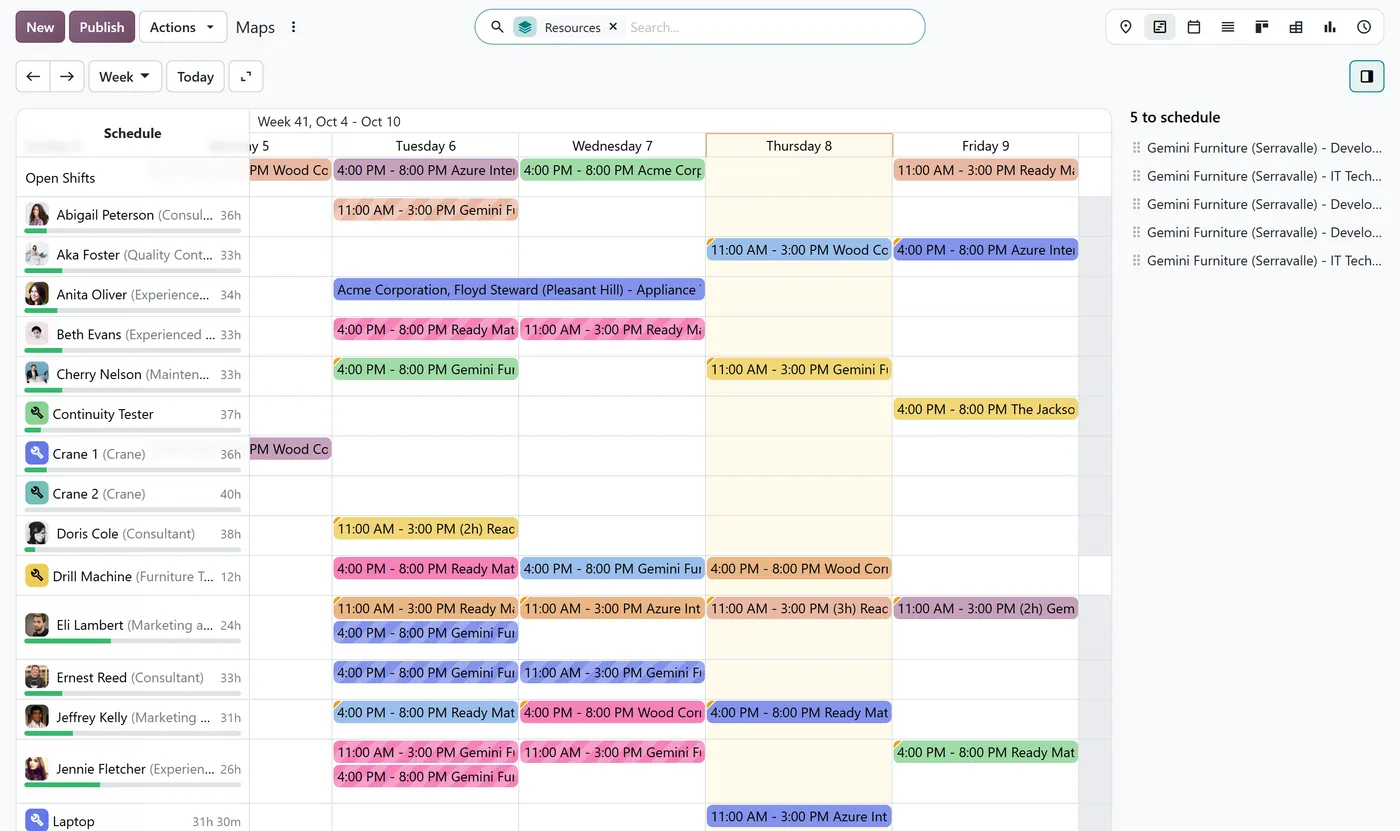
If you use Field Service today, treat this as a re-implementation, not a routine upgrade: the data model underneath has changed.
Inventory, purchase and shipping
Batch transfers are now part of Inventory. In Odoo 19 they were a separate module; in Odoo 20 the batch model lives in the core Inventory app.

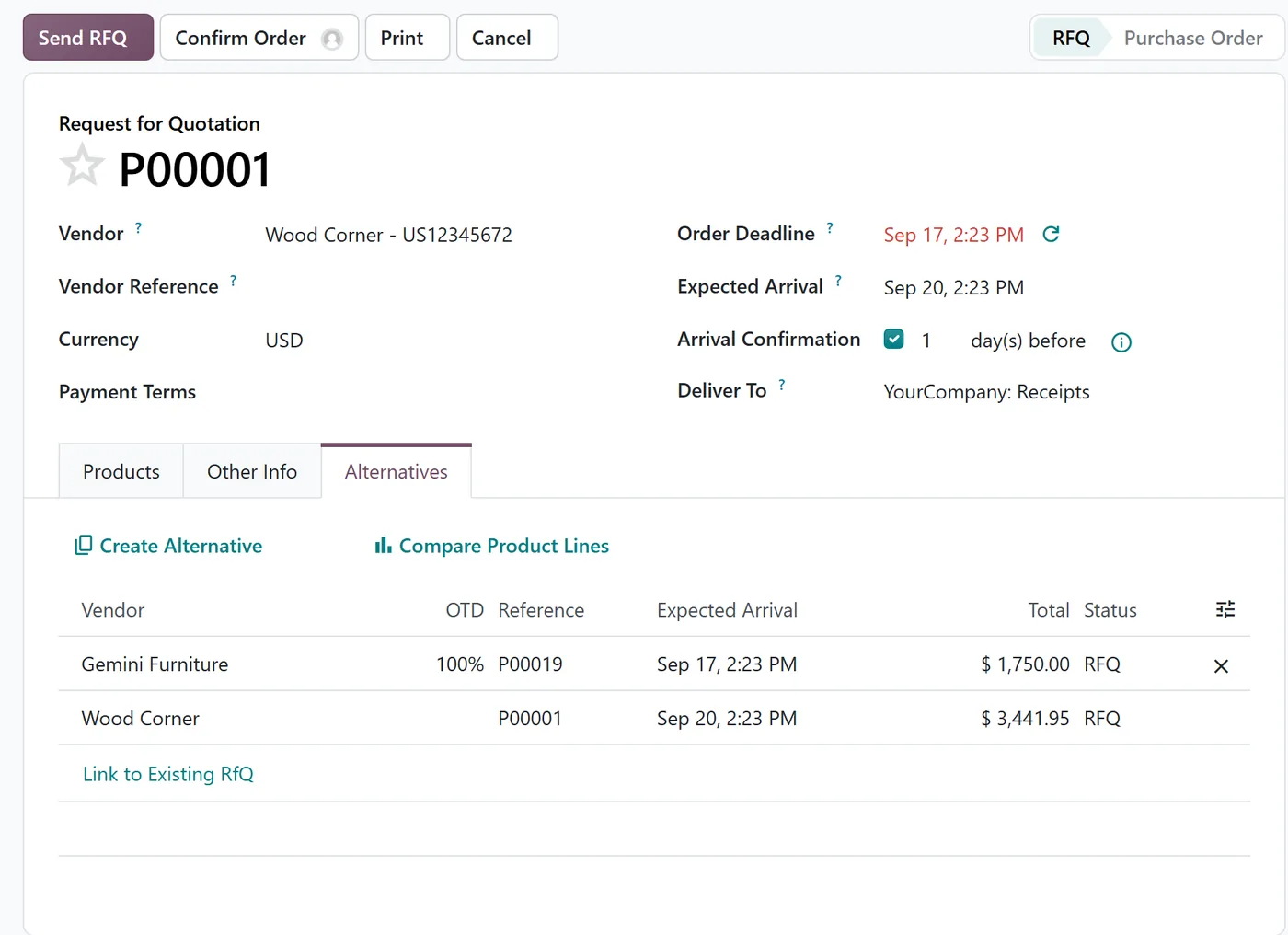
Purchase alternatives are their own module. In Odoo 19, alternative quotations sat inside the purchase agreements module. In Odoo 20 they stand alone: create an alternative request for quotation for another vendor, then compare them line by line.
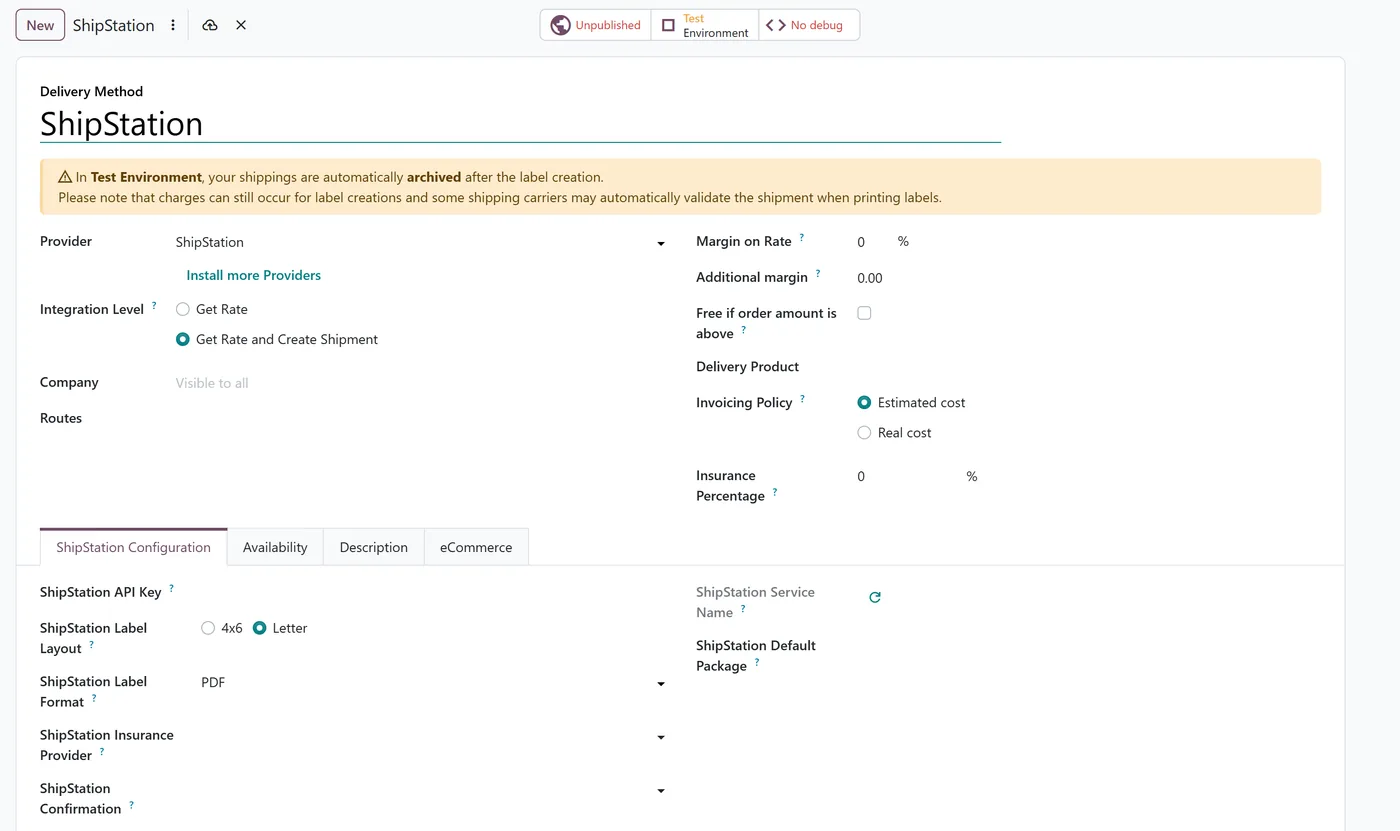
ShipStation joins the shipping connectors (Enterprise), with rate lookup and label creation from the delivery order.
Odoo 20 also adds Pricer electronic shelf labels for retail (Enterprise), and Web Serial support in Community, which lets the browser talk directly to devices connected over a serial port.
Sales and CRM
You can now create a project directly from an opportunity. The project stays linked to the opportunity, and the opportunity shows its projects and tasks.
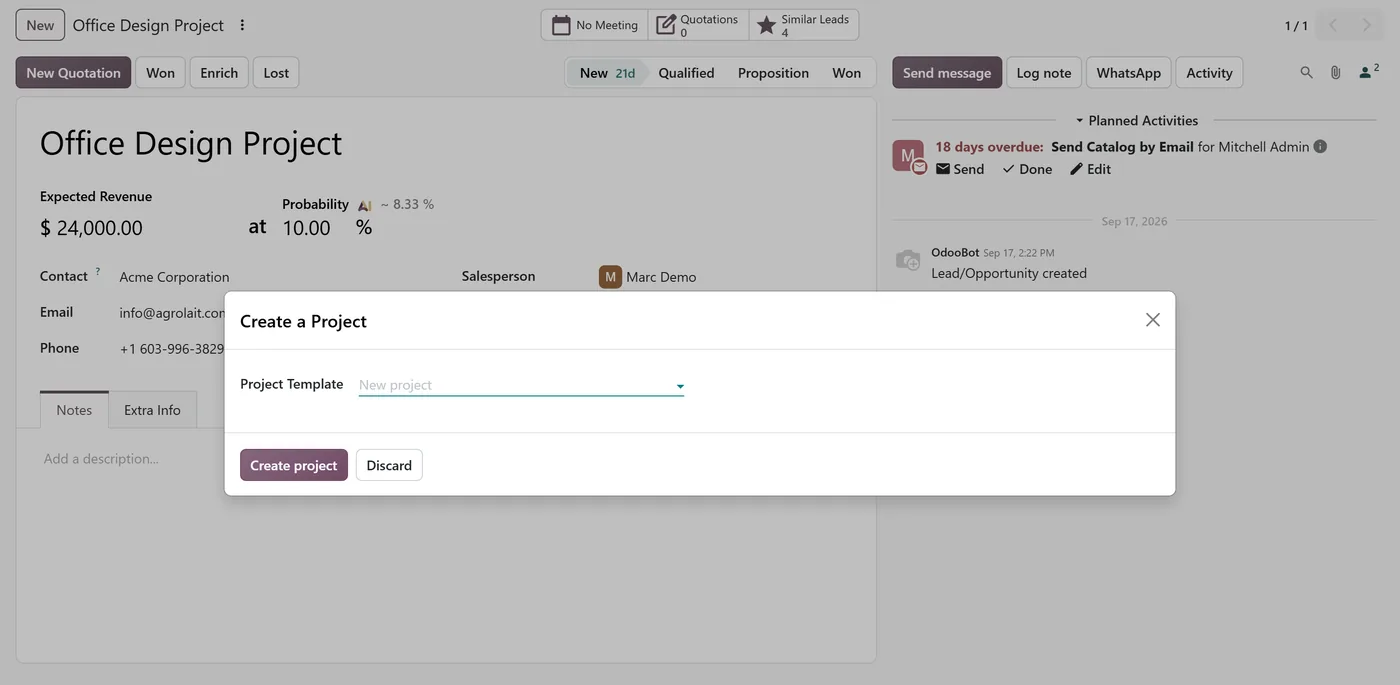
In Enterprise, WhatsApp conversations continue from CRM leads, and the Point of Sale gets sales commissions and a link to Planning.
Employees and attendance
Biometric attendance arrives in Enterprise, with integrations for ZKTeco (through its BioTime server, versions 8.5 and 9.0), eSSL and Mantra devices. For ZKTeco, Odoo fetches the punches from the BioTime server on each sync.
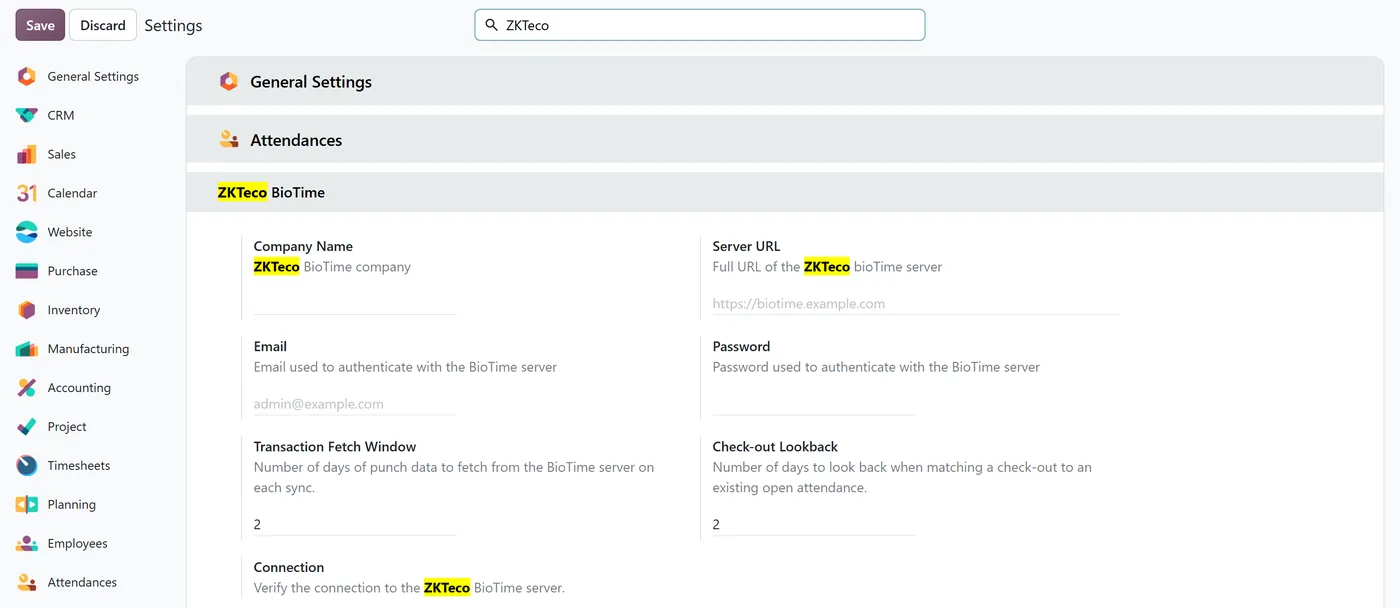
In Community, remote work locations and the org chart are now part of Employees, instead of separate modules.
Website and eCommerce
The wishlist and product comparison are now part of eCommerce rather than separate modules, and address autocomplete helps customers fill in checkout. In Enterprise, the website generator can import the blog from your existing website.
Accounting and payments
Intercompany payments move from Enterprise to Community, as does the PayU payment provider. Point of Sale gains Bancontact Pay and Wero QR payments. In Enterprise, accounting reports can be opened in Spreadsheet, and loan documents can be scanned to fill in loans automatically.
For businesses in Pakistan, Odoo 20 also changes the localisation. See Odoo 20 FBR e-invoicing, the new Pakistan chart of accounts and Point of Sale with FBR.
Odoo 19 vs Odoo 20: what changes under the hood
This is the part that decides how hard your upgrade will be.
| Odoo 19 | Odoo 20 | |
|---|---|---|
| Python | 3.10 to 3.14 | 3.12 to 3.14 |
| PostgreSQL | 13 or later | 16 or later |
| Frontend framework | Owl 2 | Owl 3 |
| PDF reports | wkhtmltopdf | wkhtmltopdf by default, Paper Muncher as an option |
| XML-RPC and JSON-RPC | Deprecated | Still deprecated, removal scheduled for Odoo 22 |
| Field Service | Built on Project | Built on Planning |
Three consequences for self-hosted and Odoo.sh projects:
- Check your server first. A database server below PostgreSQL 16 or a Python below 3.12 will not run Odoo 20.
- Custom JavaScript needs porting. Owl 3 is a new major version of the framework the whole interface is built on, so custom widgets and views have to be checked one by one.
- Custom modules may depend on modules that no longer exist. Batch transfers, the wishlist, product comparison, remote work, the org chart and VAT validation were separate modules in Odoo 19 and are built into the main apps in Odoo 20. A custom module that lists one of them as a dependency will not install until that is updated.
The good news: XML-RPC integrations keep working on Odoo 20. The Odoo 20 code still says removal is scheduled for Odoo 22, and the replacement JSON-2 API is already there. See our Odoo API guide.
Should you upgrade to Odoo 20 now?
- On Odoo Online, Odoo upgrades you on its own schedule, and there are no custom modules to port, so there is little to plan.
- If you rely on third-party apps, wait until each one has an Odoo 20 version. One missing app blocks the whole upgrade.
- If you use Field Service or heavy custom JavaScript, budget the upgrade as a project, not a weekend.
- If you are on Odoo 16 or older, get to a supported version first, then decide on 20.
Our Odoo upgrade cost guide explains what drives the price, and our Odoo migration and upgrade services cover the work Odoo's own upgrade service does not.
How we checked this
We compared the module lists and code of Odoo 19 and Odoo 20, Community and Enterprise, and confirmed each item above in the Odoo 20.0 source. The screenshots come from an Odoo 20 Enterprise database we run for testing. This guide covers what you will notice and what affects an upgrade; it does not list every small interface change in every app.
Frequently asked questions
Is the AI in Odoo 20 available in Community?
No. The AI agents and the MCP server are Enterprise modules; none of them exist in the Odoo 20 Community code. Community still gets many of the other Odoo 20 changes, such as batch transfers in Inventory, purchase alternatives and creating projects from opportunities.
Does Odoo 20 remove XML-RPC?
No. The Odoo 20 code still describes the XML-RPC and JSON-RPC endpoints as deprecated and scheduled for removal in Odoo 22. Existing integrations keep working, and the JSON-2 API that replaces them is already available.
What do I need to run Odoo 20 on my own server?
Python 3.12, 3.13 or 3.14, and PostgreSQL 16 or later. Odoo 19 accepted Python 3.10 and PostgreSQL 13, so many existing servers need an upgrade before Odoo 20 can run.
Will my custom modules work on Odoo 20?
Not without porting. Python code needs the usual version changes, custom JavaScript has to move to Owl 3, and any module that depends on one of the modules merged into the main apps needs its dependencies updated.
Is Field Service still part of the Project app in Odoo 20?
No. In Odoo 20, Field Service is rebuilt inside the Planning app. Interventions are planned on the Planning schedule, with their own modules for stock, timesheets, worksheets and invoicing.
Planning a move to Odoo 20?
We can check your database, custom modules and third-party apps against Odoo 20 and tell you exactly what has to move. Contact us or see our Odoo migration and upgrade services.


